doubao-seedream-5-0-flashDoubao Seedream 5.0 Flash 是字节跳动豆包 Seedream 5.0 系列里主打速度与成本的一档,这里走的是火山方舟官方通道。它面向高频、大批量的出图场景,在出图速度和单价比画质上限更重要的地方最合适:我们实测 2K 约 13–15 秒、1K 约 10 秒出一张。文生图和图生图共用一个端点,最多可传 10 张参考图做融合编辑。它还能编辑本身就是透明背景的图并保住透明:传一张带透明通道的 PNG,把 background 设为 transparent,返回的仍是带透明通道的 PNG,可以直接放进 banner 或商品模板。输出为 1K 或 2K(这个模型没有 4K),比例从 21:9 到 9:16,每张 $0.03,无水印。它还能把一张图拆成 1 张底图加最多 16 个透明 PNG 图层(文字、主体、道具等),每层都带名称、描述、叠放顺序和在原图中的坐标框;底图是抬走图层后补全的画面,图层 PNG 会比它的坐标框大。图层拆分按输出张数计费,每张 $0.03,比如拆成底图加 11 层就是 $0.36。
Generated image will appear here
Enter a prompt and click Generate
实测 1K 约 10 秒、2K 约 13–15 秒,适合大批量和交互式场景
传一张本身带透明通道的 PNG,background 设为 transparent,编辑后返回的仍是保留透明的 PNG;它不是给普通图片抠图去背
文生图、单图编辑和最多 10 张参考图的融合编辑,同一个端点
1K 与 2K 同价,每次出一张,无水印
把一张图拆成底图加最多 16 个透明 PNG 图层,每层带名称、描述和坐标框;按输出张数每张 $0.03,下方有 8 个真实案例可逐层查看
图层拆分是 Seedream 5.0 Flash 上的一项能力,火山方舟文档就叫它「图层拆分」,第三方目录里对应的子模型是 doubao-seedream-5-0-flash-layerize:传一张 PNG 或 JPEG,把 layer_decomposition 设为 true,模型会返回一张底图加最多 16 个透明 PNG 图层。每个图层都带名称、一句话描述、表示叠放顺序的 z_index,以及像素坐标和 0–1000 归一化坐标两种 bounding_box。在 apimodels.app 上,它就是 doubao-seedream-5-0-flash 这个模型名上的一个布尔字段,和文生图、改图走同一个端点、同一把 API Key,不需要火山引擎账号。
我们实际跑下来有两点出乎意料,而且一旦你要在它上面搭东西,这两点都绕不开。第一,底图不是原图:它是把所有拆出来的图层抠走之后、再把空洞补好的画面。一张咖啡店海报拆成 9 层,底图就只剩一张米色卡纸;只让它拆文字的那张海报,标题位置被重新画成了天空。第二,每个图层 PNG 都比它的 bounding_box 大——通常每边是 2 到 4 倍(一个 439×70 像素的 logo 框,返回的 PNG 是 1801×287),长宽比不变。合成时请按 bounding_box.absolute 定位并缩放,多出来的像素当作以后放大这一层的余量就好。
本页所有内容都来自 apimodels.app 上的真实请求,每个案例一次,2026 年 9 月 27 日到 28 日之间以 2K 档跑出。图片、图层名称、描述和坐标框都是 Seedream 5.0 Flash 原样返回的,没有修饰;价格按每张输出 $0.03 的挂牌价计算;秒数是从建单到拿到结果的实际等待时间。点下面任何一个图层,就能单独看它以及它在底图上的框。
| 字段 | 位置 | 含义 |
|---|---|---|
| resultUrls | 任务结果 | 第一张是底图,之后按 z_index 顺序是各图层 |
| resultJson.layers[i].z_index | 每张图 | 0 是底图,1 往上越大越靠前 |
| resultJson.layers[i].name、description | 每个图层 | 模型自己写的,语言跟随提示词的要求(不要求就是中文) |
| resultJson.layers[i].bounding_box.absolute | 每个图层 | [x1, y1, x2, y2],底图像素坐标 |
| resultJson.layers[i].bounding_box.normalized | 每个图层 | 同一个框换算到 0–1000 网格,与分辨率无关 |
| 图层文件 | 每个图层 | 带 alpha 的 PNG,比框大;底图格式跟随 output_format |


点一个图层可以单独查看。黄框是它在底图上的 bounding_box;底图是模型把各层抠走之后补好的画面。
prompt: Separate every main element onto its own layer. Write every layer name and description in English.
size 2K · 10 张输出 · $0.30 每张 $0.03 · 62秒
| z_index | name | bounding_box(normalized,0–1000) | description |
|---|---|---|---|
| 0 | 底图(z_index 0)—— 没有名称、描述和框,格式跟随 output_format | ||
| 1 | Sunset Sky | [18, 11, 981, 497] | The gradient sunset sky with purple to orange textured clouds, forming the base background of the poster. |
| 2 | River Water | [400, 595, 908, 810] | The calm river surface reflecting the orange sunset glow, with subtle ripples. |
| 3 | Distant Hills and Forests | [24, 486, 976, 625] | The layered purple distant mountain ranges and dense dark forest tree silhouettes on both river banks. |
| 4 | Setting Sun | [559, 459, 728, 535] | The round yellow-orange setting sun above the distant hills, no other landscape elements included. |
| 5 | Foreground Rock and Grass | [20, 601, 980, 908] | The foreground rocky outcrop and tall wild grass with small wildflowers, excluding the guitar. |
| 6 | Acoustic Guitar | [92, 397, 392, 837] | The full wooden acoustic guitar leaning on the rock, no surrounding grass or rocks included. |
| 7 | Live at Riverside Park Text | [107, 284, 894, 322] | The text 'Live at Riverside Park' with two horizontal divider lines on both sides, in cream retro font. |
| 8 | Event Info Text | [55, 906, 945, 952] | The bottom text 'Aug 14 · 7 PM · Free entry' with two horizontal divider lines on both sides, in cream retro font. |
| 9 | SUMMER ECHOES Title Text | [73, 36, 926, 278] | The large bold vintage text 'SUMMER ECHOES' in cream textured font, no other elements included. |
apimodels.app 上的真实请求,2026-09-28,任务 cmulg47z
下面这批请求覆盖了图层拆分真正会被用到的三种方式:整图自动拆分(不传 prompt,或者写「把每个主要元素分到单独图层」)、按需拆分(「只拆文字」「把运动鞋和价签拆出来」),以及单个元素抠图。费用只跟返回的张数走,跟输入多大、多复杂无关,所以只要一个元素时,按需拆分就是最省的拿法——抠一个元素 $0.06,整张海报 $0.30,封顶 16 张是 $0.51。
| 场景 | 请求方式 | 输出 | 挂牌价 | 耗时 |
|---|---|---|---|---|
| 活动海报,3:4 | 整图拆分 | 1 底图 + 9 层 | $0.30 | 62 秒 |
| 咖啡店促销海报,3:4 | 整图拆分 | 1 底图 + 9 层 | $0.30 | 60 秒 |
| 商品广告图,16:9 | 整图拆分 | 1 底图 + 7 层 | $0.24 | 53 秒 |
| 应用图标 + 字标,3.8:1 | 整图拆分,触到 16 张上限 | 1 底图 + 15 层 | $0.48 | 74 秒 |
| 活动海报,只拆文字 | 按需拆分 | 1 底图 + 4 层 | $0.15 | 52 秒 |
| 运动鞋广告 | 按需拆分,两个元素 | 1 底图 + 2 层 | $0.09 | 37 秒 |
| 双人照片 | 只拆一个人 | 1 底图 + 1 层 | $0.06 | 31 秒 |
| 咖啡海报,中文提示词 | 只拆一个徽章 | 1 底图 + 1 层 | $0.06 | 25 秒 |
一张复古演出海报——晚霞、湖面、远山、靠在石头上的吉他、三块文字。提示词写「把每个主要元素分到单独图层」,Seedream 5.0 Flash 拆出 9 层:晚霞天空、河水、远山与树林、落日、前景岩石与草丛、木吉他,以及三块文字各自成层(主标题、「Live at Riverside Park」副标题、底部日期行)。10 张输出,$0.30,62 秒。
海报要反复复用的时候,需要的就是这种拆法:改底部的日期、把吉他拿去别的设计里、把标题往上挪给赞助商留一条——这些都不用重画天空。留意落日那一层的描述写着「不包含其他景物」:模型会明确说清每个抠图里排除了什么。


点一个图层可以单独查看。黄框是它在底图上的 bounding_box;底图是模型把各层抠走之后补好的画面。
prompt: Separate every main element onto its own layer. Write every layer name and description in English.
size 2K · 10 张输出 · $0.30 每张 $0.03 · 62秒
| z_index | name | bounding_box(normalized,0–1000) | description |
|---|---|---|---|
| 0 | 底图(z_index 0)—— 没有名称、描述和框,格式跟随 output_format | ||
| 1 | Sunset Sky | [18, 11, 981, 497] | The gradient sunset sky with purple to orange textured clouds, forming the base background of the poster. |
| 2 | River Water | [400, 595, 908, 810] | The calm river surface reflecting the orange sunset glow, with subtle ripples. |
| 3 | Distant Hills and Forests | [24, 486, 976, 625] | The layered purple distant mountain ranges and dense dark forest tree silhouettes on both river banks. |
| 4 | Setting Sun | [559, 459, 728, 535] | The round yellow-orange setting sun above the distant hills, no other landscape elements included. |
| 5 | Foreground Rock and Grass | [20, 601, 980, 908] | The foreground rocky outcrop and tall wild grass with small wildflowers, excluding the guitar. |
| 6 | Acoustic Guitar | [92, 397, 392, 837] | The full wooden acoustic guitar leaning on the rock, no surrounding grass or rocks included. |
| 7 | Live at Riverside Park Text | [107, 284, 894, 322] | The text 'Live at Riverside Park' with two horizontal divider lines on both sides, in cream retro font. |
| 8 | Event Info Text | [55, 906, 945, 952] | The bottom text 'Aug 14 · 7 PM · Free entry' with two horizontal divider lines on both sides, in cream retro font. |
| 9 | SUMMER ECHOES Title Text | [73, 36, 926, 278] | The large bold vintage text 'SUMMER ECHOES' in cream textured font, no other elements included. |
apimodels.app 上的真实请求,2026-09-28,任务 cmulg47z
一张「AUTUMN LATTE WEEK」海报,带 20% OFF 徽章、一杯南瓜拿铁和四角的四片枫叶。Seedream 5.0 Flash 拆成 9 层,四片叶子按位置和颜色分别命名(左上黄色枫叶、右下橙色枫叶),把杯子和杯口的奶油饮品分成两层,标题和底部活动信息各自一层。返回的底图是一张空白米色卡纸——所有元素都被抬走了。
连锁品牌要在十二个城市跑同一档促销,这就是模板:底部信息按门店换,徽章那一层把 20% 改成 15%,做 9:16 竖版时把叶子重新摆位——全部来自一次 $0.30 的拆分,而不是重新生成十二张风格各自漂移的图。


点一个图层可以单独查看。黄框是它在底图上的 bounding_box;底图是模型把各层抠走之后补好的画面。
prompt: Separate every main element onto its own layer. Write every layer name and description in English.
size 2K · 10 张输出 · $0.30 每张 $0.03 · 60秒
| z_index | name | bounding_box(normalized,0–1000) | description |
|---|---|---|---|
| 0 | 底图(z_index 0)—— 没有名称、描述和框,格式跟随 output_format | ||
| 1 | Bottom Event Info Text | [100, 912, 899, 943] | The brown text 'Oct 1 - Oct 7 · Maple Street Café' with short horizontal line decorations on both sides, no extra elements included. |
| 2 | Bottom Left Red Maple Leaf | [43, 622, 311, 842] | The large red maple leaf decoration located at the bottom left of the cup, no other elements included. |
| 3 | Bottom Right Orange Maple Leaf | [743, 728, 937, 852] | The orange maple leaf decoration located at the bottom right of the cup, no other elements included. |
| 4 | Top Left Yellow Maple Leaf | [59, 326, 218, 461] | The yellow maple leaf decoration located at the top left of the cup, no other elements included. |
| 5 | Top Right Small Red Maple Leaf | [876, 521, 987, 607] | The small red maple leaf decoration located at the top right of the cup, no other elements included. |
| 6 | White Latte Cup with Pumpkin Logo | [213, 384, 869, 810] | The white ceramic latte cup with an orange pumpkin logo printed on the front, no coffee or cream inside included. |
| 7 | Latte Drink with Whipped Cream | [224, 274, 751, 547] | The pumpkin spice latte topped with swirled whipped cream dusted with cinnamon powder, placed inside the cup. |
| 8 | 20% OFF Red Badge | [682, 260, 950, 459] | The circular red discount badge with white dashed border and white text '20% OFF', no other elements included. |
| 9 | AUTUMN LATTE WEEK Title Text | [77, 52, 923, 227] | The bold brown text 'AUTUMN LATTE WEEK' with small leaf decorations on both sides, no extra elements included. |
apimodels.app 上的真实请求,2026-09-28,任务 cmukjkdk
一张典型电商版式的耳机横幅。Seedream 5.0 Flash 返回的 7 层和设计师当初搭这张图的方式一一对应:SoundPeak logo、「Silence Everything」主标题、卖点副标题、圆形展台、黄色 $129 价签、「Shop Now」按钮,以及耳机本体。底图是拿掉展台之后的蓝色影棚背景。8 张输出,$0.24,53 秒。
也是这一次让分辨率的规律变得明显:logo 在 2720×1536 的底图上只占 439×70 像素的框,但它的 PNG 是 1801×287。缩回框里,它就原位不动;留着原 PNG,就有了一个放大四倍做首图也不糊的 logo。


点一个图层可以单独查看。黄框是它在底图上的 bounding_box;底图是模型把各层抠走之后补好的画面。
prompt: Separate every main element onto its own layer. Write every layer name and description in English.
size 2K · 8 张输出 · $0.24 每张 $0.03 · 53秒
| z_index | name | bounding_box(normalized,0–1000) | description |
|---|---|---|---|
| 0 | 底图(z_index 0)—— 没有名称、描述和框,格式跟随 output_format | ||
| 1 | SoundPeak Logo and Brand Text | [67, 64, 228, 109] | Extract the SoundPeak brand logo and the text 'SoundPeak', no extra elements included. |
| 2 | Headline Text Silence Everything | [66, 229, 429, 473] | Extract the bold dark blue headline text 'Silence Everything', no extra elements included. |
| 3 | Subtitle Feature Text | [67, 503, 404, 535] | Extract the subtitle text 'Active noise cancelling, 40-hour battery', no extra elements included. |
| 4 | White Round Display Pedestal | [455, 754, 917, 946] | Extract the light blue round display pedestal that holds the headphones, no extra elements included. |
| 5 | Yellow Price Tag $129 | [67, 565, 201, 665] | Extract the yellow price tag with the text '$129', no extra elements included. |
| 6 | Shop Now Button | [67, 705, 253, 792] | Extract the dark blue rounded 'Shop Now' button with arrow, no extra elements included. |
| 7 | Black Over-Ear Headphones | [512, 100, 826, 789] | Extract the black SoundPeak over-ear noise cancelling headphones, no extra elements included. |
apimodels.app 上的真实请求,2026-09-27,任务 cmujyv1k
一个扁平的 logo 组合——黑色圆角图标里一颗星和八道彩色射线,旁边是「Sparkpix」字样。Seedream 5.0 Flash 把能用的名额全用上了:15 层加底图,16 张,$0.48,74 秒。每道射线单独一层(按颜色和方位命名),星和图标底板分开,字标也被拆散:「Spark」保持为一层,而 p、i、i 上的点、x 各自成层。
最后这个细节就是上限在起作用。碰到上限时模型不会丢元素,而是合并。当你的画面里在意的东西超过 15 个,就分两三次按需拆,不要一次拆全:每次只按返回张数计费,两次各拆 4 层加起来 $0.30,比一次整图拆分(反正也会把它们合并)还便宜。
点一个图层可以单独查看。黄框是它在底图上的 bounding_box;底图是模型把各层抠走之后补好的画面。
prompt: Separate every main element onto its own layer. Write every layer name and description in English.
size 2K · 16 张输出 · $0.48 每张 $0.03 · 74秒
| z_index | name | bounding_box(normalized,0–1000) | description |
|---|---|---|---|
| 0 | 底图(z_index 0)—— 没有名称、描述和框,格式跟随 output_format | ||
| 1 | Black rounded square icon background | [62, 124, 250, 875] | The black rounded square base of the app icon, no other decorative elements included |
| 2 | Yellow four-pointed star | [88, 323, 176, 653] | The bright yellow four-pointed star shape at the center of the icon, no surrounding rays included |
| 3 | Green top-left ray | [38, 132, 98, 359] | The bright green teardrop-shaped ray at the top-left position of the icon |
| 4 | Green top-right ray | [164, 137, 225, 367] | The bright green teardrop-shaped ray at the top-right position of the icon |
| 5 | Green bottom-left ray | [39, 609, 99, 837] | The bright green teardrop-shaped ray at the bottom-left position of the icon |
| 6 | Green bottom-right ray | [166, 617, 226, 843] | The bright green teardrop-shaped ray at the bottom-right position of the icon |
| 7 | Orange top ray | [122, 55, 143, 280] | The orange teardrop-shaped ray at the top center position of the icon |
| 8 | Red bottom ray | [122, 695, 143, 917] | The red teardrop-shaped ray at the bottom center position of the icon |
| 9 | Pink left ray | [21, 447, 81, 526] | The bright pink teardrop-shaped ray at the left center position of the icon |
| 10 | Purple right ray | [183, 446, 242, 527] | The purple teardrop-shaped ray at the right center position of the icon |
| 11 | Yellow text 'Spark' | [306, 171, 755, 863] | The bold rounded yellow text spelling 'Spark', no other colored text included |
| 12 | Orange text 'p' | [752, 335, 861, 862] | The bold rounded orange lowercase letter 'p' that follows the yellow 'Spark' text |
| 13 | Red text 'i' | [859, 311, 898, 732] | The bold rounded red lowercase letter 'i' that follows the orange 'p' text |
| 14 | Yellow dot of 'i' | [857, 126, 901, 286] | The solid yellow circular dot positioned above the red 'i' letter |
| 15 | Pink text 'x' | [897, 326, 1000, 732] | The bold rounded bright pink lowercase letter 'x' that follows the red 'i' text |
apimodels.app 上的真实请求,2026-09-28,任务 cmul6zg7
还是第一个例子里那张演出海报,但提示词改成「只拆文字」。Seedream 5.0 Flash 返回 4 层——「Live at Riverside Park」「ECHOES」「SUMMER」和日期行——吉他、太阳和风景都留在底图里,原来标题的位置被重新画成天空。5 张输出,$0.15,52 秒:只有整图拆分的一半价钱,因为你只为要的那几层付费。
这是做多语言海报最省的路:保留底图,把四个文字层换成日文或德文版本,底下的画面一点没动。注意模型把两个词的标题拆成了两层;如果你需要它作为一整块,在提示词里说明。


点一个图层可以单独查看。黄框是它在底图上的 bounding_box;底图是模型把各层抠走之后补好的画面。
prompt: Separate only the text. Write every layer name and description in English.
size 2K · 5 张输出 · $0.15 每张 $0.03 · 52秒
| z_index | name | bounding_box(normalized,0–1000) | description |
|---|---|---|---|
| 0 | 底图(z_index 0)—— 没有名称、描述和框,格式跟随 output_format | ||
| 1 | Live at Riverside Park text | [107, 284, 893, 322] | Extract the text 'Live at Riverside Park' with its left and right horizontal divider lines only, no other elements included. |
| 2 | ECHOES text | [157, 155, 852, 278] | Extract the text 'ECHOES' only, no other elements included. |
| 3 | SUMMER text | [73, 36, 927, 178] | Extract the text 'SUMMER' only, no other elements included. |
| 4 | Event info text | [55, 906, 945, 952] | Extract the text 'Aug 14 · 7 PM · Free entry' with its left and right horizontal divider lines only, no other elements included. |
apimodels.app 上的真实请求,2026-09-28,任务 cmukpy5o
一张薄荷绿的跑鞋广告,有标题、「Shop now」按钮、鞋子和一个黄色 $89 价签。提示词只点了两样——「把运动鞋和价签拆出来」——Seedream 5.0 Flash 就只返回这两层,标题和按钮留在底图里。3 张输出,$0.09,37 秒。
商品目录的活大多是这个形状:一个主体商品加一个每周都在变的价格元素。拆一次就拿到一张带干净 alpha 边缘的抠图去做列表页,再加一个可以重新写字的价签层,广告的其余部分作为锁定的背景不动。


点一个图层可以单独查看。黄框是它在底图上的 bounding_box;底图是模型把各层抠走之后补好的画面。
prompt: Separate the sneaker and the price tag. Write every layer name and description in English.
size 2K · 3 张输出 · $0.09 每张 $0.03 · 37秒
| z_index | name | bounding_box(normalized,0–1000) | description |
|---|---|---|---|
| 0 | 底图(z_index 0)—— 没有名称、描述和框,格式跟随 output_format | ||
| 1 | Sneaker | [237, 130, 818, 744] | The white and orange running sneaker, including its mesh upper, laces, sole, heel tab, and the attached orange tag string, no price tag included |
| 2 | Price Tag | [761, 219, 954, 403] | The yellow price tag with black text '$89', no other elements included |
apimodels.app 上的真实请求,2026-09-28,任务 cmukpzj6
一张两个人的办公室照片(两人都是 AI 生成的,不涉及任何真人肖像)。「把右边的女生拆出来」得到一层——模型给的名字就是「右边的女性」——以及一张她已经不在、身后会议室被补全的底图。2 张输出,$0.06,31 秒。
从合影里抠一个人,通常是先做蒙版、再到另一个工具里补背景;这里一次调用两样都回来了。底图的补全是生成出来的,交付前看一眼——这次椅子和桌沿都补得很干净,但模型是在「编」人身后的画面,不是「找回」它。


点一个图层可以单独查看。黄框是它在底图上的 bounding_box;底图是模型把各层抠走之后补好的画面。
prompt: Separate the woman on the right. Write every layer name and description in English.
size 2K · 2 张输出 · $0.06 每张 $0.03 · 31秒
| z_index | name | bounding_box(normalized,0–1000) | description |
|---|---|---|---|
| 0 | 底图(z_index 0)—— 没有名称、描述和框,格式跟随 output_format | ||
| 1 | Woman on the right | [526, 116, 989, 999] | The full body of the woman sitting on the right side of the image, wearing a black sweater with lace collar and gold hoop earrings, no extra annotation elements included |
apimodels.app 上的真实请求,2026-09-28,任务 cmukpy7d
还是那张咖啡海报,这次提示词用中文写——「提取20% off的文字标签」——后面再跟一句英文,要求图层名称和描述用英文。Seedream 5.0 Flash 返回了一个叫「20% OFF text badge」的图层,带英文描述,底图里徽章消失、后面的海报纸被补好。2 张输出,$0.06,25 秒——本页最快的一次。
这个案例说明两件实用的事:你可以用自己习惯的语言描述目标;返回的元数据用什么语言,由结尾那句单独控制。不写那句,名称就是中文——做中文产品刚好,其他人会觉得意外。


点一个图层可以单独查看。黄框是它在底图上的 bounding_box;底图是模型把各层抠走之后补好的画面。
prompt: 提取20% off的文字标签. Write every layer name and description in English.
size 2K · 2 张输出 · $0.06 每张 $0.03 · 25秒
| z_index | name | bounding_box(normalized,0–1000) | description |
|---|---|---|---|
| 0 | 底图(z_index 0)—— 没有名称、描述和框,格式跟随 output_format | ||
| 1 | 20% OFF text badge | [681, 260, 950, 459] | Extract the red circular 20% OFF text badge with white dashed outline, only keep the complete badge including the '20% OFF' white text and red circular background, no extra elements included. |
apimodels.app 上的真实请求,2026-09-28,任务 cmul38tl
请求就是普通的图片端点再加两个字段。POST https://api.apimodels.app/v1/images/generations,model 填 "doubao-seedream-5-0-flash",image_url 指向一张 PNG 或 JPEG(公网 URL 或 base64),layer_decomposition 设 true,prompt 和 size("1K" 或 "2K",底图保持输入的长宽比)可选。返回 taskId 后,轮询 GET /v1/images/generations?task_id=… 直到 state 为 completed,再读 resultUrls 和 resultJson.layers。本页所有案例都是这一个调用跑出来的。
三种提示词写法基本覆盖所有需求。不传 prompt,或写「把每个主要元素分到单独图层」,就是整图拆分。点名要什么——「只拆文字」「把运动鞋和价签拆出来」「把右边的女生拆出来」——就是按需拆分,Seedream 5.0 Flash 只返回这些层,其余全部留在底图里。想要英文元数据,在结尾加一句「Write every layer name and description in English」;不加的话,无论提示词本身是什么语言,名称和描述都是中文。
从这批案例看,拆分本身的规律是:每一块文字成一层,大标题可能按词拆开(SUMMER 和 ECHOES 是分开返回的);叶子、射线这类小装饰各自一层,按颜色和方位命名;商品和它所在的物件会被分开(杯子和饮品、展台和耳机)。层数会超过 15 时,模型是合并而不是丢弃,所以画面很密的图,分两三次按需拆比一次拆全更划算。
| 目标 | 用的提示词 | 返回了什么 |
|---|---|---|
| 整图拆分 | 不传,或「Separate every main element onto its own layer.」 | 按画面复杂度 7–15 层;文字块、道具、装饰全部分开 |
| 只拆文字 | 「Separate only the text.」 | 4 个文字层;画面留在底图里,文字位置被重绘 |
| 点名的物件 | 「Separate the sneaker and the price tag.」 | 正好这 2 层 |
| 单个主体 | 「Separate the woman on the right.」 | 1 层,底图里人身后被补全 |
| 任意语言 | 「提取20% off的文字标签.」+ 要英文名的那句 | 1 层,名称和描述是英文 |
| 英文元数据 | 结尾加「Write every layer name and description in English.」 | 名称和描述从中文变成英文 |
返回的每一张图都是 $0.03——底图算一张,每个图层算一张——拆分本身不另外收费。因为返回多少层由模型决定,建单时会按最多 17 张($0.51)从余额里预扣,任务完成后按实际张数结算,差额立即释放。请求失败什么也不返回、也不收费:不存在「拆了一半、付一半」的部分成功。
由此得出的实际结论是:用 Seedream 5.0 Flash 拆图层,最省钱的办法是少要。整张海报拆分 $0.30,同一张海报只拆四个文字层 $0.15,只拆一枚徽章 $0.06。如果管线里只需要商品和价签,按需的提示词只花整图拆分的三分之一,要管理的文件也更少。
| 返回张数 | 构成 | 实付 |
|---|---|---|
| 2 | 底图 + 1 层 | $0.06 |
| 3 | 底图 + 2 层 | $0.09 |
| 5 | 底图 + 4 层 | $0.15 |
| 8 | 底图 + 7 层 | $0.24 |
| 10 | 底图 + 9 层 | $0.30 |
| 16 | 底图 + 15 层 | $0.48 |
| 17(上限) | 底图 + 16 层 | $0.51——建单时预扣的金额 |
设计交接。一张扁平的 AI 生成横幅对设计师来说是死胡同;同一张图变成底图加 7 个带位置的具名 PNG 图层,就是一个等着组装的 PSD 或 Figma 文件。把每层按 bounding_box.absolute 写回去、用 z_index 当图层顺序,标题、价格、按钮就又是可编辑对象了。基于这个模型做的工具干的正是这件事——把海报或照片拆成具名图层,导出成 PSD。
本地化和变体。上面「只拆文字」和咖啡海报两个例子就是套路:一次 $0.15 到 $0.30 的拆分,得到一张锁定的背景和几个文字层,之后每种语言、每个地区、每档折扣都只是换文字,而不是会改变画面的重新生成。给价签或行动按钮跨广告组做 A/B 测试也是同样的做法。
动效与合成。带层级顺序和坐标框的图层正是视差、动态文字和商品揭示动画需要的——海报的天空、远山、吉他和标题可以按不同速度移动,因为它们是位置已知的独立文件。电商模板同理:运动鞋抠图和它的价签可以放到任何背景上,而每个图层 PNG 多出来的分辨率意味着从 2K 广告里抠出来的商品图,做首图也撑得住。
输入:恰好一张图,PNG 或 JPEG。多图融合、文生图和图层拆分是同一个模型的不同模式,不能在一次调用里叠加;layer_decomposition 也不能和 background "transparent" 同用——那个模式是编辑一张本来就带 alpha 通道的图并保住透明,是另一件事。size 只选 1K 或 2K 档位;底图保持输入的长宽比,所以 16:9 的广告返回 2720×1536,3:4 的海报返回 1760×2352。
输出:层数不由你控制——模型在 1 到 16 之间自己决定,名额不够时会合并元素。底图在图层被抬走的位置是重新画的,请当作生成内容对待、交付前检查,尤其是人和商品身后。图层 PNG 比它的 bounding_box 大(本页每一次都是每边 2 到 4 倍),合成时必须缩回框内。把图重新合起来时,水面、天空这类边缘柔和的大图层与重绘的底图之间会有一道淡淡的接缝——上面的浏览器如实显示了这一点。图层名称和描述由模型撰写,除非提示词要求别的语言,否则是中文。
耗时与交付:本页八次请求耗时 25 到 74 秒,大致是 25 秒起、每层再加 3 秒,而普通的 Seedream 5.0 Flash 出图是 10–15 秒——客户端超时请设到 180 秒,或者用 callback_url 代替阻塞等待。结果链接是临时的:任务一完成就把底图和各层转存到自己的存储里。
apimodels.app 上的三档 Seedream 5.0 走同一个端点、同一套参数,所以选择只看各档多出来的能力。Seedream 5.0 Flash 是走量档,也是本站唯一带图层拆分和透明底编辑的一档。Seedream 5.0 Pro 多了交互式编辑——用坐标、框选或手绘标记指哪改哪,只动那一块——以及更强的图内文字。Seedream 5.0 Lite 是走官方通道、出 2K/4K 的通用档。切换只改 model 一个字符串。
| 档位 | 模型 id | 本站价格 | 图层拆分 | 透明底编辑 | 适合 |
|---|---|---|---|---|---|
| Seedream 5.0 Flash | doubao-seedream-5-0-flash | 每张输出 $0.03,1K/2K | 有——底图 + 最多 16 层 | 有 | 走量、拆图层、保留透明的改图 |
| Seedream 5.0 Pro | doubao-seedream-5-0-pro | 1K $0.03 / 2K $0.06 | 本站不提供 | 有 | 交互式局部编辑、密集图内文字 |
| Seedream 5.0 Lite | doubao-seedream-5-0-260128 | 每张 $0.055,2K/4K | 无 | 无 | 2K/4K 通用生成与融合 |
Doubao Seedream 5.0 Flash 是由 ByteDance 提供的图片生成 API。Doubao Seedream 5.0 Flash 是字节跳动豆包 Seedream 5.0 系列里主打速度与成本的一档,这里走的是火山方舟官方通道。它面向高频、大批量的出图场景,在出图速度和单价比画质上限更重要的地方最合适:我们实测 2K 约 13–15 秒、1K 约 10 秒出一张。文生图和图生图共用一个端点,最多可传 10 张参考图做融合编辑。它还能编辑本身就是透明背景的图并保住透明:传一张带透明通道的 PNG,把 background 设为 transparent,返回的仍是带透明通道的 PNG,可以直接放进 banner 或商品模板。输出为 1K 或 2K(这个模型没有 4K),比例从 21:9 到 9:16,每张 $0.03,无水印。它还能把一张图拆成 1 张底图加最多 16 个透明 PNG 图层(文字、主体、道具等),每层都带名称、描述、叠放顺序和在原图中的坐标框;底图是抬走图层后补全的画面,图层 PNG 会比它的坐标框大。图层拆分按输出张数计费,每张 $0.03,比如拆成底图加 11 层就是 $0.36。 通过 APIMODELS 平台,您可以使用统一的 API 接口调用该模型,按量计费、价格透明。当前定价:1K: $0.03, 2K: $0.03。
快速生成高质量产品展示图,适用于电商平台、广告素材等场景。
为社交平台创建吸引眼球的视觉内容,提升互动率和品牌曝光。
生成游戏角色、场景、道具等概念设计图,加速游戏开发流程。
制作海报、Banner、宣传图等营销物料,降低设计成本。
Doubao Seedream 5.0 Flash 通过 APIMODELS 平台调用,当前定价:1K: $0.03, 2K: $0.03。按量计费,用多少付多少。
在 APIMODELS 注册账号并获取 API Key,然后通过我们的统一 API 端点调用即可。我们提供详细的 API 文档和 cURL、Python、Node.js 代码示例。
APIMODELS 通过聚合平台提供与官方相同的 Doubao Seedream 5.0 Flash 模型。我们提供统一的 API 接口,无需分别注册各平台账号,一个 API Key 即可调用所有模型。
给 doubao-seedream-5-0-flash 传一张 PNG 或 JPEG,把 layer_decomposition 设为 true,模型会把它拆成一张底图加最多 16 个透明 PNG 图层。每个图层带名称、一句话描述、z_index(0 是底图,数字越大越靠上)和两套 bounding_box(底图像素坐标,以及 0–1000 归一化坐标)。resultUrls 第一张是底图,之后按 z 顺序是各层;同样的字段也在 resultJson.layers 里。字节的文档叫它「图层拆分」;在 apimodels.app 上它就是文生图同一个模型名上的一个布尔字段,一把 API Key,不需要火山引擎账号。
每张输出 $0.03,底图也算一张,拆分本身不另收费。返回多少层由模型决定,所以建单时按上限 17 张($0.51)预扣,任务完成后按实际张数结算——一张海报拆成底图加 9 层是 $0.30,按需拆两个元素是 $0.09,抠一个元素是 $0.06。失败的请求什么都不返回、也不收费,没有「拆了一半」的部分成功。
能,在提示词里点名就行。对一张演出海报写「只拆文字」,返回 4 个文字层,吉他、太阳和风景留在底图里($0.15,整图拆分是 $0.30)。「把运动鞋和价签拆出来」正好返回这两层。「把右边的女生拆出来」返回一层。不传提示词,或者写「把每个主要元素分到单独图层」,就是整图自动拆分。因为按返回张数计费,想要某一个元素时按需拆分最省。
名称和描述由模型撰写,默认是中文,跟提示词本身用什么语言无关。在提示词末尾加一句「Write every layer name and description in English.」就会返回英文;换成别的语言同理。描述要拆什么可以用任何语言:一句中文「提取20% off的文字标签」加上那句英文要求,返回的图层就叫「20% OFF text badge」。
不是。底图是把所有拆出来的图层抬走、再把空洞补好之后的画面。一张咖啡海报拆成 9 层,底图只剩一张空白米色卡纸;只拆文字那次,标题位置被重新画成天空;抠一个人那次,她身后的房间被补全。把底图当作生成内容来对待,交付前检查一下,尤其是人和商品身后——模型是在编被挡住的部分,不是找回它。
因为 Seedream 5.0 Flash 会按自己的分辨率渲染每个图层,比它在底图上占的框大——我们测过的每一次都是每边 2 到 4 倍(一个 439×70 像素的 logo 框返回 1801×287 的 PNG),长宽比不变。合成时把每层缩到 bounding_box.absolute 就会准确落回原位;留着原始 PNG,以后要放大这个元素就不用再超分。
在 apimodels.app 上不支持:图层拆分和透明底编辑只在 doubao-seedream-5-0-flash 上提供。Seedream 5.0 Pro 是做交互式局部编辑和密集图内文字的档位(1K $0.03、2K $0.06),Seedream 5.0 Lite 是 2K/4K 的通用档($0.055)。三档走同一个端点、同一套参数,所以管线里可以用 Flash 拆、用 Pro 改,只换 model 字符串。
我们的八次请求耗时 25 到 74 秒——大致 25 秒起、每层再加 3 秒左右——普通的 Seedream 5.0 Flash 出图是 10–15 秒。调用是异步的:建单立即返回 taskId,然后轮询 GET /v1/images/generations?task_id=… 或者传 callback_url。客户端超时至少设 180 秒。结果链接是临时的,任务一完成就把底图和各层转存到自己的存储。
在 APIMODELS,Doubao Seedream 5.0 Flash 与 60+ 个模型共用一个 API Key、一个余额,所以选型只看合不合适,不存在锁定。它支持 Fast (~10–15s)、Keeps PNG Transparency、Layer Decomposition (up to 16 layers)、Multi-Image (up to 10)、Aspect Ratio 21:9 to 9:16、1K / 2K、$0.03/image,你可以在价格和能力上把它和其它图片生成模型对比,换模型只需改一个模型名字符串——无需新账号、无需重新对接。所有图片生成模型与实时价格见 apimodels.app/models。
Doubao Seedream 5.0 Flash 支持:Fast (~10–15s)、Keeps PNG Transparency、Layer Decomposition (up to 16 layers)、Multi-Image (up to 10)、Aspect Ratio 21:9 to 9:16、1K / 2K、$0.03/image。完整参数与调用方式见 APIMODELS 的 API 文档。
可以。APIMODELS 提供可直接访问的统一 API,一个 API Key 即可调用 Doubao Seedream 5.0 Flash,无需分别注册官方账号、也无需自行处理官方接口的网络访问。
我们支持 Stripe(Visa、Mastercard 等国际信用卡)和支付宝付款。充值后积分即时到账。
图层拆分的一个典型用法:有的工具就靠它把照片或海报拆成带名称的图层,再把每一层单独导出成 PNG 或 PSD,设计师挪标题、换产品都不用重画其余部分。
社区作者公开的提示词,可直接复制修改。每条都标注作者并回链原帖。

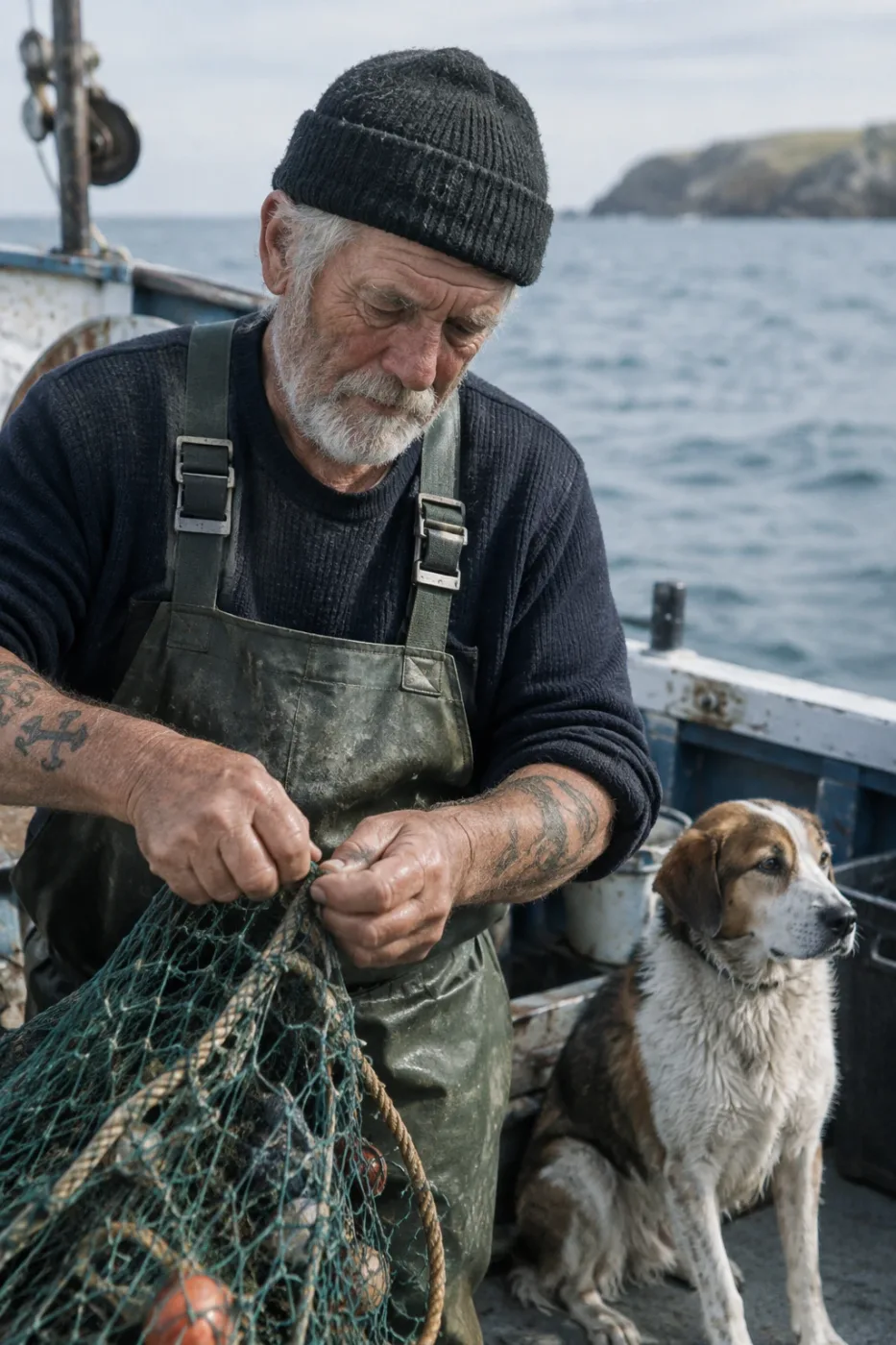
老水手与渔船纪实摄影
Create a photorealistic candid photograph of an elderly sailor standing on a small fishing boat. He has weathered skin with visible wrinkles, pores, and sun texture, and a few faded traditional sailor tattoos on his arms. He is calmly adjusting a net while his dog sits nearby on the deck. Shot like a 35mm film photograph, medium close-up at eye level, using a 50mm lens. Soft coastal daylight, shallow depth of field, subtle film grain, natural color balance. The image should feel honest and unposed, with real skin texture, worn materials, and everyday detail. No glamorization, no heavy retouching.
作者 OpenAI
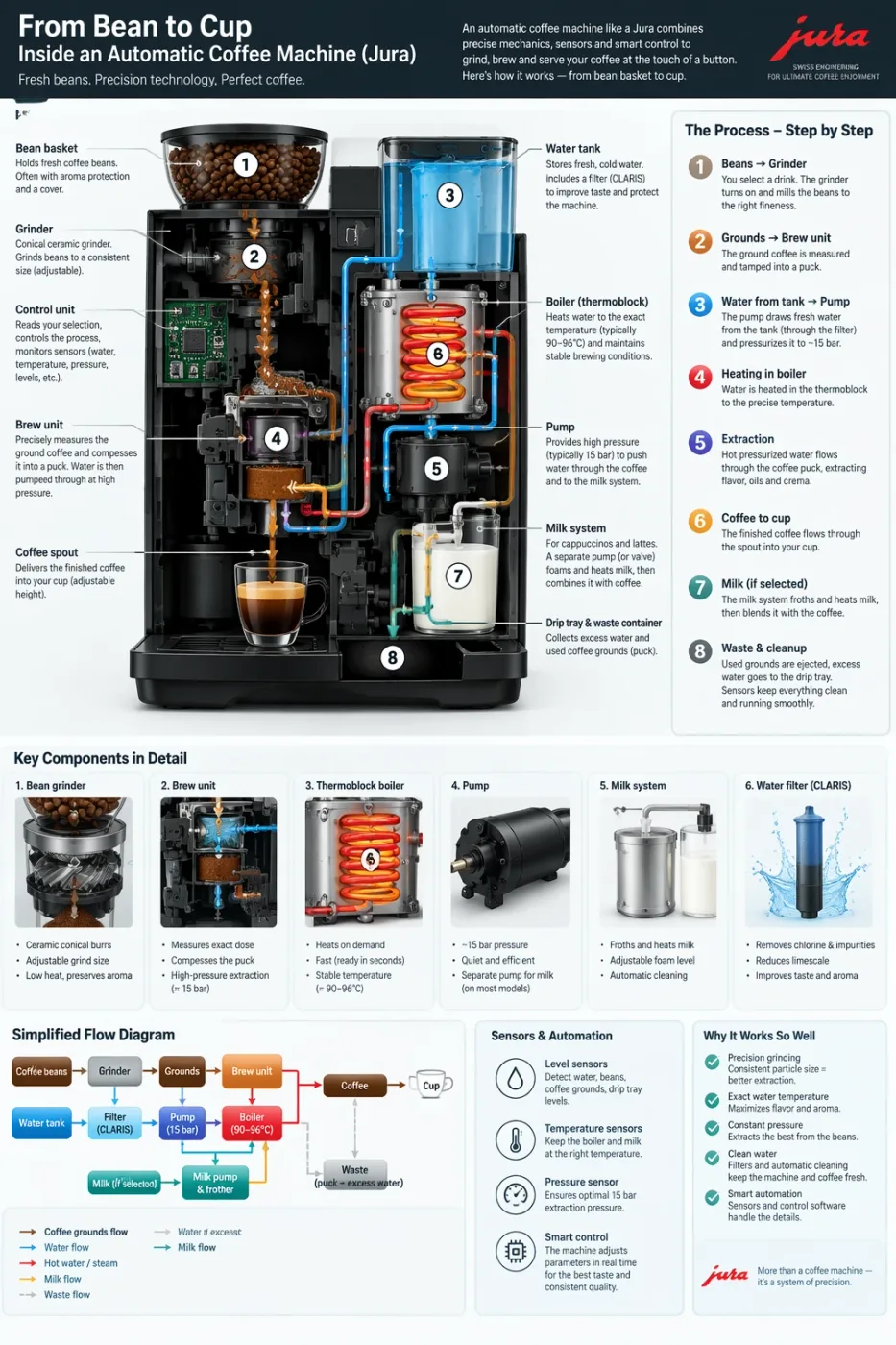
自动咖啡机工作流程信息图
Create a detailed Infographic of the functioning and flow of an automatic coffee machine like a Jura. From bean basket, to grinding, to scale, water tank, boiler, etc. I'd like to understand technically and visually the flow.
作者 OpenAI
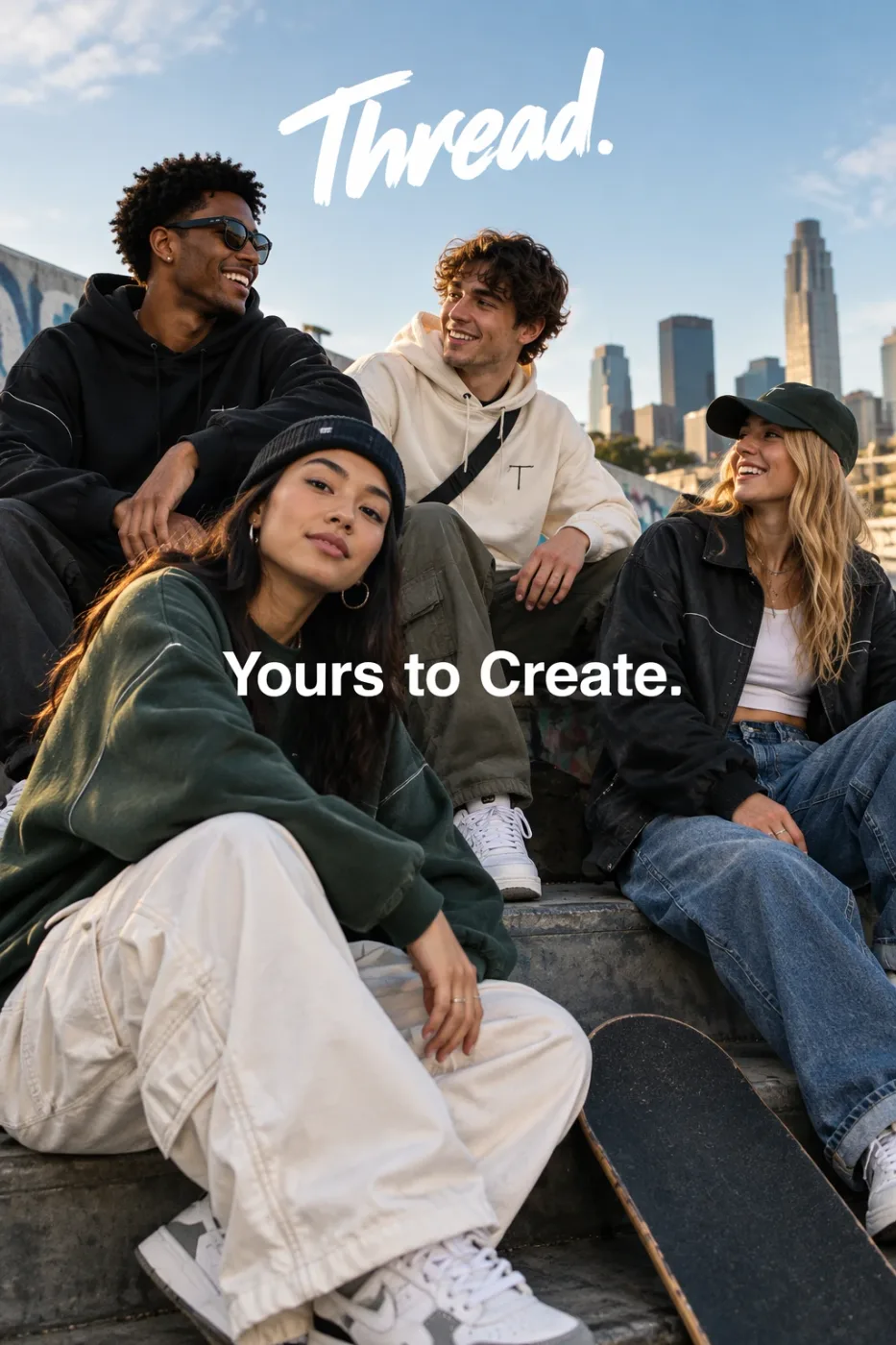
Thread 街头服饰广告
Give me a cool in culture ad / fashion shot for a brand called Thread. It's a hip young street brand. The ad shows a group of friends hanging out together with the tagline "Yours to Create." Make it feel like a polished campaign image for a youth streetwear audience: stylish, contemporary, energetic, and tasteful. Use clean composition, strong color direction, natural poses, and premium fashion photography cues. Render the tagline exactly once, clearly and legibly, integrated into the ad layout. No extra text, no watermarks, no unrelated logos.
作者 OpenAI