
doubao-seedream-5-0-flashDoubao Seedream 5.0 Flash は ByteDance の Seedream 5.0 ファミリーのうち、速度とコストを重視した高速版で、ここでは Volcano Ark の公式エンドポイント経由で提供しています。仕上がりの細部より、処理時間と 1 枚あたりの単価が効いてくる大量生成向けのモデルです。当社の計測では 2K で約 13〜15 秒、1K で約 10 秒で 1 枚が返ってきます。テキストからの生成と画像編集は同じエンドポイントで行え、合成編集には最大 10 枚の参照画像を渡せます。すでに透明背景を持つ画像を、透明を保ったまま編集することもできます。アルファチャンネル付きの PNG を 1 枚送り、background を "transparent" にすると、アルファ付きの PNG が返ってくるので、そのままバナーや商品テンプレートに重ねられます。出力は 1K か 2K(このモデルに 4K はありません)、アスペクト比は 21:9 から 9:16 まで、1 枚 $0.03 で透かしは入りません。1 枚の画像を、ベース画像と最大 16 枚の透明 PNG レイヤー(文字、被写体、小物など)に分解することもでき、各レイヤーには名前、重なり順、元画像での位置が付きます。レイヤー分解は出力 1 枚ごとに $0.03 で、ベースと 11 レイヤーに分けた場合は $0.36 です。
Generated image will appear here
Enter a prompt and click Generate
当社の計測では 1K で約 10 秒、2K で約 13〜15 秒。大量生成やインタラクティブな用途に向いています
すでにアルファチャンネルを持つ PNG を 1 枚送り、background を "transparent" にすると、透明を保った PNG で返ってきます(通常の画像の背景を切り抜く機能ではありません)
テキストからの生成、単一画像の編集、最大 10 枚の参照画像による合成を同じエンドポイントで
1K と 2K は同じ価格、1 回の呼び出しで 1 枚、透かしなし
1 枚の画像をベースと最大 16 枚の透明 PNG レイヤーに分解、各レイヤーに名前と位置付き。出力 1 枚ごとに $0.03
レイヤー分解は Seedream 5.0 Flash の機能で、ByteDance のドキュメントでは 图层拆分、サードパーティのカタログでは doubao-seedream-5-0-flash-layerize として掲載されています。PNG か JPEG を 1 枚送り、layer_decomposition を true にすると、モデルはベース画像と最大 16 枚の透明 PNG レイヤーを返します。各レイヤーには名前、一文の説明、重なり順を表す z_index、そしてピクセル座標と 0–1000 の正規化座標の 2 種類の bounding_box が付きます。apimodels.app では、テキストからの生成や編集にすでに使っている doubao-seedream-5-0-flash と同じモデル名に付いたブール値 1 つで、API キーは 1 つ、Volcengine のアカウントは不要です。
実際に Seedream 5.0 Flash を回してみて意外だった点が 2 つあり、どちらもこの上に何かを作った瞬間に効いてきます。1 つ目、ベース画像は元画像ではありません。抽出したレイヤーをすべて剥がし、その穴を塗り直した画像です。カフェのポスターを 9 レイヤーに分解すると、ベース画像は無地のクリーム色のカードだけになりました。文字だけを指定したポスターでは、タイトルのあった場所が空として描き直されて返ってきます。2 つ目、各レイヤーの PNG は bounding_box より大きく描画されます。一辺あたりおおむね 2〜4 倍で(439×70 px のロゴの枠が 1801×287 px の PNG として返りました)、縦横比は保たれています。合成するときは各レイヤーを bounding_box.absolute に合わせて配置・縮小し、余分なピクセルは後でそのレイヤーを拡大するときの余裕として扱ってください。
このページの内容はすべて apimodels.app 上の実リクエストで、各ケース 1 回ずつ、2026 年 9 月 27〜28 日に 2K ティアで実行したものです。画像、レイヤー名、説明、座標枠は Seedream 5.0 Flash が返したままで手を加えていません。価格は出力 1 枚 $0.03 の定価で計算し、秒数は作成呼び出しから結果完了までの実際の待ち時間です。下のエクスプローラーでレイヤーをクリックすると、そのレイヤーだけを表示し、ベース画像上の枠を確認できます。
| フィールド | 場所 | 意味 |
|---|---|---|
| resultUrls | タスク結果 | 先頭がベース画像、続いて各レイヤーが z_index 順 |
| resultJson.layers[i].z_index | すべての画像 | 0 がベース画像、1 以上は数字が大きいほど手前 |
| resultJson.layers[i].name、description | 各レイヤー | モデルが書くテキストで、言語はプロンプトの指示に従う(指示しなければ中国語) |
| resultJson.layers[i].bounding_box.absolute | 各レイヤー | [x1, y1, x2, y2]、ベース画像のピクセル座標 |
| resultJson.layers[i].bounding_box.normalized | 各レイヤー | 同じ枠を 0–1000 のグリッドに換算したもので、解像度に依存しない |
| レイヤーファイル | 各レイヤー | アルファ付き PNG で枠より大きい。ベース画像の形式は output_format に従う |


レイヤーをクリックすると単独で表示されます。枠はベース画像上の bounding_box、ベース画像はレイヤーを取り除いたあとにモデルが埋めた画面です。
prompt: Separate every main element onto its own layer. Write every layer name and description in English.
size 2K · 10 枚の出力 · $0.30 1 枚 $0.03 · 62秒
| z_index | name | bounding_box(normalized、0–1000) | description |
|---|---|---|---|
| 0 | ベース画像(z_index 0)— 名前・説明・枠なし、形式は output_format に従う | ||
| 1 | Sunset Sky | [18, 11, 981, 497] | The gradient sunset sky with purple to orange textured clouds, forming the base background of the poster. |
| 2 | River Water | [400, 595, 908, 810] | The calm river surface reflecting the orange sunset glow, with subtle ripples. |
| 3 | Distant Hills and Forests | [24, 486, 976, 625] | The layered purple distant mountain ranges and dense dark forest tree silhouettes on both river banks. |
| 4 | Setting Sun | [559, 459, 728, 535] | The round yellow-orange setting sun above the distant hills, no other landscape elements included. |
| 5 | Foreground Rock and Grass | [20, 601, 980, 908] | The foreground rocky outcrop and tall wild grass with small wildflowers, excluding the guitar. |
| 6 | Acoustic Guitar | [92, 397, 392, 837] | The full wooden acoustic guitar leaning on the rock, no surrounding grass or rocks included. |
| 7 | Live at Riverside Park Text | [107, 284, 894, 322] | The text 'Live at Riverside Park' with two horizontal divider lines on both sides, in cream retro font. |
| 8 | Event Info Text | [55, 906, 945, 952] | The bottom text 'Aug 14 · 7 PM · Free entry' with two horizontal divider lines on both sides, in cream retro font. |
| 9 | SUMMER ECHOES Title Text | [73, 36, 926, 278] | The large bold vintage text 'SUMMER ECHOES' in cream textured font, no other elements included. |
apimodels.app での実リクエスト、2026-09-28、タスク cmulg47z
以下のリクエストは、Seedream 5.0 Flash のレイヤー分解が実際に使われる 3 つの形をカバーしています。全体の自動分解(プロンプトなし、または「主要な要素をすべて分ける」と指示)、選択的な分解(「文字だけ」「スニーカーと値札」)、そして単一要素の切り抜きです。料金は返ってきた画像の枚数で決まり、入力のサイズや複雑さには関係ありません。必要なピースが 1 つだけなら、選択的な分解がいちばん安い取り出し方になります。単一の切り抜きは $0.06、ポスター全体は $0.30、上限の 16 枚で $0.51 です。
| シナリオ | リクエスト | 出力 | 定価 | 所要時間 |
|---|---|---|---|---|
| イベントポスター、3:4 | 全体分解 | ベース 1 + 9 レイヤー | $0.30 | 62 秒 |
| カフェの販促ポスター、3:4 | 全体分解 | ベース 1 + 9 レイヤー | $0.30 | 60 秒 |
| 商品広告、16:9 | 全体分解 | ベース 1 + 7 レイヤー | $0.24 | 53 秒 |
| アプリアイコン + ワードマーク、3.8:1 | 全体分解、16 枚の上限に到達 | ベース 1 + 15 レイヤー | $0.48 | 74 秒 |
| イベントポスター、文字のみ | 選択的 | ベース 1 + 4 レイヤー | $0.15 | 52 秒 |
| スニーカー広告 | 選択的、2 要素 | ベース 1 + 2 レイヤー | $0.09 | 37 秒 |
| 2 人の写真 | 1 人だけ | ベース 1 + 1 レイヤー | $0.06 | 31 秒 |
| カフェのポスター、中国語プロンプト | バッジ 1 つ | ベース 1 + 1 レイヤー | $0.06 | 25 秒 |
ヴィンテージ調のコンサートポスターで、夕焼け、湖、丘、岩に立てかけたギター、3 つの文字ブロックが入っています。「Separate every main element onto its own layer」というプロンプトに対し、Seedream 5.0 Flash は 9 レイヤーを返しました。Sunset Sky(夕焼けの空)、River Water、Distant Hills and Forests、Setting Sun、Foreground Rock and Grass、Acoustic Guitar、そして 3 つの文字ブロック(タイトル、「Live at Riverside Park」の行、日付の行)がそれぞれ別レイヤーです。出力 10 枚、$0.30、62 秒でした。
ポスターを使い回す必要があるときに欲しいのがこの分解です。下段の日付を差し替える、ギターを別のデザインに流用する、スポンサー帯のためにタイトルを上にずらす。どれも空を描き直す必要がありません。太陽のレイヤーの説明に「no other landscape elements included」とある点にも注目してください。モデルは各切り抜きから何を除外したかを明示します。


レイヤーをクリックすると単独で表示されます。枠はベース画像上の bounding_box、ベース画像はレイヤーを取り除いたあとにモデルが埋めた画面です。
prompt: Separate every main element onto its own layer. Write every layer name and description in English.
size 2K · 10 枚の出力 · $0.30 1 枚 $0.03 · 62秒
| z_index | name | bounding_box(normalized、0–1000) | description |
|---|---|---|---|
| 0 | ベース画像(z_index 0)— 名前・説明・枠なし、形式は output_format に従う | ||
| 1 | Sunset Sky | [18, 11, 981, 497] | The gradient sunset sky with purple to orange textured clouds, forming the base background of the poster. |
| 2 | River Water | [400, 595, 908, 810] | The calm river surface reflecting the orange sunset glow, with subtle ripples. |
| 3 | Distant Hills and Forests | [24, 486, 976, 625] | The layered purple distant mountain ranges and dense dark forest tree silhouettes on both river banks. |
| 4 | Setting Sun | [559, 459, 728, 535] | The round yellow-orange setting sun above the distant hills, no other landscape elements included. |
| 5 | Foreground Rock and Grass | [20, 601, 980, 908] | The foreground rocky outcrop and tall wild grass with small wildflowers, excluding the guitar. |
| 6 | Acoustic Guitar | [92, 397, 392, 837] | The full wooden acoustic guitar leaning on the rock, no surrounding grass or rocks included. |
| 7 | Live at Riverside Park Text | [107, 284, 894, 322] | The text 'Live at Riverside Park' with two horizontal divider lines on both sides, in cream retro font. |
| 8 | Event Info Text | [55, 906, 945, 952] | The bottom text 'Aug 14 · 7 PM · Free entry' with two horizontal divider lines on both sides, in cream retro font. |
| 9 | SUMMER ECHOES Title Text | [73, 36, 926, 278] | The large bold vintage text 'SUMMER ECHOES' in cream textured font, no other elements included. |
apimodels.app での実リクエスト、2026-09-28、タスク cmulg47z
「AUTUMN LATTE WEEK」のポスターで、20% OFF のバッジ、パンプキンスパイスラテ、四隅にカエデの葉が 4 枚あります。Seedream 5.0 Flash はこれを 9 レイヤーに分解し、葉はそれぞれ位置と色で命名(Top Left Yellow Maple Leaf、Bottom Right Orange Maple Leaf)、カップとその上のホイップクリームの飲み物を分け、見出しと下段のイベント情報を 2 つの文字レイヤーとして保持しました。返ってきたベース画像は無地のクリーム色のカードで、すべての要素が剥がされています。
同じキャンペーンを 12 都市で展開するチェーンなら、これがテンプレートになります。下段の行を店舗ごとに差し替え、バッジのレイヤーで 20% を 15% に変え、9:16 のストーリー版では葉の位置を組み替える。すべて 1 回 $0.30 の分解から派生でき、スタイルがそれぞれずれていく 12 回の再生成は不要です。


レイヤーをクリックすると単独で表示されます。枠はベース画像上の bounding_box、ベース画像はレイヤーを取り除いたあとにモデルが埋めた画面です。
prompt: Separate every main element onto its own layer. Write every layer name and description in English.
size 2K · 10 枚の出力 · $0.30 1 枚 $0.03 · 60秒
| z_index | name | bounding_box(normalized、0–1000) | description |
|---|---|---|---|
| 0 | ベース画像(z_index 0)— 名前・説明・枠なし、形式は output_format に従う | ||
| 1 | Bottom Event Info Text | [100, 912, 899, 943] | The brown text 'Oct 1 - Oct 7 · Maple Street Café' with short horizontal line decorations on both sides, no extra elements included. |
| 2 | Bottom Left Red Maple Leaf | [43, 622, 311, 842] | The large red maple leaf decoration located at the bottom left of the cup, no other elements included. |
| 3 | Bottom Right Orange Maple Leaf | [743, 728, 937, 852] | The orange maple leaf decoration located at the bottom right of the cup, no other elements included. |
| 4 | Top Left Yellow Maple Leaf | [59, 326, 218, 461] | The yellow maple leaf decoration located at the top left of the cup, no other elements included. |
| 5 | Top Right Small Red Maple Leaf | [876, 521, 987, 607] | The small red maple leaf decoration located at the top right of the cup, no other elements included. |
| 6 | White Latte Cup with Pumpkin Logo | [213, 384, 869, 810] | The white ceramic latte cup with an orange pumpkin logo printed on the front, no coffee or cream inside included. |
| 7 | Latte Drink with Whipped Cream | [224, 274, 751, 547] | The pumpkin spice latte topped with swirled whipped cream dusted with cinnamon powder, placed inside the cup. |
| 8 | 20% OFF Red Badge | [682, 260, 950, 459] | The circular red discount badge with white dashed border and white text '20% OFF', no other elements included. |
| 9 | AUTUMN LATTE WEEK Title Text | [77, 52, 923, 227] | The bold brown text 'AUTUMN LATTE WEEK' with small leaf decorations on both sides, no extra elements included. |
apimodels.app での実リクエスト、2026-09-28、タスク cmukjkdk
典型的な EC レイアウトのヘッドホンのバナーです。Seedream 5.0 Flash が返した 7 レイヤーは、デザイナーが組み立てたであろう構造と 1 対 1 で対応します。SoundPeak のロゴ、「Silence Everything」の見出し、機能を示すサブタイトル、円形の展示台、黄色い $129 の値札、「Shop Now」ボタン、そしてヘッドホン本体。ベース画像は展示台を取り除いた青いスタジオ背景です。画像 8 枚、$0.24、53 秒でした。
解像度の挙動がはっきり見えたのもこのケースです。ロゴは 2720×1536 のベース画像上で 439×70 px の枠を占めるだけですが、PNG は 1801×287 px あります。枠に合わせて縮小すれば元の位置にぴったり収まり、PNG をそのまま残しておけば、ヒーロー配置のために 4 倍に拡大しても耐えるロゴが手に入ります。


レイヤーをクリックすると単独で表示されます。枠はベース画像上の bounding_box、ベース画像はレイヤーを取り除いたあとにモデルが埋めた画面です。
prompt: Separate every main element onto its own layer. Write every layer name and description in English.
size 2K · 8 枚の出力 · $0.24 1 枚 $0.03 · 53秒
| z_index | name | bounding_box(normalized、0–1000) | description |
|---|---|---|---|
| 0 | ベース画像(z_index 0)— 名前・説明・枠なし、形式は output_format に従う | ||
| 1 | SoundPeak Logo and Brand Text | [67, 64, 228, 109] | Extract the SoundPeak brand logo and the text 'SoundPeak', no extra elements included. |
| 2 | Headline Text Silence Everything | [66, 229, 429, 473] | Extract the bold dark blue headline text 'Silence Everything', no extra elements included. |
| 3 | Subtitle Feature Text | [67, 503, 404, 535] | Extract the subtitle text 'Active noise cancelling, 40-hour battery', no extra elements included. |
| 4 | White Round Display Pedestal | [455, 754, 917, 946] | Extract the light blue round display pedestal that holds the headphones, no extra elements included. |
| 5 | Yellow Price Tag $129 | [67, 565, 201, 665] | Extract the yellow price tag with the text '$129', no extra elements included. |
| 6 | Shop Now Button | [67, 705, 253, 792] | Extract the dark blue rounded 'Shop Now' button with arrow, no extra elements included. |
| 7 | Black Over-Ear Headphones | [512, 100, 826, 789] | Extract the black SoundPeak over-ear noise cancelling headphones, no extra elements included. |
apimodels.app での実リクエスト、2026-09-27、タスク cmujyv1k
フラットなロゴの組み合わせで、星と 8 本の色付きの光線が入った黒い角丸アイコンの横に「Sparkpix」の文字があります。Seedream 5.0 Flash は使える枠をすべて使い切りました。15 レイヤーとベース画像、計 16 枚、$0.48、74 秒です。各光線を別レイヤーにし(色と位置で命名)、星をアイコンの背景から分離し、ワードマークも分解しました。「Spark」は 1 レイヤーのまま、p、i、i の点、x はそれぞれ独立したレイヤーになっています。
この最後の細部が上限の効き方です。モデルは要素を捨てて 16 で止まるのではなく、まとめます。作品の中に気にかけたいものが 15 個より多いなら、1 回で全部を頼むのではなく、2〜3 回のリクエストに分けて選択的に指定してください。各リクエストは返ってきた分だけの課金なので、4 レイヤーずつの選択的な分解 2 回でも合計 $0.30 で、どのみち要素をまとめてしまう全体分解 1 回より安く済みます。
レイヤーをクリックすると単独で表示されます。枠はベース画像上の bounding_box、ベース画像はレイヤーを取り除いたあとにモデルが埋めた画面です。
prompt: Separate every main element onto its own layer. Write every layer name and description in English.
size 2K · 16 枚の出力 · $0.48 1 枚 $0.03 · 74秒
| z_index | name | bounding_box(normalized、0–1000) | description |
|---|---|---|---|
| 0 | ベース画像(z_index 0)— 名前・説明・枠なし、形式は output_format に従う | ||
| 1 | Black rounded square icon background | [62, 124, 250, 875] | The black rounded square base of the app icon, no other decorative elements included |
| 2 | Yellow four-pointed star | [88, 323, 176, 653] | The bright yellow four-pointed star shape at the center of the icon, no surrounding rays included |
| 3 | Green top-left ray | [38, 132, 98, 359] | The bright green teardrop-shaped ray at the top-left position of the icon |
| 4 | Green top-right ray | [164, 137, 225, 367] | The bright green teardrop-shaped ray at the top-right position of the icon |
| 5 | Green bottom-left ray | [39, 609, 99, 837] | The bright green teardrop-shaped ray at the bottom-left position of the icon |
| 6 | Green bottom-right ray | [166, 617, 226, 843] | The bright green teardrop-shaped ray at the bottom-right position of the icon |
| 7 | Orange top ray | [122, 55, 143, 280] | The orange teardrop-shaped ray at the top center position of the icon |
| 8 | Red bottom ray | [122, 695, 143, 917] | The red teardrop-shaped ray at the bottom center position of the icon |
| 9 | Pink left ray | [21, 447, 81, 526] | The bright pink teardrop-shaped ray at the left center position of the icon |
| 10 | Purple right ray | [183, 446, 242, 527] | The purple teardrop-shaped ray at the right center position of the icon |
| 11 | Yellow text 'Spark' | [306, 171, 755, 863] | The bold rounded yellow text spelling 'Spark', no other colored text included |
| 12 | Orange text 'p' | [752, 335, 861, 862] | The bold rounded orange lowercase letter 'p' that follows the yellow 'Spark' text |
| 13 | Red text 'i' | [859, 311, 898, 732] | The bold rounded red lowercase letter 'i' that follows the orange 'p' text |
| 14 | Yellow dot of 'i' | [857, 126, 901, 286] | The solid yellow circular dot positioned above the red 'i' letter |
| 15 | Pink text 'x' | [897, 326, 1000, 732] | The bold rounded bright pink lowercase letter 'x' that follows the red 'i' text |
apimodels.app での実リクエスト、2026-09-28、タスク cmul6zg7
最初の例と同じコンサートポスターですが、プロンプトは「Separate only the text」です。Seedream 5.0 Flash は 4 レイヤー(「Live at Riverside Park」「ECHOES」「SUMMER」と日付の行)を返し、ギター、太陽、風景はベース画像に残したまま、タイトルがあった場所には空を描き直しました。画像 5 枚、$0.15、52 秒。全体分解の半額で済んだのは、頼んだレイヤーの分しか支払っていないからです。
ローカライズしたポスターを作る最安の道がこれです。ベース画像はそのまま、4 つの文字レイヤーを日本語版やドイツ語版に差し替えれば、下のアートワークには一切手が入りません。なお、モデルは 2 語のタイトルを 2 レイヤーに分ける判断をしました。1 つのブロックとして必要なら、プロンプトでそう指示してください。


レイヤーをクリックすると単独で表示されます。枠はベース画像上の bounding_box、ベース画像はレイヤーを取り除いたあとにモデルが埋めた画面です。
prompt: Separate only the text. Write every layer name and description in English.
size 2K · 5 枚の出力 · $0.15 1 枚 $0.03 · 52秒
| z_index | name | bounding_box(normalized、0–1000) | description |
|---|---|---|---|
| 0 | ベース画像(z_index 0)— 名前・説明・枠なし、形式は output_format に従う | ||
| 1 | Live at Riverside Park text | [107, 284, 893, 322] | Extract the text 'Live at Riverside Park' with its left and right horizontal divider lines only, no other elements included. |
| 2 | ECHOES text | [157, 155, 852, 278] | Extract the text 'ECHOES' only, no other elements included. |
| 3 | SUMMER text | [73, 36, 927, 178] | Extract the text 'SUMMER' only, no other elements included. |
| 4 | Event info text | [55, 906, 945, 952] | Extract the text 'Aug 14 · 7 PM · Free entry' with its left and right horizontal divider lines only, no other elements included. |
apimodels.app での実リクエスト、2026-09-28、タスク cmukpy5o
ミントグリーンのランニングシューズ広告で、見出し、「Shop now」ボタン、シューズ、黄色い $89 のタグがあります。プロンプトでは「Separate the sneaker and the price tag」と 2 つだけ名指しし、Seedream 5.0 Flash はまさにその 2 レイヤーだけを返し、見出しとボタンはベース画像に残しました。画像 3 枚、$0.09、37 秒です。
商品カタログの仕事はだいたいこの形をしています。主役の商品が 1 つと、毎週変わる価格要素が 1 つ。一度分解しておけば、商品一覧ページ用にアルファのエッジがきれいな切り抜きと、文字を打ち直せるタグのレイヤーが手に入り、広告の残りはロックされた背景として動かさずに済みます。


レイヤーをクリックすると単独で表示されます。枠はベース画像上の bounding_box、ベース画像はレイヤーを取り除いたあとにモデルが埋めた画面です。
prompt: Separate the sneaker and the price tag. Write every layer name and description in English.
size 2K · 3 枚の出力 · $0.09 1 枚 $0.03 · 37秒
| z_index | name | bounding_box(normalized、0–1000) | description |
|---|---|---|---|
| 0 | ベース画像(z_index 0)— 名前・説明・枠なし、形式は output_format に従う | ||
| 1 | Sneaker | [237, 130, 818, 744] | The white and orange running sneaker, including its mesh upper, laces, sole, heel tab, and the attached orange tag string, no price tag included |
| 2 | Price Tag | [761, 219, 954, 403] | The yellow price tag with black text '$89', no other elements included |
apimodels.app での実リクエスト、2026-09-28、タスク cmukpzj6
オフィスで撮った 2 人の写真です(2 人とも AI 生成で、実在の人物の肖像は一切含みません)。「Separate the woman on the right」で 1 レイヤーが得られ(モデルが付けた名前もまさにその通りでした)、ベース画像では彼女がいなくなり、背後の会議室が埋められています。画像 2 枚、$0.06、31 秒でした。
集合写真から 1 人を切り抜く作業は、普通ならマスク作りに加えて別ツールでの背景補完が必要ですが、ここでは 1 回の呼び出しで両方が返ってきます。ベース画像の補完は生成されたものなので、納品前に確認してください。今回は椅子とテーブルの縁がきれいに再構成されましたが、モデルは人物の背後を「復元」しているのではなく「作り出して」います。


レイヤーをクリックすると単独で表示されます。枠はベース画像上の bounding_box、ベース画像はレイヤーを取り除いたあとにモデルが埋めた画面です。
prompt: Separate the woman on the right. Write every layer name and description in English.
size 2K · 2 枚の出力 · $0.06 1 枚 $0.03 · 31秒
| z_index | name | bounding_box(normalized、0–1000) | description |
|---|---|---|---|
| 0 | ベース画像(z_index 0)— 名前・説明・枠なし、形式は output_format に従う | ||
| 1 | Woman on the right | [526, 116, 989, 999] | The full body of the woman sitting on the right side of the image, wearing a black sweater with lace collar and gold hoop earrings, no extra annotation elements included |
apimodels.app での実リクエスト、2026-09-28、タスク cmukpy7d
再びカフェのポスターで、今度はプロンプトを中国語で書きました。提取20% off的文字标签(「20% off の文字バッジを抽出する」)に続けて、名前と説明を英語で書くよう求める英文を 1 文添えています。Seedream 5.0 Flash は「20% OFF text badge」という 1 レイヤーを英語の説明付きで返し、ベース画像ではバッジが消えて背後のポスターの紙が埋められました。画像 2 枚、$0.06、25 秒。このページで最速のケースです。
ここから分かる実用的な点は 2 つです。対象の指定は自分が考える言語で書いてよいこと、そして返ってくるメタデータの言語は末尾のその 1 文で別に制御できることです。その文を省くと名前は中国語で返ってきます。中国語圏向けの製品なら好都合ですが、それ以外の人には不意打ちになります。


レイヤーをクリックすると単独で表示されます。枠はベース画像上の bounding_box、ベース画像はレイヤーを取り除いたあとにモデルが埋めた画面です。
prompt: 提取20% off的文字标签. Write every layer name and description in English.
size 2K · 2 枚の出力 · $0.06 1 枚 $0.03 · 25秒
| z_index | name | bounding_box(normalized、0–1000) | description |
|---|---|---|---|
| 0 | ベース画像(z_index 0)— 名前・説明・枠なし、形式は output_format に従う | ||
| 1 | 20% OFF text badge | [681, 260, 950, 459] | Extract the red circular 20% OFF text badge with white dashed outline, only keep the complete badge including the '20% OFF' white text and red circular background, no extra elements included. |
apimodels.app での実リクエスト、2026-09-28、タスク cmul38tl
リクエストは通常の画像エンドポイントに 2 つのフィールドを足すだけです。POST https://api.apimodels.app/v1/images/generations に model "doubao-seedream-5-0-flash"、PNG か JPEG 1 枚を指す image_url(公開 URL または base64)、layer_decomposition true、必要に応じて prompt と size("1K" または "2K"、ベース画像は入力の縦横比を保ちます)を付けます。taskId が返ってくるので、GET /v1/images/generations?task_id=… を state が completed になるまでポーリングし、resultUrls と resultJson.layers を読み取ります。下の表にある画像はすべて、まさにこの呼び出しで得たものです。
プロンプトのパターンは 3 つでほぼ足ります。全体分解なら prompt を省くか「Separate every main element onto its own layer」と書きます。選択的な分解なら「only the text」「the sneaker and the price tag」「the woman on the right」のように対象を名指しすると、Seedream 5.0 Flash はそのレイヤーだけを返し、残りはベース画像に置いたままにします。英語のメタデータが欲しければ「Write every layer name and description in English」の 1 文を末尾に足してください。この文がないと、プロンプト自体が何語であっても名前と説明は中国語で返ってきます。
今回のケースから見えた分解そのものの傾向はこうです。文字ブロックはそれぞれ 1 レイヤーになり、大きなタイトルは単語ごとに分かれることがあります(SUMMER と ECHOES は別々に返りました)。葉や光線のような小さな装飾はそれぞれ独立したレイヤーになり、色と位置で命名されます。商品とそれが載っているものは分離されます(カップと飲み物、展示台とヘッドホン)。レイヤー数が 15 を超えそうなときは、モデルは捨てるのではなくまとめるので、密度の高いアートワークでは 1 回ではなく 2〜3 回の選択的なリクエストに分けてください。
| 目的 | 使ったプロンプト | 返ってきたもの |
|---|---|---|
| 全体分解 | (省略)または「Separate every main element onto its own layer.」 | アートワーク次第で 7〜15 レイヤー。文字ブロック、小物、装飾がすべて分離 |
| 文字のみ | 「Separate only the text.」 | 文字レイヤー 4 枚。アートワークはベース画像に残り、文字の位置は描き直し |
| 名指しした物体 | 「Separate the sneaker and the price tag.」 | ちょうどその 2 レイヤー |
| 1 人の人物 | 「Separate the woman on the right.」 | 1 レイヤー、ベース画像では背後が補完 |
| 任意の言語 | 「提取20% off的文字标签.」+ 英語名を求める 1 文 | 英語の名前と説明が付いた 1 レイヤー |
| 英語のメタデータ | 「Write every layer name and description in English.」を追加 | 名前と説明が中国語ではなく英語に |
Seedream 5.0 Flash が返す画像は 1 枚 $0.03 で、ベース画像も 1 枚、各レイヤーも 1 枚として数えます。分解そのものに別料金はありません。何レイヤー返すかはモデルが決めるため、作成呼び出しの時点で最大の 17 枚分($0.51)を残高から確保し、タスク完了時に実際の枚数で精算して差額は即座に戻ります。失敗したリクエストは何も返さず課金もされません。分解の半分だけを支払うような部分的な成功はありません。
実務上の帰結として、Seedream 5.0 Flash のレイヤーをいちばん安く使う方法は「少なく頼む」ことです。ポスター全体の分解は $0.30、同じポスターの文字レイヤー 4 枚なら $0.15、バッジ 1 つなら $0.06。パイプラインで必要なのが商品と値札だけなら、選択的なプロンプトは全体分解の 3 分の 1 の費用で済み、管理するファイルも減ります。
| 返ってくる枚数 | 内訳 | 支払額 |
|---|---|---|
| 2 | ベース + 1 レイヤー | $0.06 |
| 3 | ベース + 2 レイヤー | $0.09 |
| 5 | ベース + 4 レイヤー | $0.15 |
| 8 | ベース + 7 レイヤー | $0.24 |
| 10 | ベース + 9 レイヤー | $0.30 |
| 16 | ベース + 15 レイヤー | $0.48 |
| 17(上限) | ベース + 16 レイヤー | $0.51 — 作成時に確保される金額 |
デザインへの引き渡し。フラットな AI 生成バナーはデザイナーにとって行き止まりですが、同じバナーが Seedream 5.0 Flash のベース画像と位置付きの名前付き PNG レイヤー 7 枚になれば、組み立てを待つ PSD や Figma のファイルです。各レイヤーを bounding_box.absolute の位置に書き込み、z_index をレイヤー順として使えば、見出し、価格、ボタンは再び編集可能なオブジェクトになります。このモデルの上に作られたツールはまさにそれをしています。ポスターや写真を名前付きレイヤーに分解し、PSD として書き出すのです。
ローカライズとバリエーション。上の「文字のみ」とカフェの例がそのパターンです。$0.15〜$0.30 の分解 1 回で、ロックされた背景と数枚の文字レイヤーが得られ、以後は言語、地域、割引率のどれを変えるにしても、アートワークを変えてしまう再生成ではなく文字の差し替えで済みます。値札や CTA を広告セットごとに A/B テストする場合も同じです。
モーションと合成。奥行き順と枠を持つレイヤーは、パララックス、キネティックタイポグラフィ、商品リビール系のアニメーションがまさに必要とするものです。ポスターの空、丘、ギター、タイトルは位置が分かっている別ファイルなので、それぞれ違う速度で動かせます。EC のテンプレートも同様で、スニーカーの切り抜きと値札はどんな背景にも置けますし、各レイヤー PNG の余分な解像度のおかげで、2K の広告から切り出した商品画像がヒーロー画像としても持ちこたえます。
入力:画像はちょうど 1 枚、PNG または JPEG です。複数画像の合成、テキストからの生成、レイヤー分解は同じモデルの別モードで、1 回の呼び出しでは組み合わせられません。layer_decomposition は background "transparent" とも併用できません。そちらはすでにアルファチャンネルを持つ画像を透明背景のまま編集するモードで、別の仕事です。size は 1K か 2K のティアを選ぶだけで、ベース画像は入力の縦横比を保ちます。16:9 の広告が 2720×1536、3:4 のポスターが 1760×2352 で返ってきたのはそのためです。
出力:レイヤー数は指定できません。Seedream 5.0 Flash が 1〜16 の範囲で決め、枠が足りなくなると要素をまとめます。ベース画像はレイヤーを剥がした場所が描き直されているので、生成コンテンツとして扱い、特に人物や商品の背後は納品前に確認してください。レイヤー PNG は bounding_box より大きく(ここでのすべてのケースで一辺 2〜4 倍)、合成時に枠へ縮小する必要があります。水や空のように大きくて縁の柔らかいレイヤーが塗り直されたベース画像と接する部分には、画像を組み直したときにかすかな継ぎ目が出ることを見込んでください。上のエクスプローラーはそれを隠さずに見せています。レイヤーの名前と説明はモデルが書くもので、プロンプトで別の言語を指示しない限り中国語で届きます。
時間と受け取り:8 回の実行は 25〜74 秒で、おおむね 25 秒に 1 レイヤーあたり 3 秒を足した程度です。通常の Seedream 5.0 Flash の画像が 10〜15 秒なのに対し、クライアントのタイムアウトは 180 秒に設定するか、ブロッキングで待つ代わりに callback_url を使ってください。結果のリンクは一時的なものです。タスクが完了したらすぐに、ベース画像とレイヤーを自分のストレージにコピーしてください。
apimodels.app の 3 つの Seedream 5.0 ティアは、同じエンドポイントに同じパラメータで応答するので、選択の基準はそれぞれが何を足すかです。Seedream 5.0 Flash は量産向けのティアで、このプラットフォームではレイヤー分解と透明背景のまま編集ができる唯一のティアでもあります。Seedream 5.0 Pro はインタラクティブ編集(座標、矩形、手描きのマークで領域を指すと、その領域だけが変わる)と、より強い画像内テキストを加えます。Seedream 5.0 Lite は公式チャンネル経由で 2K/4K を出す汎用ティアです。切り替えは model の文字列 1 つの変更で済みます。
| ティア | モデル ID | 当サイトの価格 | レイヤー分解 | 透明背景のまま編集 | 向いている用途 |
|---|---|---|---|---|---|
| Seedream 5.0 Flash | doubao-seedream-5-0-flash | 出力 1 枚 $0.03、1K/2K | あり — ベース + 最大 16 レイヤー | あり | 量産、レイヤー分解、アルファを保つ編集 |
| Seedream 5.0 Pro | doubao-seedream-5-0-pro | $0.03(1K)/ $0.06(2K) | 当サイトでは提供なし | あり | インタラクティブな領域編集、密度の高い画像内テキスト |
| Seedream 5.0 Lite | doubao-seedream-5-0-260128 | 1 枚 $0.055、2K/4K | なし | なし | 2K/4K の汎用生成と合成 |
Doubao Seedream 5.0 Flash は ByteDance の画像生成 API です。Doubao Seedream 5.0 Flash は ByteDance の Seedream 5.0 ファミリーのうち、速度とコストを重視した高速版で、ここでは Volcano Ark の公式エンドポイント経由で提供しています。仕上がりの細部より、処理時間と 1 枚あたりの単価が効いてくる大量生成向けのモデルです。当社の計測では 2K で約 13〜15 秒、1K で約 10 秒で 1 枚が返ってきます。テキストからの生成と画像編集は同じエンドポイントで行え、合成編集には最大 10 枚の参照画像を渡せます。すでに透明背景を持つ画像を、透明を保ったまま編集することもできます。アルファチャンネル付きの PNG を 1 枚送り、background を "transparent" にすると、アルファ付きの PNG が返ってくるので、そのままバナーや商品テンプレートに重ねられます。出力は 1K か 2K(このモデルに 4K はありません)、アスペクト比は 21:9 から 9:16 まで、1 枚 $0.03 で透かしは入りません。1 枚の画像を、ベース画像と最大 16 枚の透明 PNG レイヤー(文字、被写体、小物など)に分解することもでき、各レイヤーには名前、重なり順、元画像での位置が付きます。レイヤー分解は出力 1 枚ごとに $0.03 で、ベースと 11 レイヤーに分けた場合は $0.36 です。 APIMODELS のプラットフォーム経由なら、統一 API と明朗な従量課金でこのモデルを呼び出せます。 現在の料金: 1K: $0.03, 2K: $0.03。
ネットショップ、広告、販促物に使える高品質な商品ビジュアルを生成します。
目に留まるビジュアルを用意して、エンゲージメントとブランド認知を伸ばします。
キャラクター、背景、小物のコンセプトアートを起こし、ゲーム開発の立ち上がりを速めます。
ポスター、バナー、キャンペーン素材を従来のデザイン費のごく一部で用意できます。
Doubao Seedream 5.0 Flash は APIMODELS 経由で 1K: $0.03, 2K: $0.03 で利用できます。課金は従量制で、生成した分だけの支払いです。
APIMODELS に登録して API キーを取得し、統一エンドポイントを呼ぶだけです。cURL / Python / Node.js のサンプルを含む詳しいドキュメントを用意しています。
APIMODELS は同じ Doubao Seedream 5.0 Flash を集約プラットフォーム経由で提供します。統一された API インターフェースなので、プロバイダごとにアカウントを作る必要はありません。キー 1 本ですべてのモデルに届きます。
doubao-seedream-5-0-flash に PNG か JPEG を 1 枚送り、layer_decomposition を true にすると、ベース画像と最大 16 枚の透明 PNG レイヤーに分解されます。各レイヤーには名前、一文の説明、z_index(0 がベース画像、大きいほど手前)、ピクセル座標と 0–1000 正規化座標の bounding_box が付きます。resultUrls は先頭がベース画像で以下 z 順、同じ情報は resultJson.layers にもあります。apimodels.app では同じモデル名のブール値 1 つで使えます。
出力 1 枚あたり $0.03 で、ベース画像も含みます。分解そのものに別料金はありません。何レイヤー返すかはモデルが決めるため、作成時に上限の 17 枚分($0.51)を確保し、完了時に実際の枚数で精算します。ベース画像と 9 レイヤーで返ったポスターは $0.30、2 要素の選択的な分解は $0.09、切り抜き 1 つは $0.06 でした。失敗したリクエストは何も返さず課金もされず、部分的な成功はありません。
できます。プロンプトで対象を名指ししてください。コンサートポスターに「Separate only the text」と指定すると文字レイヤー 4 枚が返り、ギターや風景はベース画像に残りました(全体分解の $0.30 に対して $0.15)。「Separate the sneaker and the price tag」ではその 2 レイヤーだけ、「Separate the woman on the right」では 1 レイヤーです。省略すれば全体の自動分解になります。返った枚数分の課金なので、1 ピースだけ欲しいときは選択的なプロンプトが最安です。
名前と説明はモデルが書くもので、プロンプトが何語であっても既定では中国語で返ってきます。プロンプトの末尾に「Write every layer name and description in English.」の 1 文を足すと英語になり、ほかの言語でも同じ方法が使えます。何を分解するかの指示自体はどの言語でも構いません。中国語のプロンプト(提取20% off的文字标签)にその英文を添えたところ、「20% OFF text badge」という名前のレイヤーが返りました。
いいえ。ベース画像は、抽出したレイヤーをすべて剥がし、その穴を塗り直した画像です。カフェのポスターを 9 レイヤーに分解すると、ベース画像は無地のクリーム色のカードになりました。文字だけの分解ではタイトルの位置が空として描き直され、1 人だけの切り抜きでは背後の部屋が埋められて返ってきます。ベース画像は生成コンテンツとして扱い、特に人物や商品の背後は納品前に確認してください。モデルは隠れていた部分を復元しているのではなく、作り出しています。
Seedream 5.0 Flash は各レイヤーを、ベース画像上で占める枠より大きい独自の解像度で描画するためです。計測したすべてのケースで一辺 2〜4 倍で(439×70 px のロゴの枠が 1801×287 px の PNG で返りました)、縦横比は保たれています。合成するときは各レイヤーを bounding_box.absolute に合わせて縮小すれば元の位置にぴったり収まります。元の PNG を残しておけば、後でその要素を拡大するときにアップスケールなしで余裕が使えます。
apimodels.app では使えません。レイヤー分解と透明背景のまま編集は doubao-seedream-5-0-flash だけで提供しています。Seedream 5.0 Pro はインタラクティブな領域編集と密度の高い画像内テキスト向けのティア(1K $0.03、2K $0.06)、Seedream 5.0 Lite は 2K/4K の汎用ティア($0.055)です。3 つとも同じエンドポイントに同じパラメータで応答するので、Flash で分解して Pro で編集するパイプラインも、model の文字列を変えるだけで組めます。
8 回の実行は 25〜74 秒で、おおむね 25 秒に 1 レイヤーあたり約 3 秒を足した程度です。通常の Seedream 5.0 Flash の画像は 10〜15 秒です。呼び出しは非同期で、作成は即座に taskId を返し、その後 GET /v1/images/generations?task_id=… をポーリングするか callback_url を渡します。クライアントのタイムアウトは最低 180 秒にしてください。結果のリンクは一時的なので、タスクが完了したらすぐベース画像とレイヤーを自分のストレージにコピーしてください。
APIMODELS では Doubao Seedream 5.0 Flash が 60 以上のモデルと同じ API キー・同じ残高の上に並んでいるので、選択は「相性」の問題であって「囲い込み」の問題ではありません。Fast (~10–15s)、Keeps PNG Transparency、Layer Decomposition (up to 16 layers)、Multi-Image (up to 10)、Aspect Ratio 21:9 to 9:16、1K / 2K、$0.03/image に対応しており、他の画像生成モデルと価格・機能を並べて評価できます。乗り換えはモデル名の文字列を 1 つ書き換えるだけ。新しいアカウントも追加の実装も要りません。画像生成の選択肢と最新価格は apimodels.app/models で確認できます。
Doubao Seedream 5.0 Flash は次に対応しています: Fast (~10–15s)、Keeps PNG Transparency、Layer Decomposition (up to 16 layers)、Multi-Image (up to 10)、Aspect Ratio 21:9 to 9:16、1K / 2K、$0.03/image。パラメータの全一覧と呼び出し例は APIMODELS のドキュメントをご覧ください。
はい。APIMODELS は Doubao Seedream 5.0 Flash を単一の統一 API とキー 1 本で提供します。プロバイダごとのアカウントも、各社の地域ごとのネットワーク経路を自分で面倒みる必要もありません。
Stripe(Visa、Mastercard などの国際カード)と Alipay に対応しています。支払い後、残高はすぐ反映されます。
レイヤー分解の典型的な使い方として、写真やポスターを名前付きのレイヤーに分けたうえで、各レイヤーを PNG や PSD で書き出せるツールがあります。見出しを動かしたり商品を差し替えたりしても、ほかの部分を描き直す必要はありません。
Prompts shared by their authors — copy and adapt them. Each one credits its author and links back to the original post.
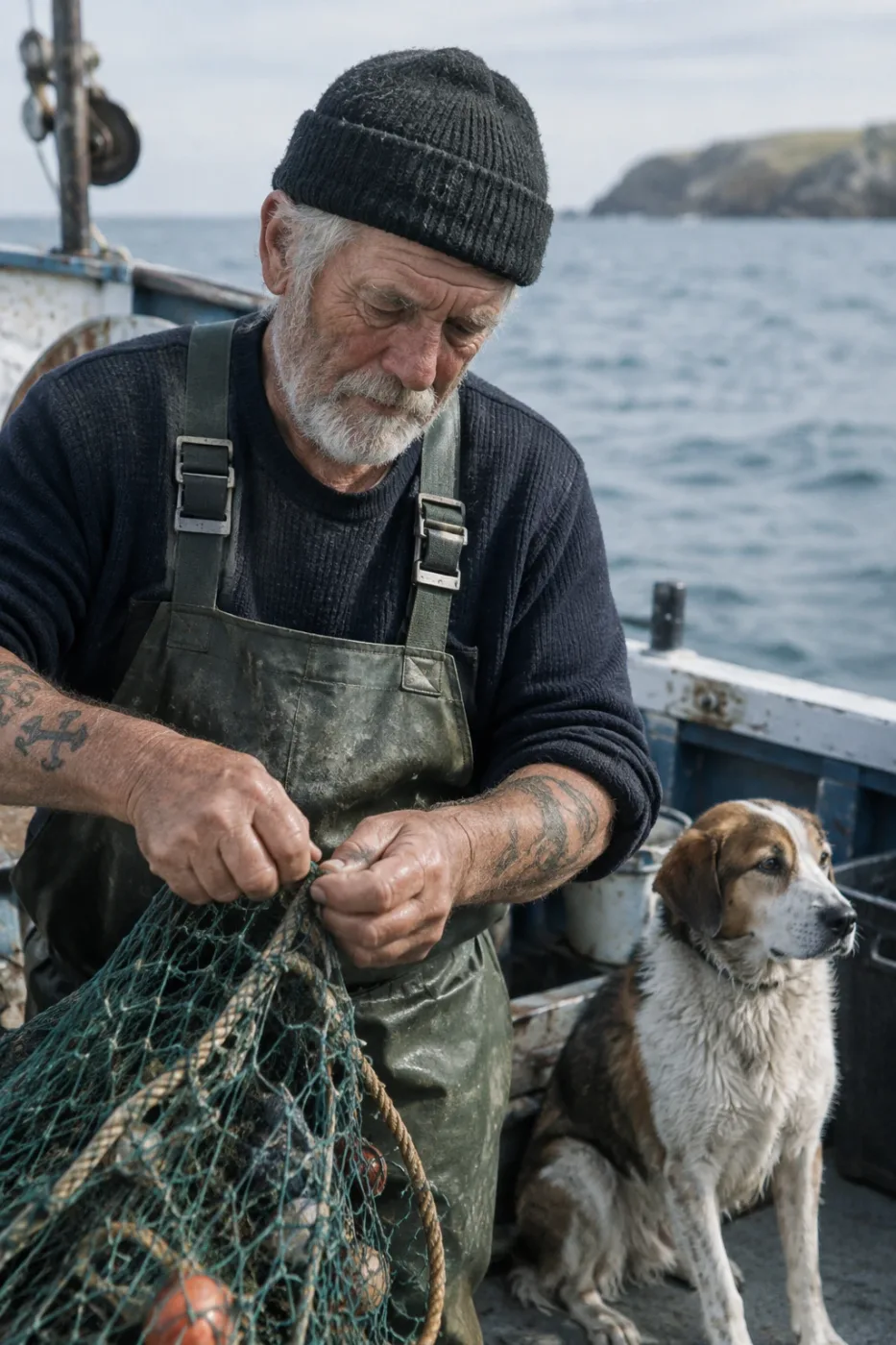
Weathered sailor on a fishing boat
Create a photorealistic candid photograph of an elderly sailor standing on a small fishing boat. He has weathered skin with visible wrinkles, pores, and sun texture, and a few faded traditional sailor tattoos on his arms. He is calmly adjusting a net while his dog sits nearby on the deck. Shot like a 35mm film photograph, medium close-up at eye level, using a 50mm lens. Soft coastal daylight, shallow depth of field, subtle film grain, natural color balance. The image should feel honest and unposed, with real skin texture, worn materials, and everyday detail. No glamorization, no heavy retouching.
by OpenAI
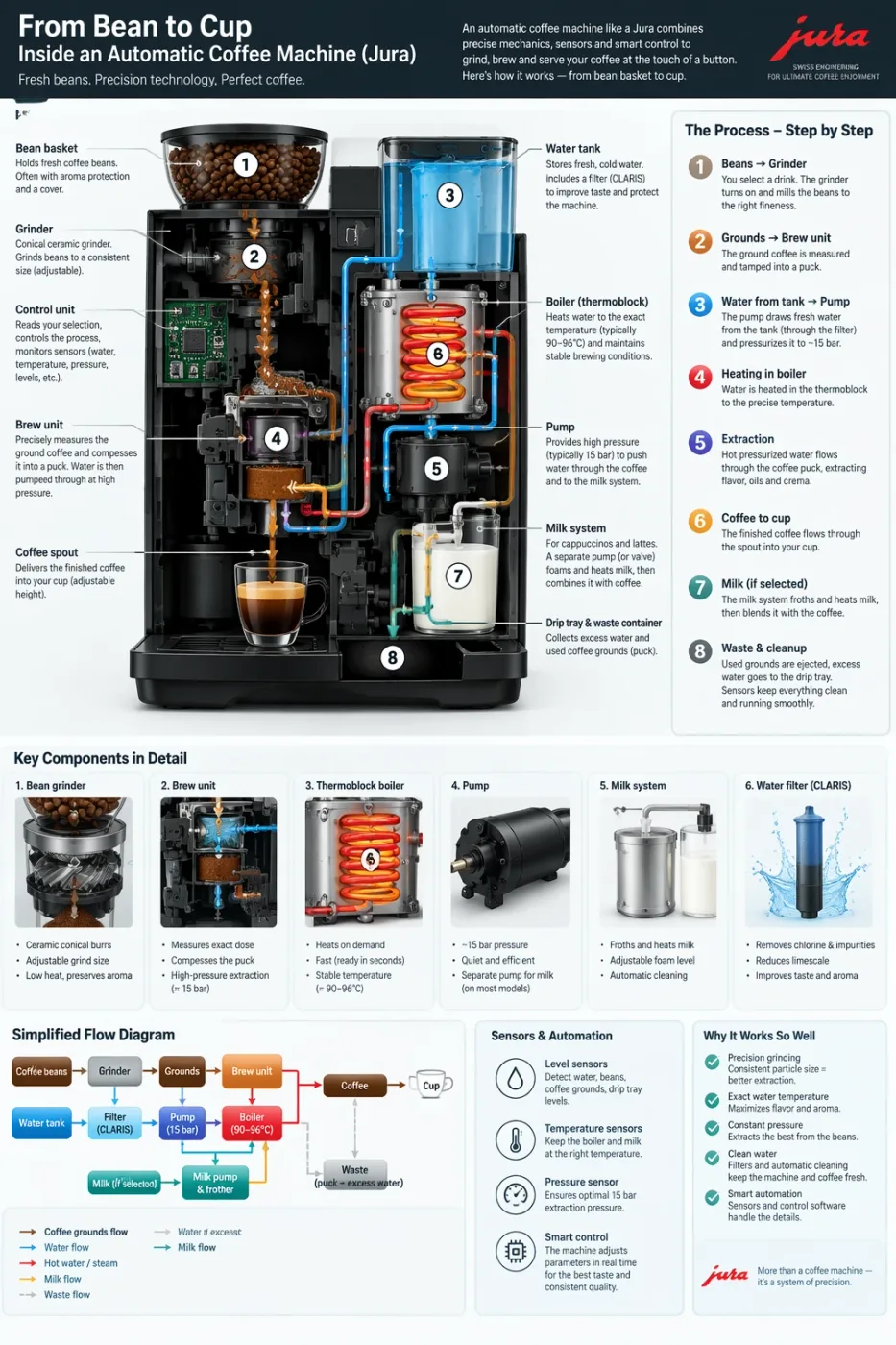
Automatic coffee machine workflow infographic
Create a detailed Infographic of the functioning and flow of an automatic coffee machine like a Jura. From bean basket, to grinding, to scale, water tank, boiler, etc. I'd like to understand technically and visually the flow.
by OpenAI
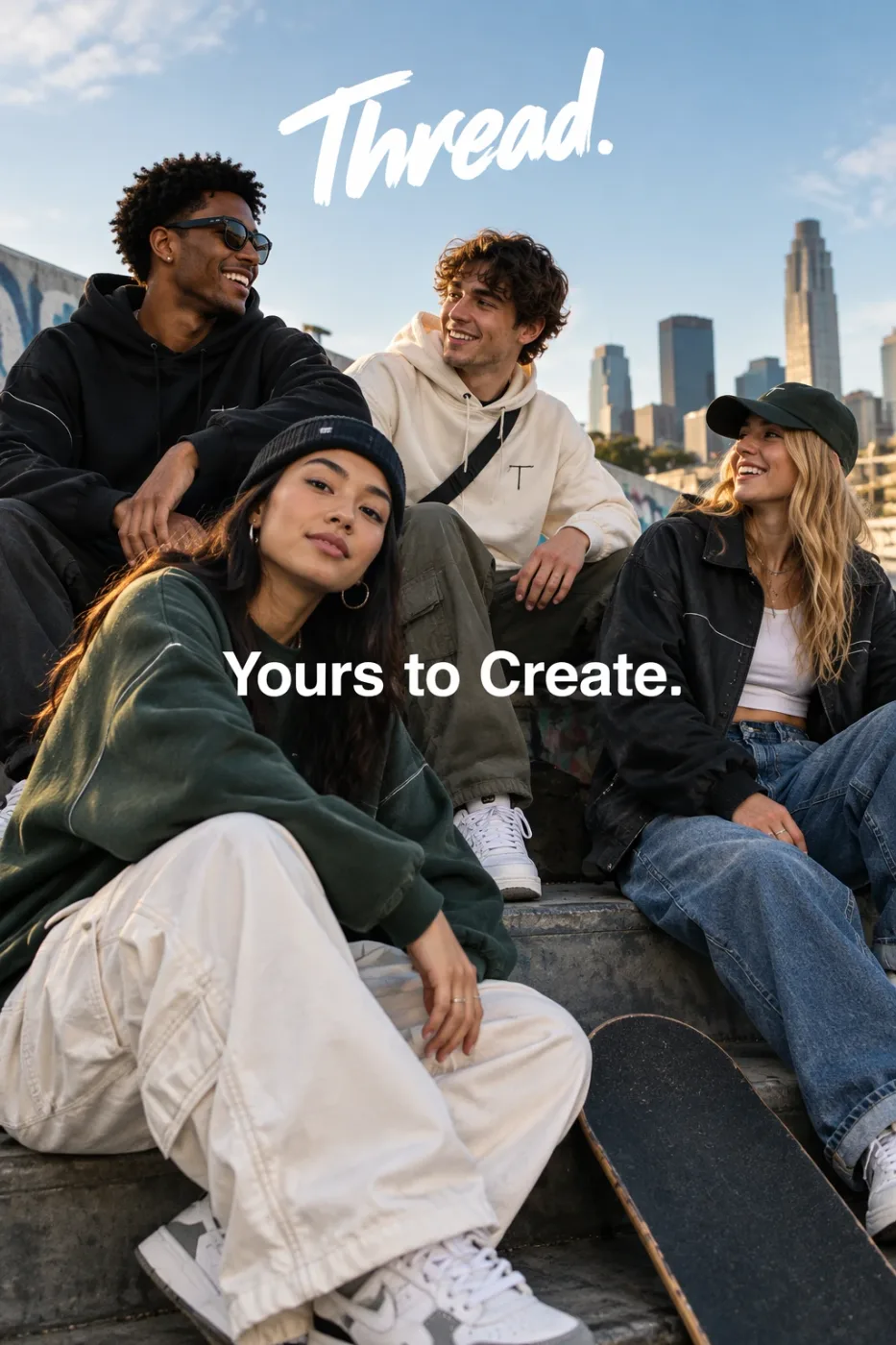
Thread streetwear ad with exact typography
Give me a cool in culture ad / fashion shot for a brand called Thread. It's a hip young street brand. The ad shows a group of friends hanging out together with the tagline "Yours to Create." Make it feel like a polished campaign image for a youth streetwear audience: stylish, contemporary, energetic, and tasteful. Use clean composition, strong color direction, natural poses, and premium fashion photography cues. Render the tagline exactly once, clearly and legibly, integrated into the ad layout. No extra text, no watermarks, no unrelated logos.
by OpenAI
We curate copy-ready prompt libraries — every entry shows its full text and a sample result, ready to adapt.
How to get access, regional availability, and how this model compares with its alternatives.