

Claude Opus 5.5 API
claude-opus-5-5Claude Opus 5.5 es el primer modelo de la familia Claude 5.5 de Anthropic, publicado el 22 de septiembre de 2026. En APIMODELS cuesta $2.40 por 1M de tokens de entrada y $12.00 por 1M de salida, un 40% por debajo de la lista oficial de $4 / $20, con lecturas de caché a $0.12 y escrituras a $3.00. Según Anthropic, rinde al nivel de Claude Fable 5.1 en la mayoría del trabajo y cuesta un 40% menos que Opus 5 en cargas típicas; está pensado para sesiones largas de programación agéntica y trabajo de conocimiento. Las especificaciones coinciden con Fable 5.1: contexto de 1M de tokens, 128K de salida máxima, entrada de texto e imágenes y corte de conocimiento fiable en junio de 2026. El pensamiento adaptativo está siempre activo y no se puede desactivar; la profundidad se controla con el parámetro effort (medium por defecto). Cuatro cambios rompedores llegan desde Fable 5.1: el uso forzado de herramientas devuelve error, los bloques thinking quedan ligados al modelo que los produjo, la herramienta antigua computer_20251124 ya no se acepta y el texto entre llamadas a herramientas vuelve dentro de bloques thinking. Se llama por /v1/messages o por el /v1/chat/completions compatible con OpenAI con una sola clave; las peticiones fallidas no se cobran.
API Documentation
View complete API reference with all parameters and examples.
Advanced Features
Streaming
Enable real-time streaming responses with Server-Sent Events.
{
  "model": "claude-opus-5-5",
  "stream": true,
  "max_tokens": 1024,
  "messages": [...]
}
Function Calling (Tools)
Enable Claude to use tools and call functions.
{
  "model": "claude-opus-5-5",
  "max_tokens": 1024,
  "tools": [{
    "name": "get_weather",
    "description": "Get current weather for a location",
    "input_schema": {
      "type": "object",
      "properties": {
        "location": {"type": "string", "description": "City name"}
      },
      "required": ["location"]
    }
  }],
  "tool_choice": {"type": "auto"},
  "messages": [{"role": "user", "content": "What's the weather in Tokyo?"}]
}
PDF Support
Analyze PDF documents by sending them as base64 encoded content.
{
  "model": "claude-opus-5-5",
  "max_tokens": 1024,
  "messages": [{
    "role": "user",
    "content": [{
      "type": "document",
      "source": {
        "type": "base64",
        "media_type": "application/pdf",
        "data": "<base64_encoded_pdf>"
      }
    }, {
      "type": "text",
      "text": "Summarize this document."
    }]
  }]
}
Structured Output (JSON Schema)
Get structured JSON responses that match your schema.
{
  "model": "claude-opus-5-5",
  "max_tokens": 1024,
  "output_format": {
    "type": "json_schema",
    "schema": {
      "type": "object",
      "properties": {
        "name": {"type": "string"},
        "age": {"type": "integer"}
      },
      "required": ["name", "age"]
    }
  },
  "messages": [{"role": "user", "content": "Extract info: John is 30 years old"}]
}
Web Search
Enable Claude to search the web for up-to-date information.
{
  "model": "claude-opus-5-5",
  "max_tokens": 1024,
  "tools": [{
    "type": "web_search_20250305",
    "name": "web_search",
    "max_uses": 5
  }],
  "messages": [{"role": "user", "content": "What's the latest news about AI?"}]
}
API Parameters Reference
| Parameter | Type | Required | Description |
|---|---|---|---|
| model | string | Yes | Model identifier (e.g., claude-opus-5-5) |
| messages | array | Yes | Array of message objects with role and content |
| max_tokens | integer | Yes | Maximum tokens in the response (1 - 128000) |
| system | string | No | System prompt to set context |
| stream | boolean | No | Enable streaming responses (SSE) |
| temperature | number | No | Sampling temperature (0.0 - 1.0) |
| top_p | number | No | Nucleus sampling threshold (0.0 - 1.0) |
| top_k | integer | No | Top-k sampling (0 - infinity) |
| stop_sequences | array | No | Sequences that stop generation |
| tools | array | No | Function calling tools definition |
| tool_choice | object | No | Tool selection strategy (auto/any/tool) |
| thinking | object | No | Enable extended thinking mode |
| output_format | object | No | Structured output with JSON schema |
Full API Documentation
View complete API reference with streaming, thinking, and more.
Pricing
Billing: Cost = (input_tokens * input_price + output_tokens * output_price) / 1,000,000
40% por debajo del oficial
$2.40 / $12.00 por 1M de tokens frente a los $4 / $20 de lista; lecturas de caché a $0.12
Trabajo de nivel Fable a precio Opus
Anthropic: resultados de nivel Fable 5.1 en la mayoría del trabajo, 40% más económico de ejecutar que Opus 5
Contexto 1M, salida 128K
Mismas especificaciones que Fable 5.1; entrada de texto e imágenes; conocimiento hasta junio de 2026
Pensamiento adaptativo siempre activo
No se puede desactivar: la profundidad se controla con effort (medium por defecto); el uso forzado de herramientas da error
Motion design con código
Escribe código canvas, SVG o Remotion que se renderiza a MP4; nuestro vídeo de prueba de 12 s costó $0.368
Acerca de Claude Opus 5.5
Claude Opus 5.5 es una API de modelo de lenguaje de Anthropic. Claude Opus 5.5 es el primer modelo de la familia Claude 5.5 de Anthropic, publicado el 22 de septiembre de 2026. En APIMODELS cuesta $2.40 por 1M de tokens de entrada y $12.00 por 1M de salida, un 40% por debajo de la lista oficial de $4 / $20, con lecturas de caché a $0.12 y escrituras a $3.00. Según Anthropic, rinde al nivel de Claude Fable 5.1 en la mayoría del trabajo y cuesta un 40% menos que Opus 5 en cargas típicas; está pensado para sesiones largas de programación agéntica y trabajo de conocimiento. Las especificaciones coinciden con Fable 5.1: contexto de 1M de tokens, 128K de salida máxima, entrada de texto e imágenes y corte de conocimiento fiable en junio de 2026. El pensamiento adaptativo está siempre activo y no se puede desactivar; la profundidad se controla con el parámetro effort (medium por defecto). Cuatro cambios rompedores llegan desde Fable 5.1: el uso forzado de herramientas devuelve error, los bloques thinking quedan ligados al modelo que los produjo, la herramienta antigua computer_20251124 ya no se acepta y el texto entre llamadas a herramientas vuelve dentro de bloques thinking. Se llama por /v1/messages o por el /v1/chat/completions compatible con OpenAI con una sola clave; las peticiones fallidas no se cobran. A través de la plataforma APIMODELS puedes acceder a este modelo mediante una API unificada con precios de pago por uso transparentes. Precio actual: Input: $2.40, Output: $12.00 per 1M tokens.
Características principales
- 40% por debajo del oficial -- $2.40 / $12.00 por 1M de tokens frente a los $4 / $20 de lista; lecturas de caché a $0.12
- Trabajo de nivel Fable a precio Opus -- Anthropic: resultados de nivel Fable 5.1 en la mayoría del trabajo, 40% más económico de ejecutar que Opus 5
- Contexto 1M, salida 128K -- Mismas especificaciones que Fable 5.1; entrada de texto e imágenes; conocimiento hasta junio de 2026
- Pensamiento adaptativo siempre activo -- No se puede desactivar: la profundidad se controla con effort (medium por defecto); el uso forzado de herramientas da error
- Motion design con código -- Escribe código canvas, SVG o Remotion que se renderiza a MP4; nuestro vídeo de prueba de 12 s costó $0.368
Casos de uso
Chatbot y atención al cliente
Crea sistemas conversacionales inteligentes que responden automáticamente y mejoran la eficiencia del servicio.
Generación de contenido
Redacta automáticamente artículos, correos, textos publicitarios y más para aumentar la productividad.
Asistente de programación
Apoya la escritura, depuración y revisión de código para acelerar el desarrollo.
Análisis de datos
Comprende y analiza datos no estructurados, extrae información clave y genera resúmenes.
Por qué APIMODELS
- API unificada -- Una sola clave para todos los modelos, sin registrarte en varias plataformas
- Precios transparentes -- Pago por uso con el precio por llamada publicado en cada página de modelo, ideal para desarrolladores independientes y startups
- Acceso instantáneo -- Empieza a usarlo justo después de registrarte, con pago por Stripe y Alipay
- Documentación completa -- Documentación de API detallada con ejemplos en cURL, Python y Node.js
Preguntas frecuentes
¿Cuánto cuesta Claude Opus 5.5?
Claude Opus 5.5 está disponible a través de APIMODELS a: Input: $2.40, Output: $12.00 per 1M tokens. La facturación es de pago por uso: solo pagas por lo que generas.
¿Cómo usar la API de Claude Opus 5.5?
Regístrate en APIMODELS, obtén tu clave API y llama a nuestro endpoint unificado. Ofrecemos documentación detallada con ejemplos en cURL, Python y Node.js.
¿Cuál es la diferencia entre APIMODELS y la API oficial de Anthropic?
APIMODELS ofrece el mismo modelo Claude Opus 5.5 a través de nuestra plataforma de agregación. Proporcionamos una interfaz de API unificada, así que no necesitas cuentas separadas por proveedor: una sola clave para acceder a todos los modelos.
¿Cuánto cuesta Claude Opus 5.5 en apimodels y cuánto más económico es que el oficial?
$2.40 por 1M de tokens de entrada y $12.00 por 1M de salida, con lecturas de caché a $0.12 y escrituras a $3.00. Anthropic lista $4 / $20 con lecturas de caché a $0.20, así que estamos un 40% por debajo. Se cobra por token real, las peticiones fallidas son gratis y no hay mínimo mensual.
¿Cómo elijo entre Opus 5.5, Opus 5 y Fable 5.1?
El posicionamiento de la propia Anthropic: Opus 5.5 rinde al nivel de Fable 5.1 en la mayoría del trabajo y cuesta un 40% menos que Opus 5 en cargas típicas. Aquí Opus 5.5 cuesta $2.40 / $12.00, Opus 5 $3 / $15 y Fable 5.1 $5 / $25; salvo que hayas comprobado que una tarea solo sale bien en Fable 5.1, empezar por Opus 5.5 es la mejor opción por defecto. Los tres comparten especificaciones: contexto de 1M, salida de 128K.
¿Qué cambia al migrar de Opus 5 a Opus 5.5?
Cambia el nombre del modelo a claude-opus-5-5 y vigila cuatro cambios rompedores: el pensamiento adaptativo está siempre activo y ya no se puede desactivar (la profundidad se controla con effort, medium por defecto); el uso forzado de herramientas —tool_choice con una herramienta concreta— devuelve error; los bloques thinking quedan ligados al modelo que los produjo, así que una conversación no puede arrastrar bloques thinking antiguos entre modelos; y la herramienta antigua computer_20251124 ya no se acepta. Además, el texto entre llamadas a herramientas vuelve dentro de bloques thinking, así que las apps que lo muestran como progreso deben fijar display.
¿Cómo lo llamo y admite el formato de OpenAI?
Ambos funcionan: el nativo de Anthropic POST https://api.apimodels.app/v1/messages o el /v1/chat/completions compatible con OpenAI, con model claude-opus-5-5 y Authorization: Bearer tu clave de apimodels. Se admiten streaming, llamadas a herramientas y entrada de imágenes; la caché de prompts sigue el uso de cache_control de Anthropic y los aciertos se cobran a $0.12.
¿Claude Opus 5.5 puede hacer motion design y cómo funciona?
Sí, mediante código. Opus 5.5 genera texto, no vídeo, así que para motion design escribe un programa que dibuja cada fotograma: una página HTML con canvas o SVG que expone renderFrame(t) o seek(t), o una composición de Remotion. Un navegador sin interfaz renderiza cada fotograma y ffmpeg codifica el MP4. Funciona bien en tipografía cinética, recorridos de interfaz, gráficos animados, revelados de logotipo y animaciones explicativas. Las tomas fotorrealistas, las personas reales y el movimiento natural de cámara son trabajo de un modelo de vídeo como Seedance 2.5 o Veo 3.1. Nuestro recorrido completo y probado está en esta página y en https://apimodels.app/access/claude-opus-5-5-video.
¿Cuál es el mejor prompt de motion design para Claude Opus 5.5?
El que casi todos usan para empezar lo publicó @stephanlivera el 25 de septiembre de 2026 y superó los 2 millones de visualizaciones: "make a dynamic 15-second motion graphics video that shows what an incredible motion designer you are, like it's your showreel for a résumé. go all out." Sirve para comprobar que tu entorno funciona, pero da resultados parecidos a todo el mundo. Los prompts que aguantan son briefs largos: qué materiales debe pedirte, un solo estilo y un color de acento, una lista de efectos por defecto prohibidos, cada plano sobre una rejilla de tiempos y un contrato de render con seek(t). Siete de ellos, literales y con su autor, junto a los vídeos que produjeron, están en https://apimodels.app/claude-opus-5-5-video-prompts/motion-graphics.
¿Cuánto cuesta un vídeo de motion design con Opus 5.5 por API?
Nuestra prueba en apimodels.app fue una sola llamada en streaming: 31,786 tokens de salida, 6 minutos 37 segundos y $0.368 cobrados por un promo de 12 segundos a 1280x720; el render se hizo en local sin coste. A $2.40 / $12 por millón de tokens, cada 10,000 tokens de salida cuestan $0.12, así que un clip que necesita entre 30,000 y 80,000 tokens de razonamiento y código sale por unos $0.36 a $0.96 por intento, más unos céntimos de entrada. Las sesiones largas de agente con muchas revisiones cuestan más: los creadores hablan de unos $2 a $400 por pieza terminada. Las llamadas fallidas no se cobran.
¿Cómo se compara Claude Opus 5.5 con otros modelos de modelo de lenguaje?
En APIMODELS, Claude Opus 5.5 convive con más de 60 modelos bajo una sola clave API y un solo saldo, así que elegir es cuestión de ajuste, no de dependencia. Admite 40% Below Official, 1M Context, Agentic Coding, Adaptive Thinking y puedes valorarlo en precio y capacidad frente a otros modelos de modelo de lenguaje, y cambiar modificando una sola cadena con el nombre del modelo: sin nueva cuenta ni integración. Explora todas las opciones de modelo de lenguaje con precios en vivo en apimodels.app/models.
¿Qué puede hacer Claude Opus 5.5?
Claude Opus 5.5 admite: 40% Below Official, 1M Context, Agentic Coding, Adaptive Thinking. Consulta la documentación de APIMODELS para ver todos los parámetros y ejemplos de llamada.
¿Puedo acceder a la API de Claude Opus 5.5 desde cualquier lugar?
Sí. APIMODELS expone Claude Opus 5.5 mediante una única API unificada y una sola clave, sin cuentas separadas por proveedor ni necesidad de gestionar tú mismo el acceso de red regional de cada proveedor.
¿Qué métodos de pago se admiten?
Aceptamos Stripe (Visa, Mastercard y otras tarjetas internacionales) y Alipay. El saldo está disponible al instante tras el pago.
Related models
Claude Opus 5.5 motion design: how it works, what it is good at, and a tested run with the full prompt
Motion design with Claude Opus 5.5 means code, not generated pixels. The model outputs text, so it writes a program that draws every frame (an HTML canvas page with a renderFrame(t) or seek(t) function, or a Remotion composition), and a headless browser plus ffmpeg turns those frames into an MP4. We ran the whole pipeline once through apimodels.app on 30 September 2026: one API call, a 12-second 1280x720 promo, 360 frames rendered with headless Chrome, encoded with ffmpeg. This is exactly what we did and what it cost.
This run
- Model
- claude-opus-5-5
- First token
- 110 s
- Total time
- 6 min 37 s
- Output tokens
- 31,786
- Billed
- $0.368
- Frames / render time
- 360 / 14 s
- Video
- 12 s · 1280x720 · 30 fps · 1.8 MB
What Opus 5.5 motion design does well
- Kinetic typography: words that land on the beat, masked reveals, type that morphs into the next scene.
- UI and product walkthroughs: a cursor clicking through screens, one shape morphing through button, loader, player and chart states.
- Animated charts and data stories, where every number and axis has to be exact.
- Logo reveals and end cards with precise timing and brand colours.
- Explainer animations, including Manim-style maths and science lessons with narration added afterwards.
- Short social templates and loops (vertical or square) you can re-render with new text in seconds.
Opus 5.5 motion design prompts: 8 cases, 7 full creator briefs, with the videos →
What it is not for
Anything that has to look filmed: photoreal people, natural camera motion, physics, skin and fabric. Code draws shapes and type; it does not shoot footage. For those shots use a video model and let Opus 5.5 write the shot list and prompts, or add titles and graphics on top in code. On apimodels.app these run on the same key:
The prompt everyone is running
This one-liner, posted by @stephanlivera on 25 September 2026, passed 2 million views and has been re-run thousands of times. It is a good way to check your setup works; because so many people use it, the results tend to look alike, and the longer briefs in our case library hold up better.
make a dynamic 15-second motion graphics video that shows what an incredible motion designer you are, like it's your showreel for a résumé. go all out.Prompt by @stephanlivera, verbatim from the original post · x.com/stephanlivera
What a run like this costs: our own 12-second test billed $0.368 for 31,786 output tokens. At $2.40 / $12 per million tokens every 10,000 output tokens is $0.12, so a clip that takes 30,000 to 80,000 tokens of thinking and code costs roughly $0.36 to $0.96 per attempt, plus a few cents of input. Rendering happens on your machine and costs nothing.
1. Ask for a program with a frame contract, not for a video
The one rule that makes everything else work: the page must expose window.renderFrame(t) and draw frame t from scratch, with no clock, no randomness and no state carried between calls. Then a script can ask for frame 0, frame 1 … frame 359 in any order and get the same picture every time, which is what a video encoder needs. A page that animates itself with requestAnimationFrame looks fine in a browser but cannot be exported frame-accurately. We also fixed the rhythm in the prompt (120 BPM, a beat every 0.5 s) and asked the model to list its beat plan as a comment; it did, 24 beats, and every cut landed on one.
2. Tell the story in time ranges, then the style
Describe what happens in each time window (problem, turn, payoff) before any visual detail. Name the labels you want on screen and say what must not appear (we asked for plain rounded labels instead of real company logos). Style comes last and stays short: one accent colour, which easing functions, and an explicit "no clutter in the last 3 seconds". The full prompt we sent is below, unedited.
The prompt we sent (verbatim)
You are writing a program that renders a video. Output one complete, self-contained HTML file and nothing else.

Rules for the program (these make it renderable frame by frame):
1. A single <canvas> of exactly 1280x720, no CSS scaling, black page background.
2. Expose a global function window.renderFrame(t) that draws the frame at time t (seconds, 0 <= t < 12) from scratch. Everything on screen must be a pure function of t: no Date.now, no performance.now, no Math.random (use a seeded PRNG if you need noise), no accumulated state between calls, no requestAnimationFrame loop.
3. Also expose window.DURATION = 12 and window.FPS = 30. When the page is opened normally, play it once in a loop with requestAnimationFrame by calling renderFrame, so a human can preview it.
4. No external assets, fonts, images or libraries. Use system-ui for text.
5. The rhythm is 120 BPM: a beat every 0.5 s. Put every major cut, text entrance and impact on a beat time (a multiple of 0.5). List the beat plan as a comment at the top of the script.

The story (tell this, then decide the visuals):
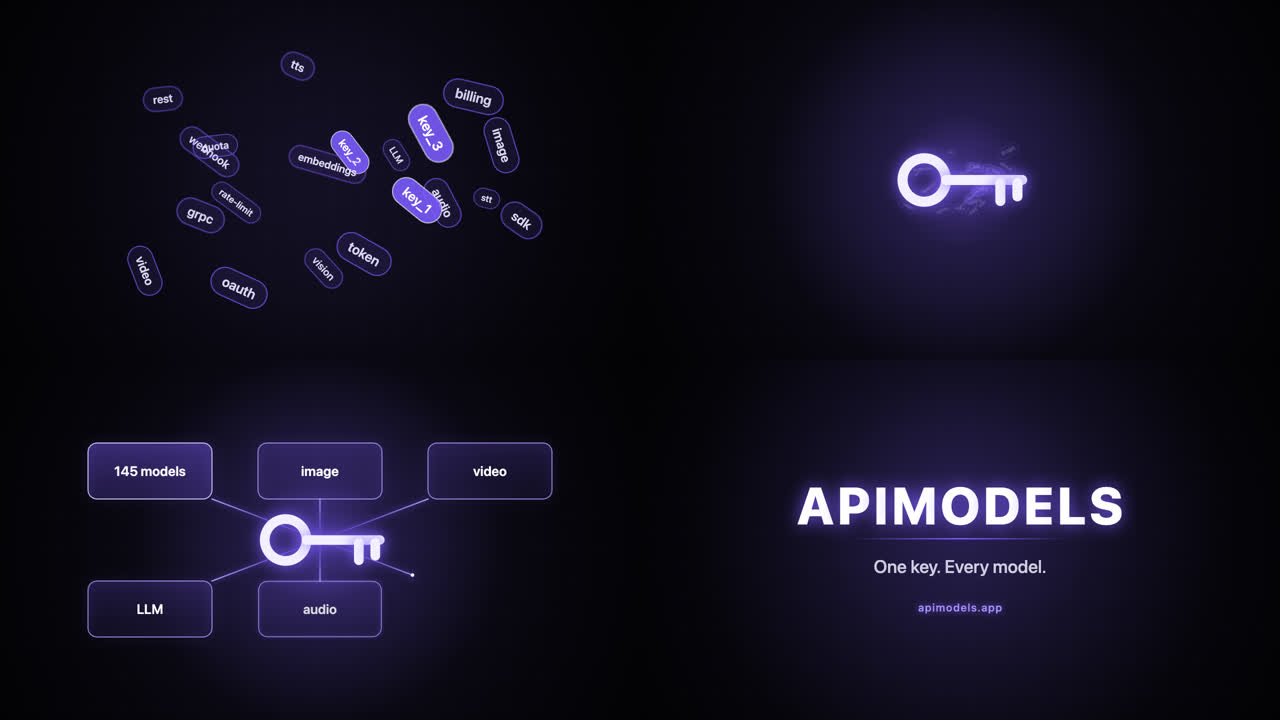
A 12-second promo for "APIMODELS", an API gateway. Problem, then turn, then payoff:
- 0-3 s: a developer's screen is cluttered with many different API keys and SDK logos flying in from every side, overlapping, getting chaotic (draw them as simple rounded labels such as "image", "video", "LLM", "audio", "key_1", "key_2", "sdk", not real company logos).
- 3-4.5 s: everything snaps together on a beat and collapses into one glowing key.
- 4.5-9 s: from that one key, lines fan out to a grid of model cards that light up one per beat (label them "145 models", "image", "video", "LLM", "audio", "one endpoint").
- 9-12 s: clean end card: the word APIMODELS, the line "One key. Every model.", and "apimodels.app" small underneath; hold still for the last second.

Style: dark background, one accent colour (electric violet #7c5cff) plus white, motion with easing (easeOutCubic / easeInOutQuad written by you), subtle depth (scale and blur fall-off), no clutter in the final 3 seconds.

Before the code, do not explain. Return only the HTML.
3. Call Opus 5.5 with streaming and no max_tokens
Opus 5.5 thinks before it writes, and the thinking counts as output. On this prompt the first character of the answer arrived after 110 seconds and the whole reply took 6 minutes 37 seconds: 31,786 output tokens for about 16,000 characters of HTML. Stream the request so the connection stays alive, and do not send a small max_tokens; the gateway forwards none when you omit it, so the model uses its own limit. The call cost $0.368 at $2.40 / $12 per million tokens, and the exact amount is returned by GET /v1/records/{id}.
curl https://api.apimodels.app/v1/chat/completions \
  -H "Authorization: Bearer $APIMODELS_API_KEY" \
  -H "Content-Type: application/json" \
  -d "$(jq -n --rawfile p prompt.md \
        '{model:"claude-opus-5-5", stream:true, messages:[{role:"user", content:$p}]}')" \
  --no-buffer > stream.txt
# no max_tokens on purpose: this run used 31,786 output tokens, mostly thinking
4. Render every frame with headless Chrome
Open the page, stop its preview loop, then call renderFrame(i / 30) for every frame and read the canvas back as a PNG. 360 frames took 14 seconds on a laptop and the page threw no errors. Encoding to H.264 with faststart gave a 1.8 MB file that plays everywhere.
// render.mjs — pnpm add puppeteer-core; uses the Chrome you already have
import puppeteer from 'puppeteer-core'
import { mkdirSync, writeFileSync } from 'node:fs'

mkdirSync('frames', { recursive: true })
const browser = await puppeteer.launch({
  executablePath: '/Applications/Google Chrome.app/Contents/MacOS/Google Chrome',
})
const page = await browser.newPage()
await page.setViewport({ width: 1280, height: 720 })
await page.goto('file://' + process.cwd() + '/promo.html')
await page.evaluate(() => { window.requestAnimationFrame = () => 0 }) // stop the preview loop
const { DURATION, FPS } = await page.evaluate(() => ({ DURATION, FPS }))
for (let i = 0; i < DURATION * FPS; i++) {
  const png = await page.evaluate((t) => {
    window.renderFrame(t)
    return document.querySelector('canvas').toDataURL('image/png')
  }, i / FPS)
  writeFileSync(`frames/f${String(i).padStart(4, '0')}.png`, Buffer.from(png.split(',')[1], 'base64'))
}
await browser.close()
ffmpeg -framerate 30 -i frames/f%04d.png -c:v libx264 -pix_fmt yuv420p -crf 20 -movflags +faststart promo.mp4
# add a soundtrack afterwards if you have one:
# ffmpeg -i promo.mp4 -i beat.mp3 -c:v copy -shortest promo-with-audio.mp45. Check the frames before you judge the video
Pull a few frames at the story beats into one contact sheet and compare them with the brief: here 2.3 s (the clutter), 3.5 s (one key), 7.2 s (cards lighting up) and 11.3 s (end card). All four matched on the first try. To change something, ask for it by timecode and beat ("at 7.5 s the sixth card should light up with a pulse"), and ask for the whole file back so the frame contract stays intact.
Limits we hit
- No audio. The program draws pictures only; add a soundtrack with ffmpeg afterwards and keep the BPM you gave the model.
- Slow first token. Expect around two minutes before the first character on a prompt like this; streaming keeps the connection alive, a short client timeout will not.
- It does not check its own output. The model never ran the page; we did. Render it, look at the frames, and treat the HTML as untested code.
Files from this run
Related guides
Idea credit: the workflow was inspired by EianLu’s article on making motion videos with Opus 5.5 on X. Everything on this page (prompt, code, video, numbers) comes from our own run. Read the original article on X
Opus 5.5 motion design examples
See all 60 →Prompts shared by their authors — copy and adapt them. Each one credits its author and links back to the original post.

The 15-second motion-designer showreel
make a dynamic 15-second motion graphics video that shows what an incredible motion designer you are, like it's your showreel for a résumé.…
by @stephanlivera

Showreel brief that lists the techniques
Create a bold, dynamic 15-second motion graphics showreel that feels like the ultimate portfolio piece of an exceptionally talented motion d…
by @lukasersil

One shape morphs through a dozen UI states on the beat
<inputs> Ask me for: 8 to 12 UI states I want the shape to become (e.g. button, loader, player, slider, toggle, tabs, chart, command palette…
by @twoclipping
Need prompts?
We curate copy-ready prompt libraries — every entry shows its full text and a sample result, ready to adapt.
Related reading
How to get access, regional availability, and how this model compares with its alternatives.
- Claude API Pricing, Compared (2026) — Fable 5.1, Opus 5.5, Sonnet 5.5, Haiku 5.5
- Claude Opus 5.5 vs Sonnet 5.5 (and Sonnet 5): Benchmarks, Price and Which to Use
- Claude Opus 5.5 vs Fable 5.1: Benchmarks, Price and When Fable Is Still Worth It
- Claude Opus 5.5 vs GPT-6 and GPT-6.1 (Sol, Astra): Price, Specs and How to Choose
- Claude Code with Opus 5.5: Setup in Two Minutes, Cost per Session, Effort Settings
- Claude Sonnet 5.5 Pricing: $2 / $10 per Million Tokens, Cache Prices and Real Cost per Task (2026)
- Make Videos with Claude Opus 5.5: Code-Rendered Motion Graphics, Tested (Prompt, Cost, Result)
- Is Claude Opus 5.5 Free? Try It on Free Credit, No Subscription