
Blog · 2026-11-06
Seedream 5.0 Pro vs GPT Image 2.6: Flawless Chinese on Both, One Russian Slip on a Six-Language Sign
Model pages: Seedream 5.0 Pro API · GPT Image 2.6 Flare API · GPT Image 2.6 Sunburst API — pricing, specs and the playground
Seedream 5.0 Pro or GPT Image 2.6? In our same-prompt tests both wrote a Chinese poster perfectly and handled edits and composites well, but on a sign in six languages GPT Image 2.6 got every word right while Seedream 5.0 Pro misspelled the Russian. ByteDance's Seedream 5.0 Pro is a flat 3 cents per 1K image with free references and a more restrained Chinese layout; OpenAI's GPT Image 2.6 is 2 cents at 1K and default quality, is steadier with mixed languages, and adds GIF, SVG and 4K.
Anyone who makes Chinese posters or shop images has probably tried ByteDance's Seedream. Its flagship, Seedream 5.0 Pro, leads on two things: more accurate lettering in more than a dozen languages, from Chinese, English and Japanese to Korean, Russian and Arabic, and edits you can steer with a box, an arrow or a hand-drawn mark. On the other side is OpenAI's GPT Image 2.6, released in November, which also promises edits that do what you ask and adds animated GIFs and SVG vectors.
Chinese is Seedream's home ground, so can GPT Image 2.6 keep up? And which one is steadier with several languages at once? We gave both the same prompts, from a Chinese poster and a six-language sign to a product shot, a background swap and a two-photo composite.
A word on who we are: we run apimodels.app, a platform where one API key calls Seedream 5.0 Pro and GPT Image 2.6 alongside other image, video, audio and language models. Every image below was generated there on 5 and 6 November 2026, at 1K, and is shown exactly as it came back.
The short version
Both got the Chinese poster letter-perfect, each with its own flavour: Seedream like a refined old print, GPT Image 2.6 like a lively event. The gap opened on multiple languages. On a sign with greetings in six languages, 2.6 got all six lines right; Seedream got the first five, then turned the Russian "Добро пожаловать" into a word that does not exist.
Edits and composites were dependable on both, and neither changed her clothes in the background swap. On price, Seedream 5.0 Pro is a flat 3 cents per 1K image with reference photos free; GPT Image 2.6 is 2 cents for a 1K image at default quality, and a multi-photo composite at a set size costs the same. So: for mostly Chinese or English images in Seedream's more restrained style, choose Seedream; for signs or menus that mix several languages, or for GIFs and vectors, choose GPT Image 2.6.
How they differ, in plain terms
- How you pay: Seedream 5.0 Pro charges per image — 3 cents at 1K, 6 cents at 2K — with reference photos free. GPT Image 2.6 prices plain images per image by resolution and quality — 2 cents at 1K and 3.5 cents at 2K at the default medium, the same for edits that pass a size — while GIFs, markup edits and a few other requests are billed per token at 10% below OpenAI's list price.
- Reference photos: up to 10 on Seedream 5.0 Pro, up to 16 on GPT Image 2.6.
- Pointing at what to change: both can. Seedream takes coordinates, a box, arrows or hand-drawn marks; GPT Image 2.6 takes a markup image with circles or arrows.
- Only on 2.6: animated GIFs from a sentence, SVG vector output, and 4K (Seedream 5.0 Pro tops out at 2K).
- Tiers: GPT Image 2.6 comes as Flare, for speed and everyday work, and Sunburst, for detail and repeated edits, priced the same at 1K and 2K.
A Chinese poster: two different tastes
First, Seedream's specialty, Chinese layout: a vertical poster for a weekend coffee market in warm orange and cream with a retro print feel, carrying three lines — 周末咖啡市集, 11月15日—16日 · 老街广场 and 上午10点 — 晚上8点 · 免费入场.
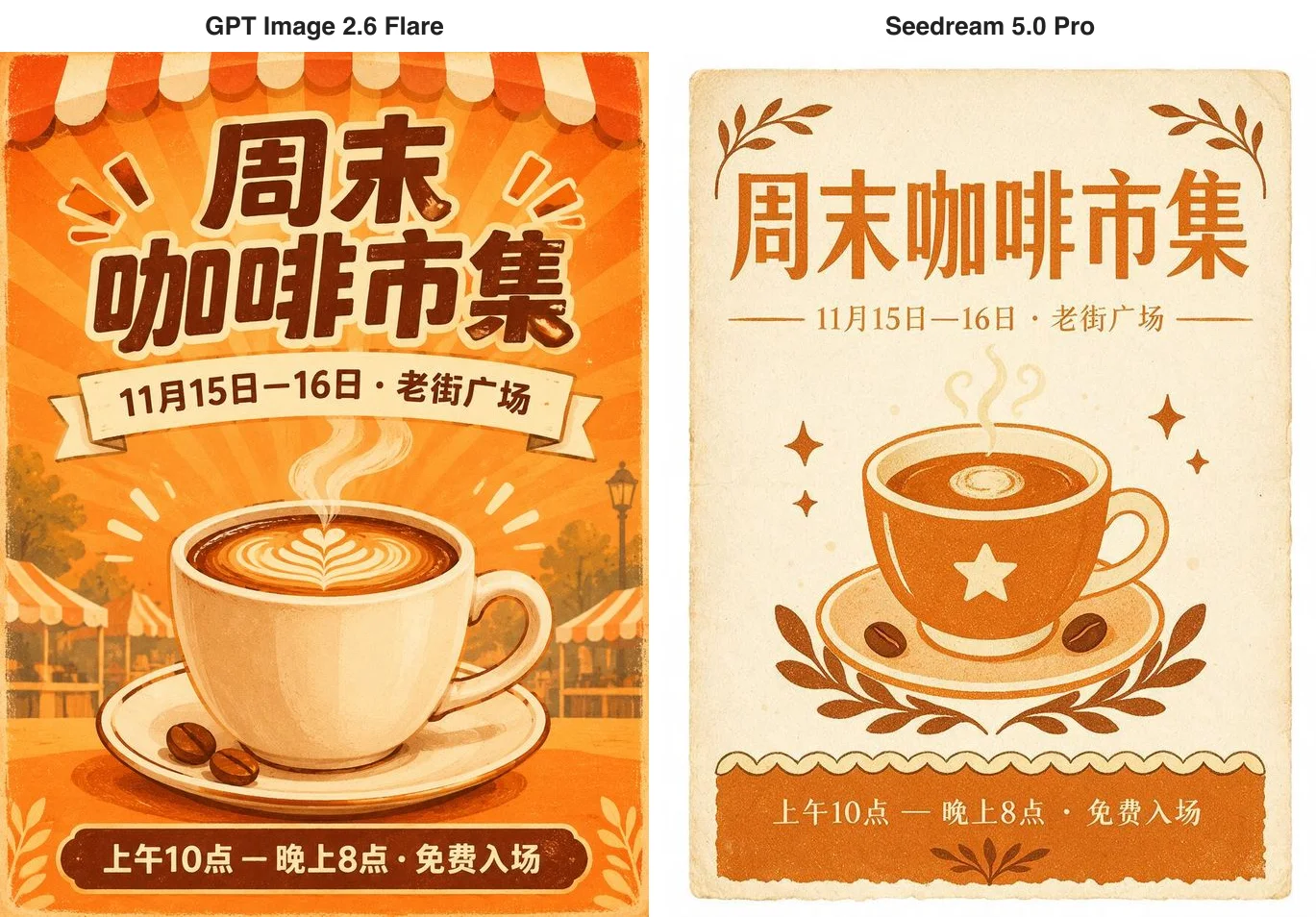
Every character is right, down to the dash and the middle dot. Seedream 5.0 Pro set the title in a fine serif face on yellowed paper with olive sprigs and a torn-paper band at the bottom — restrained, like a carefully designed vintage print. GPT Image 2.6 went for heavy lettering, sunburst rays and awnings — louder, and closer to something you would pin up straight away. Which looks better is a matter of taste; getting the Chinese wrong is no longer a worry on either. Seedream took 52 seconds; GPT Image 2.6 took 76.
A sign in six languages: 2.6 perfect, Seedream slips on Russian
Then something harder: a wooden welcome sign outside a small hotel, six hand-painted lines, one language per line, to be written exactly as given — 欢迎光临, Welcome, ようこそ (Japanese), 환영합니다 (Korean), Bienvenidos (Spanish) and Добро пожаловать (Russian).
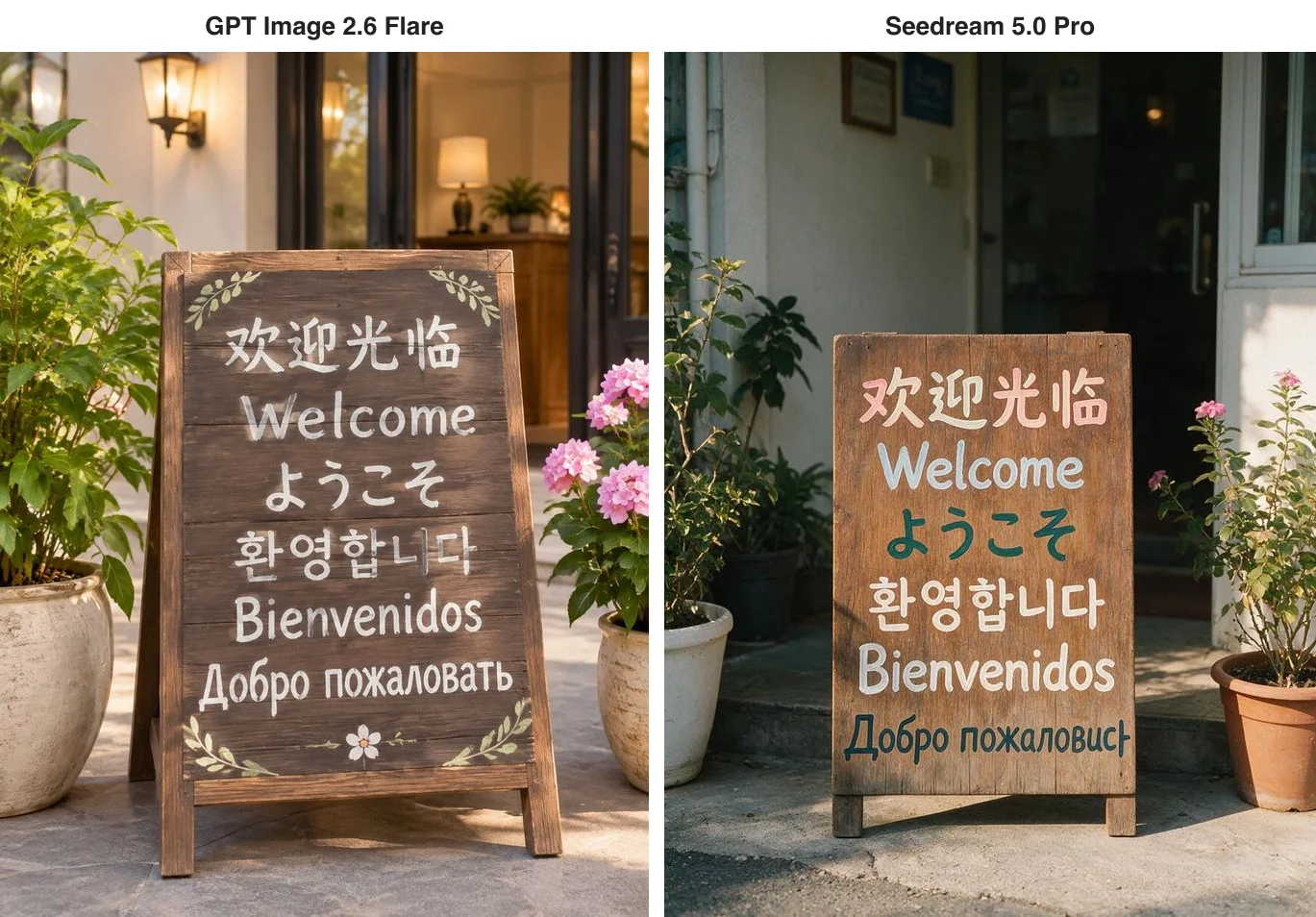
GPT Image 2.6 got all six lines right, down to the Korean strokes and the Russian soft sign. Seedream 5.0 Pro got the first five and made them livelier, with a different colour per language, but wrote the last line as "Добро пожаловисt" — the second word is wrong, and any Russian speaker would notice at once. Seedream lists Russian among its supported languages, so this looks like an occasional slip rather than a gap; still, if your signs, menus or packaging speak to customers in several languages, check every line before you print, or start with GPT Image 2.6.
A product shot: Seedream keeps it clean
Next, a listing photo: a matte sage-green ceramic mug with a small embossed leaf logo on a light oak table by a sunny window, morning light, a little steam, clean e-commerce style.
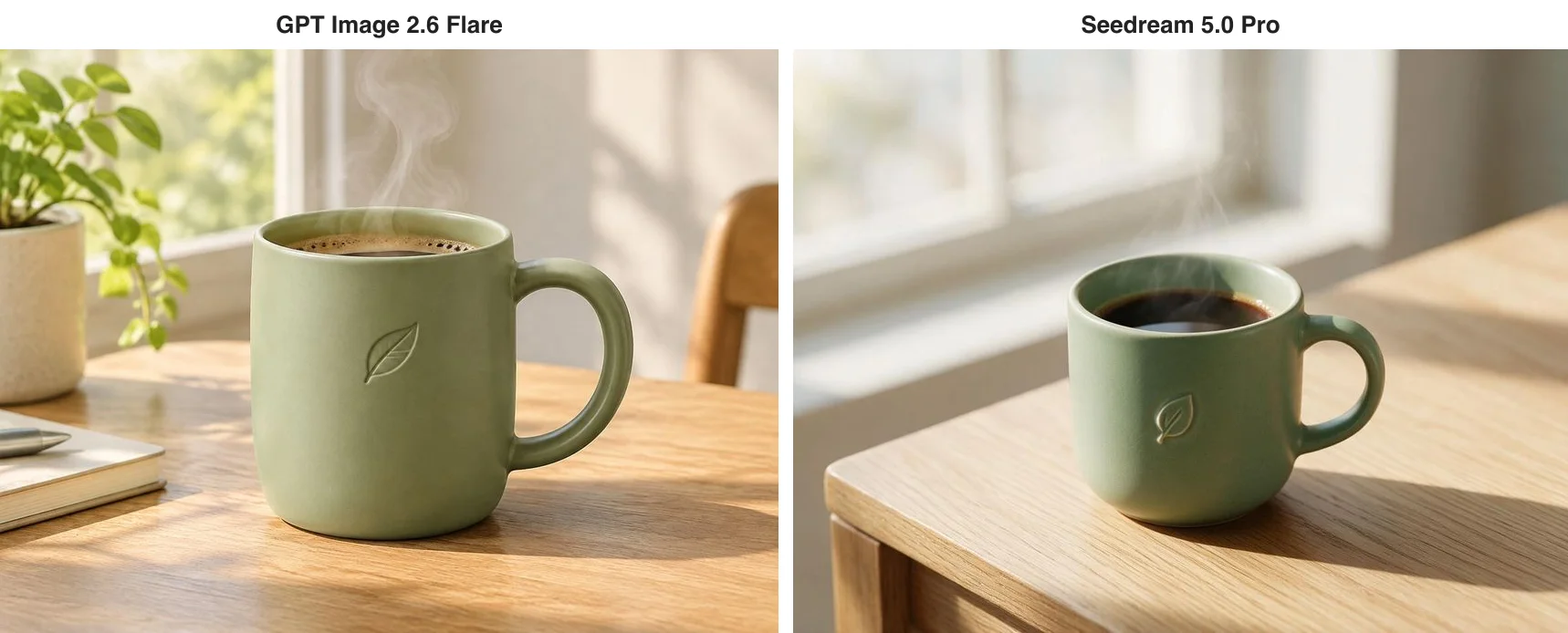
Both are usable, with the matte glaze and the embossed leaf right. Seedream 5.0 Pro kept just the mug, the table corner and the window, with plenty of space — good for a product page. GPT Image 2.6 added a plant, a notebook, a pen and a chair of its own accord, more like a lifestyle photo. Say which you want: "the mug only" or "add a few everyday objects".
Swapping only the background: both held the line
For editing we used one base image: a woman with short curly red hair, round glasses and a yellow raincoat, holding a paper coffee cup, in denim shorts and white socks. The instruction: change only the background to a snowy mountain village at dusk with warm lights in the windows, and keep everything else. On the GPT Image 2.6 side we used Sunburst, the tier built for repeated edits.
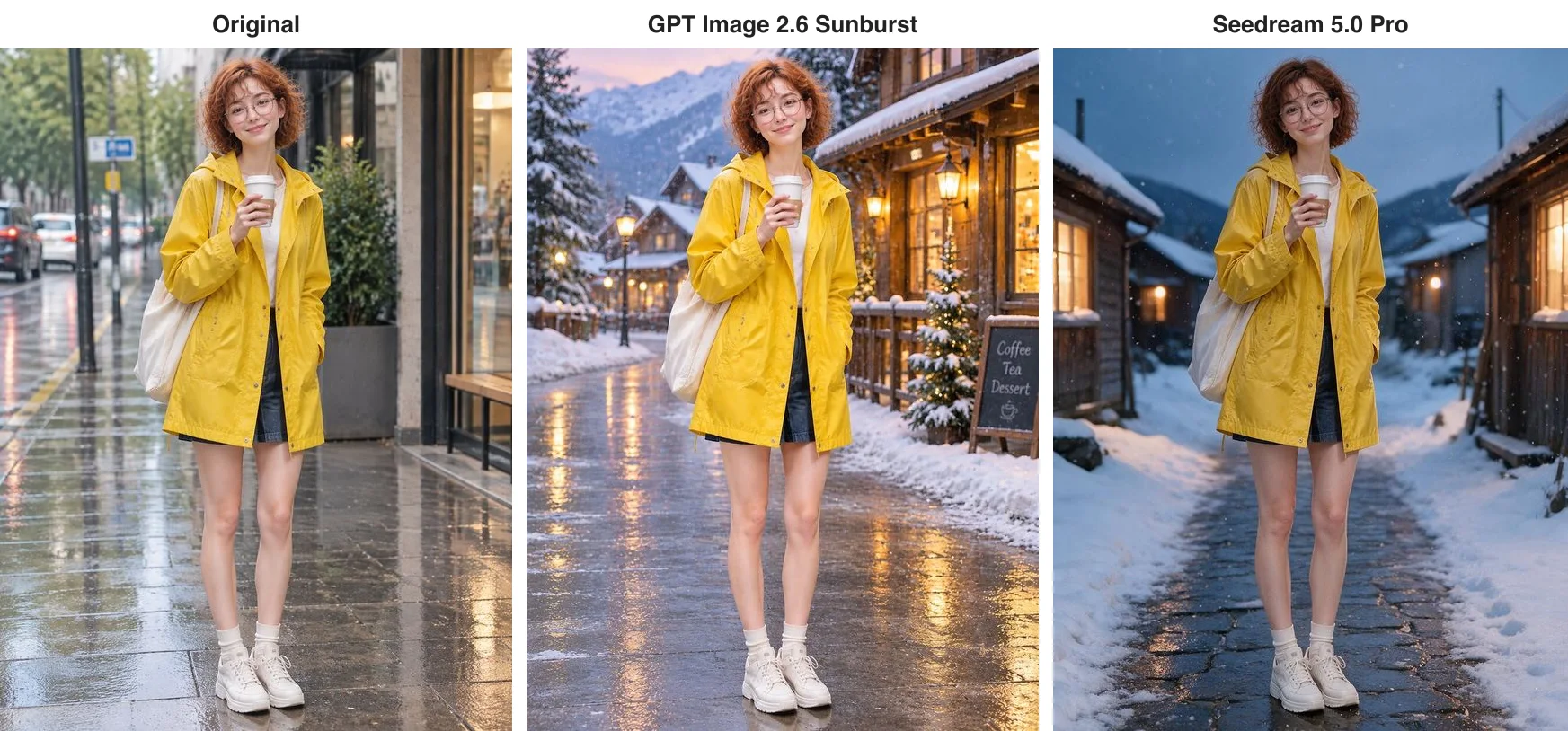
Face, curls, glasses, raincoat, tote bag and cup, plus the denim shorts, white socks and white sneakers, all stayed exactly as they were, in the same pose. That is not a given: in another of our tests, Nano Banana 2.1 put her in long jeans under the same instruction. For the background, Seedream chose a blue dusk with a wet stone path through snowy timber houses and falling snow; 2.6 kept the reflective pavement and added a chalkboard reading Coffee, Tea, Dessert.
Your person and your product in one picture
Finally, we gave each model two pictures, the red-haired woman and the green mug, and asked for her at the oak table by the window, holding that mug in both hands and smiling, with both matching their references.
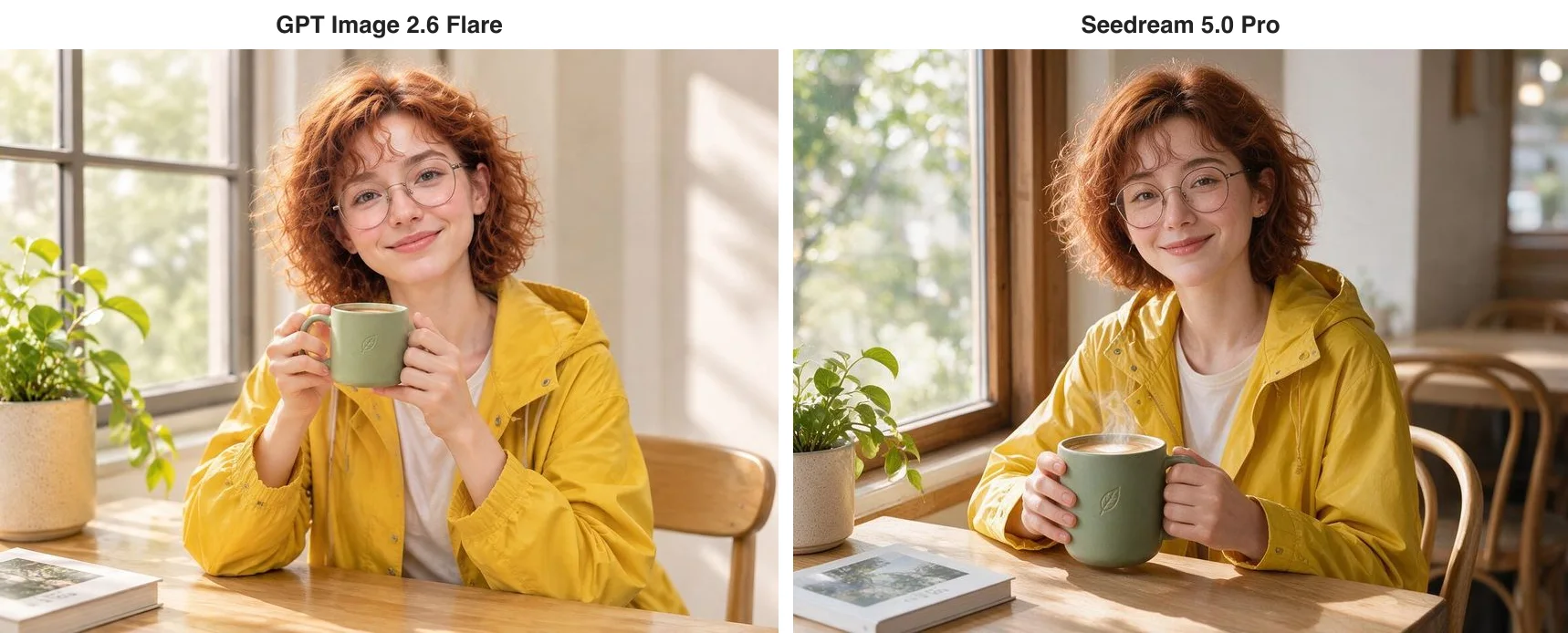
Both look natural: the face, curls, glasses, raincoat and the leaf on the mug all match, and both even carried over the book from the corner of the product shot. Seedream also added latte art and steam to the mug for more of a café feel. On the bill, Seedream's image was still 3 cents, with the references free, and took 91 seconds; GPT Image 2.6 prices an edit at a set size like any other image, so it was 2 cents at 1K and default quality, and took 32 seconds.
What only one of them can do
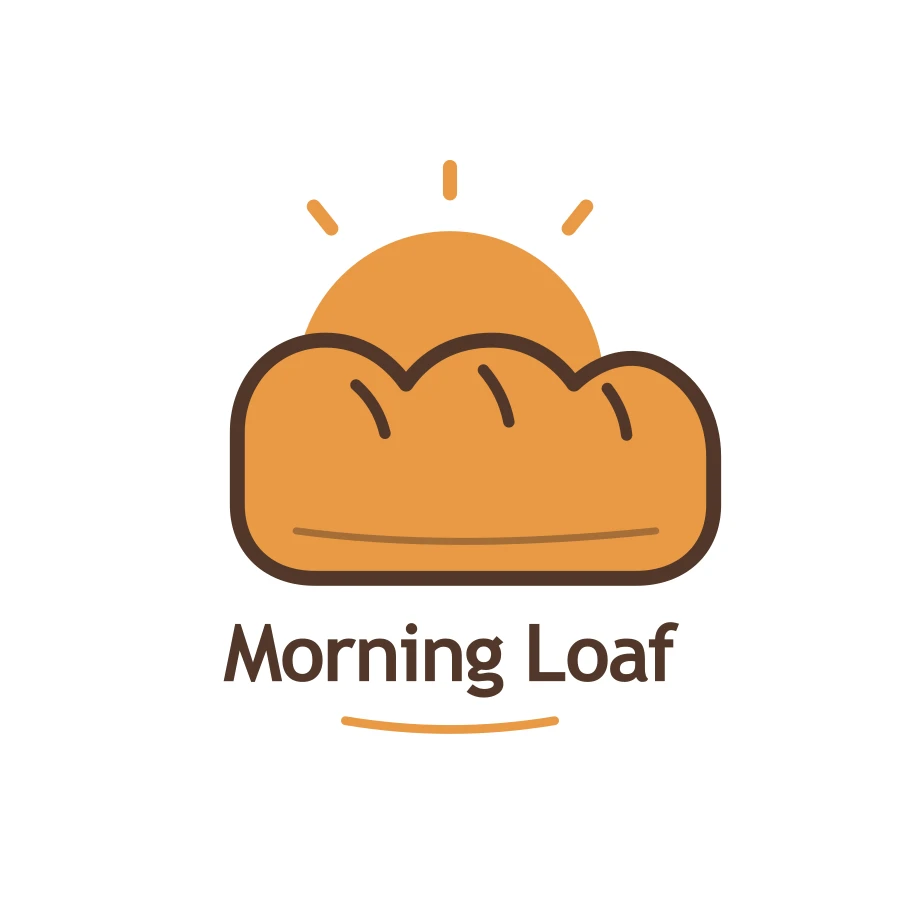
GPT Image 2.6 can turn a sentence into a looping GIF and output SVG vectors that stay sharp at any size, at a flat 3.15 cents each, and it goes up to 4K. Seedream 5.0 Pro stops at 2K and makes neither animations nor vectors. The bakery logo below is an SVG straight from GPT Image 2.6.
Seedream 5.0 Pro's advantage is more ways to say where to edit: besides marks drawn on the image, you can give coordinates or a box and have it change only that area. GPT Image 2.6 can target a spot too, through a separate markup image with circles or arrows. We did not test Seedream's box-select editing in this round.
What it costs and how long it takes
Seedream 5.0 Pro is 3 cents per 1K image and 6 cents at 2K, with references free — $3 for a hundred 1K images. From 6 November GPT Image 2.6 also prices plain PNG, JPEG and WebP images per image: 1, 2 and 3 cents at 1K for low, medium and high quality, so our default-quality 1K images are 2 cents each — $2 per hundred — and 3, 3.5 and 4.5 cents at 2K. Edits with reference photos follow the same table as long as they pass a size or resolution, so our two-photo composite is 2 cents. Animated GIFs, markup edits, transparent backgrounds and edits that keep the source image's size are still billed per token, at 10% below OpenAI's list price. Neither model charges for failed requests. We ran these tests on 5 and 6 November, while 2.6 was still billed per token; the 2.6 prices in this article are the per-image prices in force from 6 November.
On speed, Seedream 5.0 Pro took 37 to 52 seconds per image, and 91 for the composite. GPT Image 2.6 mostly took 28 to 32 seconds, with the Chinese poster the exception at 76. Overall 2.6 was a little quicker.
Which should you use?
- Mostly-Chinese posters and shop images: both write Chinese well; Seedream 5.0 Pro for a restrained, designerly layout at 3 cents an image, GPT Image 2.6 at 2 cents for 1K and default quality.
- Composites from several reference photos: both are dependable and neither charges extra for references; Seedream is 3 cents with up to 10, GPT Image 2.6 is 2 cents for a 1K edit at a set size with up to 16.
- Several languages in one image (multilingual signs, menus, packaging): GPT Image 2.6, the only one to get our six-language sign fully right.
- Coordinates or a box to say where to edit: Seedream 5.0 Pro offers more ways; both handle a drawn circle.
- Stickers, GIFs, vector logos, 4K: only GPT Image 2.6.
- Background swaps that keep the person intact: both are dependable.
You can also combine them: Seedream 5.0 Pro for batches of Chinese posters and product shots, GPT Image 2.6 for multilingual lettering, animations and vectors. On apimodels.app both run on one API key — set the model to doubao-seedream-5-0-pro, gpt-image-2.6-flare or gpt-image-2.6-sunburst to switch — and the parameters are in the Seedream 5.0 Pro docs and the GPT Image 2.6 docs.
Related models
- Seedream 5.0 Pro: the flagship of ByteDance's Seedream line, 3 cents at 1K and 6 cents at 2K, up to 10 references, box- and mark-based editing.
- Seedream 5.0 Flash: the fast Seedream tier, 3 cents at 1K or 2K, up to 10 references, keeps transparent backgrounds when editing.
- GPT Image 2.6 Flare: the everyday tier of OpenAI's newest generation, with GIF and SVG output and circle-to-edit.
- GPT Image 2.6 Sunburst: the detail tier of the same generation, built for repeated edits, the same price as Flare at 1K and 2K.
- Qwen Image 3.0: Alibaba's image model, strong on dense Chinese layouts, 3.5 cents an image.
For another model known for Chinese layout, read GPT Image 2.6 vs Qwen Image 3.0; for Google's side, read GPT Image 2.6 vs Nano Banana 2.1.
Preguntas frecuentes
Which writes Chinese better, GPT Image 2.6 or Seedream 5.0 Pro?
In our test both were letter-perfect. The difference is style: Seedream 5.0 Pro's layout is more restrained and designerly, GPT Image 2.6's louder. With several languages in one image, 2.6 got all six lines of our sign right, while Seedream misspelled the Russian.
How much does each image cost on each model?
On apimodels.app, Seedream 5.0 Pro is 3 cents per 1K image and 6 cents at 2K, with references free. GPT Image 2.6 prices plain images per image, 2 cents at 1K and 3.5 cents at 2K at default quality, two-reference composites at a set size included; GIFs and markup edits are billed per token at 10% below OpenAI's list price, and SVG is a flat 3.15 cents. Failed requests are not charged on either.
Can Seedream 5.0 Pro make 4K images, GIFs or SVG files?
No. Seedream 5.0 Pro tops out at 2K and makes neither animations nor vectors. GPT Image 2.6 does all three: 4K output, GIFs from a sentence and SVG vectors.
Can both models edit a specific spot?
Yes. Seedream 5.0 Pro accepts coordinates, a box, arrows or hand-drawn marks to mark the area; GPT Image 2.6 uses a markup image with circles or arrows. For whole-scene changes such as a new background, neither altered the person in our test.
Can I use both models with one API key?
Yes. On apimodels.app both run on the same API key and the same image endpoint; change the model field to doubao-seedream-5-0-pro, gpt-image-2.6-flare or gpt-image-2.6-sunburst to switch.