
Blog · 2026-11-06
Meta Muse Image vs GPT Image 2.6: Meta's 2-Cent Model Keeps Up, Just More Slowly
Model pages: Muse Image API · GPT Image 2.6 Flare API · GPT Image 2.6 Sunburst API — pricing, specs and the playground
Meta Muse Image or GPT Image 2.6? In our same-prompt tests both got counts and positions, infographic text and a background swap right. Meta's Muse Image is a flat 2 cents for about 2.5 megapixels and picks a sensible shape when left on auto, but took 46 to 80 seconds and rendered a night scene dark; OpenAI's GPT Image 2.6 is also 2 cents at 1K and default quality, takes about half a minute, and adds GIF, SVG and 4K.
Muse Image is Meta's image model, Muse Image 1.0 from Meta Superintelligence Labs. Meta says it reasons over a prompt before it renders, for more precise composition and lettering. Its pitch is simple: a flat 2 cents an image, about 2.5 megapixels out, one model for both generating and editing with up to four reference photos. On the other side is OpenAI's GPT Image 2.6, released in November, known for accurate lettering and obedient edits, with GIF and SVG output on top.
So how far is a 2-cent model from OpenAI's newest flagship? We picked jobs that show whether a model thought the prompt through: arranging fruit by count and position, letting the model choose the shape of a phone wallpaper, a five-step infographic, and two edits — a background swap and a two-photo composite.
A word on who we are: we run apimodels.app, a platform where one API key calls Muse Image and GPT Image 2.6 alongside other image, video, audio and language models. Every image below was generated there on 5 and 6 November 2026 — GPT Image 2.6 at 1K, Muse Image at its single size of about 2.5 megapixels — and is shown exactly as it came back.
The short version
Muse Image was steadier than we expected. Three apples, two pears and a lemon landed exactly where we asked, all five infographic captions were right, the background swap left her clothes alone, and the two-photo composite kept both the person and the mug recognisable. The most telling moment was the phone wallpaper: with the shape left on auto, Muse understood "lock screen" and returned a tall 9:16 image, while GPT Image 2.6 returned a square.
The gaps are speed and look. Muse took 46 to 80 seconds per image against about half a minute on GPT Image 2.6, and its night wallpaper came out very dark, the stars barely visible. On price they are level: Muse is a flat 2 cents, and so is a default-quality 1K image on GPT Image 2.6, but Muse's image has more than twice the pixels; at low quality 2.6 drops to 1 cent. So: for the most pixels for the money when time is not pressing, choose Muse Image; for speed, GIFs and vectors, 4K or more than four reference photos, choose GPT Image 2.6.
How they differ, in plain terms
- How you pay: Muse Image is 2 cents an image whatever the shape and with or without references. GPT Image 2.6 prices plain images per image by resolution and quality — 2 cents at 1K and 3.5 cents at 2K at the default medium, the same for edits that pass a size — while GIFs, markup edits and a few other requests are billed per token at 10% below OpenAI's list price.
- Size: Muse has one size, about 2.5 megapixels (1600×1600 at 1:1, 2048×1152 at 16:9), and no 4K; GPT Image 2.6 offers 1K, 2K, 4K and exact pixel sizes.
- Shape: Muse takes auto, letting the prompt decide, or 13 fixed ratios; GPT Image 2.6 also accepts auto and goes up to 3:1.
- Reference photos: up to 4 on Muse, up to 16 on GPT Image 2.6.
- Clear refusals: Muse returns an error for things it does not support — masks, transparent backgrounds, several images per call, more than four references — instead of quietly ignoring them.
- Only on 2.6: animated GIFs from a sentence, SVG vector output and edits limited to a circle you draw, in two tiers, Flare and Sunburst.
Arranging fruit by count: both got it right
Counts and positions are an old weakness of image models; one too many, one too few or left and right swapped are all common. We asked for a top-down photo on a blue linen tablecloth: exactly three red apples on the left, exactly two green pears on the right, exactly one lemon in the centre, and nothing else.
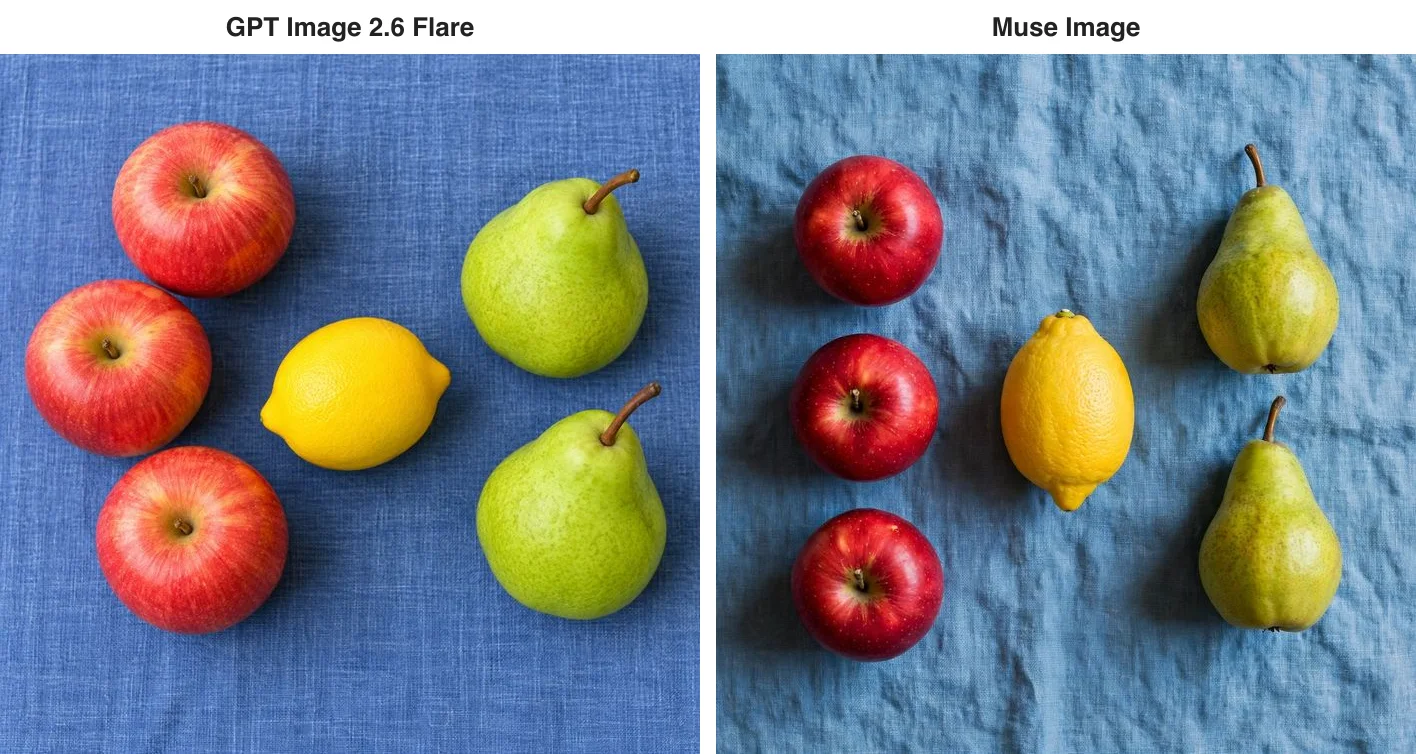
Both match the brief exactly. GPT Image 2.6 set the apples in a loose arc, like a casual styled shot; Muse Image lined the three apples up in a column, the two pears in another, and put the lemon dead centre between them, as tidy as if measured, with more natural creases and light in the linen. Muse's image is 1600×1600 against 1024×1024 from GPT Image 2.6.
A phone wallpaper: only Muse chose a tall frame
Here we deliberately left the shape on auto for both and wrote: a phone lock-screen wallpaper, a lone lighthouse on a cliff under a starry night sky, minimal, with plenty of empty sky at the top for the clock.
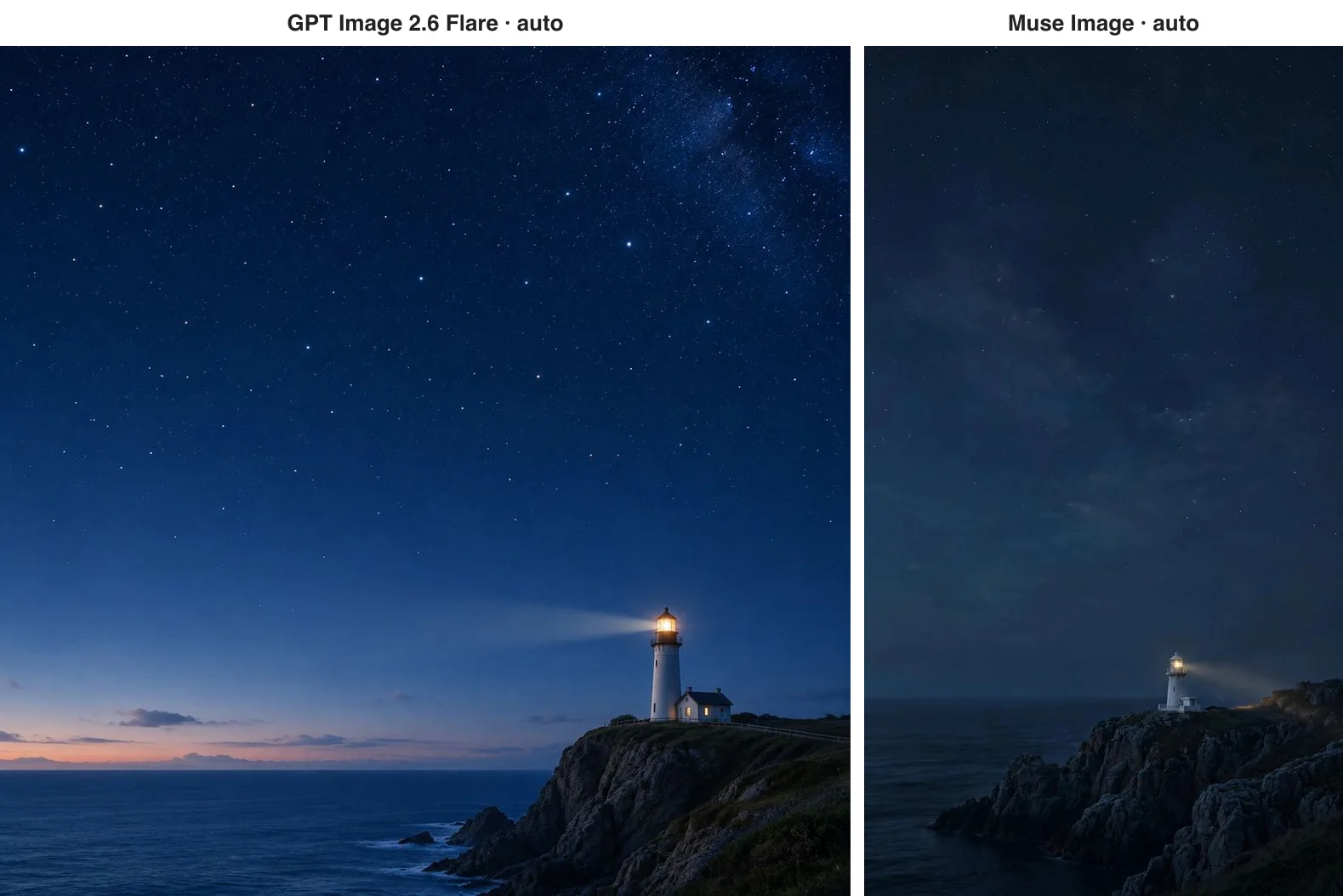
Muse Image understood "lock screen" and returned a 1152×2048 portrait at 9:16, with the lighthouse low on the right and a wide band of sky above — ready to set as a wallpaper. GPT Image 2.6 returned a 1024×1024 square; the picture itself is lovelier, with more stars and a band of sunset on the horizon, but you would have to crop it for a phone. Muse's problem is that it is too dark: the sky is close to charcoal, with the stars and the Milky Way barely visible, so it needs brightening. On 2.6, simply ask for 9:16 when you want a phone wallpaper.
An infographic: all five captions right
A five-step pour-over infographic titled Pour-Over Coffee in 5 Steps, with a small illustration and a one-line caption per step and numbers throughout — 93°C, 15 g, 30 g, 30 seconds, 250 g.
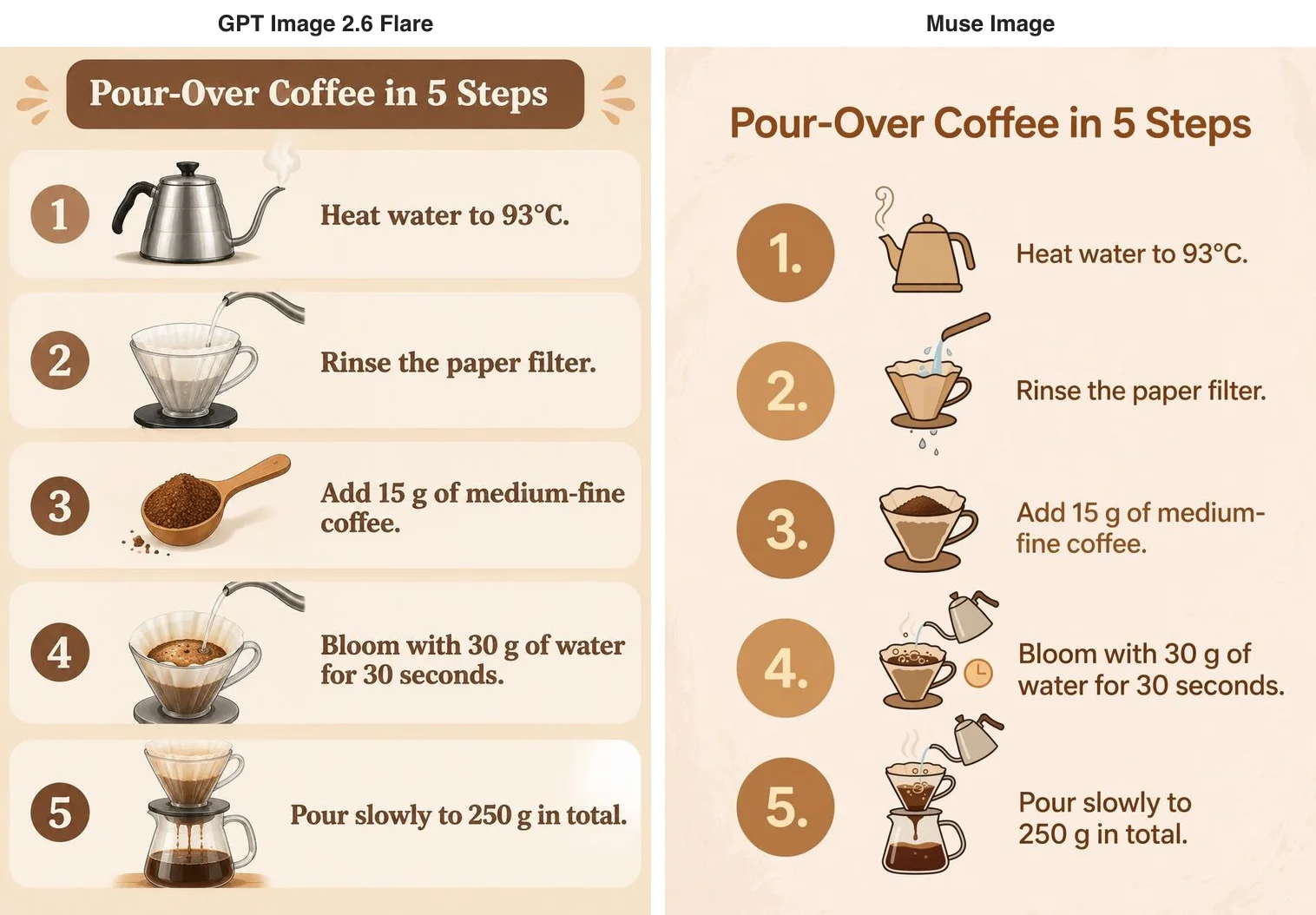
The title, the five captions and every number are right on both. GPT Image 2.6 used large serif type and near-photographic objects; Muse Image used flat icons in one palette, with a small clock for the 30 seconds in step 4, so it looks more like a finished app onboarding screen. Muse broke "medium-fine" across two lines at the hyphen, which reads fine. Muse took 78 seconds on this one; GPT Image 2.6 took 33.
Swapping only the background: Muse held the line too
For editing we used one base image: a woman with short curly red hair, round glasses and a yellow raincoat, holding a paper coffee cup, in denim shorts and white socks. The instruction: change only the background to a snowy mountain village at dusk with warm lights in the windows, and keep everything about her the same. On the GPT Image 2.6 side we used Sunburst, the tier built for repeated edits.
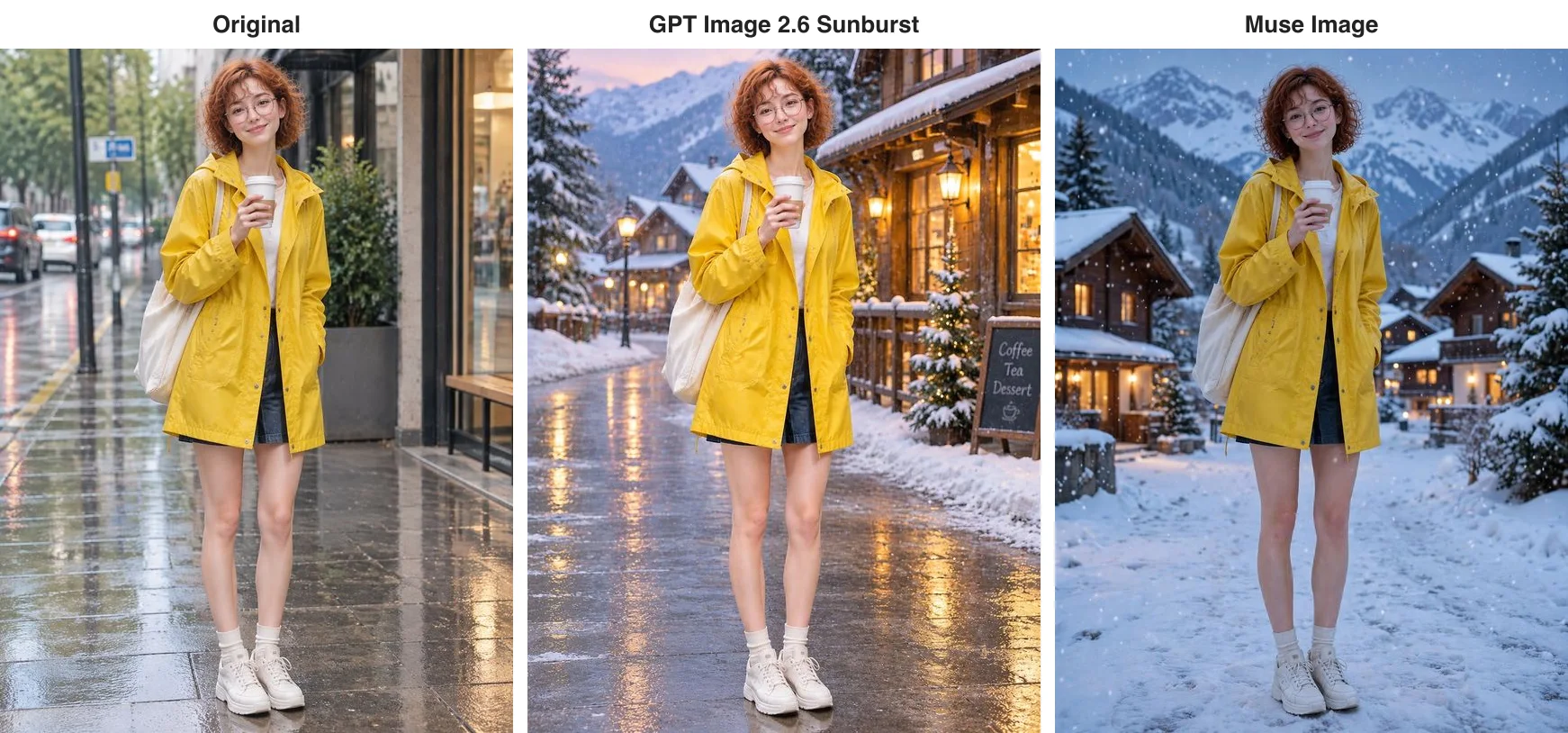
Neither touched her: face, curls, glasses, raincoat, tote bag and cup, plus the denim shorts, white socks and white sneakers, all remain, in the same pose. For the background, Muse drew a chalet village ringed by snowy peaks, with fresh snow underfoot and falling flakes, though the sky reads more like daytime than dusk. GPT Image 2.6 kept the wet, shining pavement, and its sunset-lit peaks and warm lamps are closer to dusk. Muse took 63 seconds and, reference and all, still cost 2 cents.
Your person and your product in one picture
Finally, we gave each model two pictures, the red-haired woman and a matte green mug with an embossed leaf logo, and asked for her at an oak table by the window, holding that mug in both hands and smiling.
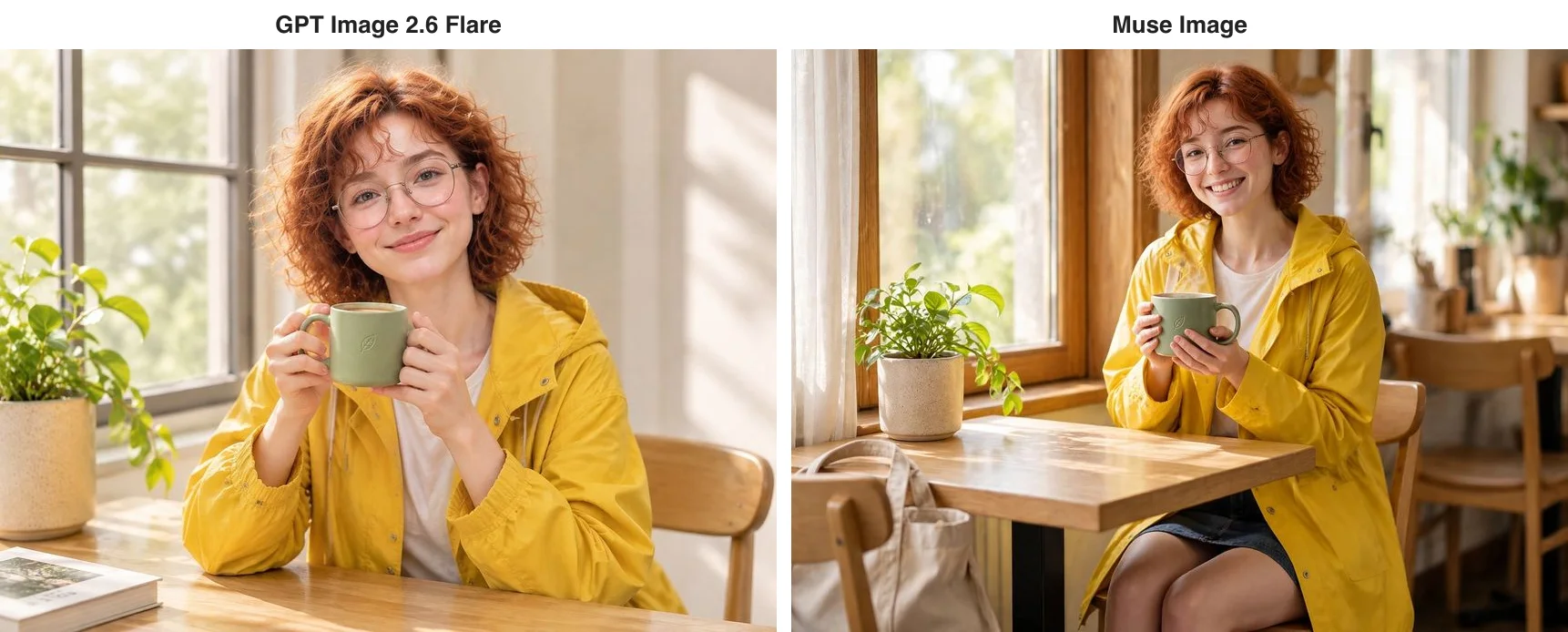
Both keep the person and the mug recognisable — the curls, glasses, yellow raincoat and the leaf on the mug are all there. GPT Image 2.6 framed her from the waist up, like a product endorsement; Muse Image stood further back, showing the whole table, her denim shorts and the tote bag on a chair, all carried over from the first reference, though the book from the product shot is gone. Muse took 80 seconds and 2 cents; GPT Image 2.6 took 32 seconds and, as an edit at a set 1K size, also 2 cents.
What only one of them can do
GPT Image 2.6 can turn a sentence into a looping GIF, output SVG vectors that stay sharp at any size at a flat 3.15 cents, edit only inside a circle you draw, and go up to 4K with as many as 16 references. Muse Image supports none of these, and says so with an error rather than quietly ignoring the request. The waving cat below is an eight-frame GIF 2.6 made from one sentence.
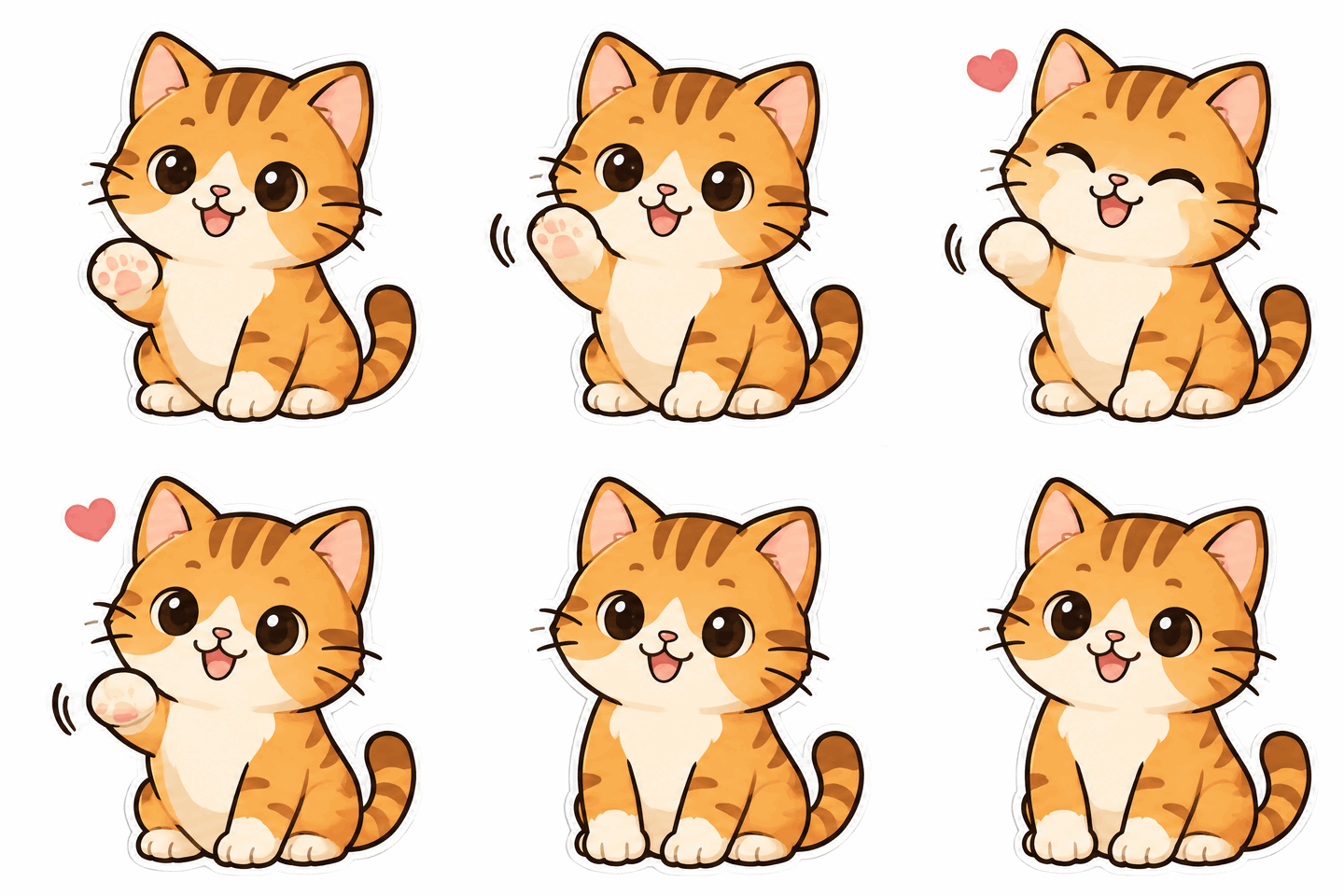
Muse's advantages are an auto shape that genuinely reads the prompt, and a larger image for the money: about 2.5 megapixels, more than twice a 1K image from GPT Image 2.6.
What it costs and how long it takes
Muse Image is a flat 2 cents an image, whatever the shape or references — $2 per hundred. From 6 November GPT Image 2.6 prices plain PNG, JPEG and WebP images per image: 1, 2 and 3 cents at 1K for low, medium and high quality, so 2 cents at the default medium — also $2 per hundred — and 3, 3.5 and 4.5 cents at 2K. Edits with reference photos follow the same table as long as they pass a size or resolution, so our two-photo composite is 2 cents. Animated GIFs, markup edits, transparent backgrounds and edits that keep the source image's size are still billed per token, at 10% below OpenAI's list price. Neither model charges for failed requests. We ran these tests on 5 and 6 November, while 2.6 was still billed per token; the 2.6 prices in this article are the per-image prices in force from 6 November.
On speed, Muse Image took 46 to 80 seconds per image in these tests, GPT Image 2.6 24 to 33. Muse is roughly twice as slow, for more than twice the pixels.
Which should you use?
- Volume with large images: Muse Image, 2 cents for about 2.5 megapixels; on GPT Image 2.6, 2 cents buys a 1K image, or 1 cent at low quality.
- Letting the model choose the shape: Muse, which reads the prompt; on 2.6, state the ratio.
- Counts, positions and infographics: both are accurate.
- Background swaps that keep the person intact: both are dependable.
- Deadlines and a steady pace: GPT Image 2.6, about half a minute an image.
- Night and low-key scenes: 2.6's exposure is more pleasing; Muse may need brightening.
- GIFs, vectors, 4K, more than four references, circle-to-edit: only GPT Image 2.6.
On apimodels.app both run on one API key — set the model to muse-image, gpt-image-2.6-flare or gpt-image-2.6-sunburst to switch — and the parameters are in the Muse Image docs and the GPT Image 2.6 docs.
Related models
- Muse Image: Meta's model for generating and editing, 2 cents an image at about 2.5 megapixels, up to 4 references, auto or 13 fixed shapes.
- GPT Image 2.6 Flare: the everyday tier of OpenAI's newest generation, with GIF and SVG output and circle-to-edit.
- GPT Image 2.6 Sunburst: the detail tier of the same generation, built for repeated edits, the same price as Flare at 1K and 2K.
- Nano Banana 2.1: Google's efficient tier, 2.2 cents per 1K image, up to 10 references and banners as wide as 8:1.
- Grok Imagine Image 2.0: xAI's image model with layered typography, 3 cents at 1K low.
For a similarly priced, flat-rate Google model, see GPT Image 2.6 vs Nano Banana 2.1; for typography and portraits, see GPT Image 2.6 vs Grok Imagine Image 2.0.
Preguntas frecuentes
Is Muse Image or GPT Image 2.6 better?
It depends on the job. In our tests both got counts and positions, infographic lettering and a background swap right. Muse Image is 2 cents for a larger image and chooses the shape from the prompt on auto; GPT Image 2.6 is roughly twice as fast, exposes night scenes better and adds GIFs, vectors and 4K.
How much does each image cost on each model?
On apimodels.app, Muse Image is a flat 2 cents an image regardless of shape or references. GPT Image 2.6 prices plain images per image, 2 cents at 1K and 3.5 cents at 2K at default quality, two-reference composites at a set size included; GIFs and markup edits are billed per token at 10% below OpenAI's list price, and SVG is a flat 3.15 cents. Failed requests are not charged on either.
How large are Muse Image's images?
Muse Image has one size, about 2.5 megapixels: 1600×1600 at 1:1 and 2048×1152 at 16:9. There is no 4K, and larger sizes return an error. For 4K or exact pixel sizes, use GPT Image 2.6.
Does Muse Image support masks, transparent backgrounds or several images per call?
No. Masks, transparent backgrounds, several images per call and more than four references all return an error on Muse Image rather than being silently ignored. GPT Image 2.6 handles these: transparent backgrounds, up to 10 images per call, up to 16 references and circle-to-edit.
Can I use both models with one API key?
Yes. On apimodels.app both run on the same API key and the same image endpoint; change the model field to muse-image, gpt-image-2.6-flare or gpt-image-2.6-sunburst to switch.