apimodels is a remote MCP server: add it to Cursor and Cursor's agent can call the image, video and speech models on apimodels directly. You add one URL and click Authorize once in the browser — no Node.js to install and no API key to copy. Every step below has a real screenshot.
Add https://api.apimodels.app/mcp to Cursor as an MCP server (the button below, or one url line in ~/.cursor/mcp.json), click Authenticate under Customize → MCPs, sign in to apimodels.app and click Authorize. When it shows Connected · 9 tools enabled, you are done.
This page is about letting Cursor's agent generate images and video; it does not change which chat model Cursor itself runs on. To run Cursor's chat on apimodels models as well, see /docs/clients.
Two ways to do it; both end up in the same place.
With Cursor installed, click the button; allow your browser to open Cursor. Cursor shows a confirmation with the name and URL filled in — click Install.
Add to Cursor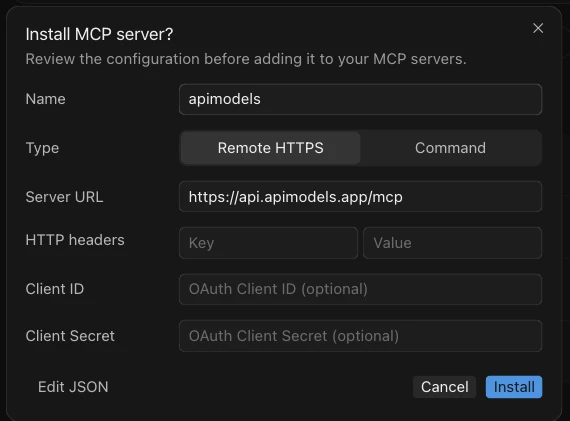
Open (or create) ~/.cursor/mcp.json — on Windows it is C:\Users\<you>\.cursor\mcp.json. If it already lists other servers, add the apimodels entry inside mcpServers. Cursor picks up the change on save; no restart.
{
  "mcpServers": {
    "apimodels": {
      "url": "https://api.apimodels.app/mcp"
    }
  }
}
To enable it for one project only, put the same content in .cursor/mcp.json at the project root.
In Cursor's sidebar open Customize and switch to MCPs (in the editor window: Cursor Settings → Tools & MCPs). apimodels shows up under Needs Attention as Needs authentication; click Authenticate on the right and Cursor opens your browser.

Your browser opens the apimodels.app authorization page (sign in first if asked). Check that it names Cursor and click Authorize. The browser is sent back to localhost:8787, which is how Cursor receives the sign-in; switch back to Cursor.
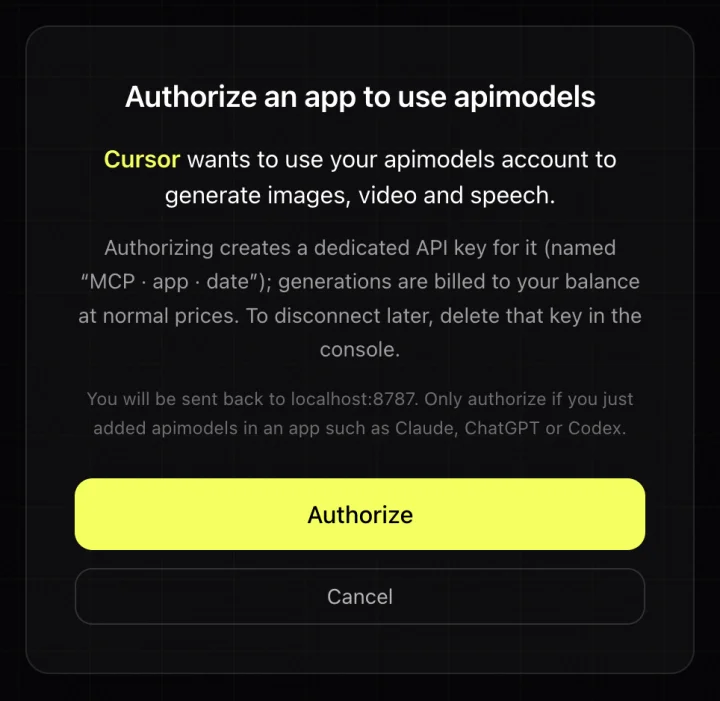
Authorizing creates a dedicated API key for Cursor named “MCP · Cursor · date”; generations are billed to your balance at normal prices. To cut Cursor off later, delete that key in Console → API Keys.
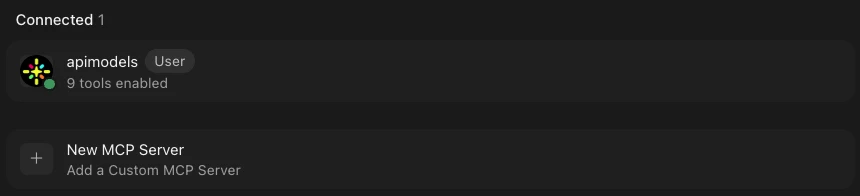
Back under Customize → MCPs, apimodels has moved to Connected with 9 tools enabled and a green dot.
| Tool | What it does | Billing |
|---|---|---|
| generate_image | Text-to-image or edit with a reference; returns the URL plus a preview the agent can look at | per image |
| generate_video | Text- or image-to-video; returns the URL, or a task id if it is still rendering | per clip / per second |
| get_task | Collects a running task until the URL is ready | free |
| text_to_speech | Narration and voice-over | by text length |
| review_image | A vision model checks an image against your brief and suggests a fixed prompt | well under $0.01 |
| get_upload_url | A 15-minute link to upload a local file for use as a reference | free |
| get_balance | Your balance in USD | free |
| list_models | Lists the current model ids | free |
| chat | Asks another chat model on apimodels | per token |
Start a new agent chat and say what you want. The first time, mention apimodels so the agent knows which tools to use; if Cursor asks before running a tool, let it run.
One image
Use apimodels to generate a 16:9 image: a golden tabby munchkin cat
sitting on a sunlit windowsill in the morning. Save it to assets/cat.png.
Let the agent plan and render a multi-shot video
Write a 3-shot, 15-second product teaser for a ceramic coffee mug.
Make one 16:9 keyframe per shot with apimodels, show them to me, then turn
each into a 5-second clip with generate_video and download the clips to assets/.
Video takes a while: a median of about 2.5 minutes, 9 in 10 within 8 minutes. Each tool call waits at most 50 seconds and then hands back a task id; the agent calls get_task on its own, without resubmitting or paying twice. Result files are deleted after 30 days, so have the agent download them into the project right away, as the examples do.
To use an image from your computer as a reference or first frame: the hosted server cannot read your files, so the agent calls get_upload_url, uploads the file with curl in the terminal and uses the link it gets back. You only approve that command when Cursor asks.
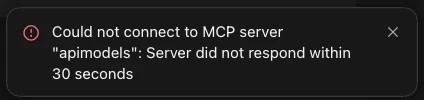
The usual cause is another program on local port 8787. Cursor always receives the browser's sign-in redirect on port 8787 and the port cannot be changed, so when something else holds it, clicking Authorize on the web page never reaches Cursor and it gives up after 30 seconds. Cloudflare's wrangler dev uses 8787 by default, so it is the most common culprit. Find out what is listening:
# macOS / Linux: who is listening on 8787?
lsof -nP -iTCP:8787 -sTCP:LISTEN

# Windows (PowerShell or cmd): find the PID, then the program
netstat -ano | findstr :8787
tasklist /FI "PID eq <PID>"
Stop that program or move it to another port (for wrangler, wrangler dev --port 8788), then sign in again as described next. Only the sign-in itself needs the port; the program can go back to 8787 afterwards.

Cursor leaves the server in the error state and stops offering Authenticate. Make it start over: open ~/.cursor/mcp.json, delete the apimodels entry and save, then add it back and save (or, after deleting it, use the Add to Cursor button again). apimodels returns to Needs authentication and Authenticate works again.
| Symptom | Cause / fix |
|---|---|
| It used to work, now every tool says unauthorized | The “MCP · Cursor · date” key Cursor uses was deleted or disabled. Remove and re-add apimodels as above and sign in again. |
| The agent says it has no apimodels tools | Check apimodels is under Connected and switched on in Customize → MCPs, and that you asked in an agent chat. Naming apimodels in the request helps too. |
| HTTP 402 | Your balance is too low. Top up at Console → Credits and retry; failed generations are not billed. |
| A local file path is refused | Expected: the hosted server cannot read local files. Have the agent upload it with get_upload_url first; it usually does this on its own. |
The local server reads your files directly and can wait for a whole video in one call, but it needs Node.js. Run npx -y apimodels-mcp login in a terminal, click Authorize in the browser, then replace the apimodels entry in mcp.json with the one below. Keep one or the other, not both.
{
  "mcpServers": {
    "apimodels": {
      "command": "npx",
      "args": ["-y", "apimodels-mcp"]
    }
  }
}
All settings, including env vars and wait times, are in /docs/mcp.
Add https://api.apimodels.app/mcp as an MCP server: use the Add to Cursor button on this page, or put {"mcpServers": {"apimodels": {"url": "https://api.apimodels.app/mcp"}}} in ~/.cursor/mcp.json. Then open Customize → MCPs, click Authenticate next to apimodels, sign in to apimodels.app and click Authorize. It shows Connected with 9 tools enabled when it is ready.
No. The hosted server runs on apimodels, and signing in creates a dedicated key for Cursor named "MCP · Cursor · date" without you copying anything. You only need an apimodels account with a balance. Node.js is needed only if you choose the local server instead, which can read files on your computer directly.
Almost always another program is using local port 8787, where Cursor waits for the sign-in redirect; the port is fixed and cannot be changed in Cursor. wrangler dev uses 8787 by default. Find it with "lsof -nP -iTCP:8787 -sTCP:LISTEN" (macOS / Linux) or "netstat -ano | findstr :8787" (Windows), stop it or move it to another port, then remove and re-add apimodels in ~/.cursor/mcp.json and click Authenticate again.
Each generation is billed to your apimodels balance at the price on that model's page, and failed generations are not billed. Checking the balance, listing models and collecting a running task are free. To disconnect, delete the "MCP · Cursor · date" key in Console → API Keys.
Yes. The hosted server cannot read your files, so the agent calls get_upload_url, uploads the file with curl in the terminal, and passes the returned link to generate_image or generate_video. You approve the upload command when Cursor asks.
