

Nano Banana 2.1 API
nano-banana-2-1Nano Banana 2.1 is Google's high-efficiency image model, which Google says improves quality, character consistency and text, with up to 10 references and output up to 4K. More than 10 references, or ratios outside its 15, are rejected with a 400. Call nano-banana-2-1 from $0.022 per image; failed calls are not charged.
Generate Image
Result
Generated image will appear here
Enter a prompt and click Generate
1K $0.022 · 2K $0.036 · 4K $0.06
Priced per image by resolution, 1K by default; reference images cost nothing extra and failed calls are not charged
Generate or Edit, One Model
Send a prompt alone for text-to-image, or add image or image_urls (up to 10 references) to edit or combine
15 Aspect Ratios
auto, 1:1 through 21:9, plus 1:4, 4:1, 1:8 and 8:1 for banners and tall strips
Text Inside the Image
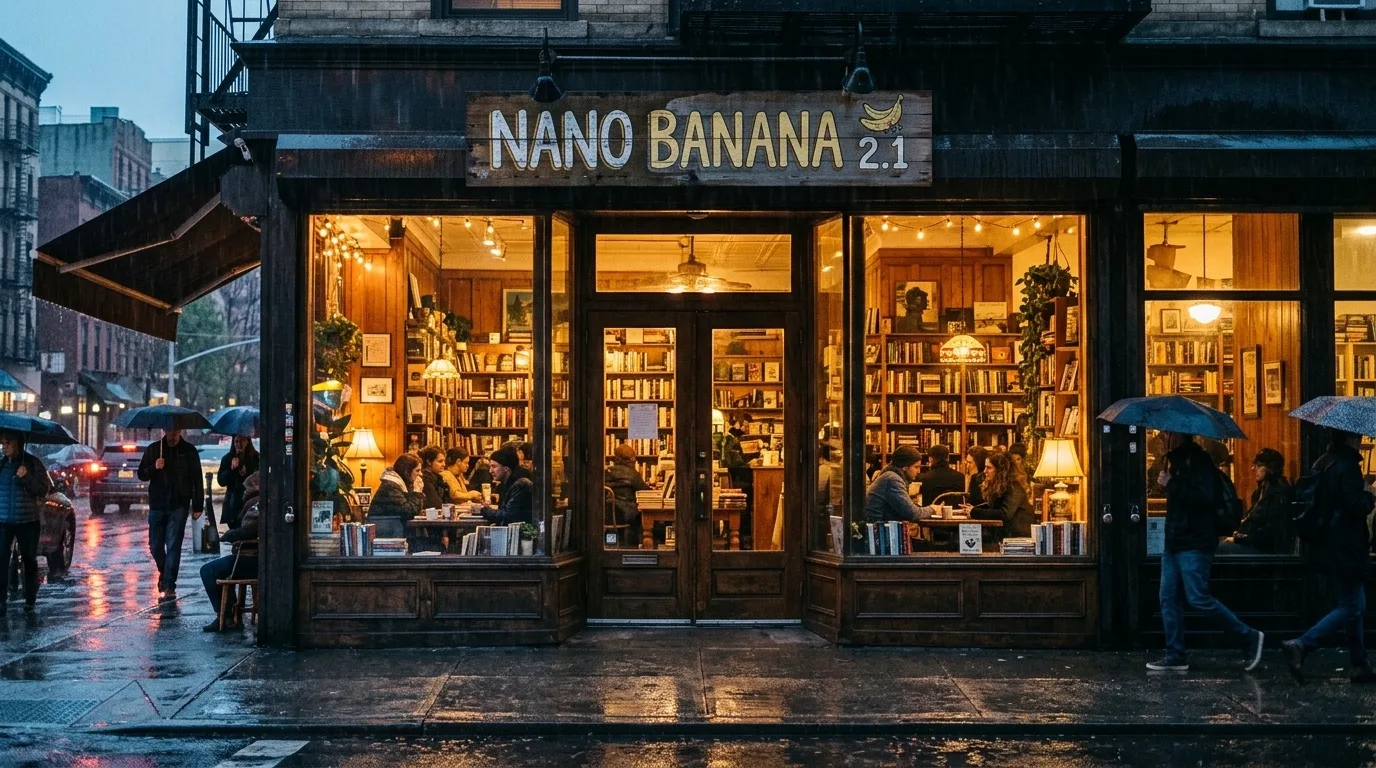
Google lists text rendering among the 2.1 upgrades; in our first test the sign "NANO BANANA 2.1" came out spelled correctly
Async, About 20 s at 1K
Create a task, then poll it or receive a callback_url webhook; a 16:9 image at 1K took about 20 seconds in testing
What Nano Banana 2.1 is, and what this page shows
Nano Banana 2.1 is Google's high-efficiency image generation and editing model, built on Gemini 3.6 Flash and released on 6 October 2026 as the successor to Nano Banana 2. Google describes it as the more efficient counterpart to Gemini 3 Pro Image (Nano Banana Pro). On apimodels.app you call Nano Banana 2.1 with the model id nano-banana-2-1 and one API key, at $0.022 per image at 1K, $0.036 at 2K and $0.06 at 4K, with up to 10 reference images and 15 aspect ratios from 1:8 to 8:1.
Most write-ups about Nano Banana 2.1 reuse the same handful of prompts from Google's examples. This page does something narrower and more useful: nine jobs people actually buy an image model for, each run once through our API at 2K, with the exact prompt we sent and the picture that came back. Nothing below is retouched. Where Nano Banana 2.1 got something wrong on the first try, we say so and show what fixed it.
The nine use cases are character consistency across scenes, a bilingual text poster, a factual infographic, an 8:1 website banner, a 1:4 vertical story, a single-object swap, a circle-to-edit fix, product photography with a logo merged in, and a three-round iterative edit. The 15 images used here cost $0.54 in total at the 2K rate.
Nano Banana 2.1 price per image: Google's standard rate and apimodels.app
Nano Banana 2.1 bills per image by output tier, and the tier, not the prompt length or the number of reference images, sets the price. The table compares Google's standard (non-batch) rate, as listed on ai.google.dev on 7 October 2026, with what Nano Banana 2.1 costs on apimodels.app. Failed requests are not charged here.
| Output tier | Google standard rate | apimodels.app | Difference |
|---|---|---|---|
| 1K | $0.0336 | $0.022 | 35% below |
| 2K | $0.0504 | $0.036 | 29% below |
| 4K | $0.113 | $0.06 | 47% below |
Nine Nano Banana 2.1 use cases, tested one request at a time
Each case below follows the same pattern: what the job is and why Nano Banana 2.1 suits it, the prompt exactly as sent, and what came back, including anything that went wrong. Edits and merges used earlier outputs from this page as their reference images, so you can see the input and the result side by side. The characters, shop names and the HEARTH & CLAY logo are invented for the test.
One habit carried every edit: say what must change, then name everything that must stay. Nano Banana 2.1 is literal about the second half, and the cases where we listed the untouched parts are the ones that came back clean on the first attempt.
1. Keep one character consistent across scenes
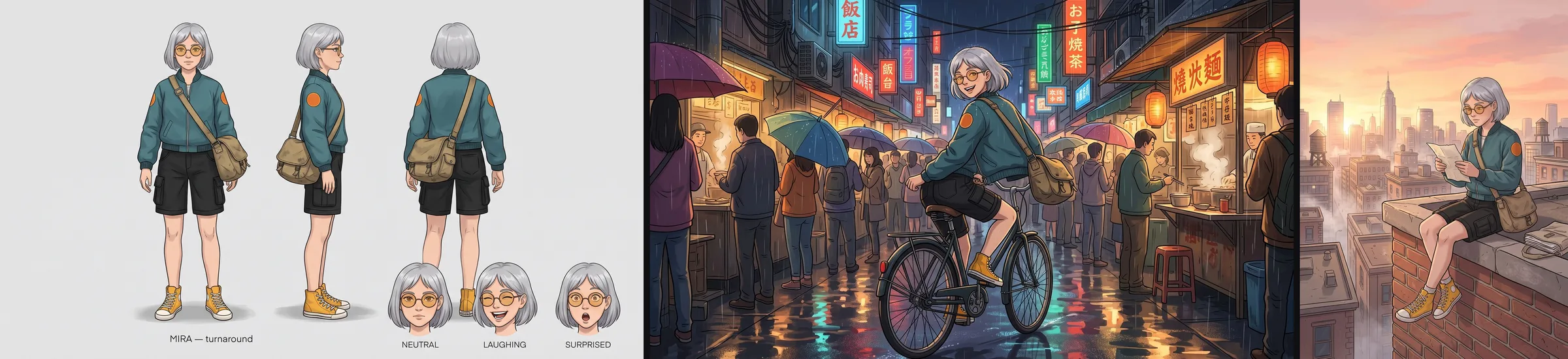
Comics, storyboards and brand mascots fall apart when the face, hair or outfit drifts between panels. Google's model card puts Nano Banana 2.1 at 1106 on multi-character editing against 978 for Nano Banana 2, and character references are the feature most worth testing. We generated a turnaround sheet first, then passed that sheet back to Nano Banana 2.1 as the only reference for two new scenes.
Prompt for scene one: "Use the character from the reference sheet. Keep her face, silver bob, round amber glasses, teal bomber jacket with the orange shoulder patch, black cargo shorts, yellow high-top sneakers and tan messenger bag exactly the same. Show her riding a bicycle through a crowded night market in light rain, neon shop signs reflected on the wet street, glancing back over her shoulder with a grin. Cinematic illustration in the same style as the sheet."
Both new scenes kept the silver bob, the amber glasses, the teal jacket with its orange patch, the shorts, the yellow sneakers and the bag; the second scene, a rooftop at sunrise in 3:4, used the same sheet with a shorter prompt. One honest miss: the sheet itself put the orange patch on both sleeves although the prompt asked for the left shoulder only, and Nano Banana 2.1 carried that detail into every scene. The shop signs in the night market are decorative pseudo-lettering, not real words.
2. A bilingual text poster with every word in place
Menus, event posters and social cards live or die on spelling. Nano Banana 2.1 improved text and infographic rendering over Nano Banana 2, so we asked for three separate strings in two scripts, each with its own size and position.
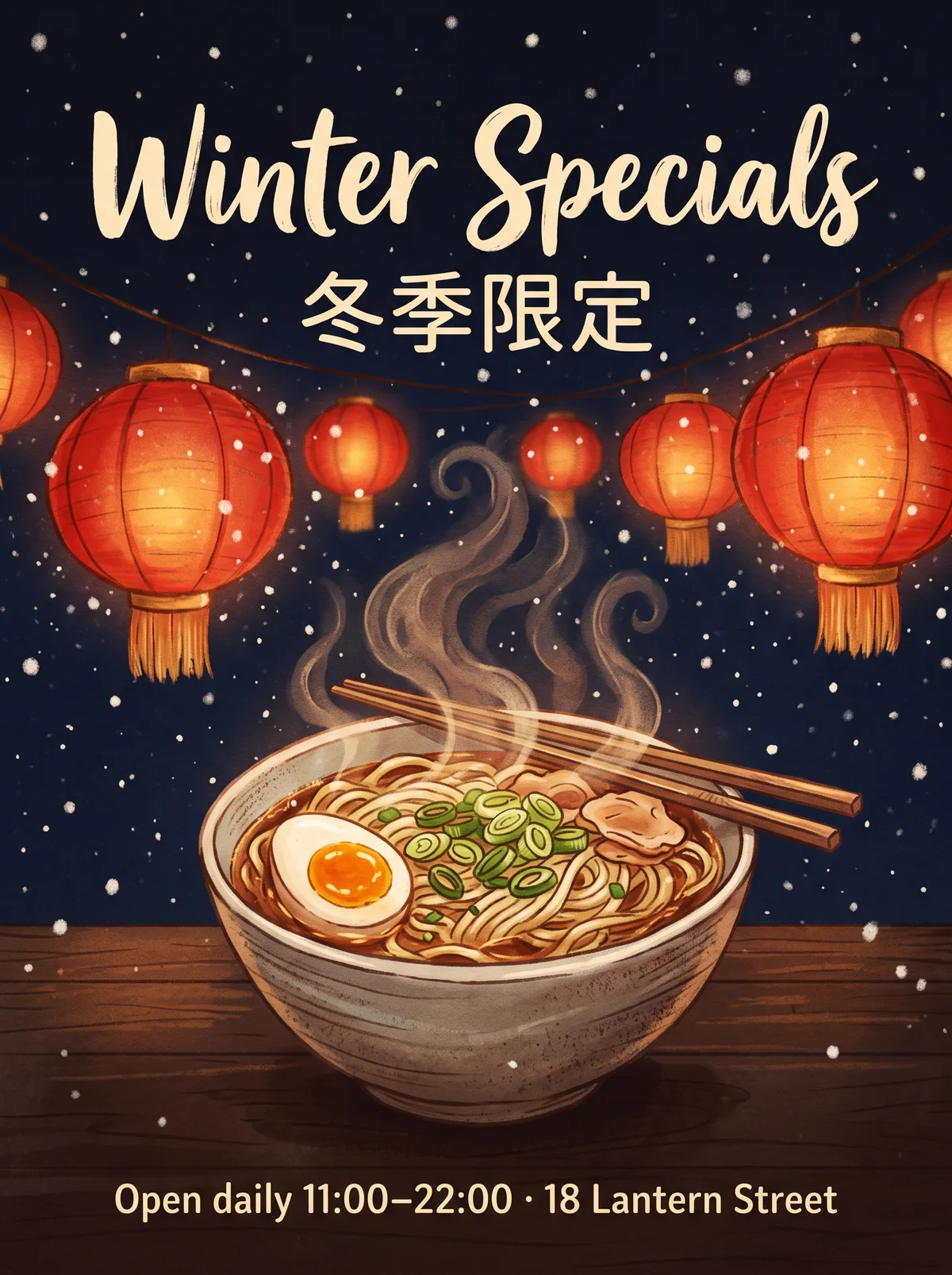
Prompt: "A portrait poster for a small noodle restaurant called Lantern Street Noodle House announcing its winter menu. Warm illustrated style: a steaming bowl of hand-pulled noodles with a soft-boiled egg and spring onions, red paper lanterns glowing above, light snow falling against a deep navy night. Render the headline exactly once in large cream brush lettering across the top: "Winter Specials". Directly below it in smaller cream lettering: "冬季限定". Along the bottom edge in small clean sans-serif: "Open daily 11:00–22:00 · 18 Lantern Street". Keep every piece of text crisp, correctly spelled and evenly spaced with generous margins. No other text, no logos, no watermark."
Nano Banana 2.1 rendered all three strings correctly on the first attempt, including the four Chinese characters and the en dash in the opening hours, with nothing extra added. Quoting each string, giving it a position and saying "exactly once" is what keeps a headline from being repeated. At 3:4 the 2K tier delivers 1792×2400.
3. An infographic that gets the facts and labels right
Google's model card reports infographic factuality of 0.521 for Nano Banana 2.1 against 0.179 for Nano Banana 2, the largest single jump on the card. Educational posts, onboarding slides and explainer threads are where that matters, so we asked for a six-stage process the model has to know, not just draw.
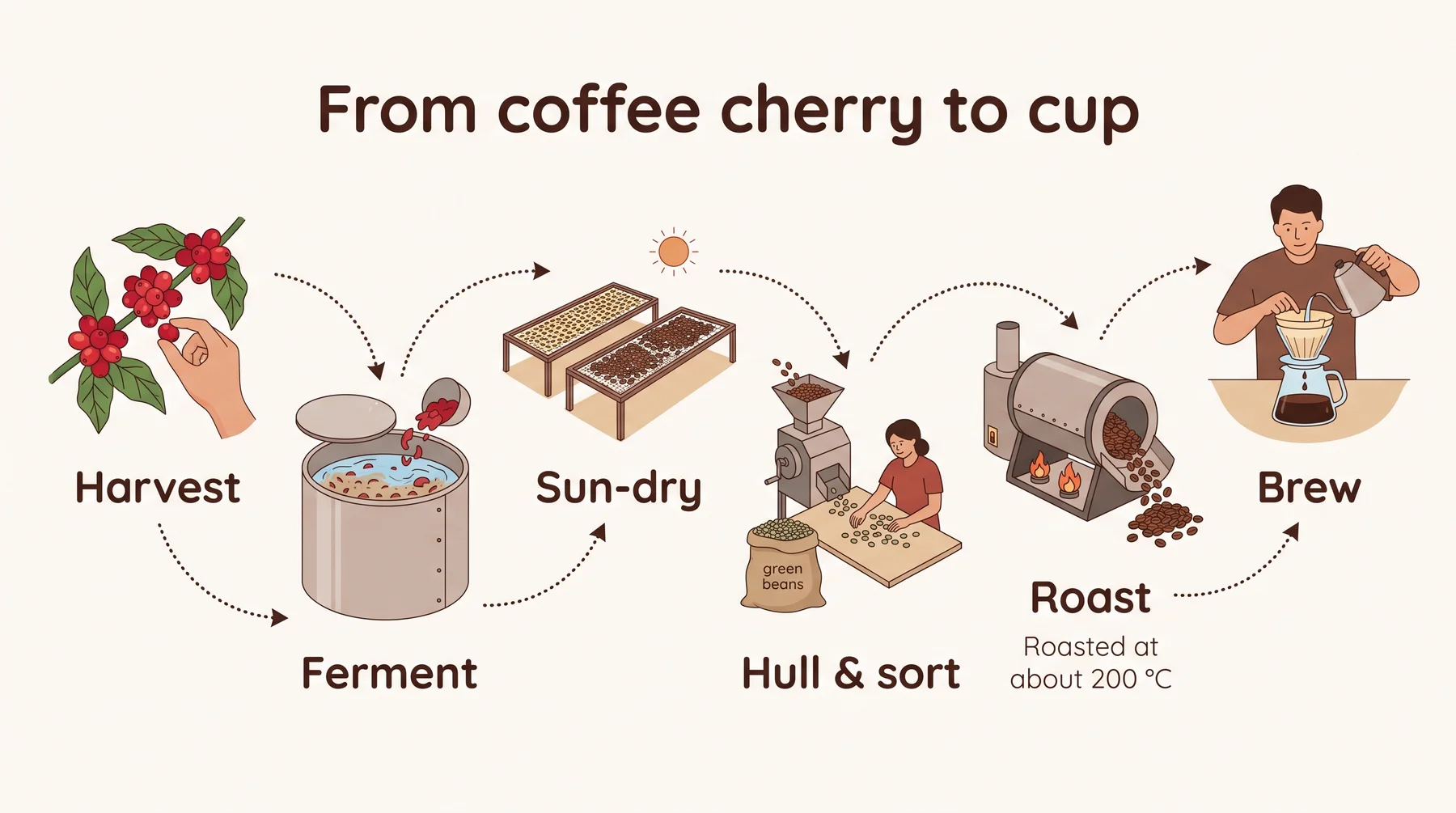
Prompt: "A clean educational infographic titled "From coffee cherry to cup", landscape layout on an off-white background. Six stages left to right joined by a curved dotted arrow: ripe red cherries on the branch, depulping and fermentation in a tank, beans drying on raised beds in the sun, hulling and sorting green beans, roasting in a drum roaster, pour-over brewing into a glass carafe. Label each stage with one short phrase in dark brown sans-serif: "Harvest", "Ferment", "Sun-dry", "Hull & sort", "Roast", "Brew". Under the roasting stage add a small note: "Roasted at about 200 °C". Flat vector illustration, warm browns and greens, plenty of white space, every label large enough to read at a glance."
All six labels and the roasting note came back spelled correctly, and each illustration matches its stage, down to a sack of green beans at the hulling step. The weak spot is the connecting arrows: between the first stages they double back instead of reading cleanly left to right. If the flow matters, ask for "one straight arrow between each pair of stages".
4. An 8:1 website banner without stretched edges
Nano Banana 2.1 adds 1:4, 4:1, 1:8 and 8:1, and Google says the extreme formats no longer show the tiling artifacts of the previous model. Hero banners, shop headers and video channel art are the obvious uses. At 2K an 8:1 image is 5856×704, so the whole frame has to hold up across almost six thousand pixels.
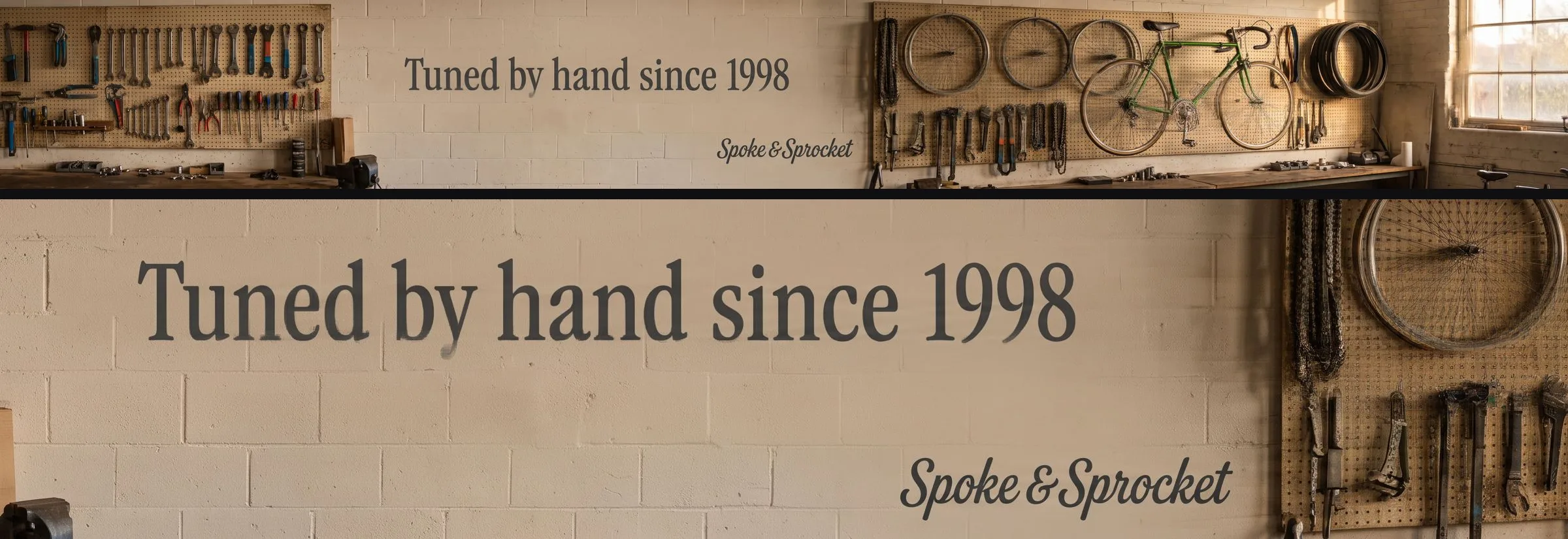
Prompt (second attempt): "An 8:1 website hero banner for a neighbourhood bicycle repair workshop called Spoke & Sprocket. A long pegboard wall runs the full width of the frame, hung with wrenches, spare wheels, chains and a vintage green road bike; warm late-afternoon light comes in from a window at the far right. On the plain wall space left of centre, place the text "Tuned by hand since 1998" in large charcoal serif lettering whose cap height is about one fifth of the banner height, with a small "Spoke & Sprocket" wordmark beneath it. Calm, photographic, no clutter at the edges."
The scene itself was coherent edge to edge on both attempts. The text was not: on the first attempt we asked only for "thin charcoal serif lettering", the letters came out small, and the word "since" was garbled. That matches the model card's warning about small text. Giving the lettering an explicit size, a fifth of the banner height, fixed it; the crop under the banner shows the second attempt at full resolution.
5. A 1:4 vertical story that reads from top to bottom
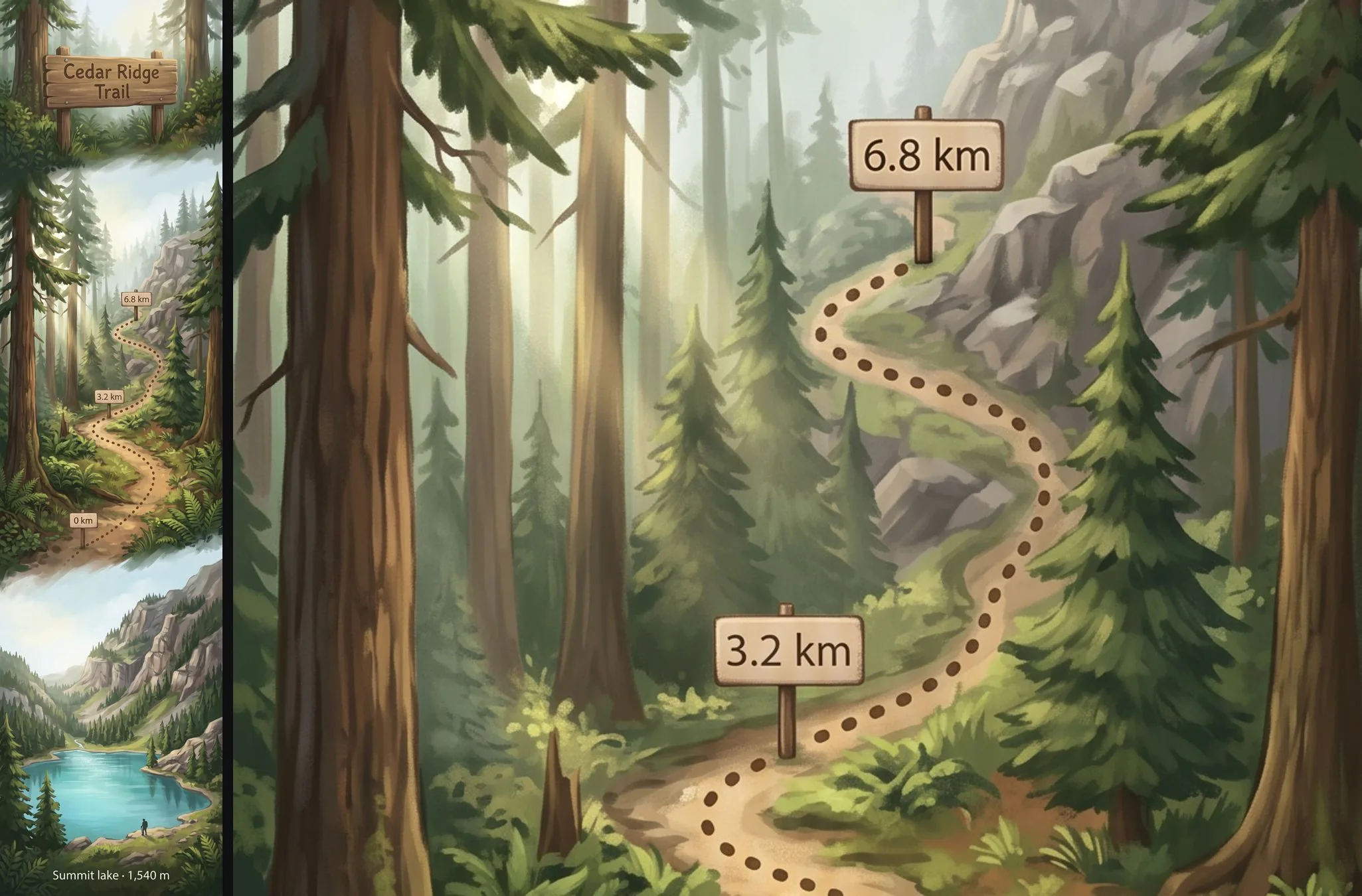
The tall formats suit phone stories, step-by-step guides and long social posts, where the eye travels down a single column. We asked Nano Banana 2.1 for a trail guide with a sign at the top, distance markers in the middle and a caption at the bottom, to see whether labels stay in order over a frame four times taller than it is wide.
Prompt: "A tall 1:4 vertical trail guide for a mobile story. Top: a wooden trailhead sign reading "Cedar Ridge Trail". Middle: a winding dotted path climbing through a cedar forest with three small markers labelled "0 km", "3.2 km" and "6.8 km". Bottom: a calm turquoise lake below the summit with a tiny hiker silhouette and the caption "Summit lake · 1,540 m". Soft painterly illustration, morning mist, consistent perspective from top to bottom, labels crisp and readable."
Every label is correct and in the right order, and the 2K tier delivered 1024×4128. Nano Banana 2.1 composed the frame as three stacked vignettes joined by mist rather than one continuous climb; for a story that is fine, for a single panorama ask for "one continuous scene with no breaks".
6. Swap one object and leave the rest of the photo alone
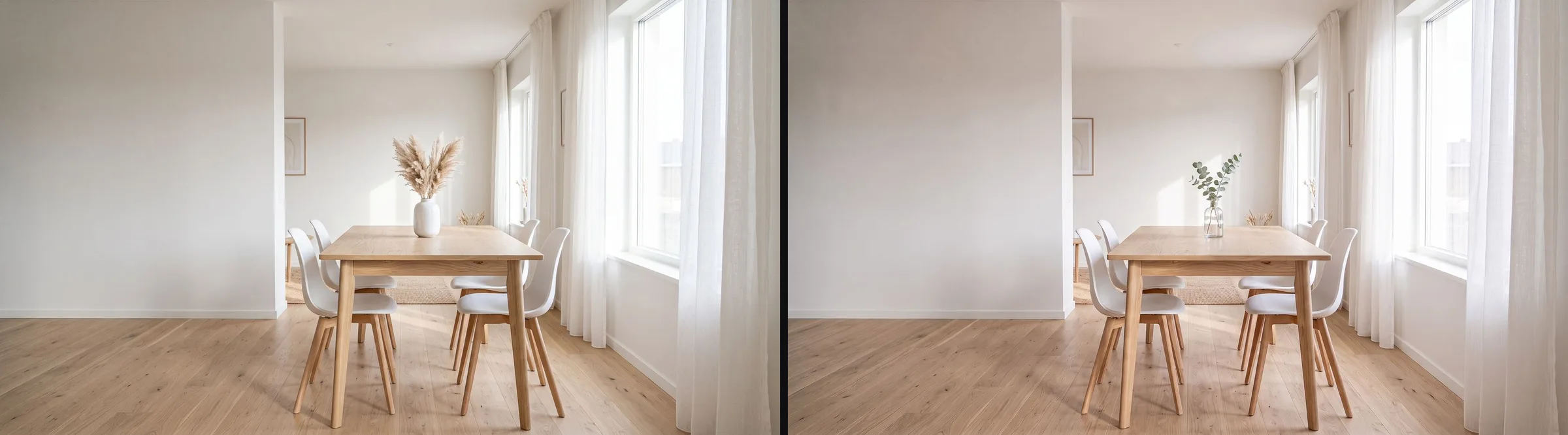
Interior shots, product scenes and listings often need one prop changed while the light, the furniture and the camera stay exactly as they were. We used the Nano Banana 2.1 dining room image on this page as the reference and asked for a single swap.
Prompt: "Replace the white ceramic vase with dried pampas grass on the dining table with a small clear glass bottle holding a single sprig of eucalyptus. Keep the table, the four chairs, the window, the curtains, the floor, the light and the camera angle exactly as they are, and match the bottle's shadow and reflections to the existing daylight."
Nano Banana 2.1 replaced the vase and left the room untouched: the chairs, the curtains, the floor boards and the framed picture on the back wall line up with the original. It put three or four sprigs in the bottle instead of one, a small liberty that is easy to tighten with "exactly one stem".
7. Circle a spot and tell Nano Banana 2.1 what goes there
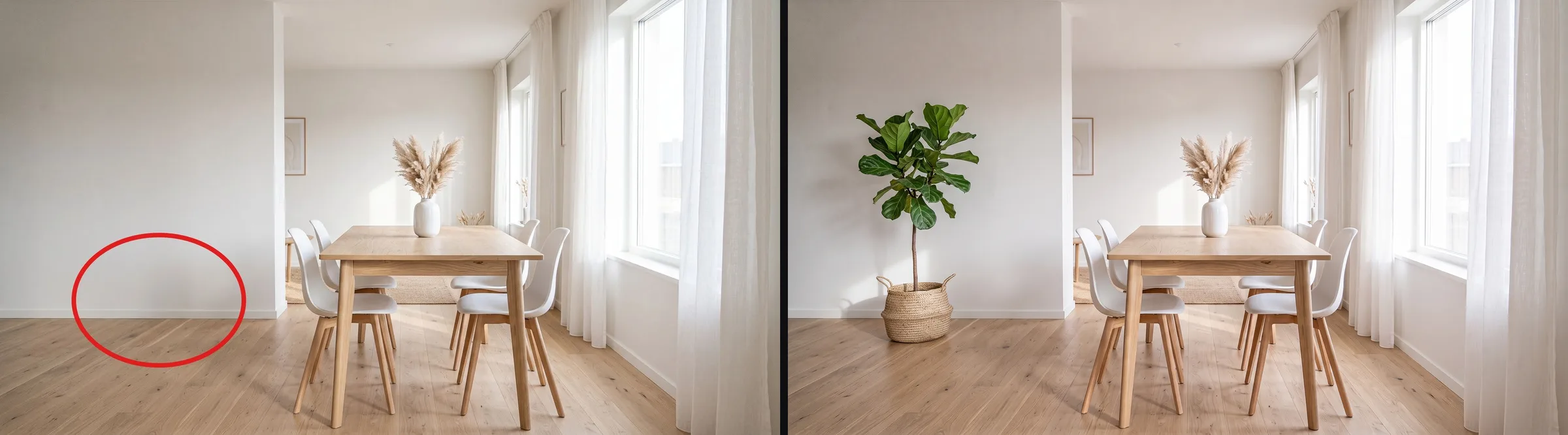
Describing a location in words ("the empty floor left of the table, near the wall") is slow and ambiguous. Drawing on the image is faster: we drew a red circle on the same dining room in an image editor and sent that marked-up image as the reference. Nano Banana 2.1 has no separate mask parameter; the circle is just part of the picture.
Prompt: "Inside the area circled in red, add a tall fiddle-leaf fig in a woven seagrass basket standing on the floor. Match its lighting and shadow to the rest of the room, remove the red circle, and leave everything outside the circle unchanged."
The plant landed inside the circle, the circle itself is gone, and the vase, the table and the window are exactly as before. This is the quickest way to place something precisely with Nano Banana 2.1: mark it in red, say "inside the red circle", and ask for the mark to be removed.
8. Product photography, then merge a logo into it
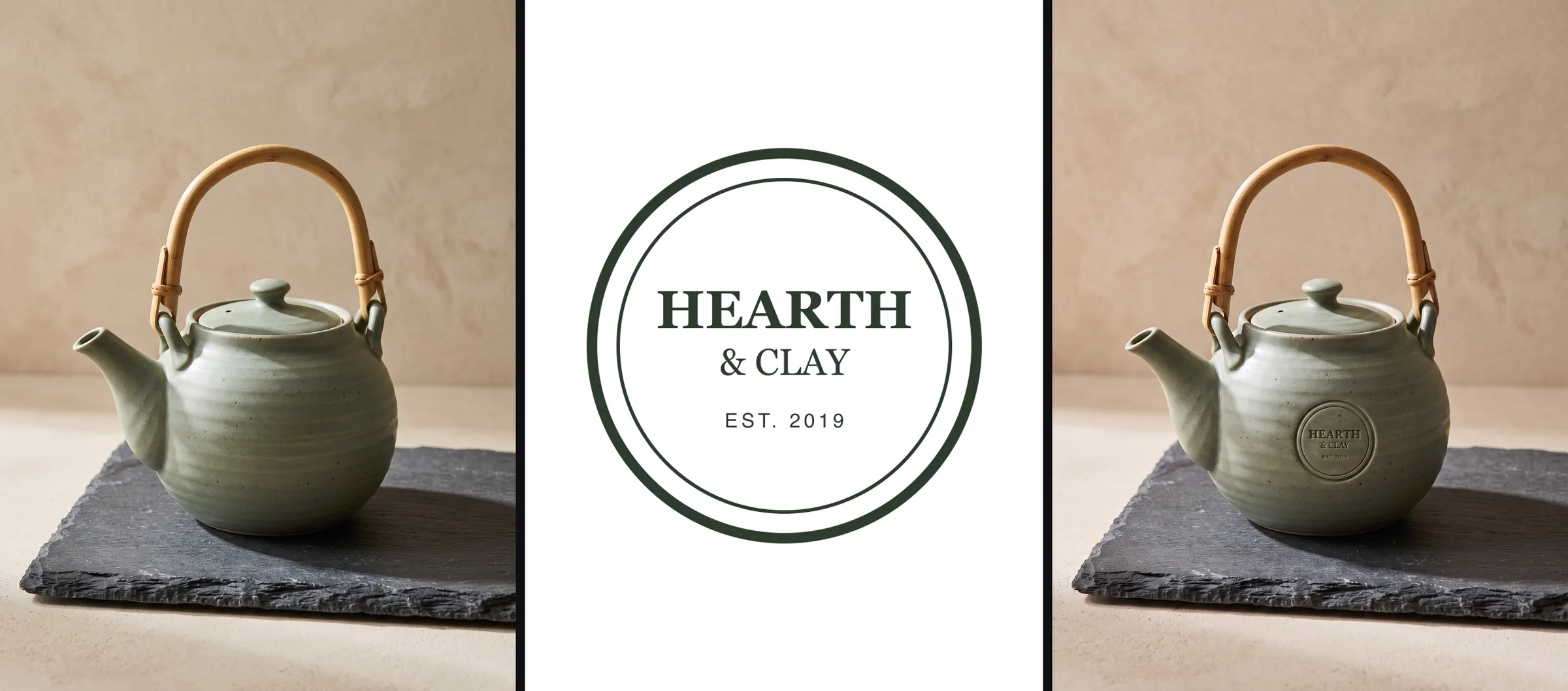
For e-commerce the useful pattern is two steps: a clean product shot, then variants made by merging other images into it. First Nano Banana 2.1 made the product photograph from a prompt written as a full scene, with the light source, shadow direction, background colour and camera angle all stated: "A studio product photograph of a hand-thrown matte sage-green ceramic teapot with a curved bamboo handle, standing on a dark slate slab. Soft window light from the left casts a long gentle shadow to the right; the background is a warm sand-coloured plaster wall. Camera slightly above the teapot at about 20 degrees, sharp focus on the glaze texture and the small throwing rings on the body."
Then we sent that photograph plus a logo we drew ourselves as two reference images. Prompt: "Take the sage-green teapot from the first image. Add the round HEARTH & CLAY logo from the second image to the front of the teapot body as a small stamp pressed into the clay, in a slightly darker green, following the curve of the pot. Keep the teapot's shape, glaze texture, bamboo handle, the slate slab, the lighting and the background exactly unchanged."
Nano Banana 2.1 pressed the logo into the clay with HEARTH, & CLAY and EST. 2019 all legible, curved it with the pot, and changed nothing else: the handle, the throwing rings, the slate and the shadow match the original shot. This is the workflow for SKU colour variants and co-branded mock-ups.
9. Build an image over three rounds of edits
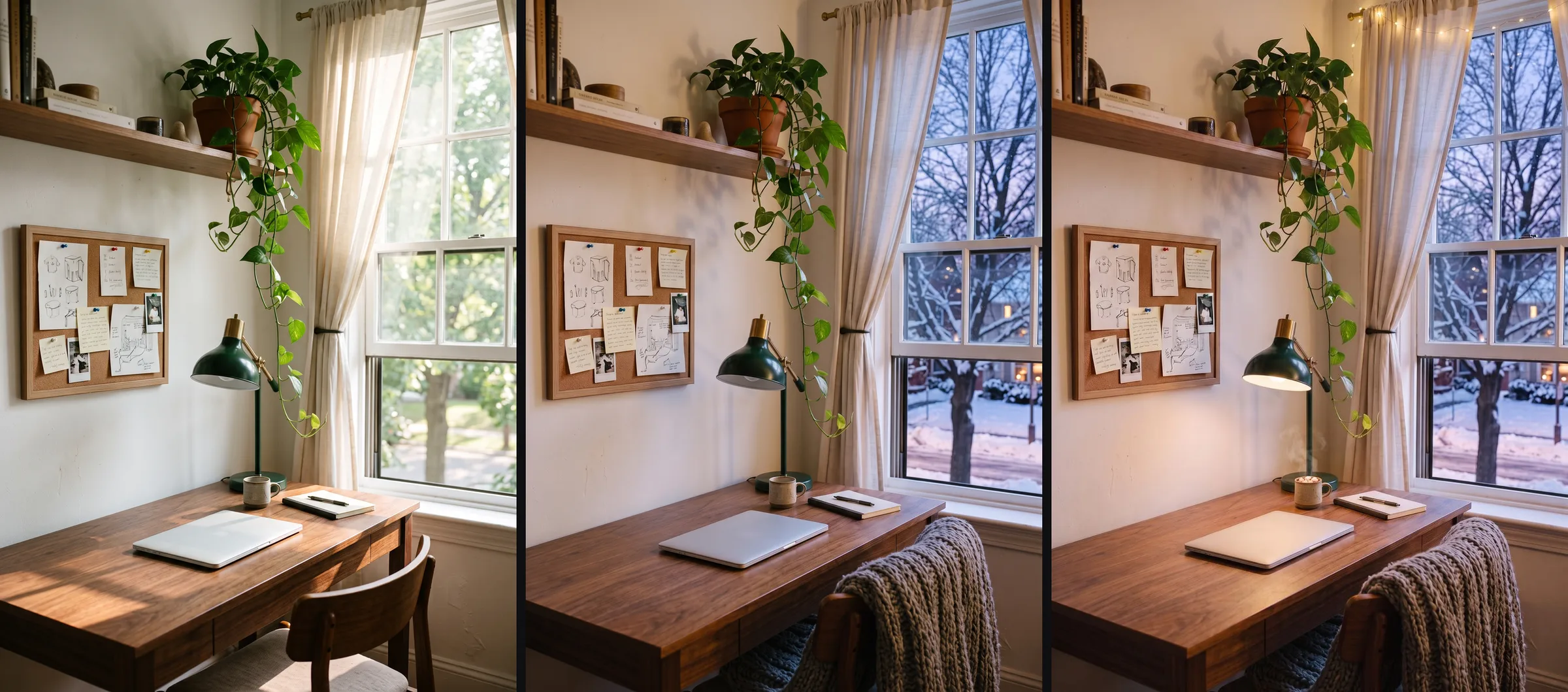
Instead of one 300-word prompt, you can start simple and add to the image round by round, passing each result back as the next reference. On our API each round is a separate request: the previous output URL goes in as image_url. Round one asked Nano Banana 2.1 for a sunlit home-office nook with a walnut desk, a green lamp switched off and a plain laptop.
Round two: "Keep the room, the furniture, every object and the camera angle exactly the same, and keep the laptop lid plain with no logo. Change the view through the window to a snowy winter street at dusk, and drape a chunky knitted grey blanket over the back of the chair." Round three: "Keep everything from the previous image, including the plain laptop lid with no logo. Add a steaming mug of hot chocolate next to the laptop and a string of warm fairy lights along the top of the window frame, and switch the green desk lamp on so it casts a soft warm pool of light on the desk."
The room stayed put across all three rounds while the season, the blanket, the drink, the fairy lights and the lamp changed on cue. One lesson cost us a re-run: in our first round two, without the "no logo" clause, Nano Banana 2.1 added a logo to a laptop that had none. Restate the constraints that matter in every round; the model does not remember what you asked for earlier, only what the reference image shows.
Prompting rules that held across all nine Nano Banana 2.1 tests
Write scenes in full sentences. Nano Banana 2.1 follows "soft window light from the left casts a long shadow to the right" far better than a pile of keywords like "soft light, shadow, studio".
Put every piece of text in quotes, give it a position and a size, and say how many times it appears. The only text failure in this set came from leaving the size to the model.
For edits, name what changes and then list what stays. "Keep the table, the chairs, the window and the light exactly as they are" is what made the swap, the circle edit and the logo merge come back clean.
Use 2K or 4K for anything with small lettering. Google's own model card says small text is often blurry at 1K, and long paragraphs degrade at any size; add paragraphs in a design tool afterwards.
Iterate with references, and restate constraints each round. Nano Banana 2.1 sees the previous image, not your previous instructions.
When Nano Banana 2.1 on apimodels.app is the wrong choice
If you need the thinking-level setting, Google Search grounding or all 14 reference images that Google's Gemini API offers for Nano Banana 2.1, call Google directly: apimodels.app exposes up to 10 references and does not pass those two options through yet.
If you need a transparent PNG, Nano Banana 2.1 does not produce one; GPT Image 2.5 does. If you need dense small print or a full paragraph of copy inside the image, neither model is dependable at 1K, and GPT Image 2.5 Sunburst holds fine typography better at higher tiers. For a scene that depends on deep world knowledge or exact brand reproduction across five recurring characters, Google still positions Nano Banana Pro as the premium choice.
For everything else in this page, from posters and infographics to swaps, merges and ultra-wide banners, Nano Banana 2.1 did the job on the first or second attempt for $0.036 an image at 2K.
Nano Banana 2.1 vs GPT Image 2.5 at a glance
Both models are on apimodels.app under the same API key, so the choice is about the job, not the account. We ran five of the prompts above on GPT Image 2.5 Sunburst at high quality as well; the full side-by-side, with images, is in the comparison article linked below.
| Nano Banana 2.1 | GPT Image 2.5 (Sunburst, high) | |
|---|---|---|
| Price on apimodels.app, 1K / 2K / 4K | $0.022 / $0.036 / $0.06 | $0.03 / $0.04 / $0.16 |
| Aspect ratios | 15, including 1:4, 4:1, 1:8, 8:1 | 6 (21:9, 16:9, 4:3, 1:1, 3:4, 9:16) |
| Reference images on our API | Up to 10 | Supported (edit endpoint) |
| Transparent PNG | No | Yes, native alpha |
| Our five same-prompt tests | All text correct; kept edit inputs untouched | All text correct; richer lighting, readable background signs |
| Pick it for | Volume work, ultra-wide formats, fast edits | Close-up hero images, fine typography, transparency |
Read the full comparison: Nano Banana 2.1 vs GPT Image 2.5, same prompts side by side → →
About Nano Banana 2.1
Nano Banana 2.1 is an Image Generation API provided by Google. Nano Banana 2.1 is Google's high-efficiency image model for generation and editing. Google positions it as an upgrade in visual quality, prompt adherence, character consistency, text rendering and multi-reference support, with output up to 4K. On apimodels.app it is the model id nano-banana-2-1 on the unified image endpoint, callable with one API key. Text-to-image and editing share that one model: send only a prompt (up to 20,000 characters) to generate, or attach reference images — image for one, image_urls for up to 10 (URL or base64; JPEG, PNG or WebP) — and describe the change or the combination you want. Fifteen aspect ratios are accepted: auto (the default), 1:1, 2:3, 3:2, 3:4, 4:3, 4:5, 5:4, 9:16, 16:9 and 21:9, plus 1:4, 4:1, 1:8 and 8:1 for banners and tall strips. resolution picks the tier and the price: $0.022 at 1K (the default), $0.036 at 2K and $0.06 at 4K per image. Reference images cost nothing extra and failed calls are never charged. That is a lower per-image price than Nano Banana 2 at every tier here — gemini-3.1-flash-image is $0.06 at 1K/2K and $0.10 at 4K, nanobanana2 is $0.05 and $0.08. In our first test on 2026-10-07, a 16:9 request at 1K came back in about 20 seconds at 1376×768, with the sign text "NANO BANANA 2.1" spelled correctly. Calls are asynchronous: create a task, then poll it or pass a callback_url. Through APIMODELS platform, you can access this model via a unified API with transparent pay-as-you-go pricing. Current pricing: 1K: $0.022, 2K: $0.036, 4K: $0.06.
Related model: gemini-3.1-flash-image — Nano Banana 2 (Gemini 3.1 Flash Image, GA) — adds a 512 tier at $0.04; $0.06 at 1K/2K, $0.10 at 4K
Related model: gpt-image-2 — OpenAI's image model — up to 16 reference images per edit, 1K $0.025, 2K $0.03, 4K $0.05
Related model: nanobananapro — Nano Banana Pro (Gemini 3 Pro Image) — the highest fidelity and text-rendering ceiling, $0.068 at 1K/2K, $0.13 at 4K
Key Features
- 1K $0.022 · 2K $0.036 · 4K $0.06 -- Priced per image by resolution, 1K by default; reference images cost nothing extra and failed calls are not charged
- Generate or Edit, One Model -- Send a prompt alone for text-to-image, or add image or image_urls (up to 10 references) to edit or combine
- 15 Aspect Ratios -- auto, 1:1 through 21:9, plus 1:4, 4:1, 1:8 and 8:1 for banners and tall strips
- Text Inside the Image -- Google lists text rendering among the 2.1 upgrades; in our first test the sign "NANO BANANA 2.1" came out spelled correctly
- Async, About 20 s at 1K -- Create a task, then poll it or receive a callback_url webhook; a 16:9 image at 1K took about 20 seconds in testing
Examples by scenario
Use Cases
E-commerce Product Images
Generate high-quality product visuals for online stores, ads, and marketing materials.
Social Media Content
Create eye-catching visual content for social platforms to boost engagement and brand visibility.
Game Asset Generation
Produce concept art for characters, scenes, and props to accelerate game development.
Marketing Materials
Design posters, banners, and promotional graphics at a fraction of traditional design costs.
Why APIMODELS
- Unified API -- One API key to access all models, no need to register on multiple platforms
- Transparent Pricing -- Pay-as-you-go with per-call pricing published on every model page, ideal for indie developers and startups
- Instant Access -- Start right after signup; pay by card, PayPal, Alipay or USDT
- Full Documentation -- Detailed API docs with code examples in cURL, Python, and Node.js
Frequently Asked Questions
How much does Nano Banana 2.1 cost?
Nano Banana 2.1 is available through APIMODELS at: 1K: $0.022, 2K: $0.036, 4K: $0.06. Billing is pay-as-you-go — you only pay for what you generate.
What is the difference between APIMODELS and the official Google API?
APIMODELS offers the same Nano Banana 2.1 model through our aggregation platform. We provide a unified API interface so you do not need separate accounts for each provider - one API key to access all models.
How is Nano Banana 2.1 priced at 1K, 2K and 4K?
Per image, set by the resolution field alone: $0.022 at 1K, $0.036 at 2K and $0.06 at 4K. Leave resolution out and you get 1K. Up to 10 reference images ride along at no extra charge, and neither the aspect ratio nor the prompt length moves the price. A failed request costs nothing, so 100 images at 1K come to $2.20 and the same 100 at 4K to $6.00.
How do I call nano-banana-2-1 for text-to-image versus editing?
Both go to POST /v1/images/generations with model set to nano-banana-2-1. A prompt on its own (up to 20,000 characters) generates from scratch. Add image for one reference or image_urls for an array — up to 10 in total, each a URL, data URI or base64 — and the same call becomes an edit or a multi-image composition. The call returns a taskId at once; poll GET /v1/images/generations?task_id=… until state is completed and read resultUrls, or pass a callback_url to be notified.
Nano Banana 2.1, Nano Banana 2 or Nano Banana Pro — which should I use?
On price, Nano Banana 2.1 comes in lower at every tier here: $0.022 / $0.036 / $0.06, against $0.06 at 1K/2K and $0.10 at 4K for gemini-3.1-flash-image (Nano Banana 2, GA) and $0.05 and $0.08 for the nanobanana2 preview channel. Nano Banana Pro (nanobananapro, Gemini 3 Pro Image, $0.068 at 1K/2K and $0.13 at 4K) is the ceiling for fidelity and dense text — pick it when the finished image matters more than the unit price. All of them share the endpoint and the parameters, so comparing them on your own prompts is a one-string change to model.
Which aspect ratios and how many reference images does Nano Banana 2.1 accept?
Fifteen ratios: auto (the default), 1:1, 2:3, 3:2, 3:4, 4:3, 4:5, 5:4, 9:16, 16:9 and 21:9, plus 1:4, 4:1, 1:8 and 8:1 for banners, skyscraper ads and tall strips. Anything else is rejected with a 400 rather than quietly replaced. Reference images go up to 10 per request (image and image_urls counted together), in JPEG, PNG or WebP; an eleventh returns a 400 instead of being dropped.
Does Nano Banana 2.1 really output 4K, and how long does an image take?
Yes — resolution accepts 4K as its top tier, billed at $0.06, alongside 1K and 2K; the exact pixel size follows the aspect ratio you pick. For a measured reference point: our first test on 2026-10-07, 16:9 at 1K, finished in about 20 seconds and came back at 1376×768 with the sign text "NANO BANANA 2.1" spelled correctly. Generation is asynchronous, so give your polling loop a few minutes of headroom rather than a short HTTP timeout, and copy results to your own storage — result files are deleted after 30 days.
What can Nano Banana 2.1 do?
Nano Banana 2.1 supports: Text to Image, Image Editing, Up to 10 References, 15 Aspect Ratios, 1K/2K/4K, $0.022–$0.06/image. See the APIMODELS docs for full parameters and call examples.
Can I use the Nano Banana 2.1 API from any country, including mainland China?
Yes. APIMODELS does not restrict access by country: the site and the API answer requests from anywhere, and apimodels.app and api.apimodels.app are reachable directly from mainland China without a proxy. You call Nano Banana 2.1 with one APIMODELS key, so you do not need a separate account with the model's developer.
What payment methods are supported? Can I pay with PayPal or crypto?
Yes to both. You can top up with a card (Visa, Mastercard and others, through Stripe), PayPal, Alipay, or USDT on TRON (TRC20) or BNB Smart Chain (BEP20). Card, PayPal and Alipay top-ups are credited immediately; USDT is credited once the transfer confirms on-chain. Auto top-up is optional, and a $50 top-up adds a $1 bonus ($3 on a $100 top-up). The balance is in USD and billed per use, with no subscription.
Related models
GPT Image 2.5 prompt examples
See all 238 →Prompts shared by their authors — copy and adapt them. Each one credits its author and links back to the original post.
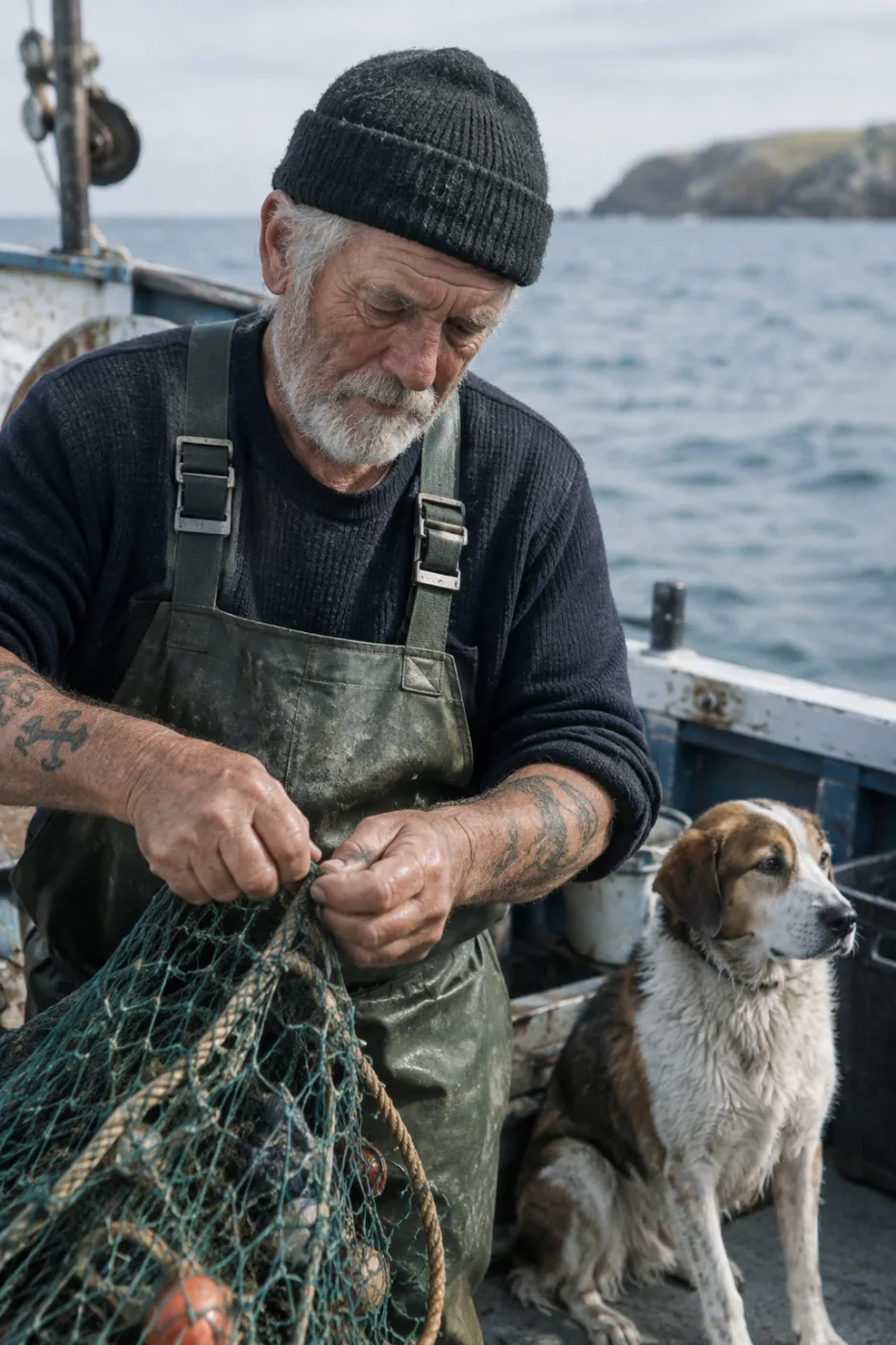
Weathered sailor on a fishing boat
Create a photorealistic candid photograph of an elderly sailor standing on a small fishing boat. He has weathered skin with visible wrinkles…
by OpenAI
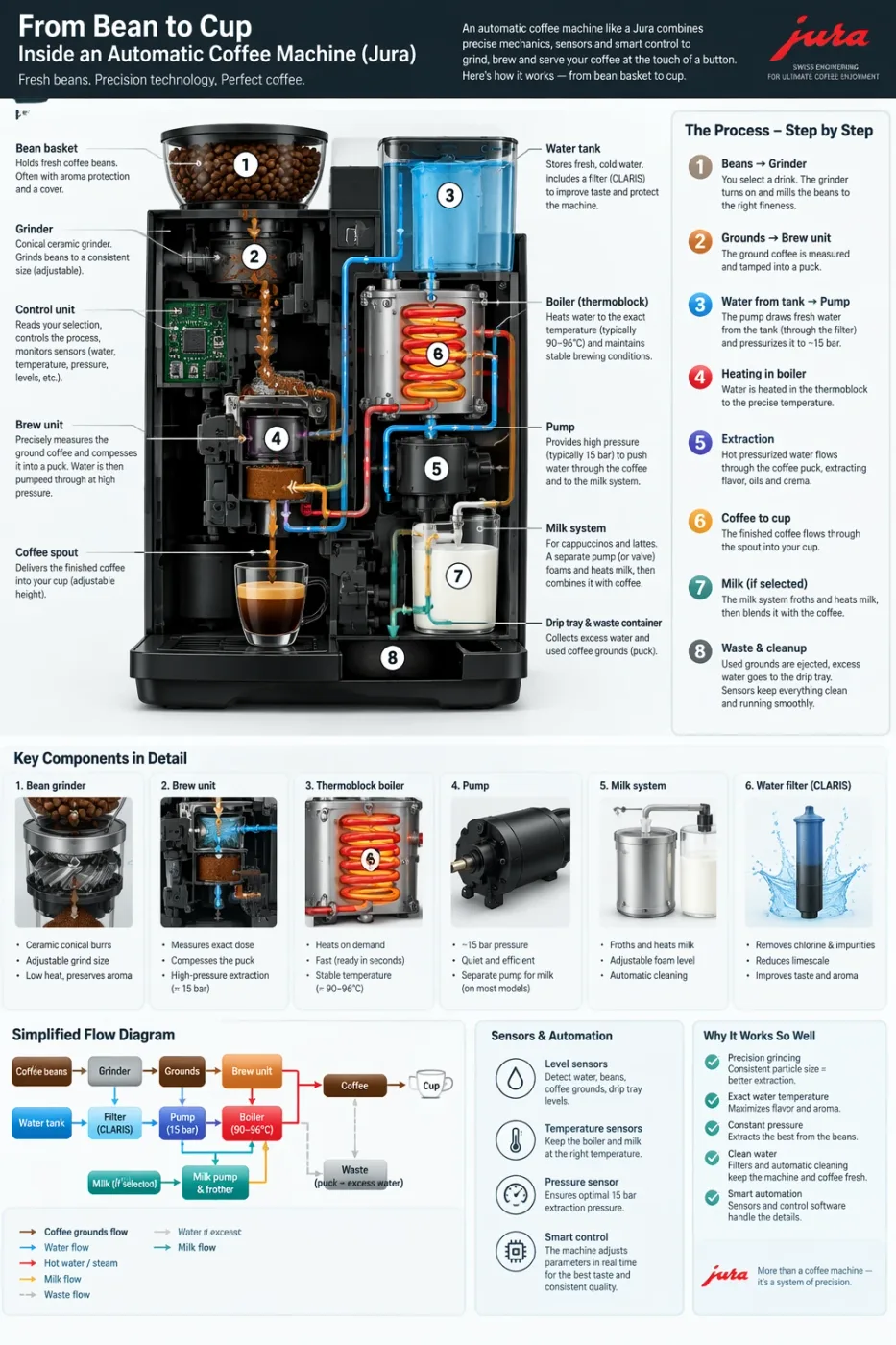
Automatic coffee machine workflow infographic
Create a detailed Infographic of the functioning and flow of an automatic coffee machine like a Jura. From bean basket, to grinding, to scal…
by OpenAI
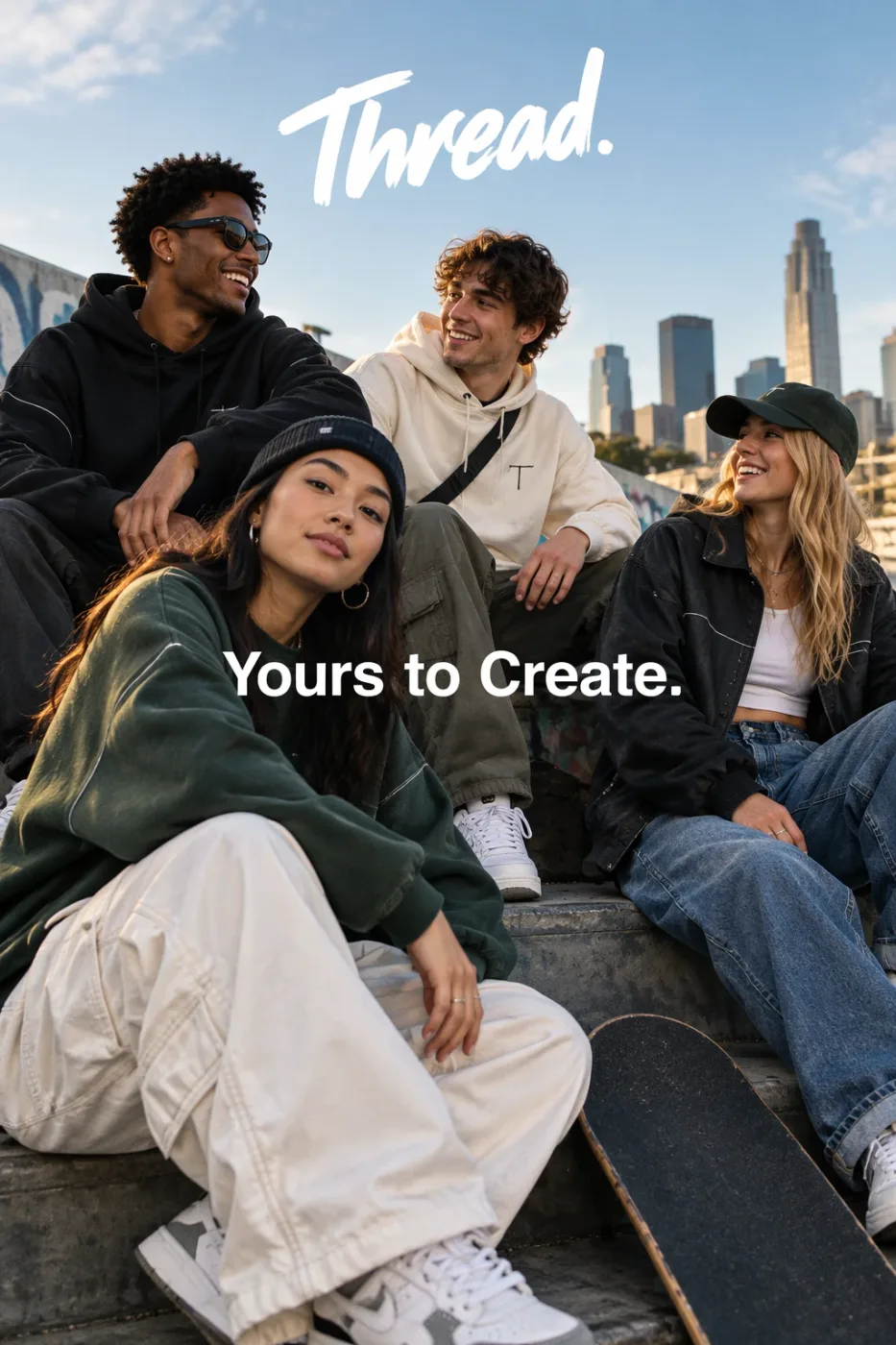
Thread streetwear ad with exact typography
Give me a cool in culture ad / fashion shot for a brand called Thread. It's a hip young street brand. The ad shows a group of friends hangin…
by OpenAI
Need prompts?
We curate copy-ready prompt libraries — every entry shows its full text and a sample result, ready to adapt.
Related reading
How to get access, regional availability, and how this model compares with its alternatives.
Comparisons
How this model stacks up against the alternatives on results, price and features.