
Blog · 2026-11-06
GPT Image 2.6 Flare vs Sunburst: Same Price at 1K, Similar Speed, and Sunburst Packs in More Detail
Model pages: GPT Image 2.6 Flare API · GPT Image 2.6 Sunburst API — pricing, specs and the playground
GPT Image 2.6 Flare or Sunburst? In our same-prompt tests the two tiers cost exactly the same at 1K and 2K, 2 cents for a 1K default-quality image, and took about half a minute each at 1K, with equally accurate text and edits. The difference is the picture: Sunburst adds more detail of its own, suiting scenes and portraits with a story; Flare stays cleaner with more space, suiting product shots and backgrounds for added text.
OpenAI's GPT Image 2.6, released in November, comes in two tiers: Flare, built for speed and everyday images, and Sunburst, built for detail — OpenAI says it spends more effort on each image and holds up better over many rounds of editing. Both take exactly the same parameters, GIFs, SVG and circle-to-edit included.
So the practical questions are: does Sunburst cost more, is it slower, and how do the pictures actually differ? We gave both tiers the same prompts: a richly detailed old library, a street portrait of an old fisherman, a five-step infographic and two rounds of edits to the same photo.
A word on who we are: we run apimodels.app, a platform where one API key calls both GPT Image 2.6 tiers alongside other image, video, audio and language models. Every image below was generated there on 5 and 6 November 2026, at 1K and default quality, and is shown exactly as it came back.
The short version
Same price at 1K, and similar speed. The two tiers are priced the same at 1K and 2K: 2 cents for a 1K default-quality image on either, and 2 cents for a 1K default-quality edit with one reference photo; only at 4K medium and high quality does Sunburst cost more. On speed, both took 24 to 30 seconds per image in these tests; we did not see Flare come out clearly faster.
In the picture, Sunburst adds more detail of its own: the same library with more readers at more tables; the same fisherman in yellow oilskin overalls with lobster pots stacked beside him; the kettle in the infographic's first step drawn on its heating base, closer to a real pour-over routine. Lettering was equally accurate and both edit chains equally dependable. So if a fuller picture matters, defaulting to Sunburst costs nothing extra at 1K and 2K; if you want a cleaner, sparer image, use Flare.
How they differ, in plain terms
- Price: plain images are priced per image, the same on both tiers at 1K and 2K (2 cents for a 1K default-quality image, 3.5 cents at 2K); at 4K medium and high, Sunburst is 8.5 and 16 cents against Flare's 4.5 and 8. Requests still billed per token, such as GIFs and markup edits, use the same rates on both tiers, and SVG is a flat 3.15 cents on both.
- Parameters: identical — 1K, 2K and 4K, exact pixel sizes, up to 16 reference photos, GIFs, SVG, markup edits and the reasoning setting.
- Positioning: OpenAI describes Flare as faster for everyday volume and Sunburst as spending more effort per image, with more detail and steadier long edit chains.
- What we measured: identical prices at 1K, similar speed in these tests, and noticeably fuller pictures from Sunburst.
An old library: Sunburst fills it with people and tables
The first job tests detail: a vast old library seen from a high balcony, towering wooden shelves packed with books, a spiral staircase, brass reading lamps, a few tiny readers at long tables, and dust floating in shafts of window light — "extremely detailed".
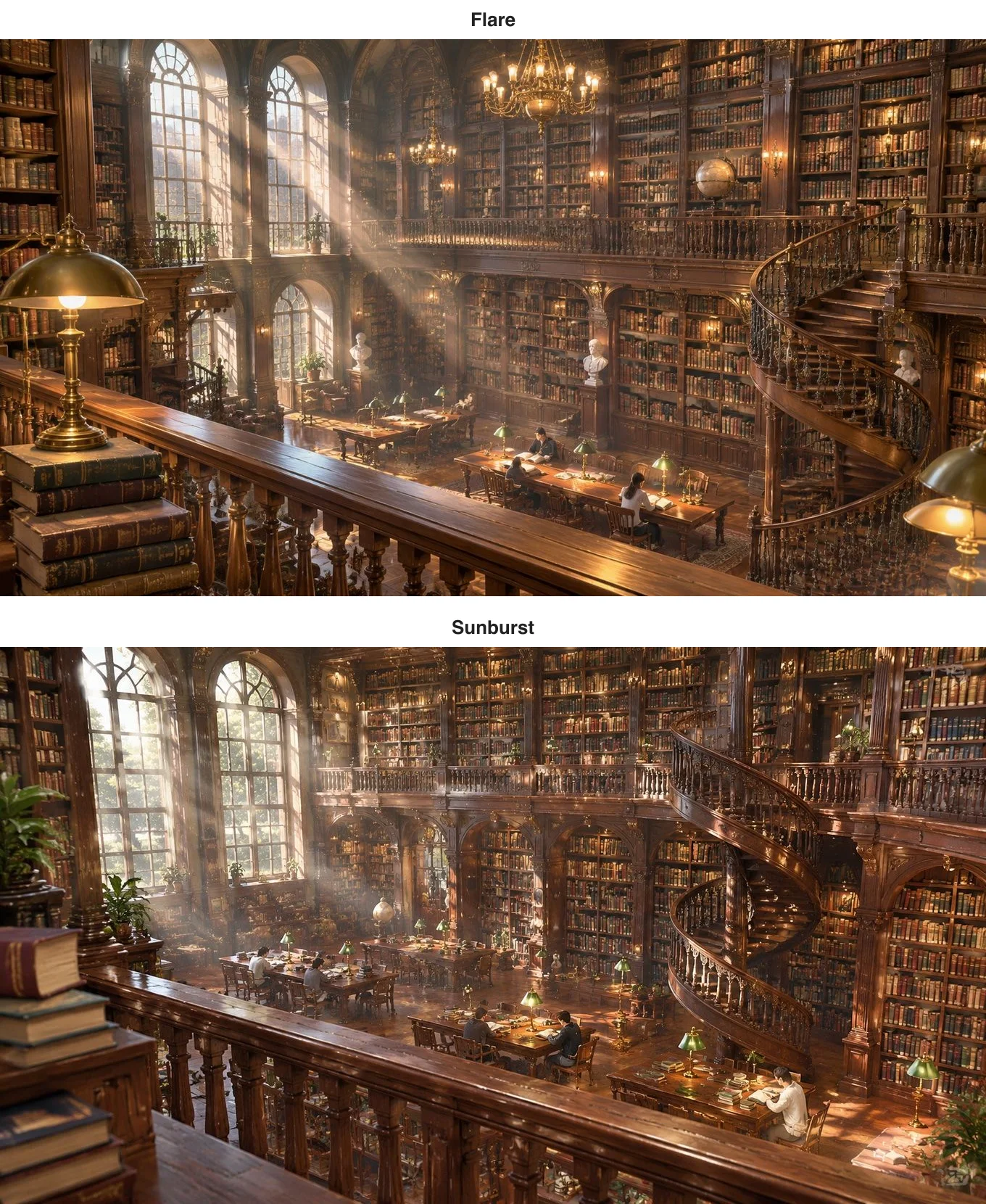
Either would work as game concept art or a poster background. Flare's composition is more dramatic — a big brass lamp and a stack of books in the foreground, a large chandelier above, bold shafts of light — but only four or five readers. Sunburst follows the prompt more faithfully: a fuller spiral staircase, three long tables below with six or seven readers, green-shaded lamps and open books on every table, and crisper book spines. Flare took 24 seconds, Sunburst 27, and both cost 2 cents.
A portrait of an old fisherman: Sunburst adds the gear
A photographic portrait: an elderly fisherman with a white beard mending a net on a harbour wall at golden hour, his weathered hands sharp, boats softly blurred behind him, a 35mm film look.
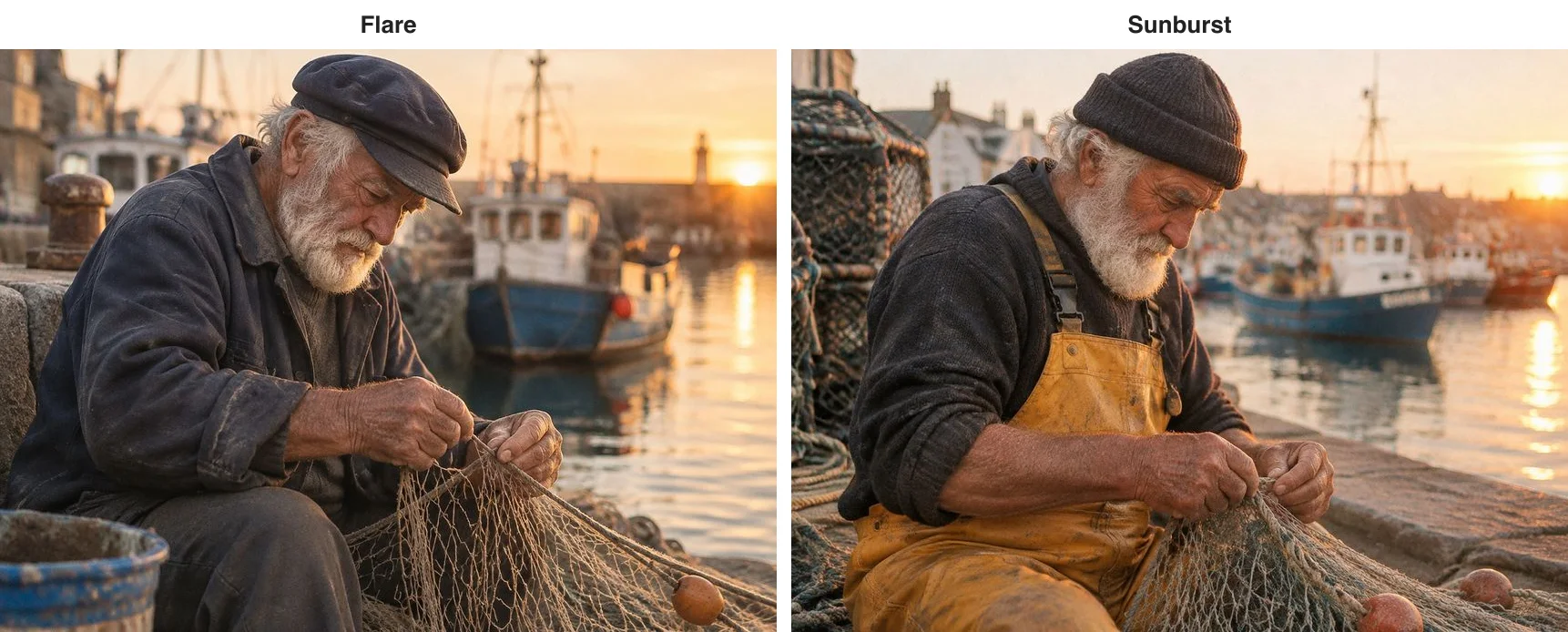
Both are convincing. Flare keeps it simple: dark jacket, flat cap, sunset and a lighthouse. Sunburst tells more of a story — yellow oilskin overalls, a knitted hat, a stack of lobster pots and coiled rope behind him, and harbour-town houses in the background — someone who clearly does this for a living. Sunburst took 27 seconds; Flare took 66 on the same prompt, the one clearly slow result in the batch, so "Flare is faster" did not show up in our runs.
An infographic: same accuracy, Sunburst's drawings know the craft
A five-step pour-over infographic titled Pour-Over Coffee in 5 Steps, with a small illustration and a one-line caption per step and numbers throughout — 93°C, 15 g, 30 g, 30 seconds, 250 g.
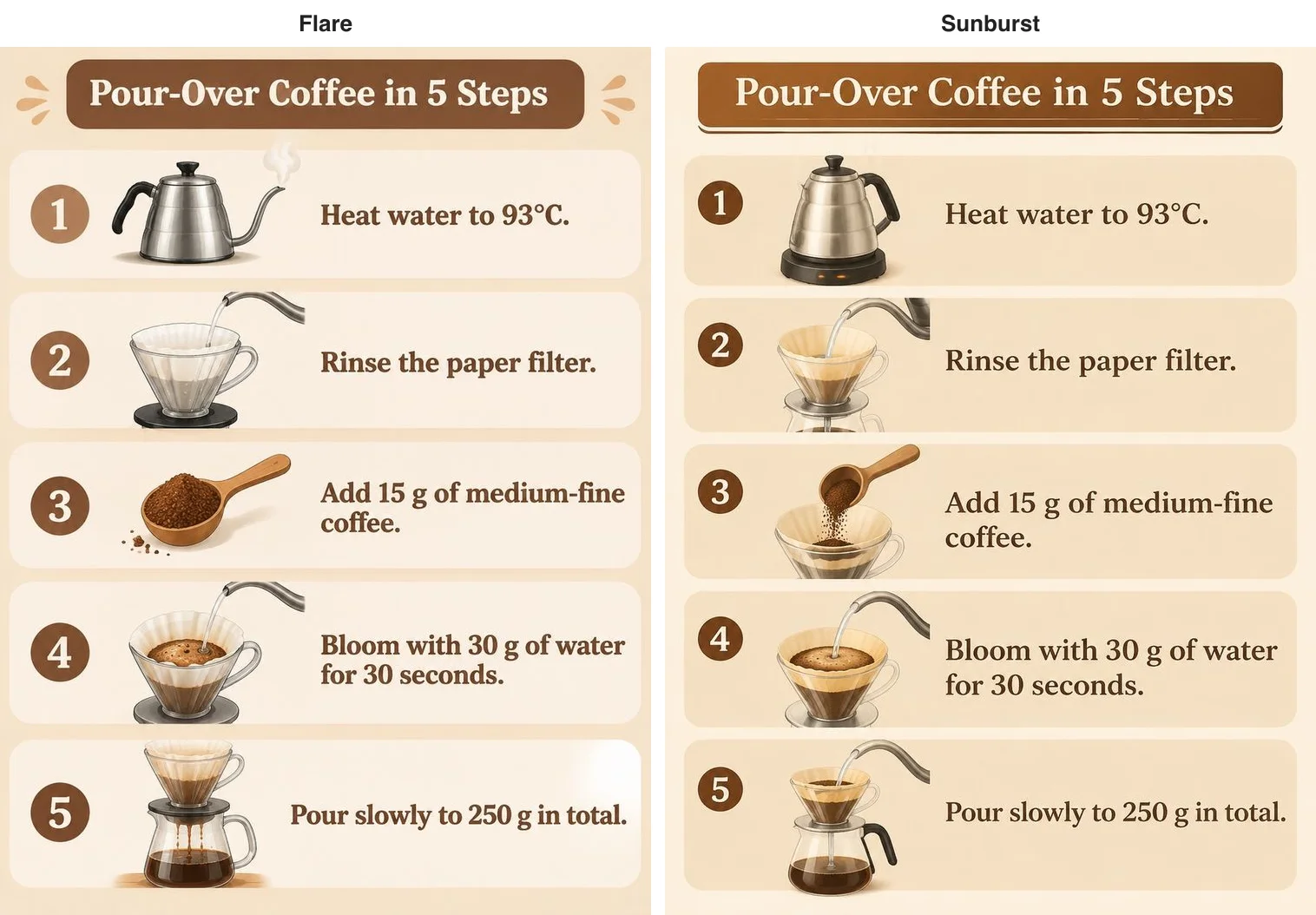
The title, five captions and all the numbers are right on both, in almost the same layout. The difference is the drawings. Flare's step 1 is a plain gooseneck kettle and step 3 a scoop of grounds; Sunburst's step 1 is an electric kettle on its heating base — exactly what you need to hit 93°C — and step 3 shows the grounds being poured into the dripper. Those details follow the real process more closely, which is where Sunburst's extra effort shows. Flare took 33 seconds, Sunburst 28.
Two rounds of edits: equally dependable
For editing we used one base image: a woman with short curly red hair, round glasses and a yellow raincoat, holding a paper coffee cup, in denim shorts and white socks. Round one changed only the background to a snowy mountain village at dusk; round two, working from round one, had her wave at the camera with her free hand. Each tier ran its own full edit chain.
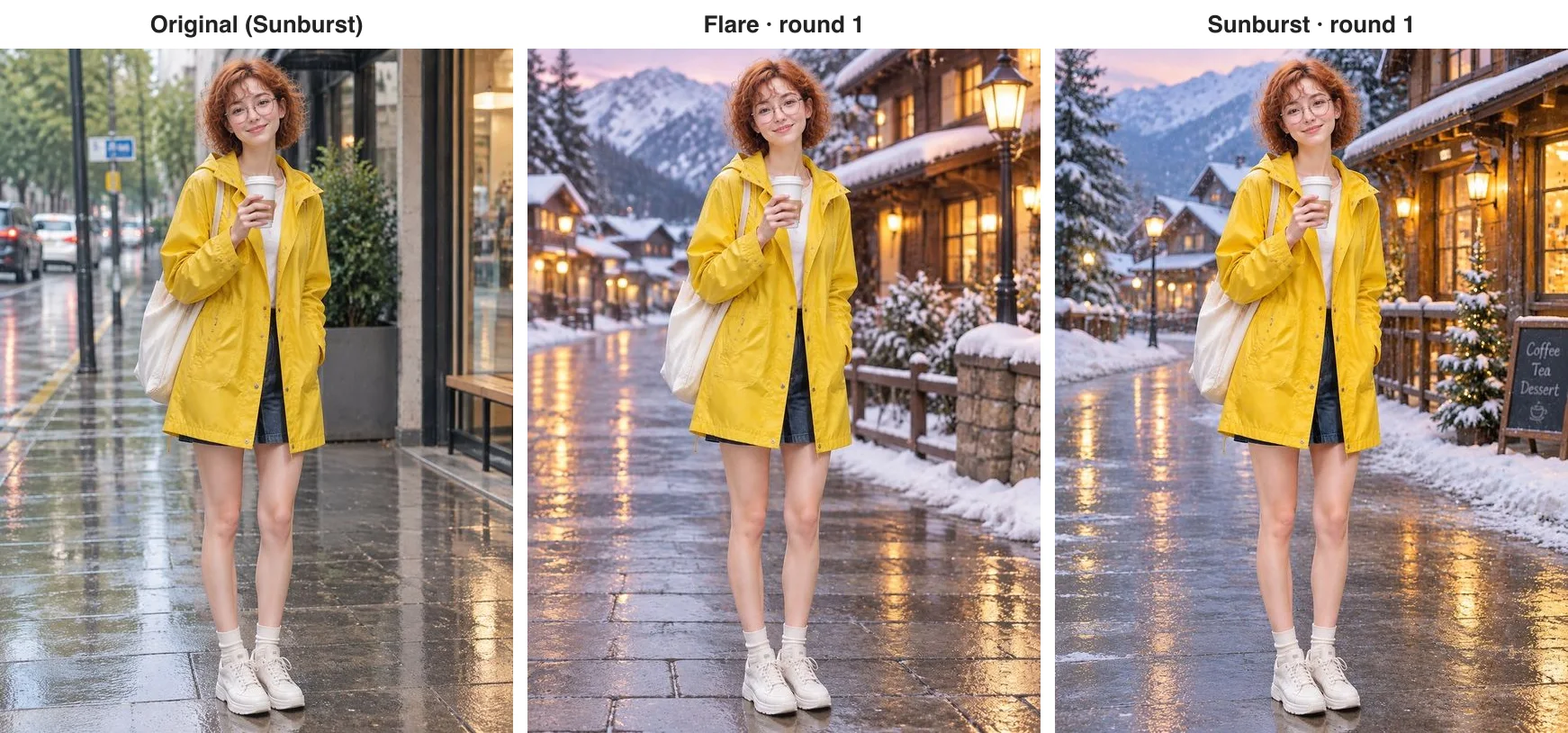
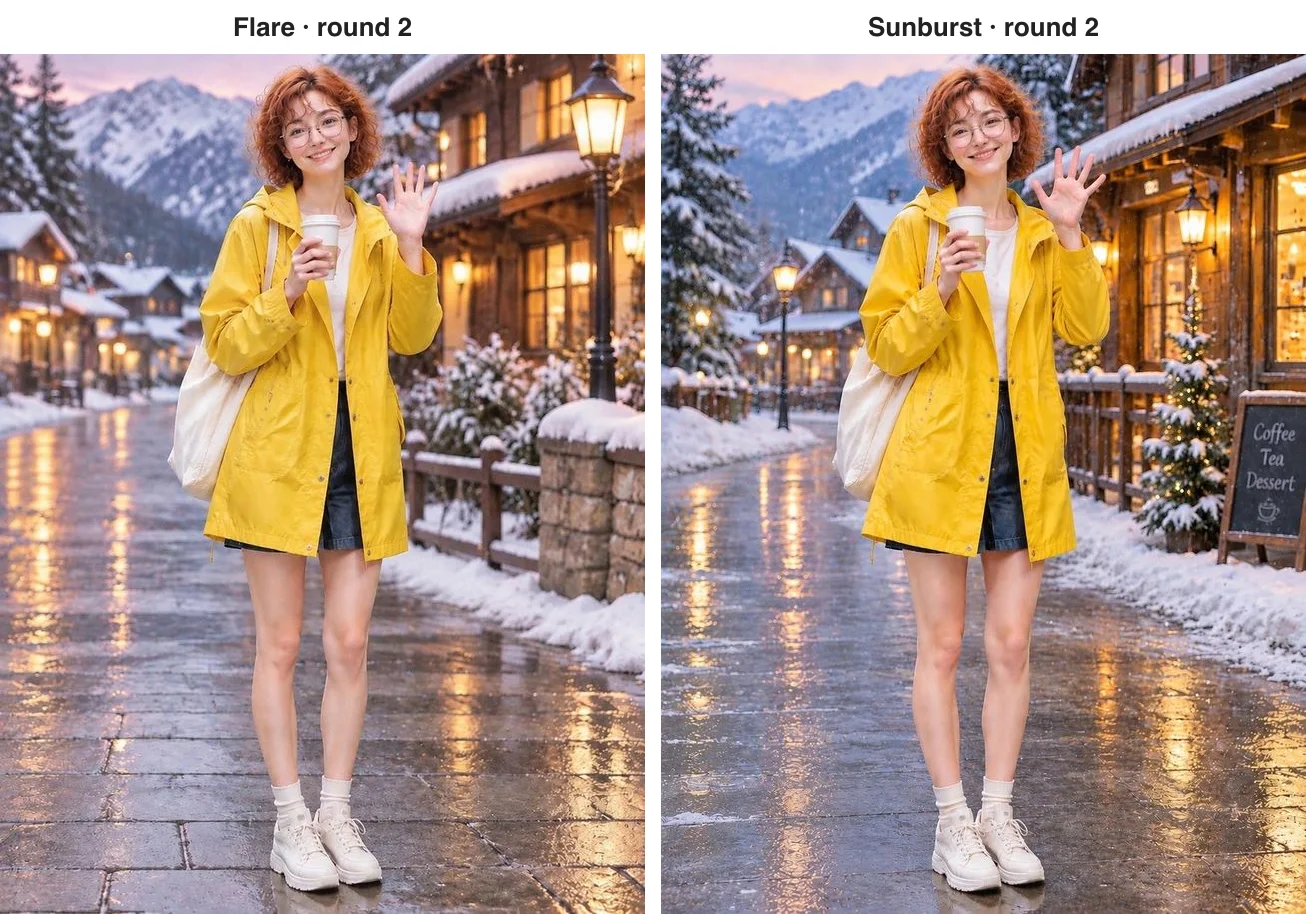
Neither chain went wrong: face, curls, glasses, raincoat, tote, cup, denim shorts, white socks and white sneakers all stayed exactly as they were, and in round two both simply raised the free hand. In the background, Flare drew a street lamp, a stone wall and a longer street; Sunburst, as usual, added a little more — a lit Christmas tree and a chalkboard reading Coffee, Tea, Dessert. Each round took about 26 to 30 seconds, and at default quality a 1K edit with a reference photo is 2 cents, the same on both tiers. OpenAI says Sunburst is steadier over longer chains; we ran two rounds, and neither tier slipped.
The new tricks both tiers share
GIFs, SVG vectors and circle-to-edit are new in the GPT Image 2.6 generation, and both Flare and Sunburst support them. The waving cat below is an eight-frame GIF Flare made from one sentence; for more examples and what this generation adds, see our GPT Image 2.6 vs 2.5 comparison.

What it costs and how long it takes
From 6 November both tiers price plain PNG, JPEG and WebP images per image: 1, 2 and 3 cents at 1K for low, medium and high quality, and 3, 3.5 and 4.5 cents at 2K, the same on either tier. At 4K, low is 3 cents on both, while medium and high are 4.5 and 8 cents on Flare and 8.5 and 16 cents on Sunburst. The 1K default-quality images in this batch are 2 cents each on either tier — $2 per hundred — and edits that pass a size or resolution follow the same table, so a 1K default-quality edit with one reference photo is also 2 cents. Animated GIFs, markup edits, transparent backgrounds and edits that keep the source image's size are still billed per token at 10% below OpenAI's list price, at the same rates on both tiers, and SVG is a flat 3.15 cents on both. Failed requests are not charged. We ran these tests on 5 and 6 November, while 2.6 was still billed per token; the prices above are the per-image prices in force from 6 November.
On speed, Flare took 24 to 33 seconds per image in this batch, apart from one 66-second portrait, and Sunburst 27 to 30. OpenAI positions Flare as the faster tier, but at 1K and default quality we did not measure a clear gap; it may show up at larger sizes or on more complex scenes.
Which should you use?
- Rich, detailed pictures (scenes, game concept art, portraits with a story): Sunburst, at no extra cost at 1K and 2K.
- Clean images with space (product shots, backgrounds for added text): Flare, which adds less of its own.
- Many rounds of revision on one image: Sunburst, as OpenAI positions it; over our two rounds both held up.
- High volume and time-sensitive work: either; OpenAI says Flare is faster, though we saw no clear gap at 1K.
- Lettering and infographics: equally accurate; choose by how full you want the picture.
On apimodels.app both tiers run on one API key and one endpoint — set the model to gpt-image-2.6-flare or gpt-image-2.6-sunburst and leave everything else as it is. The parameters are in the GPT Image 2.6 docs.
Related models
- GPT Image 2.6 Flare: the everyday tier of OpenAI's newest generation, with GIF and SVG output and circle-to-edit.
- GPT Image 2.6 Sunburst: the detail tier of the same generation, fuller pictures and steadier for repeated edits, the same price as Flare at 1K and 2K.
- GPT Image 2.5 Flare and GPT Image 2.5 Sunburst: the previous generation's two tiers, priced per image.
- GPT Image 2: the earlier workhorse at a fixed medium quality, 2.5 cents per 1K image.
- Nano Banana Pro: Google's high-end tier, 6.8 cents at 1K or 2K.
For how 2.6 improves on earlier versions, read GPT Image 2.6 vs GPT Image 2; against Google's high-end tier, read GPT Image 2.6 vs Nano Banana Pro.
FAQ
Is Sunburst more expensive than Flare?
Not at 1K or 2K, where the two tiers cost the same: on apimodels.app a 1K default-quality image is 2 cents on either, a 2K one 3.5 cents, edits that pass a size cost the same, and SVG is a flat 3.15 cents on both. Only at 4K medium and high quality does Sunburst cost more, 8.5 and 16 cents against Flare's 4.5 and 8.
Is Flare faster than Sunburst?
OpenAI positions Flare as the faster tier, but in our 1K default-quality tests both took around 24 to 30 seconds per image, with no clear gap, and one Flare portrait took 66 seconds.
How do Sunburst's images differ from Flare's?
Sunburst adds more detail of its own: more readers and tables in our library, overalls and lobster pots in the fisherman portrait, and infographic drawings that follow the real steps more closely. Flare's images are cleaner, with more space. Lettering accuracy is the same on both.
Do both tiers support the same features?
Yes. 1K, 2K and 4K, exact pixel sizes, up to 16 reference photos, GIFs, SVG vectors, markup edits and the reasoning setting are available on both, with the same parameters.
How do I switch between the tiers?
On apimodels.app, change the model field from gpt-image-2.6-flare to gpt-image-2.6-sunburst, or back; the API key, endpoint and other parameters stay the same.