
Blog · 2026-11-06
Nano Banana Pro vs GPT Image 2.6: Equal on Quality, Under a Third of the Price at 1K
Model pages: Nano Banana Pro API · GPT Image 2.6 Flare API · GPT Image 2.6 Sunburst API — pricing, specs and the playground
Nano Banana Pro or GPT Image 2.6? In our same-prompt tests the two were level on quality, with accurate text and dependable edits on both. Google's Nano Banana Pro adds correct details on its own and costs a flat 6.8 cents at 1K or 2K; OpenAI's GPT Image 2.6 follows prompts more literally, costs 2 cents at 1K default quality, under a third of Pro, and 3.5 cents at 2K, about half, and adds GIF and SVG output.
If quality comes first and budget second, most people end up choosing between two models: Google's Nano Banana Pro, also known as Gemini 3 Pro Image, and OpenAI's GPT Image 2.6, released in November. The first is the high-end tier of Google's image models; the second is OpenAI's newest generation, which also adds animated GIFs, SVG vectors and circle-to-edit.
Both are top-tier, and launch material will not tell you which to pick. So we chose jobs that test real skill — dense lettering, a map that needs general knowledge, metal detail at 2K, a background-only edit, and a person and a product combined in one picture — and gave both models the same prompts.
A word on who we are: we run apimodels.app, a platform where one API key calls Nano Banana Pro and GPT Image 2.6 alongside other image, video, audio and language models. Every image below was generated there on 5 and 6 November 2026, at 1K unless marked 2K, and is shown exactly as it came back.
The short version
None of our jobs produced a clear loser. The infographic, the Chinese poster, the map labels and the engraving on the watch were letter-perfect on both, and in the background swap neither model touched her clothes or pose. The real difference is temperament. Nano Banana Pro likes to add the right detail on its own — a thermometer next to "93°C", Île de la Cité marked on the map. GPT Image 2.6 sticks to the letter of the prompt: tell it no other labels and it adds none.
Price depends on size. At 1K and default quality, GPT Image 2.6 is 2 cents an image — under a third of Nano Banana Pro's flat 6.8 cents. At 2K it is 3.5 cents, about half of Pro, and a two-reference composite at a set size is priced like any other image, 2 cents at 1K. At 4K, Pro is 13 cents against 4.5 cents on GPT Image 2.6 Flare and 8.5 cents on Sunburst at default quality. So: for volume, for GIFs and vectors, and for prompts that must be followed to the letter, use GPT Image 2.6. For pictures that benefit from built-in general knowledge, or several recurring characters, use Nano Banana Pro.
How they differ, in plain terms
- How you pay: Nano Banana Pro charges per image — 6.8 cents at both 1K and 2K, 13 cents at 4K — about half of Google's list price. GPT Image 2.6 prices plain images per image by resolution and quality — 2 cents at 1K and 3.5 cents at 2K at the default medium, the same for edits that pass a size — while GIFs, markup edits and a few other requests are billed per token at 10% below OpenAI's list price.
- Reference photos: Google documents up to 6 object references and 5 character references for Nano Banana Pro; GPT Image 2.6 takes up to 16.
- Only on 2.6: animated GIFs from a sentence, SVG vector output, edits limited to a circle you draw, and exact pixel sizes.
- Tiers: GPT Image 2.6 comes as Flare, for speed and everyday work, and Sunburst, for detail and repeated edits, priced the same at 1K and 2K. Nano Banana Pro is itself Google's high-end tier.
An infographic: Pro adds its own visual cues
The first job is the most common kind of mixed layout: a vertical infographic titled Pour-Over Coffee in 5 Steps, with five steps, each a small illustration and a one-line caption, and numbers throughout — 93°C, 15 g, 30 g, 30 seconds, 250 g. Lots of lines and lots of numbers are where models usually slip.
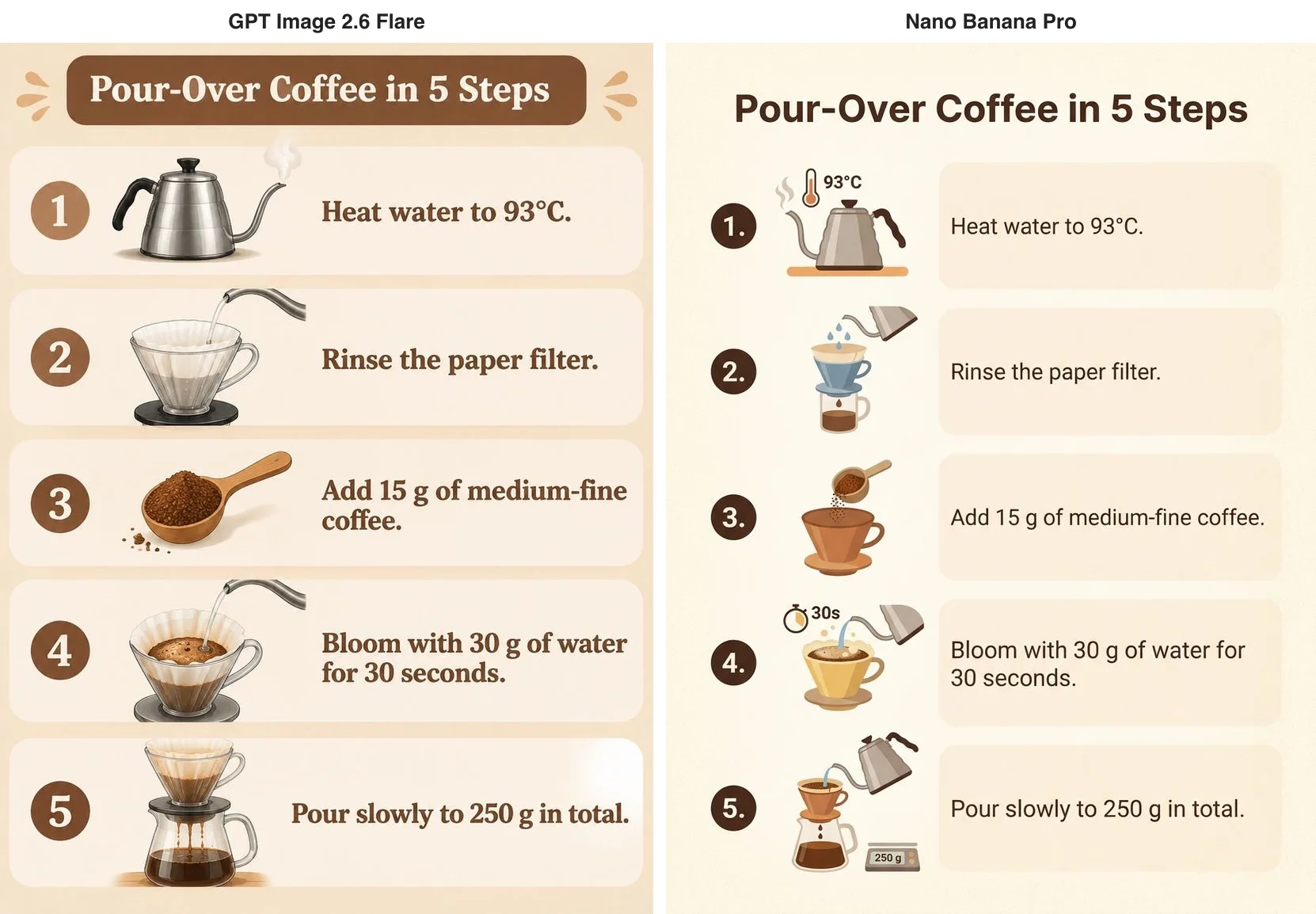
Every caption is word-perfect on both, numbers and units included. GPT Image 2.6 set the text in large serif type next to near-photographic objects, which reads well from a distance. Nano Banana Pro used clean flat icons and went a step further: a thermometer reading 93°C beside the kettle in step 1, a 30s stopwatch in step 4, a scale showing 250 g in step 5. The prompt asked for none of these, yet each one matches its caption, so the picture tells the story at a glance.
A Chinese poster: two kinds of retro
Next, our usual test poster for a weekend coffee market: warm orange and cream, a retro print feel, and three lines of Chinese — 周末咖啡市集, 11月15日—16日 · 老街广场 and 上午10点 — 晚上8点 · 免费入场.
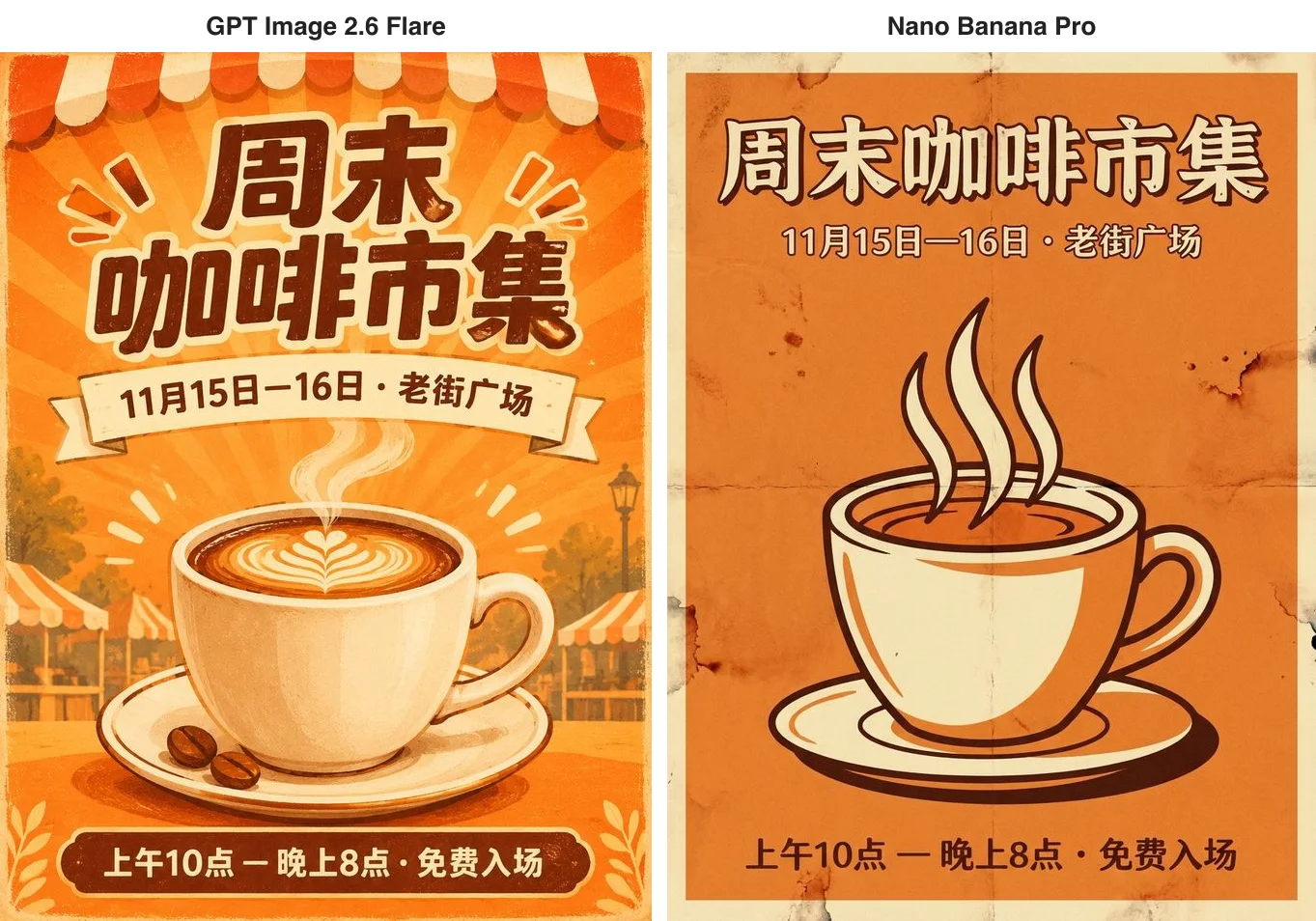
The Chinese is right on both. GPT Image 2.6 painted a lively event with awnings, sunburst rays and latte art. Nano Banana Pro read "retro print" as an actual old poster, with fold creases, stains and worn corners, in just two or three colours. The first is ready for promotion as it stands; the second has more of a designer's eye. Nano Banana Pro took 27 seconds on this one; GPT Image 2.6 took 76.
A hand-drawn map of Paris: knowledge versus obedience
A map tests general knowledge: the landmarks have to sit in roughly the right places and carry the right names. We asked each model for a watercolour tourist map of central Paris, north at the top, showing the Seine and five landmarks — the Eiffel Tower, the Arc de Triomphe, the Louvre, Notre-Dame and Sacré-Cœur — each with a small drawing and its name, and no other labels.
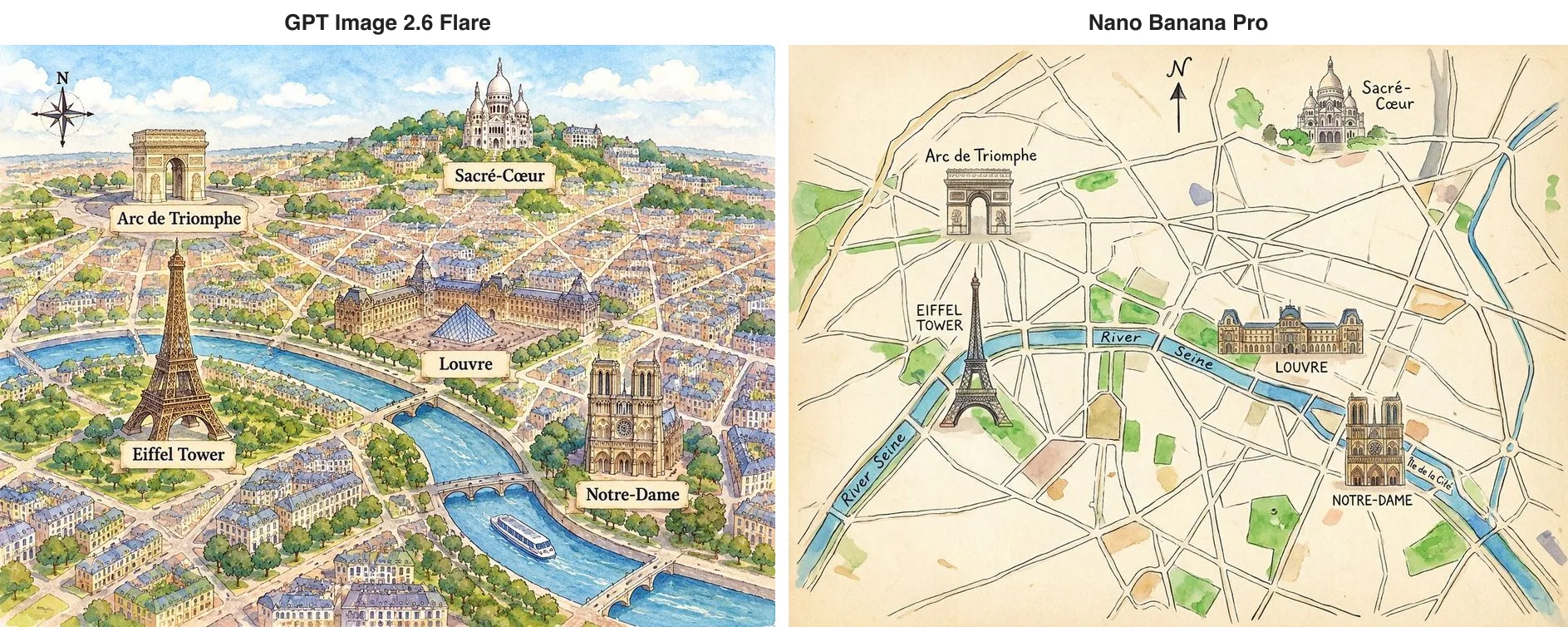
Both got the big picture right: the Arc de Triomphe in the north-west, Sacré-Cœur on its hill at the top, the Louvre on the north bank, the Eiffel Tower by the river in the west, Notre-Dame in the east. GPT Image 2.6 painted a bird's-eye watercolour city and wrote only the five names we asked for. Nano Banana Pro drew a flat street map and also labelled the River Seine and Île de la Cité — the island Notre-Dame actually stands on. The extra labels are correct and make it look more like a real map, but they ignore "no other labels". For material that must match a brief exactly, GPT Image 2.6 is the safer choice; for an illustration that should carry more information, Pro's initiative is a plus.
A watch movement at 2K: all the detail is there
To look at fine detail, this one ran at 2K: an extreme close-up of an open mechanical watch movement with tiny gears, ruby jewels, blued screws and CALIBRE 26 engraved on the bridge.
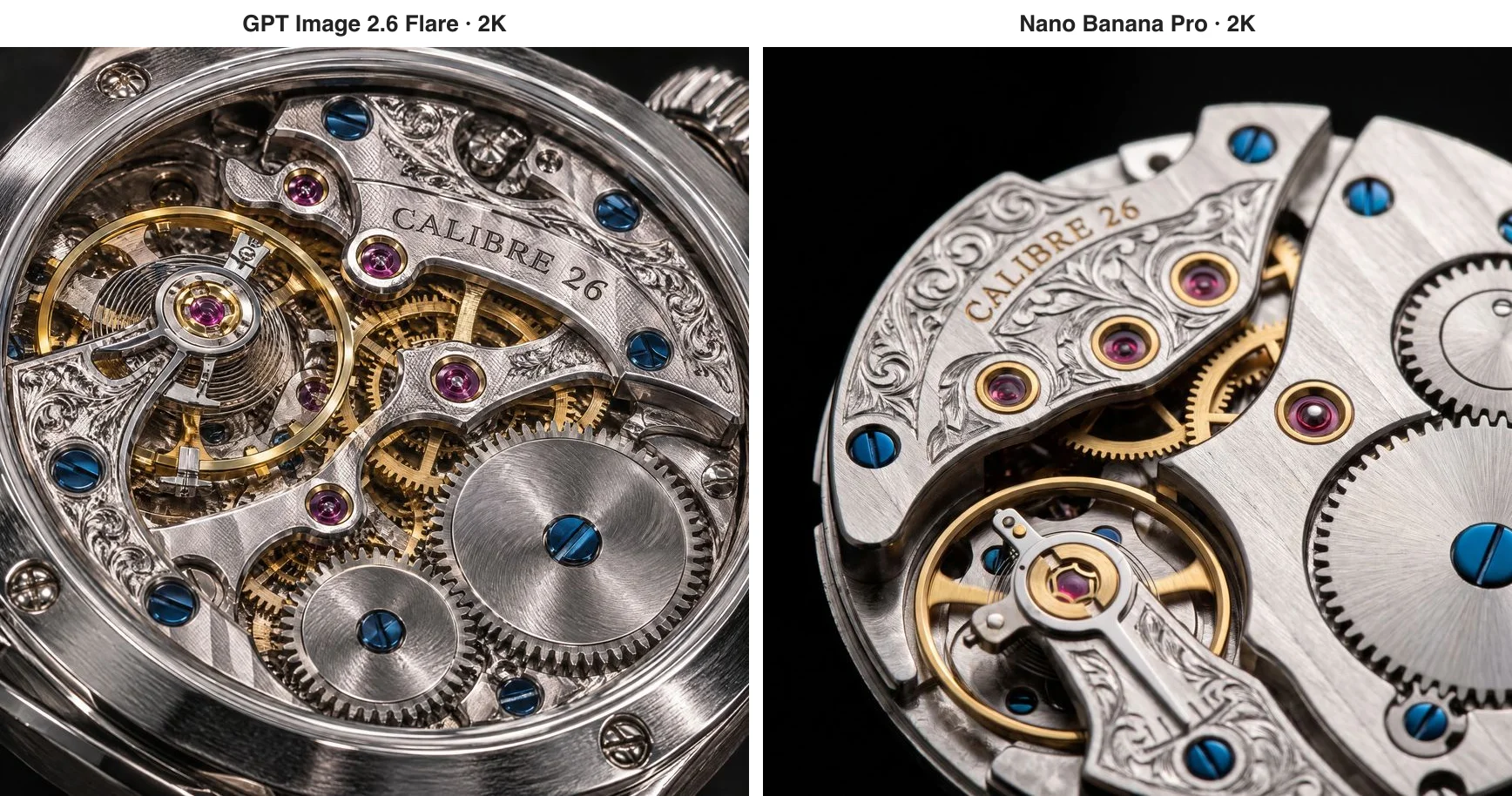
Either would do for a watch advert. CALIBRE 26 is spelled right on both, set among hand-engraved scrollwork, and the rubies, blued screws and brushed gears are all crisp. GPT Image 2.6 included the case and crown, giving a fuller picture; Nano Banana Pro framed the movement alone, more like macro photography. The prices are telling too: at 2K Nano Banana Pro is still 6.8 cents, while a default-quality 2K image on GPT Image 2.6 is 3.5 cents, about half.
Swapping only the background: neither overstepped
For editing we used one base image: a woman with short curly red hair, round glasses and a yellow raincoat, holding a paper coffee cup, in denim shorts and white socks. The instruction was a single line: change only the background to a snowy mountain village at dusk with warm lights in the windows, and keep her face, hair, glasses, raincoat, pose and coffee cup the same. On the GPT Image 2.6 side we used Sunburst, the tier built for repeated edits.
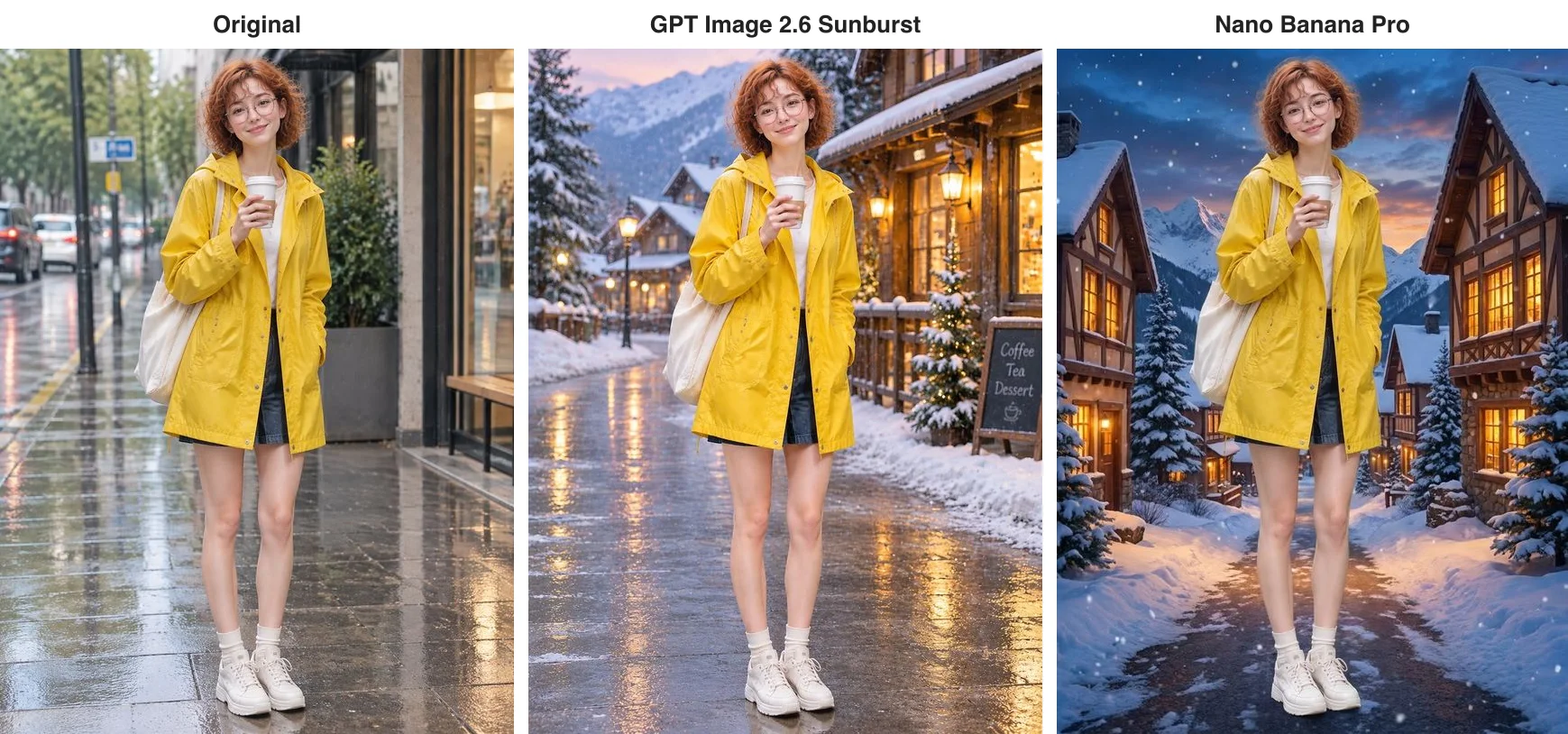
Both held the line: face, curls, glasses, raincoat, tote bag and cup, and even the denim shorts, white socks and white sneakers, in exactly the same pose. That is worth saying, because in another of our tests the more affordable Nano Banana 2.1 put her in long jeans under the same instruction. In the background, GPT Image 2.6 kept the wet pavement with snow banked at the sides and added a chalkboard reading Coffee, Tea, Dessert; Nano Banana Pro covered the whole street in snow and added falling flakes and half-timbered houses for a stronger mood.
Your person and your product in one picture
The last shared job: we gave each model two pictures, the red-haired woman and a matte green mug with an embossed leaf logo, and asked for her at an oak table by the window, holding that mug in both hands and smiling, with both matching their references.
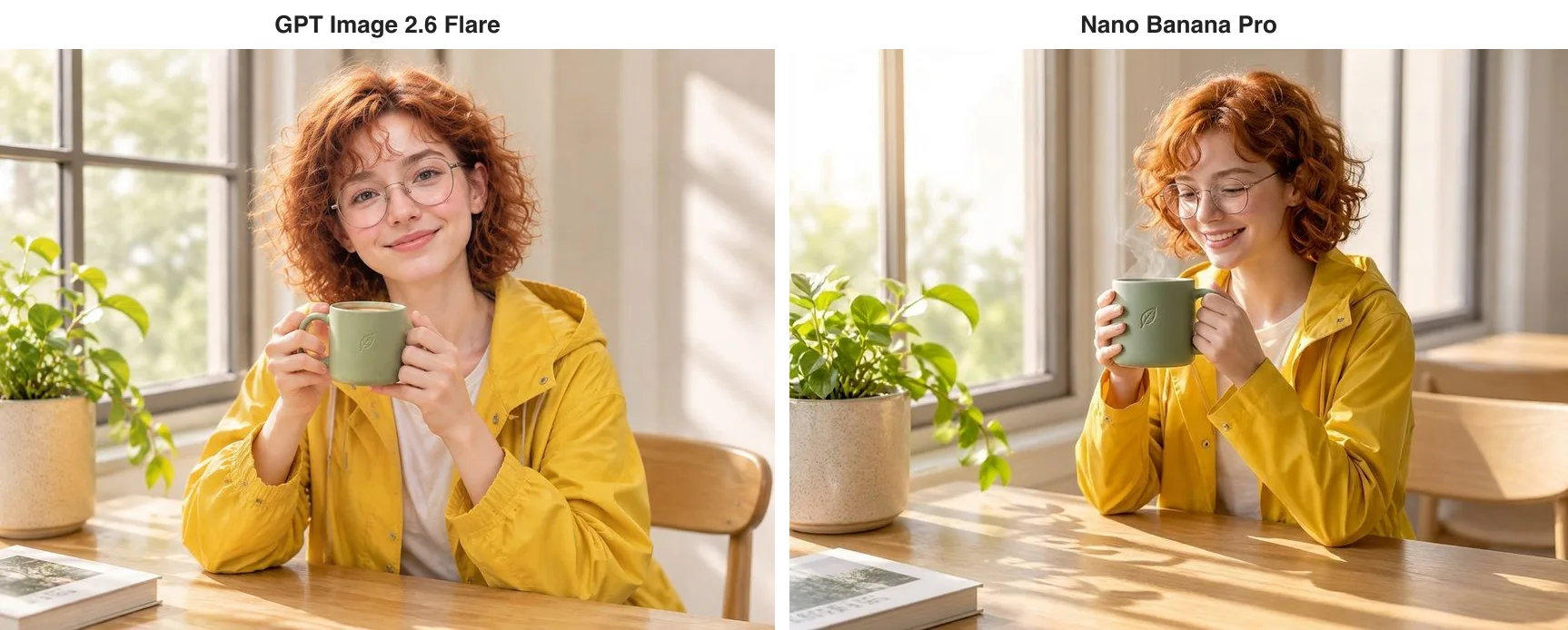
Both look natural, with the face, curls, glasses, raincoat and the leaf on the mug all matching. GPT Image 2.6 has her looking at the camera, like a product endorsement; Nano Banana Pro has her smiling down at the steaming mug, more like a candid shot. On price, GPT Image 2.6 prices an edit at a set size like any other image, so this one is 2 cents at 1K and default quality, against Pro's 6.8.
What only one of them can do
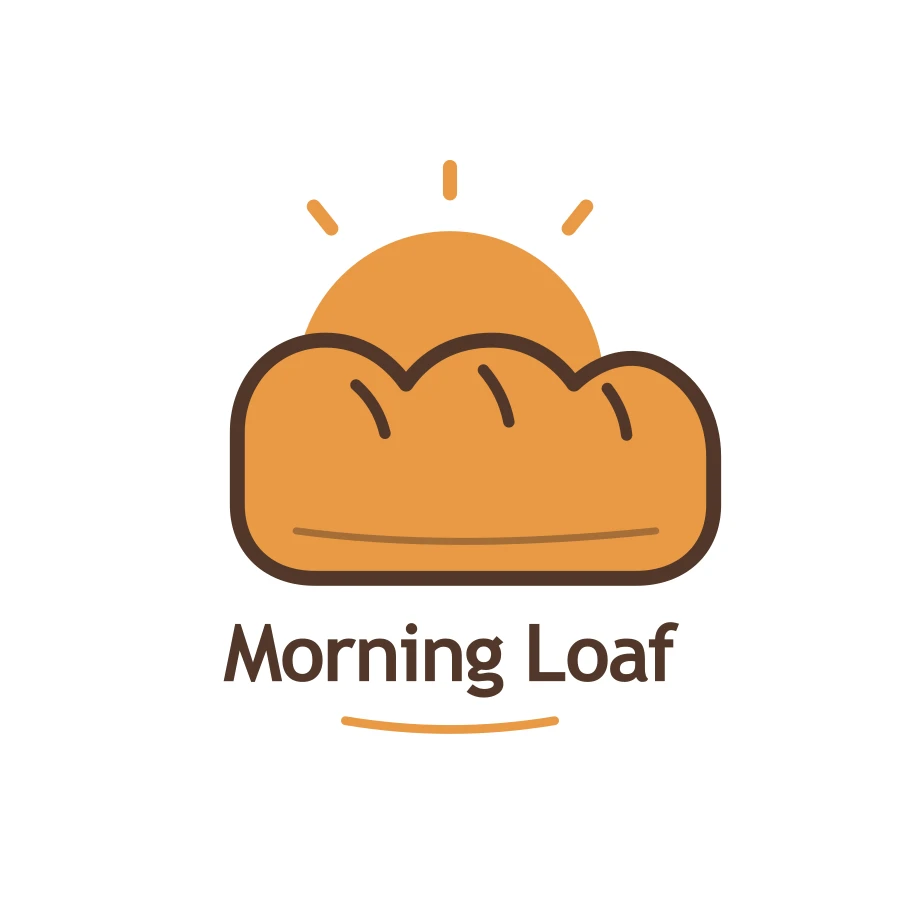
GPT Image 2.6 does several things Nano Banana Pro cannot: looping GIF animations from a sentence, for stickers and brand mascots; SVG vector output, so logos and icons stay sharp at any size, at a flat 3.15 cents each; and edits limited to a circle or arrow you draw on the picture. The bakery logo below is an SVG straight from GPT Image 2.6.
Nano Banana Pro's advantage is multiple characters: according to Google's documentation, it takes up to five character references at once — useful for series illustration or picture books where several people keep reappearing.
What it costs and how long it takes
Nano Banana Pro is easy to remember: 6.8 cents at 1K or 2K, 13 cents at 4K, however many reference photos you add. A hundred 1K or 2K images cost $6.80.
From 6 November GPT Image 2.6 prices plain PNG, JPEG and WebP images per image. Our 1K default-quality infographic and map are 2 cents each — $2 per hundred, under a third of Pro — the 2K watch is 3.5 cents, about half of Pro, and the two-reference composite at a set size is 2 cents. The full table: 1, 2 and 3 cents at 1K for low, medium and high quality; 3, 3.5 and 4.5 cents at 2K; at 4K, 3, 4.5 and 8 cents on Flare and 3, 8.5 and 16 cents on Sunburst. Animated GIFs, markup edits, transparent backgrounds and edits that keep the source image's size are still billed per token, at 10% below OpenAI's list price. Neither model charges for failed requests. We ran these tests on 5 and 6 November, while 2.6 was still billed per token; the 2.6 prices in this article are the per-image prices in force from 6 November.
On speed, Nano Banana Pro took 24 to 33 seconds per image at 1K and 43 seconds for the 2K watch. GPT Image 2.6 took 30 to 34 seconds at 1K, only 23 seconds for the 2K watch, and 76 for the Chinese poster, its slowest. Overall the two are close, at around half a minute.
Which should you use?
- High volumes at 1K: GPT Image 2.6, at 2 cents per image at default quality, under a third of Pro's price.
- 2K or 4K: both are flat per image; at default quality, 3.5 cents at 2K on GPT Image 2.6 against Pro's 6.8, and at 4K 4.5 cents on Flare and 8.5 on Sunburst against Pro's 13.
- Prompts that must be followed exactly (material where extra text is not allowed): GPT Image 2.6.
- Pictures that should fill in correct details by themselves (infographics, maps, explainers): Nano Banana Pro.
- Stickers, GIFs, vector logos, circle-to-edit: only GPT Image 2.6 does these.
- Several recurring characters: Nano Banana Pro, with up to five character references.
- Edits and composites: both are dependable; choose on price and style.
You can also combine them — draft quickly at 1K on GPT Image 2.6, then render the final at 2K or 4K on Nano Banana Pro. On apimodels.app both run on one API key: set the model to gemini-3-pro-image-preview for Nano Banana Pro, or gpt-image-2.6-flare or gpt-image-2.6-sunburst, to switch. Parameters are in the image API docs and the GPT Image 2.6 docs.
Related models
- Nano Banana Pro: Google's high-end tier (Gemini 3 Pro Image), 6.8 cents per image at 1K or 2K and 13 cents at 4K.
- GPT Image 2.6 Flare: the everyday tier of OpenAI's newest generation, with GIF and SVG output and circle-to-edit.
- GPT Image 2.6 Sunburst: the detail tier of the same generation, built for repeated edits, the same price as Flare at 1K and 2K.
- Nano Banana 2.1: Google's efficient tier, 2.2 cents per 1K image, up to 10 reference photos and banners as wide as 8:1.
On a tighter budget or at higher volume, see GPT Image 2.6 vs Nano Banana 2.1; for what 2.6 adds over the previous generation, read GPT Image 2.6 vs 2.5.
FAQ
Which has better image quality, GPT Image 2.6 or Nano Banana Pro?
In our six tests neither came out clearly ahead: the infographic, Chinese poster, map labels and 2K watch engraving were letter-perfect on both, and neither altered the person in the background edit. The difference is style — Nano Banana Pro tends to add correct details of its own, while GPT Image 2.6 follows the prompt more literally.
How much does each image cost on each model?
On apimodels.app, Nano Banana Pro is priced per image: 6.8 cents at 1K or 2K, 13 cents at 4K. GPT Image 2.6 prices plain images per image: at default quality, 2 cents at 1K, 3.5 cents at 2K, and 4.5 cents on Flare or 8.5 on Sunburst at 4K, with two-reference composites at a set size priced the same way; GIFs and markup edits are billed per token at 10% below OpenAI's list price, and SVG is a flat 3.15 cents. Failed requests are not charged on either.
Can Nano Banana Pro make GIFs or SVG files?
No. Animated GIFs, SVG vectors and circle-to-edit are GPT Image 2.6 features. Nano Banana Pro's strengths are adding correct details of its own and up to five character references.
Are Nano Banana Pro and Gemini 3 Pro Image the same model?
Yes. Nano Banana Pro is the popular name for Google's Gemini 3 Pro Image, the high-end tier of its image models. On apimodels.app, call it with the model name gemini-3-pro-image-preview.
Can I use both models with one API key?
Yes. On apimodels.app both run on the same API key and the same image endpoint; change the model field to gemini-3-pro-image-preview, gpt-image-2.6-flare or gpt-image-2.6-sunburst to switch.