
Blog · 2026-11-06
Nano Banana 2.1 vs GPT Image 2.6: Both Got the Text Right, Only One Changed Her Clothes
Model pages: Nano Banana 2.1 API · GPT Image 2.6 Flare API · GPT Image 2.6 Sunburst API — pricing, specs and the playground
Nano Banana 2.1 or GPT Image 2.6? In our same-prompt tests both rendered text accurately and cost nearly the same; they differ on editing and shapes. Google's Nano Banana 2.1 is a flat 2.2 cents per 1K image with free reference photos and makes banners as wide as 8:1, but it changed things we had not asked about in an edit. OpenAI's GPT Image 2.6 is 2 cents at 1K and default quality, changes only what you ask, and adds GIF and SVG output.
If you make images with AI today, two names keep coming up: Google's Nano Banana 2.1 and OpenAI's GPT Image 2.6, released in November. Google pitches Nano Banana 2.1 as an efficient model for both generating and editing, with better prompt following, steadier characters, more accurate text and stronger multi-reference work. GPT Image 2.6 brings things image models did not do before: animated GIFs from a sentence, SVG vector output, and edits confined to a circle you draw on the picture.
Launch claims always sound good. What most people want to know is simpler: which one makes better everyday pictures, which one edits more reliably, and what does each picture cost? So we gave both models the same prompts — a poster, a product shot, a two-round photo edit, a street of shop signs, a person-plus-product composite — and then tried what each can do that the other cannot.
A word on who we are: we run apimodels.app, a platform where one API key calls Nano Banana 2.1 and GPT Image 2.6 alongside other image, video, audio and language models. Every image below was generated there — the GPT Image 2.6 ones on 5 and 6 November 2026, the Nano Banana 2.1 ones on 6 November — all at 1K and shown exactly as they came back.
The short version
Lettering is no longer the problem: the Chinese poster and the six English shop signs we tried came out letter-perfect on both. In style, Nano Banana 2.1 is the more literal of the two and keeps compositions clean, while GPT Image 2.6 likes to dress a scene with extras of its own — awnings, a houseplant, a book on the table.
The real difference shows up in editing. Asked to change only the background, GPT Image 2.6 did not touch so much as her shorts; Nano Banana 2.1 swapped them for long jeans, presumably because shorts looked wrong in the snow. On price the two are nearly level: Nano Banana 2.1 is a flat 2.2 cents for a 1K image no matter how many reference photos you add, and GPT Image 2.6 is 2 cents for a 1K image at default quality, a two-photo composite at a set size included.
So: for extra-wide banners and cleaner, more literal compositions, use Nano Banana 2.1. When an edit must change only what you asked for, or you want animated stickers or vector logos, use GPT Image 2.6.
How they differ, in plain terms
- How you pay: Nano Banana 2.1 charges per image — 2.2 cents at 1K, 3.6 cents at 2K, 6 cents at 4K — and neither the prompt nor the number of reference photos changes that. GPT Image 2.6 also prices plain images per image by resolution and quality; at the default medium that is 2 cents at 1K, 3.5 cents at 2K, and 4.5 cents on Flare or 8.5 on Sunburst at 4K, with edits at a set size priced the same, while GIFs and markup edits are billed per token.
- Shapes: Nano Banana 2.1 offers 15 aspect ratios, as wide as 8:1 and as tall as 1:8, which suits website banners and long strips. GPT Image 2.6 goes up to 3:1.
- Reference photos: Nano Banana 2.1 takes up to 10 at no extra cost; GPT Image 2.6 takes up to 16, and an edit at a set size costs no more for them.
- Only on 2.6: animated GIFs from a sentence, SVG vector output, and edits limited to a circle you draw.
- Two tiers or one: GPT Image 2.6 comes as Flare, for speed and everyday work, and Sunburst, for detail and images you will keep editing, priced the same at 1K and 2K. Nano Banana 2.1 is a single model.
A Chinese poster: both spelled it right
Start with the most common job: a vertical poster for a weekend coffee market in warm orange and cream with a retro print feel, carrying three lines of Chinese — the title 周末咖啡市集, the dates and venue 11月15日—16日 · 老街广场, and the hours 上午10点 — 晚上8点 · 免费入场. Chinese has long tripped up image models; get one stroke wrong and a character turns into gibberish.
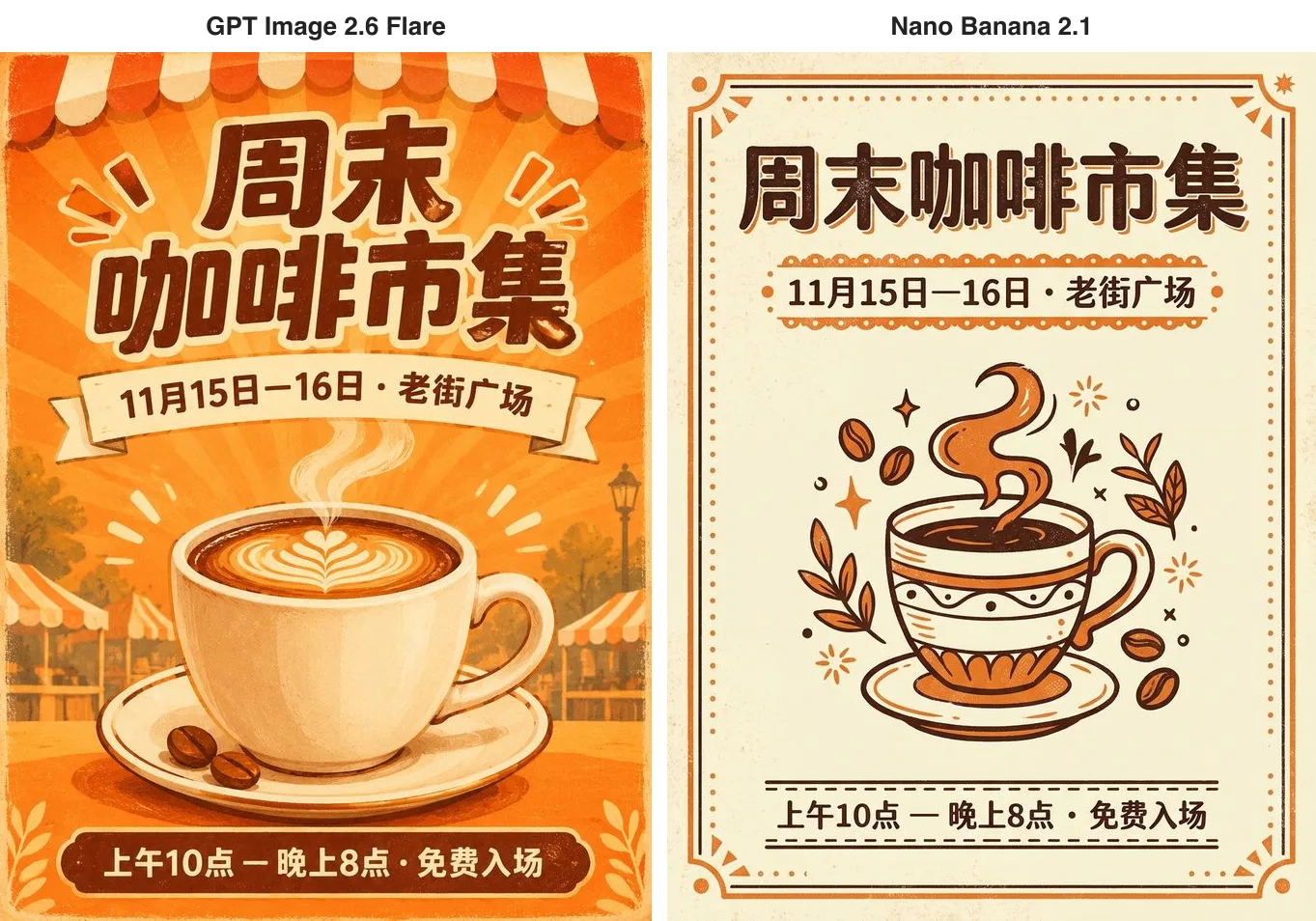
Every character is right on both, down to the dash and the middle dot. The difference is style. Nano Banana 2.1 delivered a two-colour flyer — cream paper, an orange border, a line-drawn cup — that matches "retro print" almost word for word. GPT Image 2.6 painted a scene instead, with sunburst rays, striped awnings and latte art, so it feels more like the event itself. Nano Banana 2.1 took 26 seconds on this one; GPT Image 2.6 took 76.
A product shot: clean versus styled
Next, a listing photo: a matte sage-green ceramic mug with a small embossed leaf logo, on a light oak table by a sunny window, soft morning light, a little steam, shallow depth of field, clean e-commerce style.
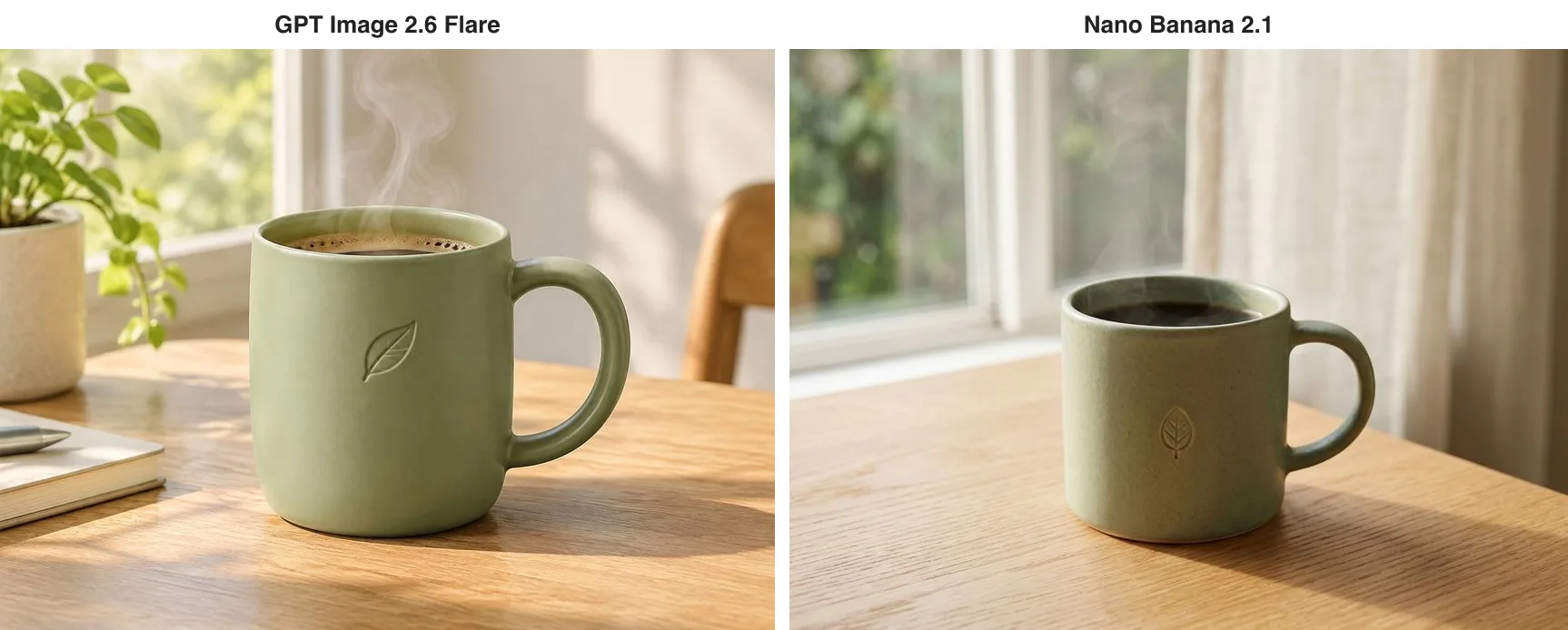
Both are usable as they stand. Nano Banana 2.1 kept it spare — mug, table, window — which suits a product page. GPT Image 2.6 added a plant, a notebook, a pen and a chair of its own accord, which reads more like a lifestyle photo for social media. Whichever you want, say so: "the mug only, no other props", or "add a few everyday objects".
Editing a photo: one does exactly what you asked
Hardly any AI image is final on the first try, so editing is where most of the work happens. The fear is that one change ripples through everything — the background is right, but now the person is different. We generated a base image of a woman with short curly red hair, round glasses and a yellow raincoat, holding a paper coffee cup on a rainy street, in denim shorts and white socks, and handed the same picture to both models. On the GPT Image 2.6 side we used Sunburst, the tier built for repeated edits.
Round one was a single instruction: change only the background to a snowy mountain village at dusk with warm lights in the windows, and keep her face, hair, glasses, yellow raincoat, pose and coffee cup exactly the same.
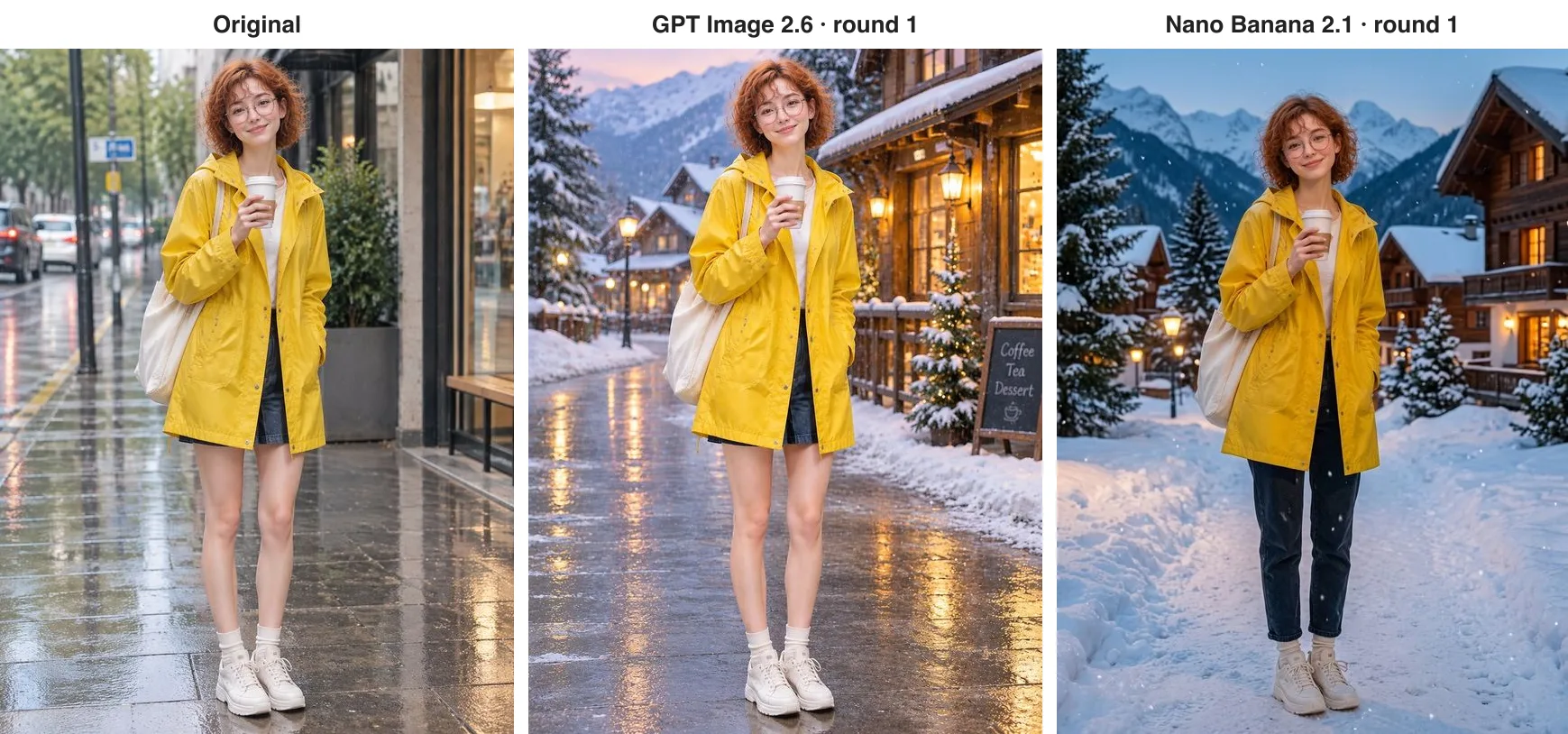
Both kept her face, curls, glasses, raincoat, tote bag and cup. The difference is in the details. GPT Image 2.6 kept even the denim shorts, the white socks and the wet pavement, and added a small chalkboard reading Coffee, Tea, Dessert. Nano Banana 2.1 put her in long dark jeans and covered the street in snow. As a picture, Nano Banana's version makes more sense — who wears shorts in the snow? As an edit, it changed something we never asked it to.
Round two: she waves at the camera with her free hand and smiles, with everything else unchanged.
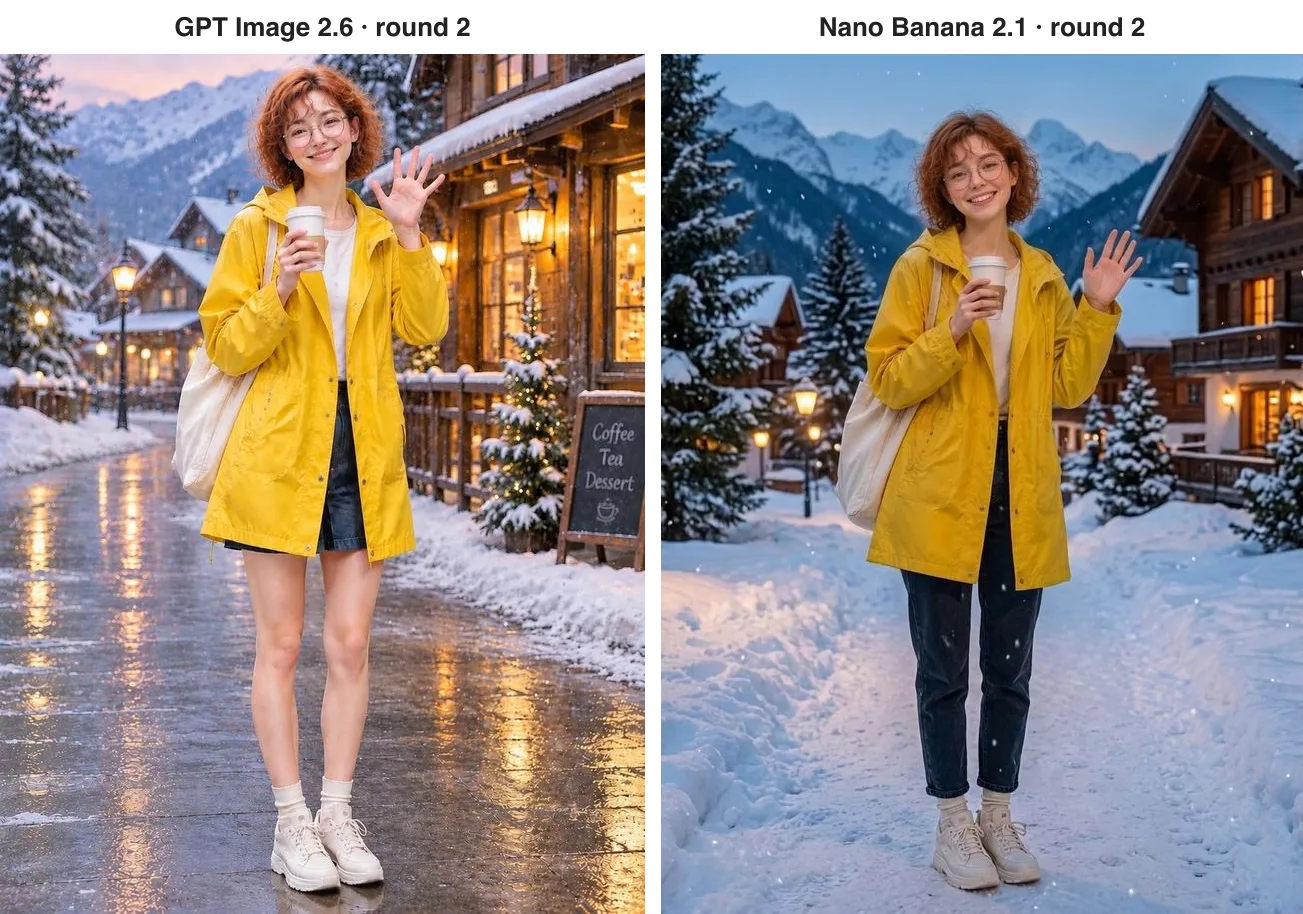
This time both simply raised her free hand; the cup stayed in the other one and the background stayed put, and Nano Banana 2.1 changed nothing else. Over two rounds, neither model swapped her face.
What this means in practice: if you are producing catalogue images, brand material or client revisions, an unrequested change is rework, and GPT Image 2.6 is the safer choice. If you edit with Nano Banana 2.1, name every item that must stay — "keep her denim shorts, white socks and white sneakers" — rather than relying on "keep everything else the same".
Six shop signs in one picture
Then a harder test: an isometric night market street with exactly six food stalls in a row, each with one sign, reading from left to right Noodles, Dumplings, Tea, Skewers, Ice Cream, Bao. The spelling, the count and the order all have to be right.
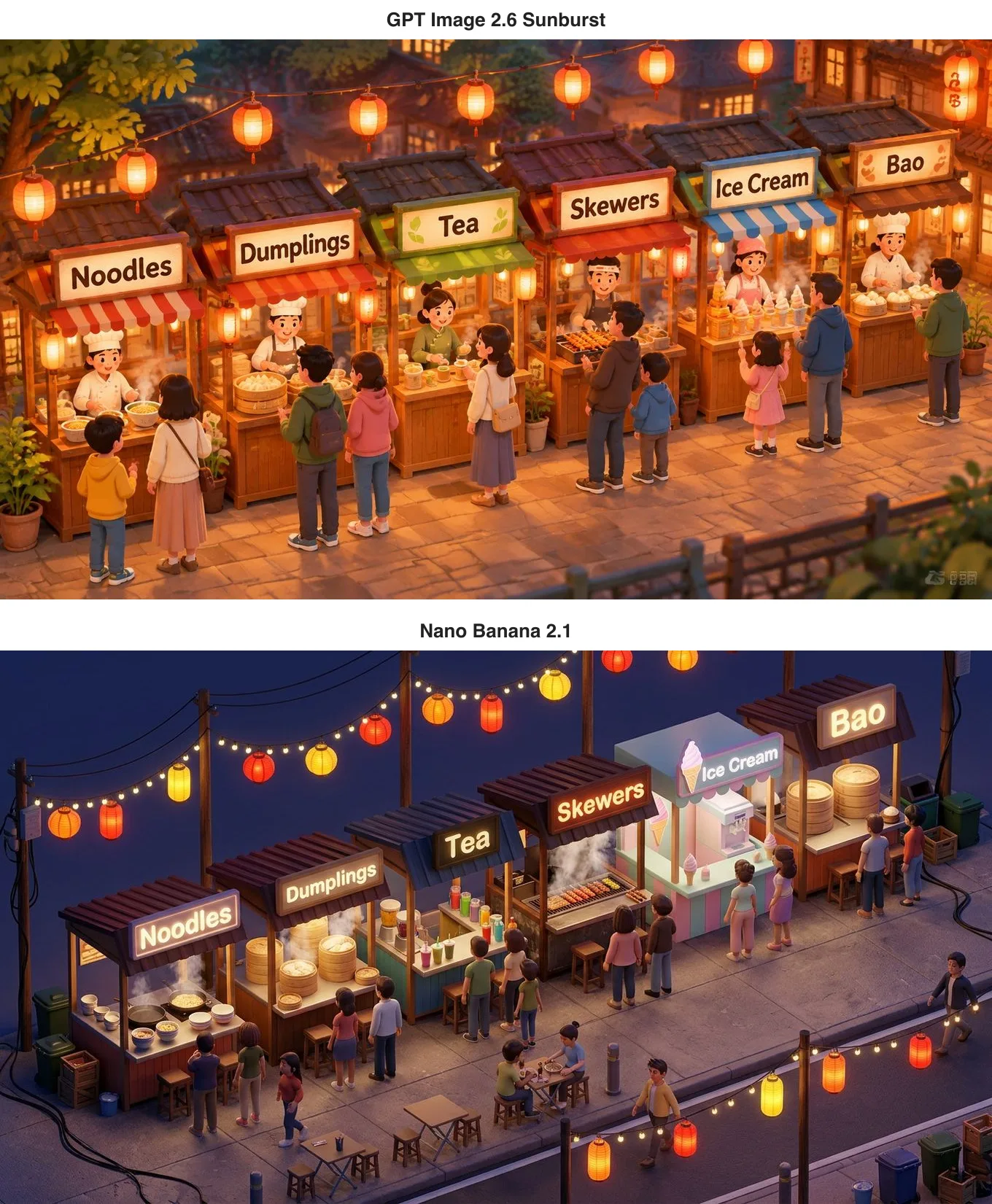
All six signs are spelled correctly on both, in the right number and order. GPT Image 2.6 drew a cosy, cartoonish street under warm lamplight with every stall-holder busy at work. Nano Banana 2.1 chose a deep-blue night and built something like a 3D miniature, adding string lights, folding tables, bins and cables on the ground of its own accord. The only blemish was on the 2.6 side: a small, illegible mark that looks like a watermark in the bottom-right corner, which you would crop or retouch before using the image.
Your person and your product in one picture
A lot of real work is combining material you already have — putting your product in a model's hands, for instance. We gave each model two pictures, the red-haired woman and the green mug, and asked for her at the oak table by the window, holding that mug in both hands and smiling, with both the person and the mug matching their references.
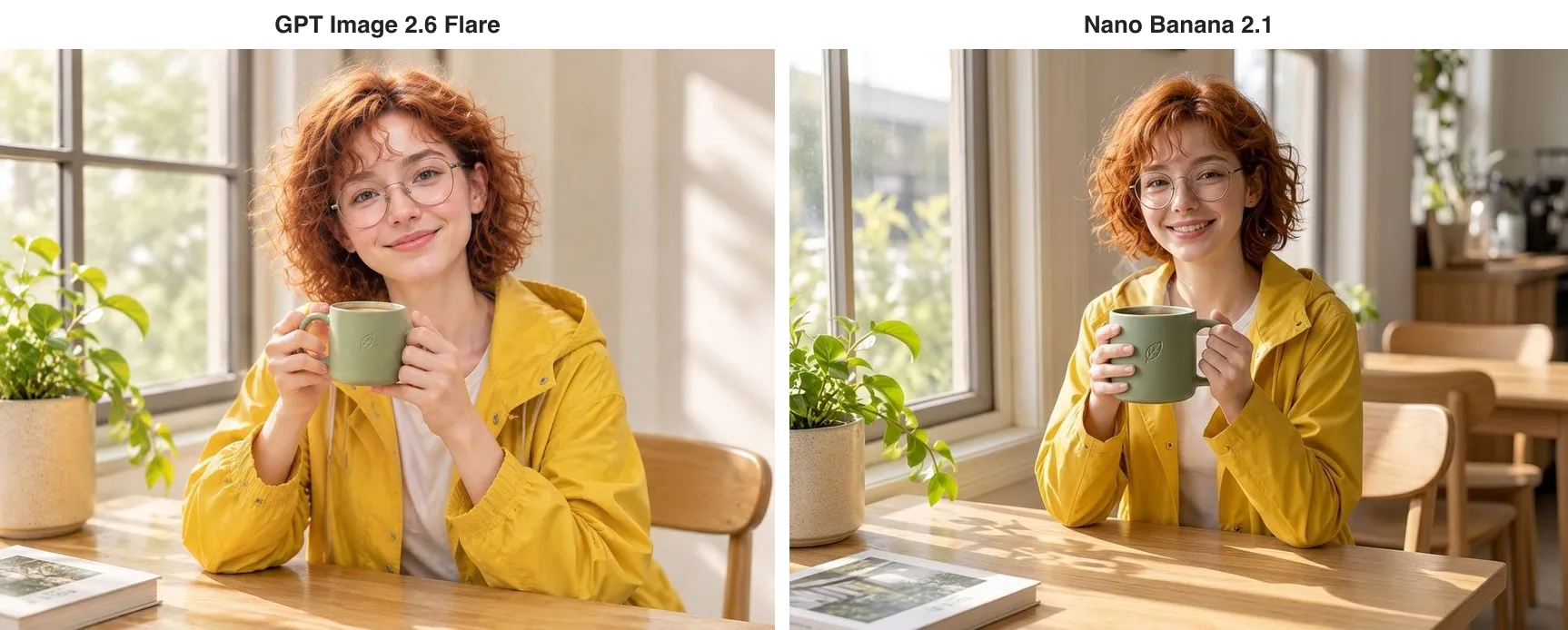
Both blended naturally: the face, curls, glasses and yellow raincoat match, the embossed leaf is still on the mug, and both models even carried over the book from the corner of the product shot. It is hard to call a winner on the pictures, and the bills are close too. The Nano Banana 2.1 image was still 2.2 cents and took 20 seconds; GPT Image 2.6 prices an edit at a set size like any other image, so this one was 2 cents at 1K and default quality, and took 32 seconds.
What only one of them can do
Nano Banana 2.1's party trick is extreme shapes. We asked it for a 4:1 website header for a bakery, with room on the left for the name Morning Loaf and the line Fresh every morning.
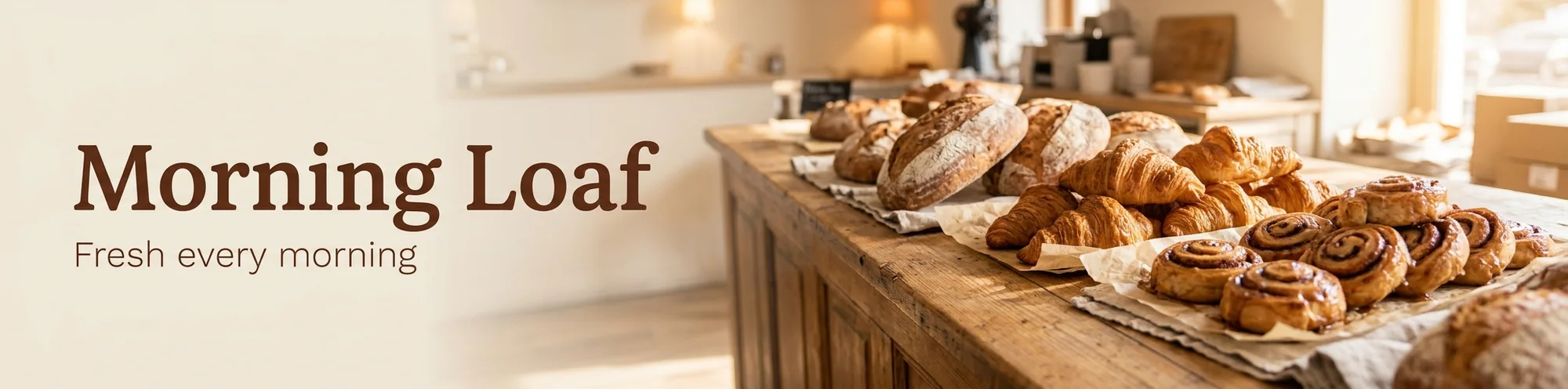
It came back at 2064×512 with the lettering right, the bakes lined up on the right and clean space on the left — ready to drop into a website header. GPT Image 2.6 tops out at 3:1, so for a banner like this you would generate and then crop. Nano Banana 2.1 goes as far as 8:1 and 1:8, which also suits long scrolling graphics.
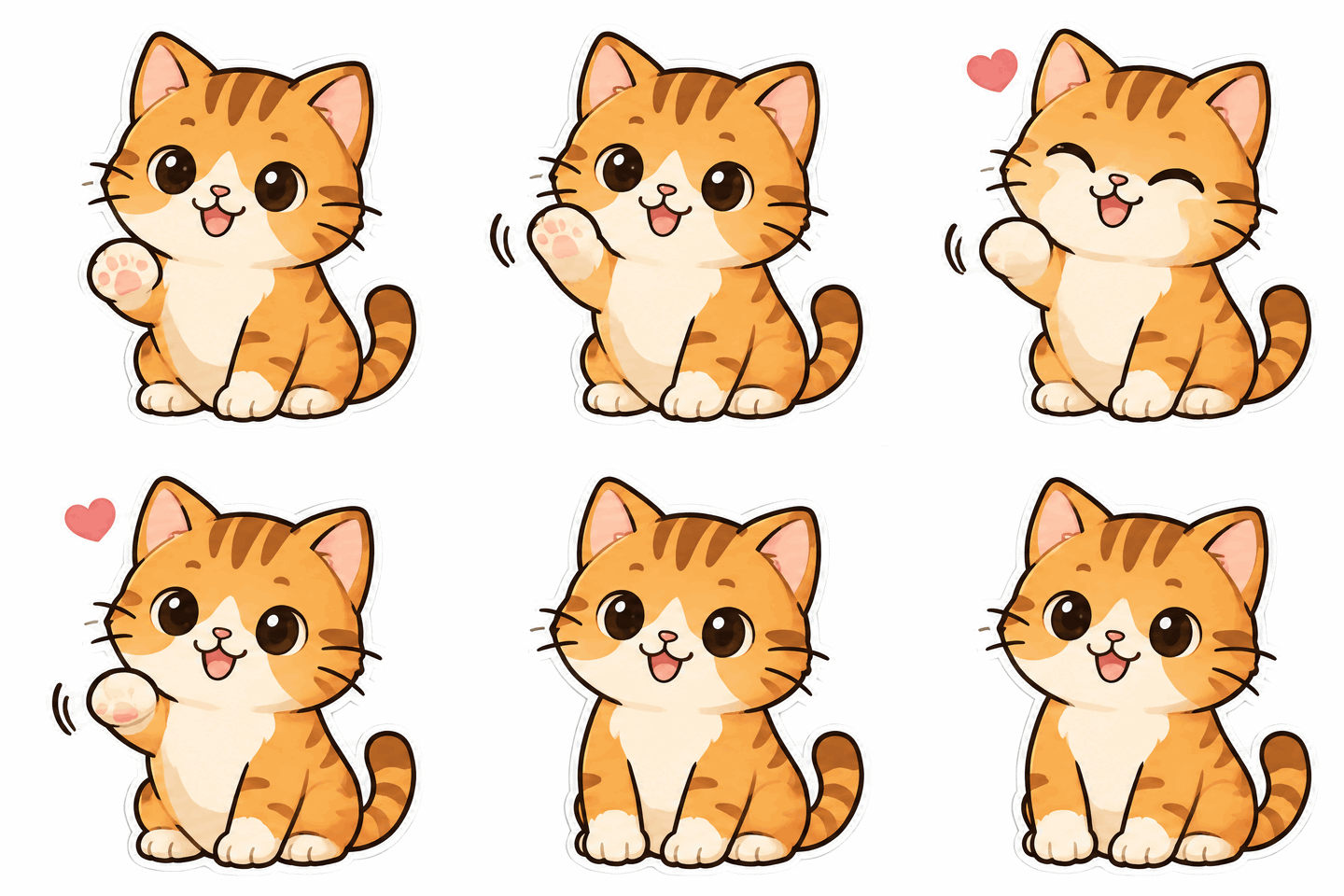
GPT Image 2.6's own tricks are motion and vectors. Describe a character and a movement and it returns a looping GIF; ask for a logo and it can output an SVG that stays sharp at any size; and when editing you can draw a circle and have it change only what is inside. Nano Banana 2.1 does none of these. The waving cat below is an eight-frame sticker 2.6 made from one sentence; there are more examples in our GPT Image 2.6 vs 2.5 comparison.
What it costs and how long it takes
Nano Banana 2.1 is the easy one to budget: 2.2 cents per image at 1K, 3.6 cents at 2K and 6 cents at 4K, whatever the prompt length and however many reference photos you add. A hundred 1K images cost $2.20.
From 6 November GPT Image 2.6 also prices plain PNG, JPEG and WebP images per image: 1, 2 and 3 cents at 1K for low, medium and high quality, 3, 3.5 and 4.5 cents at 2K, and at 4K 3, 4.5 and 8 cents on Flare or 3, 8.5 and 16 cents on Sunburst. Our default-quality 1K product shot is 2 cents, and so is the two-reference composite, since edits that pass a size or resolution follow the same table — $2 per hundred either way. Animated GIFs, markup edits, transparent backgrounds and edits that keep the source image's size are still billed per token at 10% below OpenAI's list price, and SVG is a flat 3.15 cents per image. Neither model charges for failed requests. We ran these tests on 5 and 6 November, while 2.6 was still billed per token; the 2.6 prices in this article are the per-image prices in force from 6 November.
On speed, Nano Banana 2.1 took 20 to 40 seconds per image in these tests. GPT Image 2.6 mostly landed around 30 seconds, with the Chinese poster the slowest at 76. Neither is instant, and both are workable.
Which should you use?
- High volume on a fixed budget: either, since both price plain images per image and you know the cost before you start; at 1K and default quality GPT Image 2.6 is 2 cents and Nano Banana 2.1 2.2 cents.
- Website banners, long strips, very wide or very tall images: Nano Banana 2.1, from 8:1 to 1:8.
- Combining several photos into one: both do it well, and neither charges extra for references: 2.2 cents on Nano Banana 2.1, 2 cents on GPT Image 2.6 for a 1K edit at a set size.
- Edits that must change only what you asked: GPT Image 2.6, which changed nothing else over our two rounds.
- Stickers, GIFs, vector logos, circle-to-edit: only GPT Image 2.6 does these.
- More detail and many rounds of revision on one image: GPT Image 2.6 Sunburst.
Plenty of teams use both: Nano Banana 2.1 to rough out a batch of options and pick a direction, GPT Image 2.6 for the final edit and the formats only it supports. On apimodels.app both run on one API key — set the model to nano-banana-2-1, gpt-image-2.6-flare or gpt-image-2.6-sunburst to switch — and the parameters are in the Nano Banana 2.1 docs and the GPT Image 2.6 docs.
Related models
- Nano Banana 2.1: Google's efficient model for generating and editing, 2.2 cents per 1K image, up to 10 reference photos and 15 aspect ratios.
- GPT Image 2.6 Flare: the everyday tier of OpenAI's newest generation, with GIF and SVG output and circle-to-edit.
- GPT Image 2.6 Sunburst: the detail tier of the same generation, built for repeated edits, the same price as Flare at 1K and 2K.
- Nano Banana Pro: Google's high-end tier, 6.8 cents per image at 1K or 2K and 13 cents at 4K.
- GPT Image 2.5 Flare: OpenAI's previous generation, priced per image, an option when you need neither GIFs nor vectors.
For how Google's high-end tier compares, read GPT Image 2.6 vs Nano Banana Pro; for what 2.6 adds over the previous generation, read GPT Image 2.6 vs 2.5.
FAQ
Is GPT Image 2.6 or Nano Banana 2.1 better?
It depends on the job. For everyday pictures they are close: both handled our Chinese poster, product shot, six English shop signs and person-plus-product composite well. Nano Banana 2.1 has cleaner compositions and extreme shapes such as 8:1; GPT Image 2.6 sticks more closely to edit instructions and adds animated GIFs, SVG output and circle-to-edit.
How much does each image cost on each model?
On apimodels.app, Nano Banana 2.1 is priced per image — 2.2 cents at 1K, 3.6 cents at 2K, 6 cents at 4K — with reference photos free. GPT Image 2.6 also prices plain images per image: at default quality, 2 cents at 1K, 3.5 cents at 2K, and 4.5 cents on Flare or 8.5 on Sunburst at 4K, with a two-reference composite at a set size at 2 cents; GIFs and markup edits are billed per token at 10% below OpenAI's list price, and SVG is a flat 3.15 cents. Failed requests are not charged on either.
Can Nano Banana 2.1 make GIFs or SVG files?
No. Animated GIFs, SVG vectors and circle-to-edit are GPT Image 2.6 features. Nano Banana 2.1's strengths lie elsewhere: 15 aspect ratios from 8:1 to 1:8, and cleaner, more literal compositions.
Which one keeps a person unchanged when editing?
Over two rounds, neither model changed the face, hair, glasses or coat. The difference was unrequested changes: asked only for a new background, Nano Banana 2.1 also swapped her shorts for jeans, while GPT Image 2.6 changed nothing else. When editing with Nano Banana 2.1, name every garment and prop that must stay.
Can I use both models with one API key?
Yes. On apimodels.app both run on the same API key and the same image endpoint; change the model field to nano-banana-2-1, gpt-image-2.6-flare or gpt-image-2.6-sunburst to switch, which makes it easy to draft on one and finish on the other.