
Blog · 2026-11-06
GPT Image 2 vs GPT Image 2.6: Hard to Tell Apart on Stills, the Upgrade Is GIFs, Vectors and Pointed Edits
Model pages: GPT Image 2 API · GPT Image 2.6 Flare API · GPT Image 2.6 Sunburst API — pricing, specs and the playground
GPT Image 2 or GPT Image 2.6? In our same-prompt tests the two were hard to tell apart on still images: the Chinese poster, the signs, the infographic and two rounds of edits came out right on both. On apimodels.app GPT Image 2 is a fixed 2.5 cents per 1K image and 2.6 is 2 cents at 1K and default quality; upgrading buys GIFs, SVG vectors, markup-guided edits and steadier turnaround.
GPT Image 2 is many people's workhorse for AI images: accurate Chinese, steady edits, up to 16 reference photos. OpenAI's GPT Image 2.6, released in November, is two generations on (2.5 sits in between) and adds animated GIFs, SVG vectors and circle-to-edit. If you already use GPT Image 2, the question is simple: will ordinary images look noticeably better on 2.6, and is it worth switching?
We gave both generations the same everyday jobs: a Chinese event poster, a night-market street with six signs, a five-step infographic and two rounds of edits to the same photo of a person.
A word on who we are: we run apimodels.app, a platform where one API key calls GPT Image 2 and GPT Image 2.6 alongside other image, video, audio and language models. Every image below was generated there on 5 and 6 November 2026, at 1K, and is shown exactly as it came back.
The short version
For still images the two generations are hard to tell apart. The poster's three lines of Chinese, the six market signs and the infographic's five captions were letter-perfect on both, and over two rounds of edits both changed only the background and then added only the wave, leaving face, clothes and props alone. Even the style is similar — the same latte art, the same wet, shining pavement. They are clearly family.
So what does the upgrade buy? First, new abilities: GIFs from a sentence, SVG vectors and edits confined to a circle you draw, none of which GPT Image 2 can do. Second, steadier turnaround: GPT Image 2's night-market image took 338 seconds here, against 30 for 2.6. On price, 2.6 is now the lower of the two at 1K: 2 cents at default quality against 2.5 cents for GPT Image 2 on our platform. At 2K it reverses, 3 cents on GPT Image 2 against 3.5 cents for 2.6 at default quality. So for still images at 2K when time is not pressing, GPT Image 2 still does the job; for 1K work, GIFs, vectors, precise edits or a steady pace, move to 2.6.
How they differ, in plain terms
- How you pay: on our platform GPT Image 2 is priced per image at a fixed medium quality — 2.5 cents at 1K, 3 cents at 2K, 5 cents at 4K. GPT Image 2.6 prices plain images per image by resolution and quality — 2 cents at 1K and 3.5 cents at 2K at the default medium, the same for edits that pass a size — while GIFs, markup edits and a few other requests are billed per token at 10% below OpenAI's list price.
- Reference photos: up to 16 on both.
- Only on 2.6: animated GIFs from a sentence, SVG vector output, edits steered by a markup image with circles or arrows, exact pixel sizes, and a reasoning setting that lets it think longer about complex scenes.
- Tiers: GPT Image 2.6 comes as Flare, for speed and everyday work, and Sunburst, for detail and repeated edits, priced the same at 1K and 2K; GPT Image 2 also has an All version where you pick the quality.
A Chinese poster: letter-perfect on both
A vertical poster for a weekend coffee market in warm orange and cream with a retro print feel, carrying three lines — 周末咖啡市集, 11月15日—16日 · 老街广场 and 上午10点 — 晚上8点 · 免费入场.
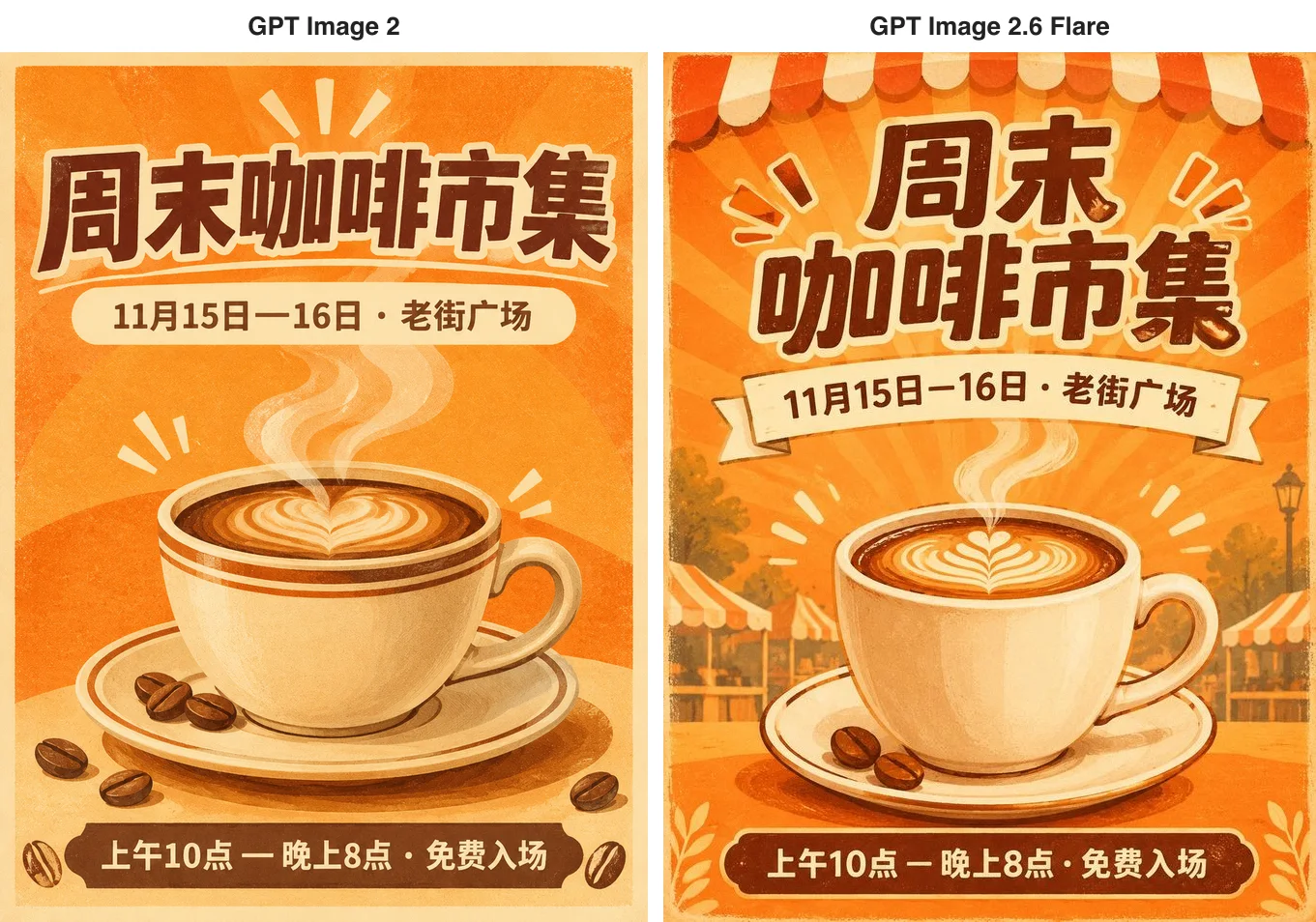
Every character is right on both, and the styles are close: the same sunburst rays, the same heart latte art, the same scattered coffee beans. The difference is that 2.6 likes to set a scene — it split the title over two lines and added awnings and market stalls, more like the event itself — while GPT Image 2 set the title on one line in a tighter layout. GPT Image 2 took 42 seconds; 2.6 took 76.
Six market signs: right on both, but GPT Image 2 took over five minutes
An isometric night-market street with exactly six stalls, signs reading from left to right Noodles, Dumplings, Tea, Skewers, Ice Cream and Bao, with lanterns overhead and people queuing.
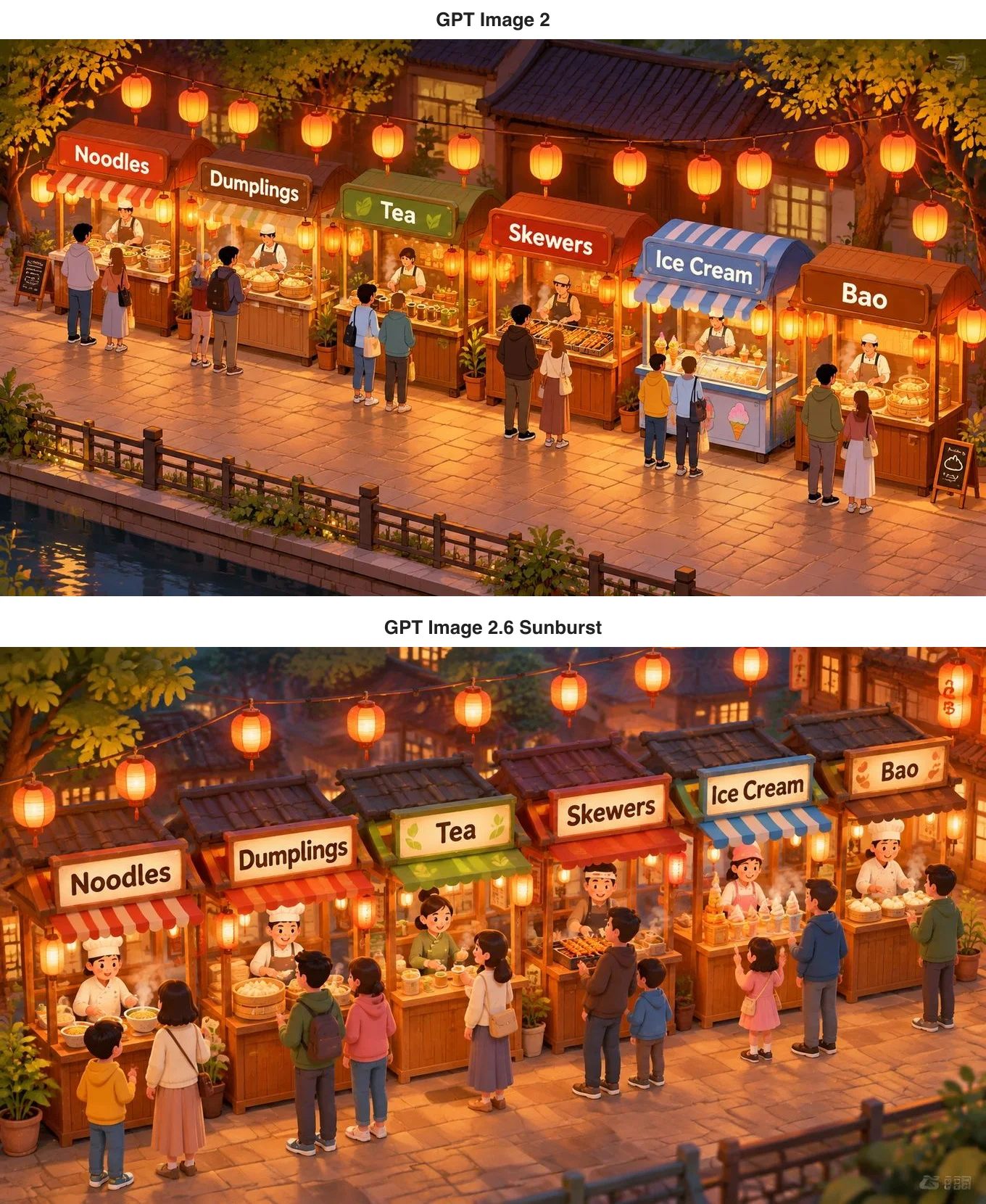
Both generations spelled all six signs right and in order. GPT Image 2 set the street along a canal with more realistic stall-holders; 2.6 went for cuter figures and more lanterns. Curiously, both images have a faint, watermark-like mark in a corner — in the leaves at the top right on GPT Image 2, at the bottom right on 2.6 — so check the corners of isometric scenes like this before use. The biggest difference is time: GPT Image 2 took 338 seconds on this one, 2.6 just 30.
An infographic: nearly identical
A five-step pour-over infographic titled Pour-Over Coffee in 5 Steps, with a small illustration and a one-line caption per step and numbers throughout — 93°C, 15 g, 30 g, 30 seconds, 250 g.
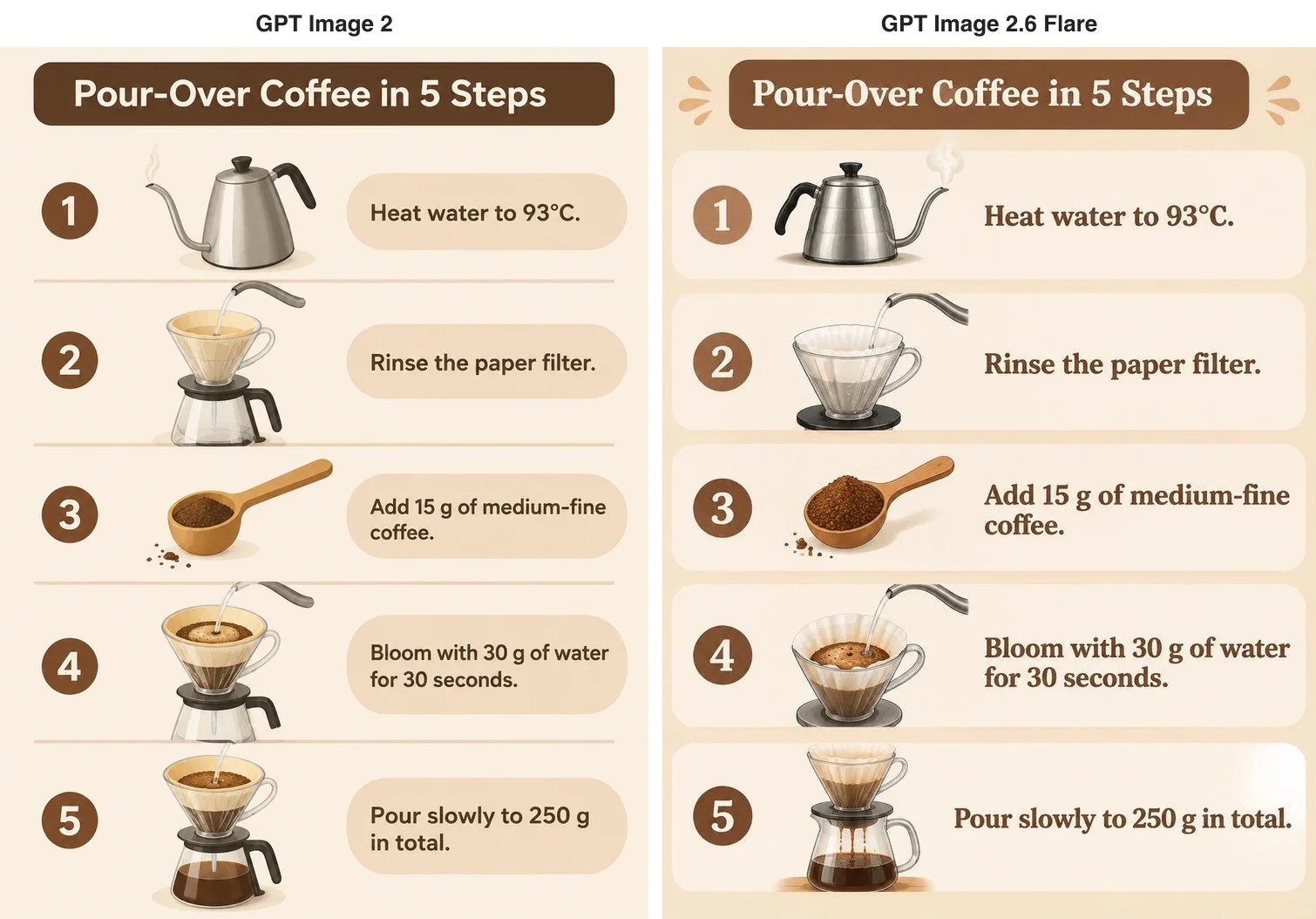
All five captions and numbers are right on both, and the layouts follow the same idea: a numbered circle on the left, a realistic illustration in the middle, a caption on the right. GPT Image 2 set sans-serif text in rounded panels for a more modern look; 2.6 used larger serif type that stands out more. Shown to a reader, it would be hard to say which came from the newer model.
Two rounds of edits: both dependable
For editing we used one base image: a woman with short curly red hair, round glasses and a yellow raincoat, holding a paper coffee cup, in denim shorts and white socks. Round one changed only the background to a snowy mountain village at dusk; round two, working from round one, had her wave at the camera with her free hand. On the GPT Image 2.6 side we used Sunburst, the tier built for repeated edits.
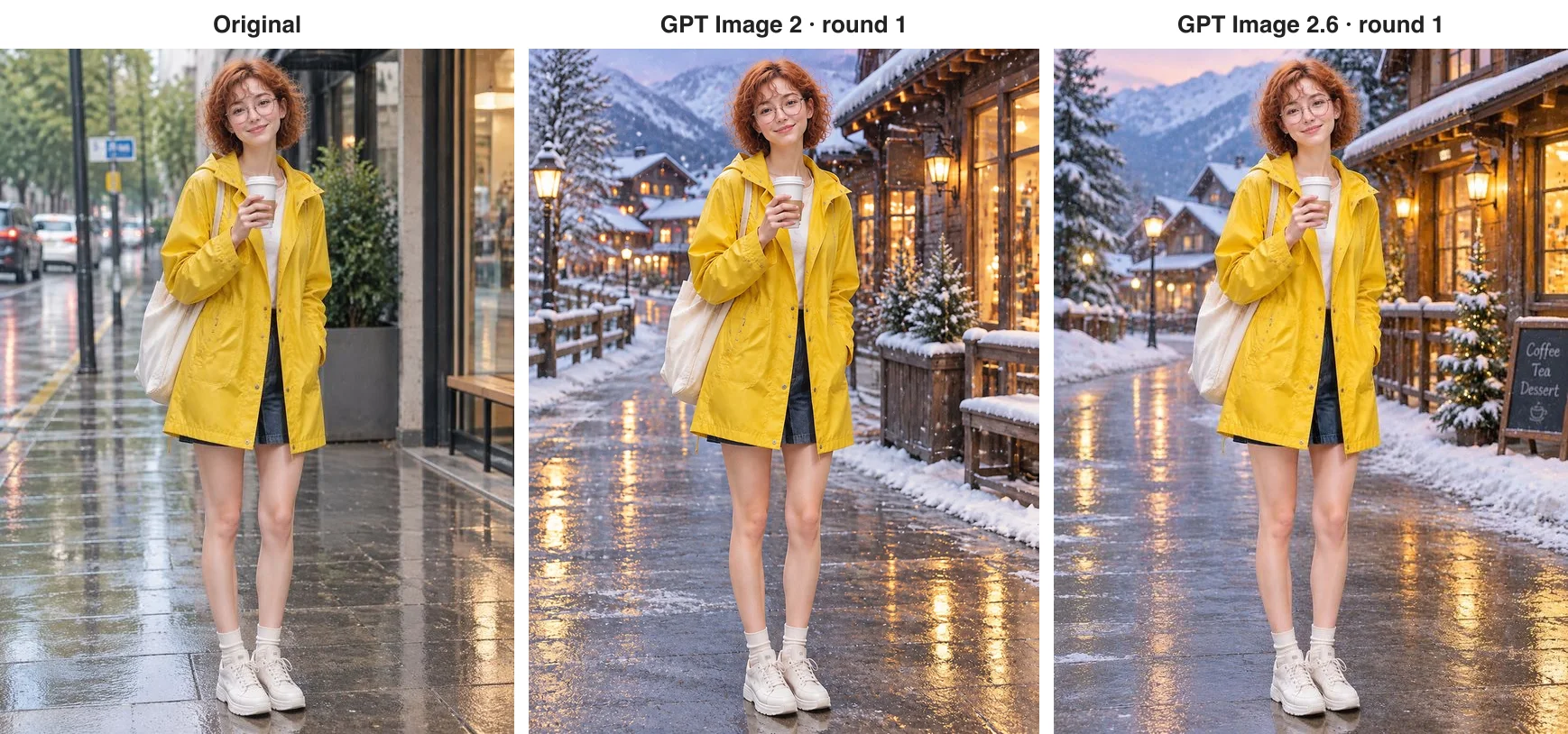
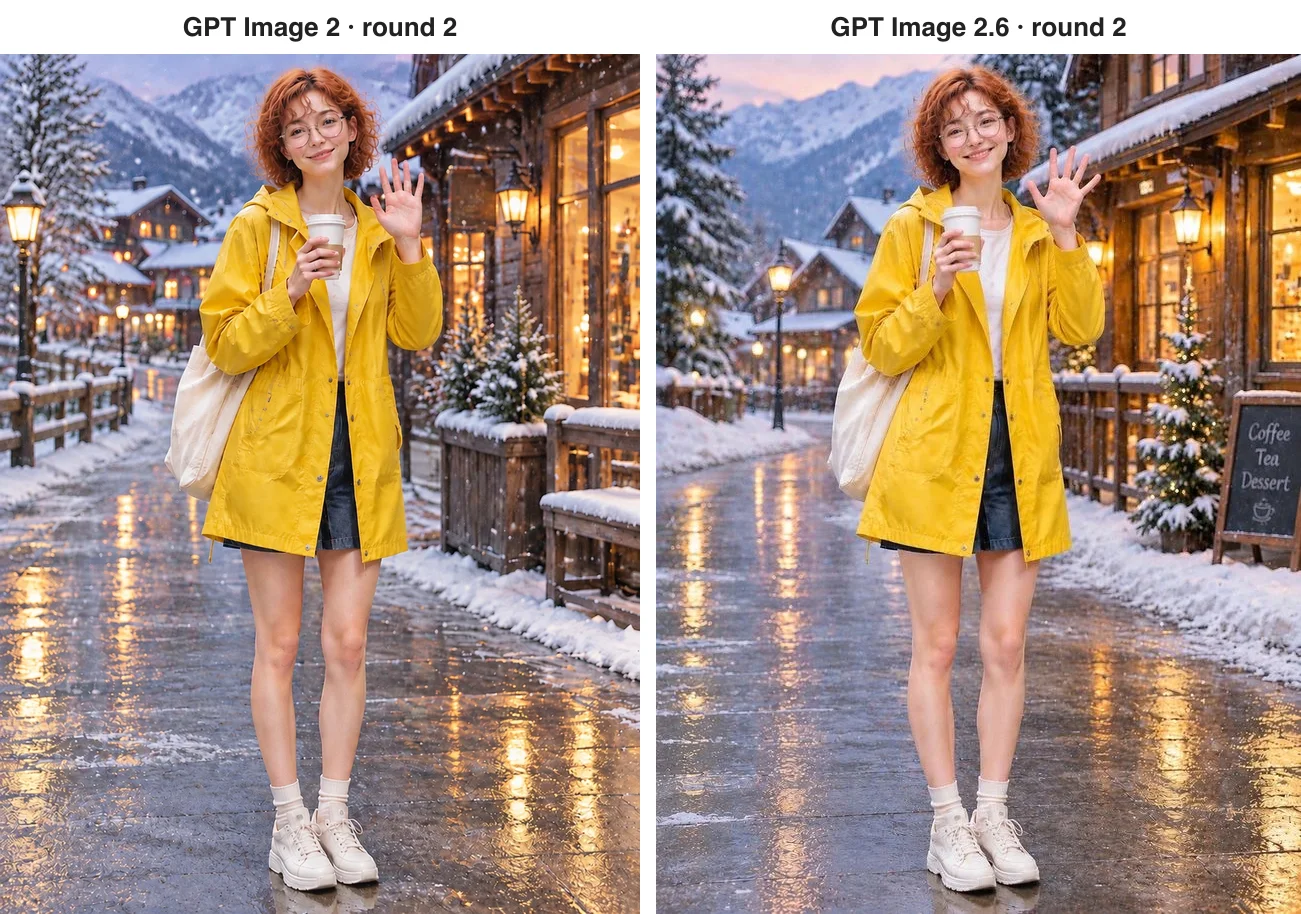
Over two rounds neither generation swapped her face, and the denim shorts, white socks, white sneakers, tote bag and cup all stayed; both backgrounds have wet pavement, snowy railings and lit chalets, in very similar compositions. In round two both simply raised the free hand, the cup still in the other. 2.6 added a chalkboard reading Coffee, Tea, Dessert. OpenAI says 2.6 holds up better over longer chains of edits; we ran two rounds, and neither generation slipped.
What only 2.6 can do
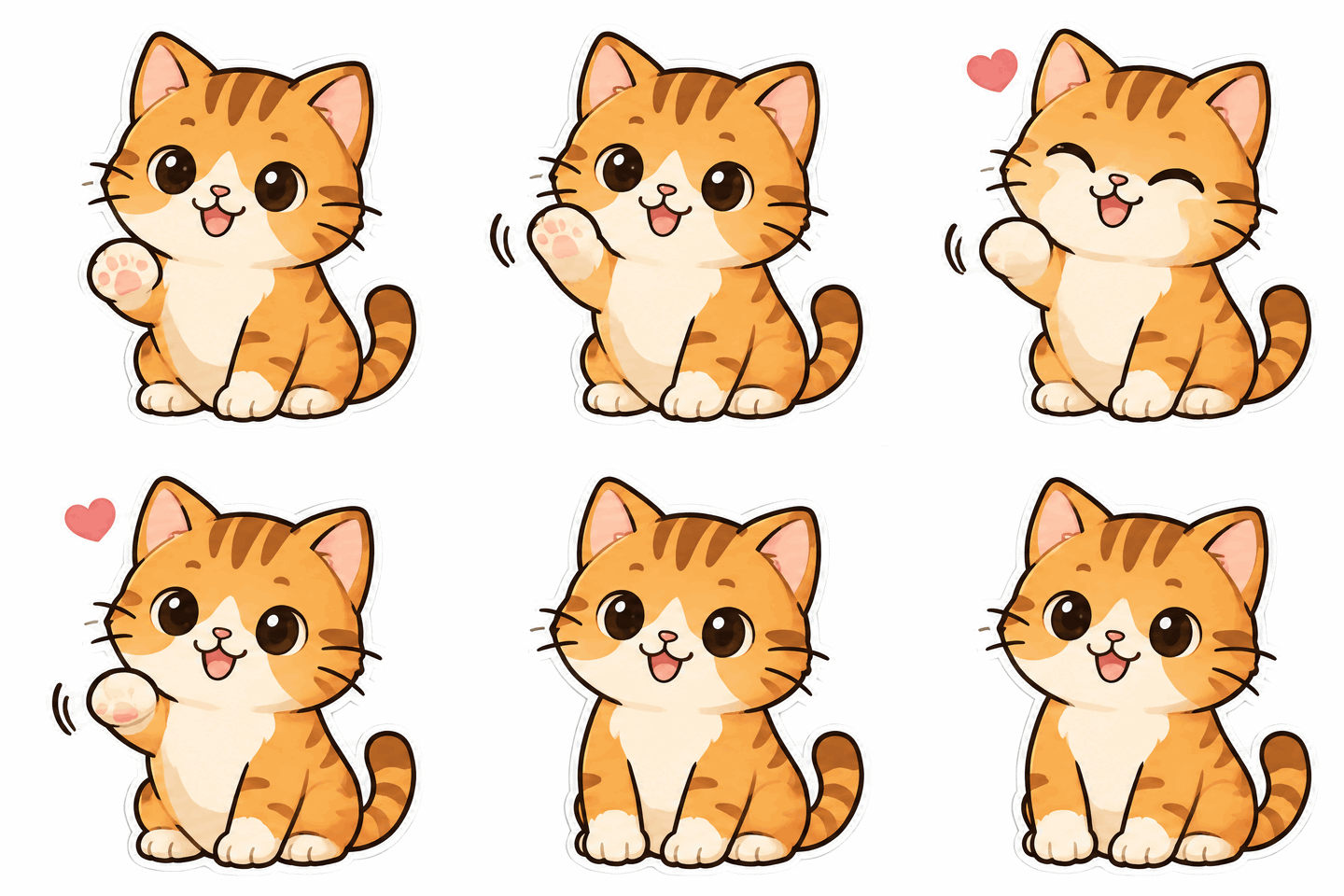
This is the real reason to upgrade. Describe a character and a movement and GPT Image 2.6 returns a looping GIF, good for stickers, brand mascots and loading animations. The waving cat below is an eight-frame GIF 2.6 made from one sentence.
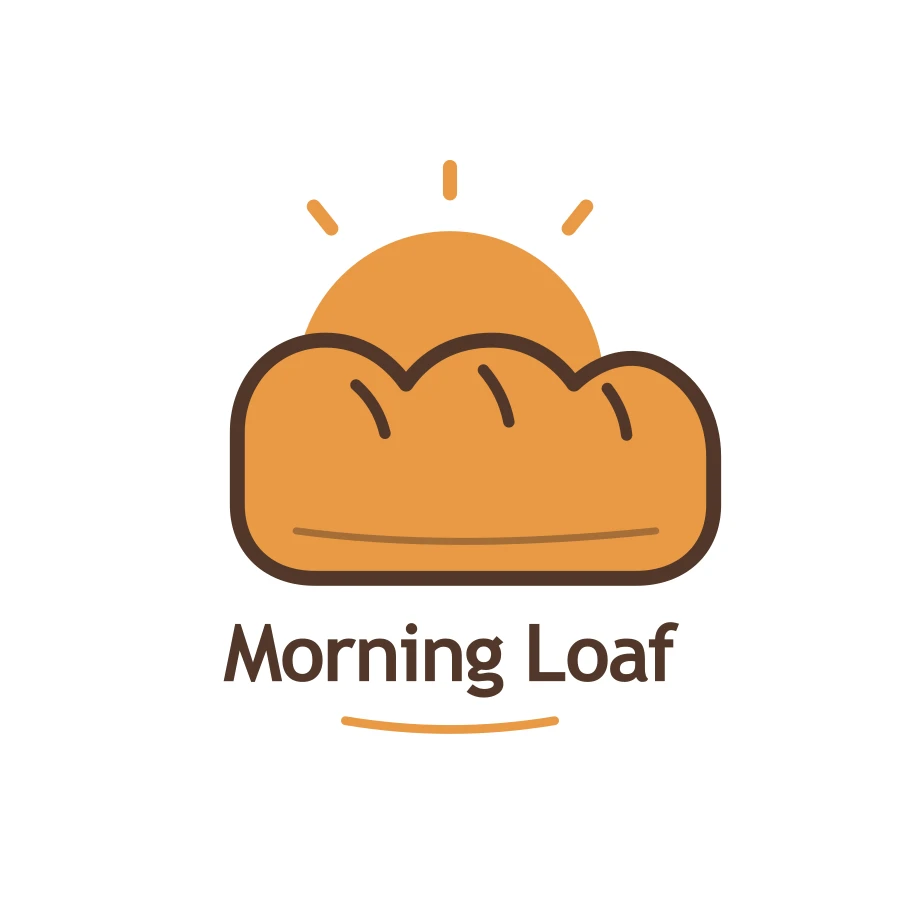
For logos and icons, 2.6 outputs SVG vectors that stay sharp at any size, at a flat 3.15 cents each; when editing, you can pass a markup image with circles or arrows and it changes only what is marked. The bakery logo below is an SVG straight from 2.6. There are more examples in our GPT Image 2.6 vs 2.5 comparison.
What it costs and how long it takes
On our platform GPT Image 2 is priced per image at a fixed medium quality: 2.5 cents at 1K, 3 cents at 2K, 5 cents at 4K — $2.50 for a hundred 1K images. From 6 November GPT Image 2.6 also prices plain PNG, JPEG and WebP images per image: 1, 2 and 3 cents at 1K for low, medium and high quality, so 2 cents at the default medium — $2 per hundred — and 3, 3.5 and 4.5 cents at 2K. Edits that pass a size or resolution cost the same. Animated GIFs, markup edits, transparent backgrounds and edits that keep the source image's size are still billed per token, at 10% below OpenAI's list price. To choose the quality yourself, GPT Image 2 All starts at 1 cent for 1K low. No model here charges for failed requests. We ran these tests on 5 and 6 November, while 2.6 was still billed per token; the 2.6 prices in this article are the per-image prices in force from 6 November.
On speed, GPT Image 2 took 37 to 48 seconds for the poster, the infographic and both edits, but 338 seconds for the night market; GPT Image 2.6 mostly took 28 to 33 seconds, with the Chinese poster the exception at 76. If your workflow waits on each image, 2.6 is easier to plan around.
Which should you use?
- High volumes of 2K still images, no rush: stay on GPT Image 2 at 3 cents at 2K; results are close to 2.6. At 1K, 2.6 is 2 cents at default quality against 2.5 cents on GPT Image 2.
- Choosing a low quality to cut the price: 1 cent at 1K low on both GPT Image 2 All and GPT Image 2.6.
- Stickers, GIFs, vector logos: only GPT Image 2.6.
- Changing one specific area: GPT Image 2.6 with a markup image.
- Predictable turnaround: GPT Image 2.6.
- Many rounds of revision on one image: GPT Image 2.6 Sunburst.
On apimodels.app both generations run on one API key — set the model to gpt-image-2, gpt-image-2.6-flare or gpt-image-2.6-sunburst to switch — and the parameters are in the GPT Image 2 docs and the GPT Image 2.6 docs.
Related models
- GPT Image 2: OpenAI's earlier workhorse at a fixed medium quality, 2.5 cents at 1K, 3 cents at 2K and 5 cents at 4K, up to 16 references.
- GPT Image 2 All: the same model with low, medium and high quality to choose from, from 1 cent at 1K low.
- GPT Image 2.5 Flare: the generation in between, priced per image.
- GPT Image 2.6 Flare: the everyday tier of OpenAI's newest generation, with GIF and SVG output and circle-to-edit.
- GPT Image 2.6 Sunburst: the detail tier of the same generation, built for repeated edits, the same price as Flare at 1K and 2K.
For 2.6 against 2.5, read GPT Image 2.6 vs 2.5; for choosing between Flare and Sunburst, read GPT Image 2.6 Flare vs Sunburst.
FAQ
Does GPT Image 2.6 make better images than GPT Image 2?
For still images the difference is small. Our Chinese poster, six signs, infographic and two rounds of edits came out right on both, in a similar style. 2.6's advantages are new features — GIFs, SVG vectors, edits steered by a markup image — and steadier turnaround.
How much does each image cost on GPT Image 2 and 2.6?
On apimodels.app, GPT Image 2 runs at a fixed medium quality: 2.5 cents at 1K, 3 cents at 2K, 5 cents at 4K. GPT Image 2.6 prices plain images per image, 2 cents at 1K and 3.5 cents at 2K at default quality and 1 cent at 1K low, while GIFs and markup edits are billed per token at 10% below OpenAI's list price and SVG is a flat 3.15 cents. GPT Image 2 All, where you pick the quality, starts at 1 cent for 1K low. Failed requests are never charged.
Can GPT Image 2 make GIFs or SVG files?
No. Animated GIFs, SVG vectors, markup-guided edits and the reasoning setting are new in GPT Image 2.6. GPT Image 2 outputs still images only.
Do I need to change my code to move from GPT Image 2 to 2.6?
On apimodels.app it is mostly one field: change the model from gpt-image-2 to gpt-image-2.6-flare or gpt-image-2.6-sunburst, with the same endpoint and API key. Add the extra parameters when you want GIFs, vectors or markup-guided edits.
Why is GPT Image 2 sometimes slow?
In these tests GPT Image 2 mostly took 37 to 48 seconds, but one night-market illustration took 338, so its timing varies more than 2.6's. Leave enough polling time; for time-sensitive workflows, use GPT Image 2.6.