
Blog · 2026-11-05
GPT Image 2.6 API Tested: GIF Loops, Markup Edits and What Each Call Cost
Model pages: GPT Image 2.6 Flare API · GPT Image 2.6 Sunburst API — pricing, specs and the playground
What does the GPT Image 2.6 API cost, and what can it do? On apimodels.app, plain images are priced per image from 6 November, 1 cent at 1K low and 2 cents at the default quality, while GIFs and markup edits are billed per token. On the production endpoint, GIF loops from a prompt, line art turned into loops, markup-guided edits and multi-round edits all worked, and SVG is a flat 3.15 cents. Flare and Sunburst cost the same at 1K and 2K; Flare is quicker, Sunburst adds detail.
GPT Image 2.6 is OpenAI's newest image model, released in November 2026 for ChatGPT, Codex and the API in two tiers: gpt-image-2.6-flare, the fast default, and gpt-image-2.6-sunburst, which spends longer on each image for detail and tightly scoped edits. Instead of repeating the launch post, we called both tiers through a production API on the day they went live and recorded what came back, how long it took and what each call cost.
Disclosure: we run apimodels.app, an API platform that serves both GPT Image 2.6 tiers under one key, and every test below was run there. The images are shown as returned, without retouching.
The short answer
On launch day Flare returned a 1K poster in 16 seconds and Sunburst took 28 seconds for the same prompt (timings on apimodels.app have changed since — see the note under the cost table). Both spelled the poster text correctly. Animated GIF works from a single prompt and from a line drawing, as long as the frames fit on one sheet (rule below). Markup editing is the most useful addition: the model changed only what we circled, and a second round of edits left the product, the type and the light alone. SVG output failed upstream on every request on launch day; it has since been enabled on apimodels.app — text-to-image only, one image per request, a flat $0.0315.
What OpenAI changed in 2.6
According to OpenAI's announcement (openai.com/index/introducing-images-2-6), Images 2.6 generates about 50% faster, can turn a text prompt into an animated GIF, keeps people, products and brand details steadier across multiple rounds of edits, brings ChatGPT's image markup to the API, adds SVG export, and adds a setting OpenAI calls complexity, which controls how much the model plans a scene before drawing it. OpenAI says Flare can return an image in as little as six seconds at low quality, and that API pricing for 2.6 is unchanged from 2.5, billed per token. OpenAI also reports that people now create about four billion images a week across ChatGPT, Codex and the API.
On apimodels.app the complexity setting is the reasoning_effort parameter (low, medium or high; xhigh and max run as high, other values are rejected with a 400). Quality is low, medium, high or auto; we default to medium when you do not pass it.
Test 1: the same poster on Flare and Sunburst
Prompt: a product poster for a hand-glazed ceramic pour-over dripper on a pale oak counter, with the headline "SLOW MORNINGS" and the line "Hand-glazed in Kyoto". Both runs at 1K, 16:9, medium quality, 1360x768 delivered.

Flare finished in 16 seconds and Sunburst in 28. Both rendered the type cleanly. Flare staged the dripper on a glass server with coffee in it; Sunburst gave the glaze more texture and kept the scene sparser. At the per-image prices in force from 6 November, this 1K medium poster is $0.02 on either tier; the two tiers cost the same at 1K, so the extra seconds buy detail, not a higher bill.
Test 2: a looping GIF from one prompt
Prompt: a round blue robot mascot waves hello and smiles, six-frame seamless loop, same camera and pastel background in every frame. Flare, low quality, six frames of 832x832, 150 ms each.
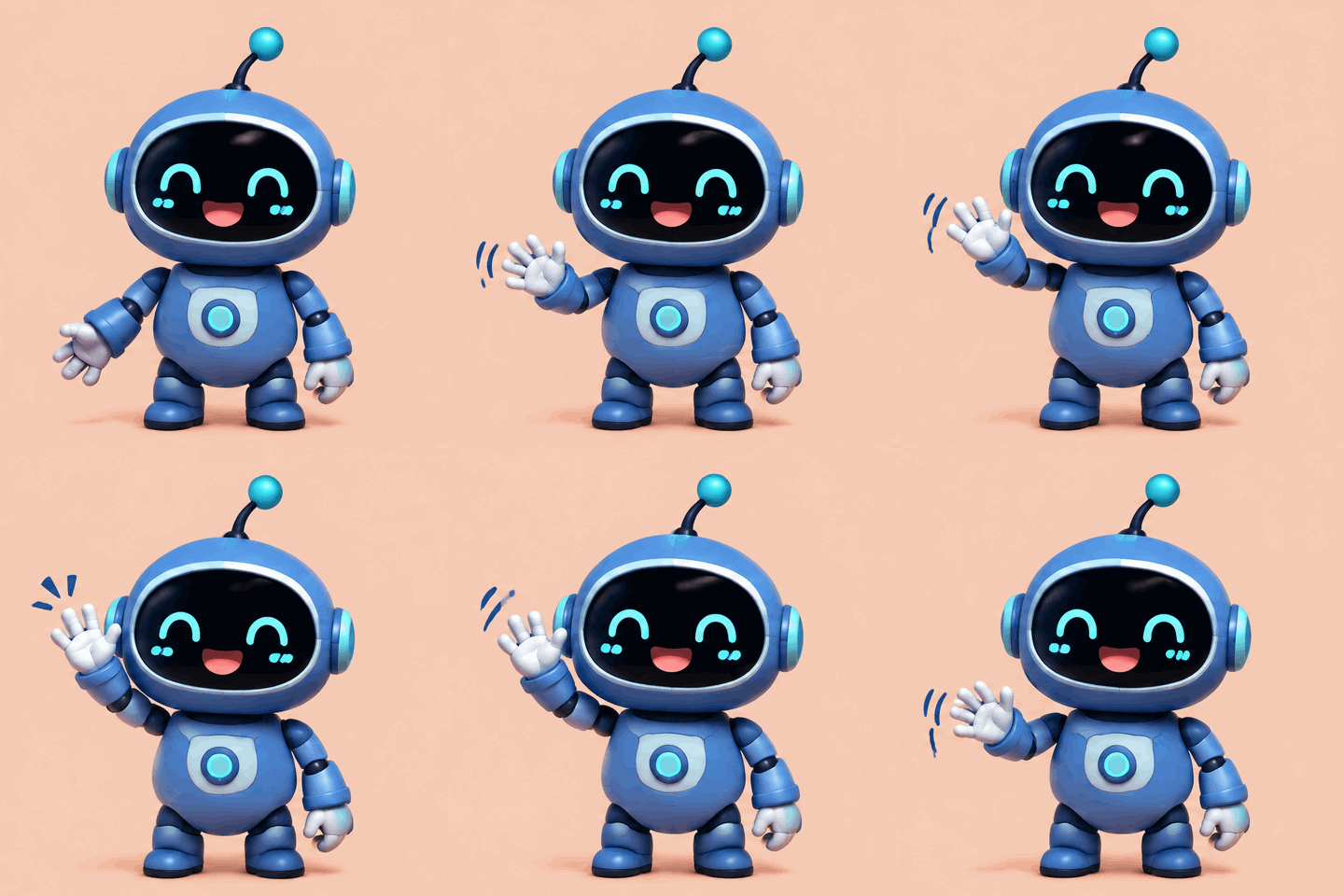
It came back in 25 seconds as a real six-frame animated GIF, and the character, framing and background held still while only the arm moved. GIFs are billed per token; re-run at current rates on 6 November, it cost about $0.034. Our first attempt failed because six frames of 1024x1024 do not fit on the frame sheet — see the size rule below — and failed requests are not charged.
Test 3: from line art to an animated loop
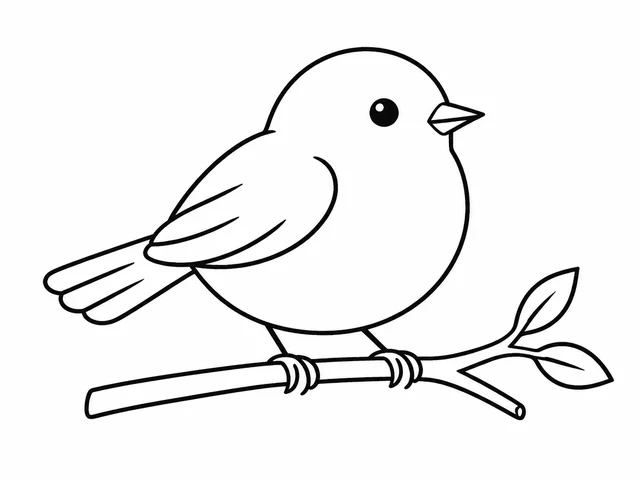
First we drew a simple ink line drawing of a bird on a branch with Flare (1K low, 11 seconds; $0.01 at the per-image price in force from 6 November). Then we passed it as the reference image and asked for a six-frame loop: the bird blinks, hops and a small pink heart floats up, keeping the original line style and adding only pink blush.
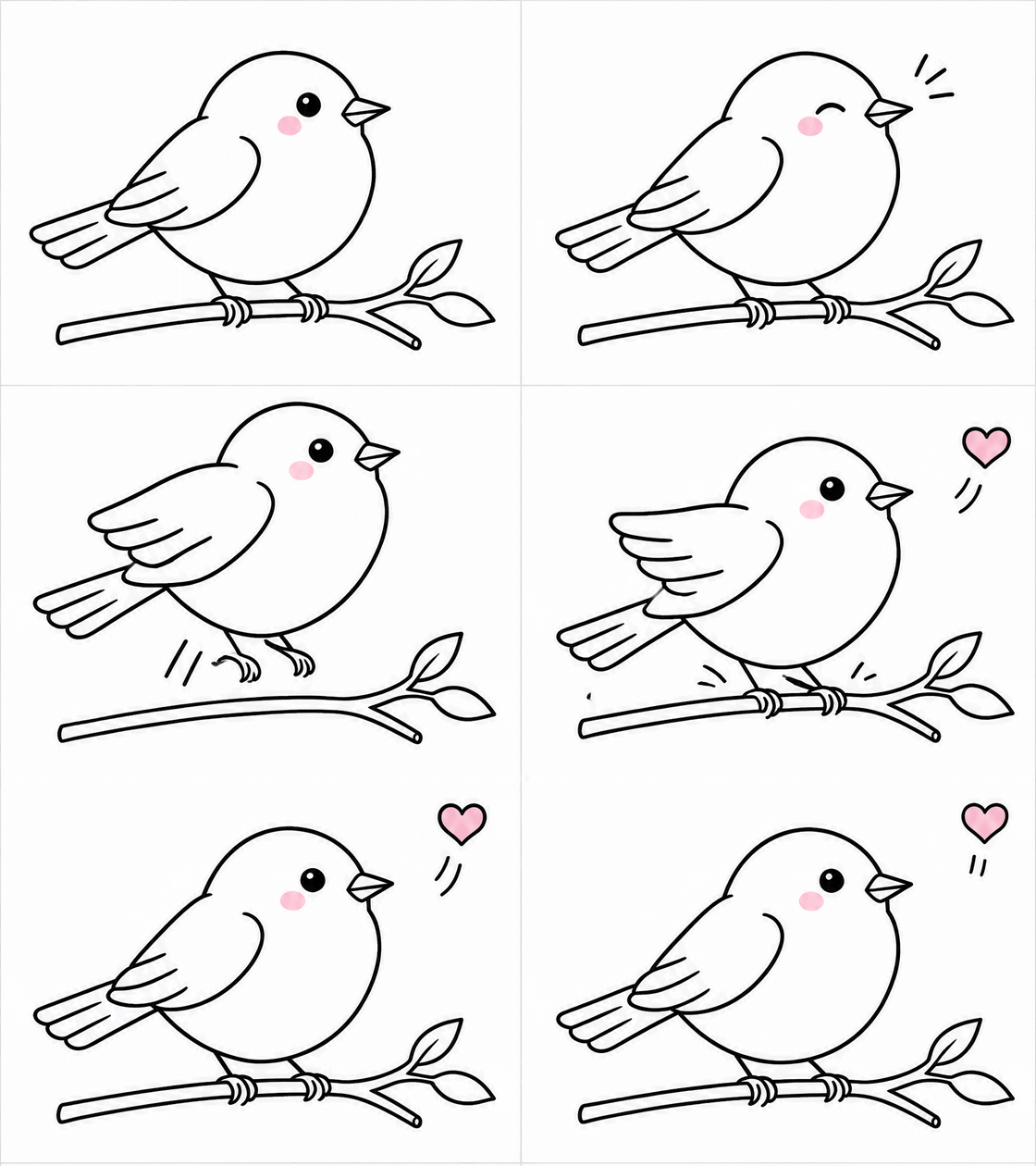
The loop took 22 seconds; GIFs are billed per token, and re-run at current rates on 6 November (default quality) it cost about $0.091. The line weight and drawing style survived every frame, the blush was the only colour added, and all three actions happened in order. This is the workflow OpenAI highlights for mascots and sticker sets: draw or generate the character once, then animate it.
Test 4: point at the change with a markup image
A markup image is a transparent PNG the same size as the picture you are editing, with only your annotations on it. We drew a red circle around the two jars on the right of the Sunburst poster, an arrow and the note "swap for a small potted plant", and sent it with the poster and the instruction to keep everything else the same.

Sunburst replaced exactly the circled objects with a plant in a speckled pot and did not paint the red marks into the result. The headline, the dripper, the window and the light stayed put; the frame came back slightly larger (1668x943) because we let the size follow the input. 35 seconds; markup edits are billed per token, and a comparable one re-run at current rates on 6 November cost about $0.037.
Test 5: a second round of edits
Consistency across rounds is what decides whether an edit workflow is usable, so we took the edited poster and asked for one more change in plain words: repaint only the wall a soft sage green.

Only the wall changed. The typography, the glaze pattern on the dripper, the plant and the shadows match the previous round. 25 seconds; at the per-image prices in force from 6 November, a 1K medium edit that passes a size or resolution is $0.02, while one that keeps the source image's size is billed per token.
What did not work, and the GIF size rule
SVG: every SVG request failed upstream on launch day, on both tiers and even with a three-word prompt, without being billed. Update, 5 November 2026 (evening): SVG now works on apimodels.app — text-to-image only, one image per request, at a flat $0.0315 per SVG. Quality has no effect on SVG output, and the file is a static vector suited to icons, logos and flat illustrations.
GIF: all frames are laid out on one sheet, and the sheet has two limits: at most 3840 pixels on its longest edge and at most 8,294,400 pixels in total — the same pixel budget as a single image. The frame count rounds up to a power of two and fills a grid: 2 frames 2×1, 3–4 frames 2×2, 5–8 frames 4×2 or 2×4, 9–16 frames 4×4 (the API takes at most 16 frames). That works out to frames of at most about 960x960 (or 1344x768) for 5–8 frames and 720x720 for 9–16. Six frames of 1024x1024 need a 4096-pixel sheet and are rejected, while six wide frames of 976x672 fit laid out 2×4 (1952x2688) and worked. A nine-frame loop at 960x960 also worked because that sheet was laid out 3×3 — 2880x2880, right at the pixel cap. If you pass only aspect_ratio and resolution, apimodels.app shrinks each frame to the largest size that fits (six frames at 1:1 1K come back at 960x960, twelve at 720x720); an exact frame size is sent as-is first, and if it does not fit, apimodels.app shrinks it to a size that fits, keeping the aspect ratio, and generates again. Correction, 5 November 2026: an earlier version of this section said the sheet only had to stay within 3840 pixels per edge and that 960x960 fits up to 16 frames; a real 12-frame request failed on exactly that, so the rule above now includes the total-pixel cap.
What it costs
From 6 November 2026, apimodels.app prices plain GPT Image 2.6 images (PNG, JPEG or WebP at a set size) per image, by resolution and quality. At low, medium and high, 1K is $0.01, $0.02 and $0.03 and 2K is $0.03, $0.035 and $0.045 on both tiers; 4K is $0.03, $0.045 and $0.08 on Flare and $0.03, $0.085 and $0.16 on Sunburst. A set size means an exact size (1K is up to 1.7 megapixels, 2K up to 4.6), aspect_ratio with resolution, or text-to-image with no size, which defaults to 1024x768 and counts as 1K; edits that pass a size or resolution count too. Medium is the default, quality auto is charged at the high price, n images cost n times the price, and the price holds whatever the token count. Animated GIFs, requests with a mask, a markup image or a transparent background, and edits that keep the source image's size are still billed per token at 10% below OpenAI's official rates: image output $27 per million tokens (OpenAI: $30), image input $7.20 (cached $1.80), text input $4.50 (cached $1.125) and text output $9, with each request rounded up to $0.0001; for those, an upper bound is held when you submit and the unused part is released when the image is ready. SVG is a flat $0.0315 per image. Failed requests are not charged. Our tests ran on 5 and 6 November, while 2.6 was still billed per token, so the table below shows the current per-image price for the plain-image rows and the measured per-token spend for the rest.
Re-run on 6 Nov 2026 (same settings)             time     price
Poster, 1K medium, Flare                         31 s     $0.02 (per image)
Poster, 1K medium, Sunburst                      38 s     $0.02 (per image)
Line art, 1K low, Flare                          27 s     $0.01 (per image)
GIF, 6 frames, 1:1 1K, low, Flare                30 s     $0.0343 (per token, measured)
GIF from line art, 6 frames, 4:3 1K, Flare       29 s     $0.0912 (per token, measured)
Markup edit, 1K medium, Sunburst                 41 s     $0.0369 (per token, measured)
Second-round edit, 1K medium, Sunburst           31 s     $0.02 (per image)
The table shows the same settings re-run on 6 November 2026 (same or comparable prompts); the images in this article are still the launch-day originals. The tests ran while 2.6 was still billed per token: rows marked per image show the per-image price in force from 6 November, which does not vary with the picture, while rows marked per token are still billed that way and show what the re-run actually cost, which varies with the picture. Times were also longer than on launch day, mostly around half a minute.
How to call it
# A six-frame GIF loop
curl -X POST https://api.apimodels.app/v1/images/generations \
  -H "Authorization: Bearer YOUR_API_KEY" -H "Content-Type: application/json" \
  -d '{"model":"gpt-image-2.6-flare","prompt":"a round blue robot mascot waves hello, six-frame seamless loop","aspect_ratio":"1:1","resolution":"1K","quality":"low","output_format":"gif","frame_count":6,"frame_duration_ms":150}'

# A markup-guided edit
curl -X POST https://api.apimodels.app/v1/images/generations \
  -H "Authorization: Bearer YOUR_API_KEY" -H "Content-Type: application/json" \
  -d '{"model":"gpt-image-2.6-sunburst","prompt":"apply the change marked in red, keep everything else the same","image":"https://example.com/poster.jpg","markup_image_url":"https://example.com/markup.png","quality":"medium"}'
# Both return a taskId; poll GET /v1/images/generations?task_id=... until state is completed.
The full parameter list, sizes and limits are in the GPT Image 2.6 API docs on apimodels.app.
When not to use it
If you only need still images at 2K, you can stay on GPT Image 2.5: on apimodels.app it is half a cent to a cent less per image at 2K, the same as 2.6 at 1K, and it keeps the xhigh and max quality levels. GPT Image 2.6's SVG output is a simple static vector for icons and flat illustrations, not a way to vectorise detailed artwork. And do not expect video: its GIFs are short loops of small movements, not clips with camera moves or a story.
Related models
- GPT Image 2.6 Flare: the everyday tier of OpenAI's newest generation, with GIF and SVG output and markup edits.
- GPT Image 2.6 Sunburst: the detail tier of the same generation, built for repeated edits, the same price as Flare at 1K and 2K.
- GPT Image 2.5 Flare: the previous generation's everyday tier, priced per image, 2 cents for a 1K medium image.
- GPT Image 2: the earlier workhorse at a fixed medium quality, 2.5 cents per 1K image.
For a plain-language comparison with examples, read GPT Image 2.6 vs 2.5; for choosing a tier, read GPT Image 2.6 Flare vs Sunburst; against Google's models, read GPT Image 2.6 vs Nano Banana 2.1.
FAQ
Is GPT Image 2.6 more expensive than GPT Image 2.5?
OpenAI kept the API token prices of 2.6 the same as 2.5. On apimodels.app, from 6 November 2026, both price plain images per image by resolution and quality. They match at 1K ($0.01, $0.02 and $0.03 for low, medium and high) and at 4K medium and high; 2.6 is higher at 2K ($0.03, $0.035 and $0.045 against $0.02, $0.03 and $0.04) and at 4K low ($0.03 against $0.02). GIFs, masks, markup images, transparent backgrounds and edits that keep the source size are billed per token on 2.6, at 10% below OpenAI's official rate (image output $27 per million tokens, against OpenAI's $30).
Can GPT Image 2.6 make SVG files?
Yes, now. Every SVG request we sent on launch day failed upstream without being billed; SVG has since been enabled on apimodels.app. Set output_format to svg for text-to-image only, one image per request, at a flat $0.0315 — quality has no effect on SVG. The file is a static vector with no scripts or embedded raster, so it suits icons, logos and flat illustrations.
How many frames can a GPT Image 2.6 GIF have?
frame_count accepts 2 to 16, but all frames share one sheet of at most 3840 pixels on the longest edge and 8,294,400 pixels in total, so more frames means smaller frames: 960x960 fits up to 8 frames and 720x720 up to 16. Pass aspect_ratio and resolution and apimodels.app picks the largest frame size that fits automatically.
Should I use Flare or Sunburst?
Use Flare for drafts, social posts and volume — it returned our 1K poster in 16 seconds. Use Sunburst when the image will be inspected up close or edited over several rounds; it took 28 seconds for the same poster and held the product and type steady across two edits. At 1K and 2K both tiers cost the same per image; at 4K medium and high, Sunburst is $0.085 and $0.16 against $0.045 and $0.08 on Flare.