
Blog · 2026-11-07
Wan 3.0 API Tested: Lines Spoken on Cue, an Exact Last Frame and a Video Made From a Web Page
Model page: Wan 3.0 Video API — pricing, specs and the playground
Is Wan 3.0 any good? Alibaba's video model covers text-to-video, first-and-last-frame, multi-reference and even document- or web-page-to-video under one model name, with up to 30 seconds and sound in a single shot. In four 480P tests on November 7, a vendor spoke our Mandarin line on cue, the last frame landed almost exactly on our image, and a URL became a narrated explainer. Standard 480P is $0.045 a second ($0.03 until Nov 23); prime was not faster for us.
Wan 3.0 is the newest video model in Alibaba's Wanxiang line. Where many vendors split features across several model IDs, Wan 3.0 keeps text-to-video, first-frame and first-and-last-frame video, and multi-reference generation under one name, and the references can be images, clips, audio, or even a PPT, a PDF or a public web page. Output is a single continuous shot of up to 30 seconds at 30 fps, with a synced soundtrack by default.
People searching for Wan 3.0 mostly ask three things: what it costs, how the prime tier differs from standard, and how it compares with Seedance 2.5. We ran one clip for each of its most distinctive modes (text-to-video with a spoken line, first-and-last-frame, and web-page-to-video), then repeated the text-to-video job on the prime tier with the same prompt and seed. To keep costs down, everything ran at 480P, the lowest resolution, for 5 to 8 seconds.
A word on who we are: we run apimodels.app, a platform where one API key calls Wan 3.0 alongside other image, video, audio and language models. Every clip in this article was generated on that platform on November 7, 2026, and the stills are untouched. The two images used as first and last frames came from an earlier GPT Image 2.6 test of ours.
The short answer
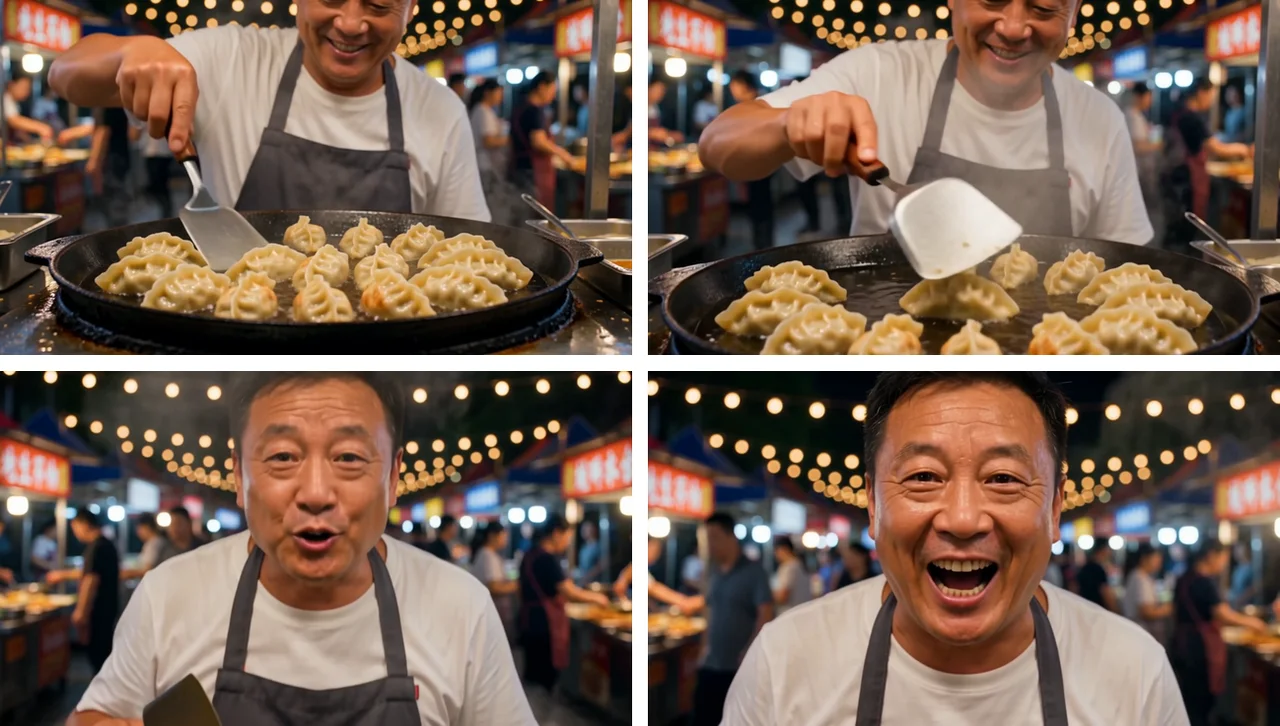
What surprised us most was how literally Wan 3.0 follows instructions. Asked for a vendor who says a line in Mandarin, it delivered the line word for word between 2.5 and 5 seconds, over the sizzle of the pan and the clink of the spatula. Given a first and a last frame, its opening frame was all but identical to ours and its closing frame matched both the wave and the framing. The web-page test was the most unusual: from a single URL it read the article and produced a short narrated explainer that boiled the article's categories down to three icons.
There were rough edges. Shop signs in the background were illegible squiggles at 480P. The soundtrack is the model's own choice: the first-and-last-frame clip came with soft background music and a child's voice that has no source on screen. The same prompt and seed on the prime tier produced a different vendor in different clothes. As for speed, the standard clips took 81 to 528 seconds and the prime clip took 187, no faster than standard.
Billing is per second. The standard tier costs $0.045 a second at 480P, $0.09 at 720P and $0.18 at 1080P, with a special price of $0.03, $0.06 and $0.12 until November 23 (Beijing time). Our four clips came to about $0.88. Wan 3.0 suits teams that want one API to cover several workflows, need a single shot longer than 10 seconds, or want a first cut made straight from an existing document. If you need frame-level control or legible text inside the scene, it is not the easiest pick yet.
What Wan 3.0 can do, and its limits
- Four workflows, one model name: text-to-video; first-frame or first-and-last-frame video; multi-reference (up to 10 images, 5 clips and 5 audio files); and documents or public web pages turned into video. The prompt refers to inputs as "figure 1", "video 1" and "audio 1".
- Length: 2 to 30 seconds in one continuous shot at 30 fps. You can also let the model pick the length; we then hold 30 seconds and settle on the real duration once the clip is done.
- Resolution and shape: 480P, 720P or 1080P, in 16:9, 4:3, 1:1, 3:4 or 9:16, or adaptive to your inputs. If you leave resolution out we default to 720P; Alibaba's own default is 1080P, at twice the price.
- Sound: a synced soundtrack is on by default and may include speech, ambience and music. You can switch it off, but the price stays the same.
- Documents and pages: PPT, Word, Excel, PDF, TXT, Markdown and more, up to 50 pages and 100 MB. Web pages must open without a login.
- Two tiers: standard and prime have the same abilities. Prime costs 51% to 56% more per second and is positioned as the faster one.
- What it won't do: frame mode and reference mode can't be mixed; sending both fails. Reference video is capped at 5 clips and 15 seconds in total, and input plus output must stay within 30 seconds.
Text-to-video: the line came out word for word
The first clip was a night-market stall: potstickers frying in a big iron pan, oil crackling, the camera slowly pushing in, and the vendor looking up to tell the camera, in Mandarin, that the dumplings are fresh out of the pan and hot. We wrote the Chinese line straight into an English prompt to see whether it would be spoken.
It did, word for word. We transcribed the soundtrack to check: he starts speaking at about 2.5 seconds and finishes right at the end, over the sizzle of the pan and the clink of the spatula. The picture follows the prompt too. It opens on the dumplings, a few of them browned underneath, he nudges them with the spatula, and the camera rises to his face, which nearly fills the frame by the last second. His face, his teeth and the hand holding the spatula all look natural.
The one flaw was in the background, where the red shop signs carry what should be lettering but at 480P is just illegible strokes. The clip took 144 seconds and came back at 854×480, 5 seconds, 30 fps, for $0.15 at the special price ($0.225 at list price).
Prime: same prompt, not faster this time
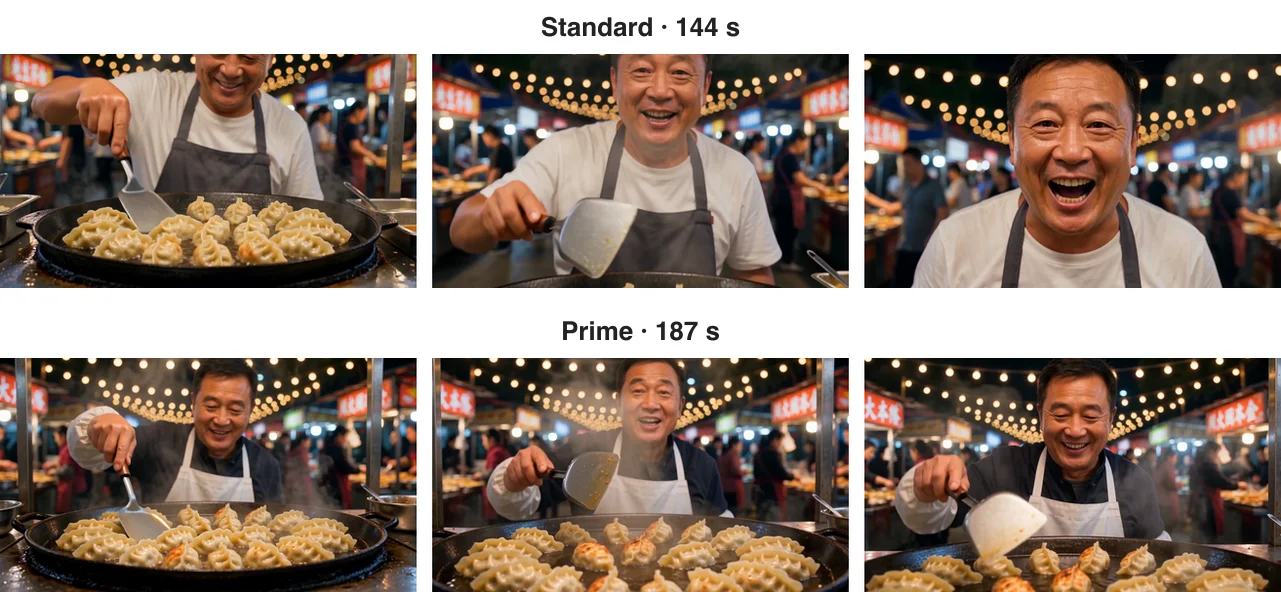
Prime is the other tier of the same model, with the same abilities, at $0.068 a second for 480P, about half again the standard list price. We ran the night-market prompt on prime unchanged, down to the seed, and got a different video: another vendor, in a dark shirt and white apron instead of a white T-shirt and grey apron. A seed only reproduces a result within one tier; switching tiers is a fresh draw.
Each had its strengths. The prime vendor actually flips a potsticker in the air, which is closer to "flips the dumplings" than the standard version, but the camera stays at the pan instead of pushing in to his face. He also says the line word for word, and this time the model added an upbeat music bed.
The timing was the surprise: 144 seconds on standard, 187 on prime. To be fair, the two were submitted a few minutes apart, and the prime job ran alongside two of our other jobs; when we tested an identical job in August, prime finished in 58 seconds and standard in 356. Render time depends heavily on the queue at that moment, so one run proves little. If speed is the only reason you would pay for prime, run a few of your own jobs on both tiers before you decide the extra half is worth it.
First and last frame: the ending matched our image
The second mode is first-and-last-frame: you supply an opening image and a closing one, and the model fills in the motion between them. We used two images from an earlier GPT Image 2.6 test, the same young woman in a yellow raincoat on a snowy village street, holding a coffee in the first and waving with a smile in the second. The prompt only said that she raises her free hand, waves at the camera with a big smile, light snow falls and the camera moves a little closer.

This was the most precise clip of the four. Its first frame is all but identical to ours, just a touch warmer, and its last frame matches the wave, her size in the frame and even the chalkboard by the path that reads "Coffee Tea Dessert". The motion in between is natural: the camera drifts in closer as her smile widens, then eases back to the framing of the last frame. Her face, glasses, curls and raincoat hold steady throughout.

The trouble was the sound. We described no audio at all, so the model chose its own: soft music, plus what sounds like a child calling out, though no child appears. For product shots, or anything you will dub later, switch the soundtrack off (the price doesn't change) or spell out the sound you want in the prompt. This clip took 81 seconds, came back at 554×740 (3:4 at 480P) and cost $0.15.
From a web page: it read the article and narrated it
The third mode is the least common: no images, no clips, just a URL. We passed in our own article on making money with GPT Image 2.6 GIFs and SVGs and asked for a short, clean explainer: a title card, then three key points as on-screen text with simple icons, over upbeat music, 8 seconds long.
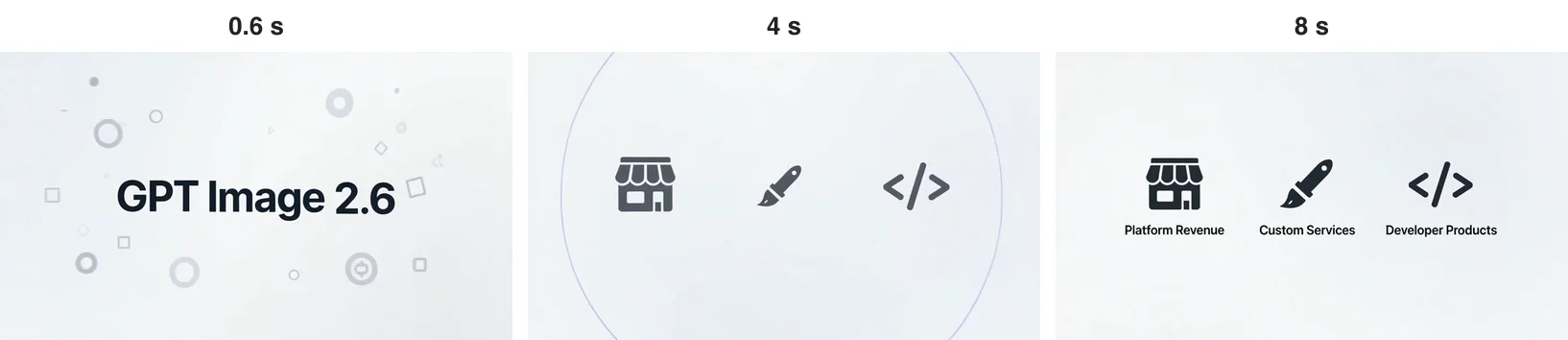
It really did read the page. The video is clean motion graphics on white: the GPT Image 2.6 title fades in, then an icon labelled "Direct GIF/SVG", and it ends on three icons captioned "Platform Revenue", "Custom Services" and "Developer Products", which map onto the article's store, custom-work and developer-product groups, all spelled correctly. It also added an English voiceover that sums the article up in three sentences: GIF and SVG come out directly, and you can earn through stores, services or apps.
The small slip is the icon beside "Direct GIF/SVG", a music note that has nothing to do with image formats. Which points get picked is also up to the model, so check every word and number before you use a clip like this in real marketing. This was the slowest job: 528 seconds for 8 seconds of video, probably because it reads the whole article first. It cost $0.24 at the special price.
How it compares with similar models
- Seedance 2.5: also does 4 to 30 seconds in one shot, takes up to 50 reference assets and can edit or extend existing video, at $0.12 a second for 480p. Better when you have lots of material or are reworking footage; our Seedance 2.5 prompting guide covers how to write for it.
- MiniMax H3: up to 15 seconds per clip at $0.097 a second for 768P, with Lite and Max Turbo tiers alongside. Worth a look for shorter clips when you want to tune quality and cost by tier.
- Kling 4.0: also reaches 30 seconds, from $0.157 a second at 720p. If your team likes Kling's look, run the same prompt on both.
- Grok Imagine Video 1.5: native sound, 1 to 15 seconds, $0.045 a second at 480p. A natural comparison for short clips with audio.
Wan 3.0 stands apart on two things: one model name that covers text, frames, multi-reference and document or web input, and 30-second single shots that come with sound. If what you need is motion transfer or swapping the character in an existing video, Wan 2.2 Animate is built for exactly that.
What a clip costs
Wan 3.0 is billed by the second, and failed jobs are not charged. Prices as of November 7, 2026:
- Standard: $0.045 a second at 480P, $0.09 at 720P, $0.18 at 1080P. Until November 23 (Beijing time) the special price is $0.03, $0.06 and $0.12.
- Prime: $0.068 a second at 480P, $0.14 at 720P, $0.28 at 1080P, with no special price.
- References: images, audio, documents and web pages cost nothing extra. With a reference video, billable seconds = input video length + output length.
Some quick sums: 100 five-second 480P clips on standard come to 100 × 5 × $0.045 = $22.50, or $15 at the special price. One 30-second 1080P clip is 30 × $0.18 = $5.40 on standard ($3.60 during the special) and 30 × $0.28 = $8.40 on prime. Our four test clips, 23 seconds in all, came to about $0.88 at today's prices.
When not to use it
- You need legible text in the scene: signs and captions blur into strokes at 480P. Try 1080P, or add the text in post.
- You need the exact same result every time: seeds don't carry across tiers, and even within a tier you depend on a fixed seed and prompt. For shots that must match, first-and-last-frame mode is the more reliable tool.
- You need more than 30 seconds in one go: the cap is 30 seconds per clip, so longer pieces have to be generated in parts and edited together.
How to call it
On apimodels.app, Wan 3.0 is called as wan-3.0-video and runs on the same asynchronous video endpoint as the platform's other video models: submit a job, get a task ID, then poll for the result or pass a callback URL. For the prime tier, add a mode parameter set to prime. The parameters for each of the four workflows, how to pass references and every limit are in the Wan 3.0 API docs. One API key is all you need; no separate Alibaba Cloud account.
Related models
- Wan 3.0: the subject of this article, from $0.045 a second on standard at 480P, special price until November 23.
- Seedance 2.5: 4 to 30 seconds, up to 50 references, video edit and extend, $0.12 a second at 480p.
- Kling 4.0: up to 30 seconds, from $0.157 a second at 720p.
- MiniMax H3: up to 15 seconds, $0.097 a second at 768P, with several tiers.
- GPT Image 2.6 Flare: make the first and last frames here, then let Wan 3.0 animate between them, as we did in this article; plain images from 1 cent.
The two frame images come from our GPT Image 2.6 vs Nano Banana 2.1 comparison. For several video models side by side, see Grok Imagine vs Seedance vs Kling.
FAQ
Who makes Wan 3.0, and what can it do?
Wan 3.0 is a video model from Alibaba's Wanxiang line. One model name covers text-to-video, first-frame or first-and-last-frame video, multi-reference generation and documents or public web pages turned into video, in single shots of up to 30 seconds at 30 fps with a synced soundtrack by default.
How much does the Wan 3.0 API cost?
It is billed per second. Standard is $0.045 at 480P, $0.09 at 720P and $0.18 at 1080P, with a special price of $0.03, $0.06 and $0.12 until November 23 (Beijing time). Prime is $0.068, $0.14 and $0.28. One hundred 5-second 480P clips on standard come to about $22.50, and failed jobs are not charged.
What is the difference between Wan 3.0 standard and prime?
The abilities are the same; prime costs 51% to 56% more per second and is meant to be faster. On November 7 the same prompt took 144 seconds on standard and 187 on prime, so prime was not faster, while an identical job in August took 58 seconds on prime and 356 on standard. Speed depends heavily on the queue, so if speed is why you would pay for prime, test a few of your own jobs on both.
Do Wan 3.0 videos have sound, and can I turn it off?
Yes, a synced soundtrack is on by default and can include speech, ambience and music. In our tests the Mandarin line in the prompt was spoken word for word; when we described no sound, the model added its own music and once a voice with no source on screen. You can switch the soundtrack off, but the price stays the same.
Can Wan 3.0 use reference videos, and how are they billed?
Yes: up to 5 clips totalling no more than 15 seconds, with input plus output capped at 30 seconds. Once a reference video is included, billable seconds are the input length plus the output length; reference images, audio, documents and web pages cost nothing extra. First-and-last-frame mode and reference mode cannot be combined in one job.