
Blog · 2026-11-06
Nano Banana 2 vs GPT Image 2.6: Both Spell It Right, but Nano Banana 2 Adds Words of Its Own
Model pages: Nano Banana 2 API · GPT Image 2.6 Flare API · GPT Image 2.6 Sunburst API — pricing, specs and the playground
Nano Banana 2 or GPT Image 2.6? In our same-prompt tests both spelled every requested word right and neither changed the person in an edit. The difference is obedience: Google's Nano Banana 2 added words and labels of its own, even labelling one bridge twice on a map, at 5 cents an image; OpenAI's GPT Image 2.6 wrote only what was asked, at 2 cents for a 1K default-quality image, and adds GIF and SVG. For Google's look at a lower price, the newer Nano Banana 2.1 is 2.2 cents.
Nano Banana 2 is Google's image generation and editing model built on Gemini 3.1 Flash, officially Gemini 3.1 Flash Image, aimed at fast output at a moderate price and widely used for social graphics and quick iteration. OpenAI's GPT Image 2.6, released in November, is known for accurate lettering and obedient edits, and adds animated GIFs and SVG vectors.
We gave both models the same five prompts: a Chinese event poster, a night-market street with six signs, a hand-drawn map of Paris, a background-only edit and a person-plus-product composite. At the end we also look at Google's newer Nano Banana 2.1, which in many cases is a better fit than Nano Banana 2.
A word on who we are: we run apimodels.app, a platform where one API key calls Nano Banana 2 and GPT Image 2.6 alongside other image, video, audio and language models. Every image below was generated there on 5 and 6 November 2026, at 1K, and is shown exactly as it came back.
The short version
Both got the requested words right: the poster's three lines of Chinese and the six market signs were all correct, both edits left her clothes alone, and both composites kept the person and the mug. The real difference is that Nano Banana 2 likes to add words. Told "no other text", it still wrote 咖啡 (coffee) on the poster's cup; asked to label five landmarks, it produced a map full of a French title, bridge names and park names, with Pont Neuf labelled twice. GPT Image 2.6 wrote only what was asked every time.
On price, Nano Banana 2 is 5 cents an image at 1K or 2K; GPT Image 2.6 is 2 cents for a default-quality 1K image and 3.5 cents at 2K. Speed is similar, around 30 to 40 seconds on both. So: for prompts followed to the letter, GIFs or vectors, choose GPT Image 2.6; if you like Google's look but want a lower price, try Nano Banana 2.1 first, at 2.2 cents an image.
How they differ, in plain terms
- How you pay: Nano Banana 2 charges per image — 5 cents at 1K or 2K, 8 cents at 4K — with references free. GPT Image 2.6 prices plain images per image by resolution and quality — 2 cents at 1K and 3.5 cents at 2K at the default medium, the same for edits that pass a size — while GIFs, markup edits and a few other requests are billed per token at 10% below OpenAI's list price.
- Obedience: in our tests GPT Image 2.6 wrote only the requested text; Nano Banana 2 added words and labels of its own.
- Only on 2.6: animated GIFs from a sentence, SVG vector output, edits limited to a circle you draw, and exact pixel sizes.
- Tiers: GPT Image 2.6 comes as Flare, for speed and everyday work, and Sunburst, for detail and repeated edits, priced the same at 1K and 2K.
- Google alternatives: the newer Nano Banana 2.1 at 2.2 cents per 1K image, and the 1K-only Nano Banana 2 Lite at 2.5 cents.
A Chinese poster: an extra word on the cup
First, our usual coffee-market poster in warm orange and cream with a retro print feel and three lines of Chinese — 周末咖啡市集, 11月15日—16日 · 老街广场 and 上午10点 — 晚上8点 · 免费入场 — plus an explicit "no other text".
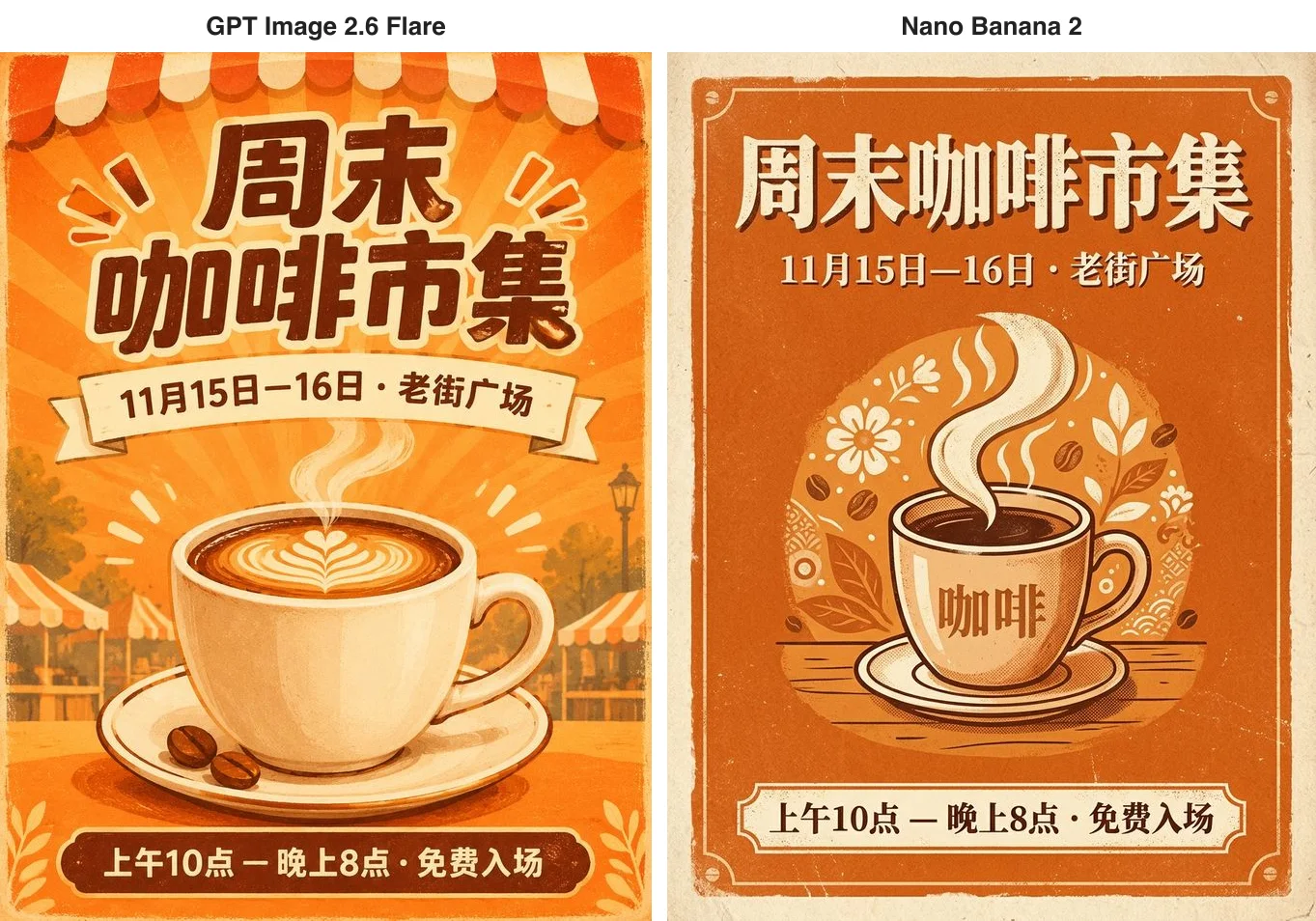
The three lines are letter-perfect on both. Nano Banana 2's layout is lovely — aged paper, an orange field, a round floral motif behind the cup, like a carefully designed vintage poster. The trouble is the cup itself: it wrote 咖啡 on it. The word is correct and fits the picture, but the prompt ruled out any other text, and if this were going to print, a client would likely ask for it to be removed. GPT Image 2.6's poster carries only the three requested lines. Nano Banana 2 took 37 seconds; 2.6 took 76.
Six market signs: right on both
An isometric night-market street with exactly six stalls, signs reading from left to right Noodles, Dumplings, Tea, Skewers, Ice Cream and Bao, with lanterns overhead and people queuing.
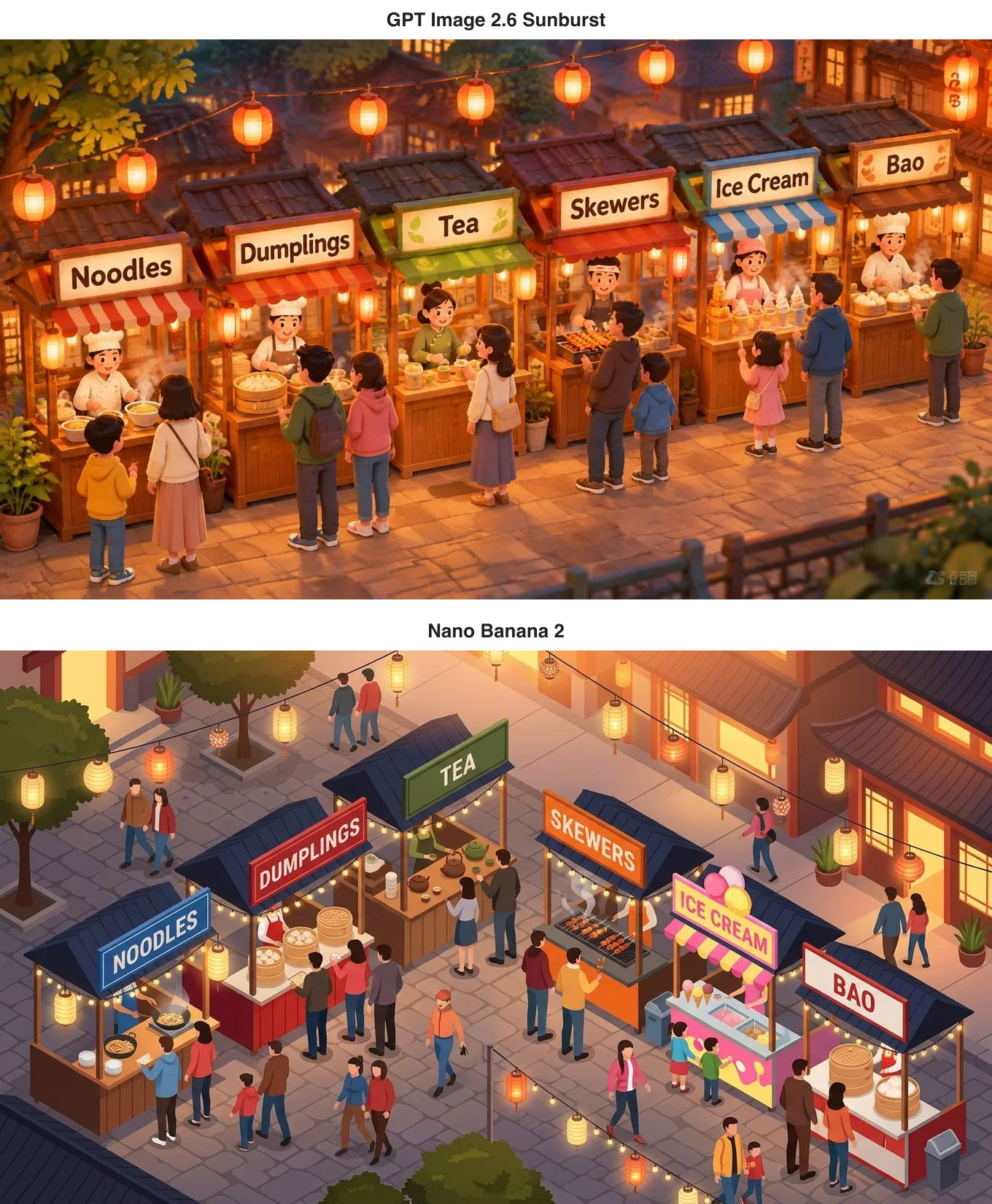
All six signs are spelled right and in order on both. Nano Banana 2 used all-caps signs and bright flat colour, made the ice-cream stall a pink cart and filled the street with more passers-by; GPT Image 2.6 drew a cosy, cartoonish street in warm lamplight with every stall-holder busy. The 2.6 image has a small watermark-like mark in the bottom-right corner to crop before use; Nano Banana 2's has none.
A Paris map: Nano Banana 2 labels everything
This one shows obedience most clearly: a watercolour tourist map of central Paris, north at the top, showing the Seine and five landmarks — the Eiffel Tower, the Arc de Triomphe, the Louvre, Notre-Dame and Sacré-Cœur — each with a small drawing and its name, and no other labels.
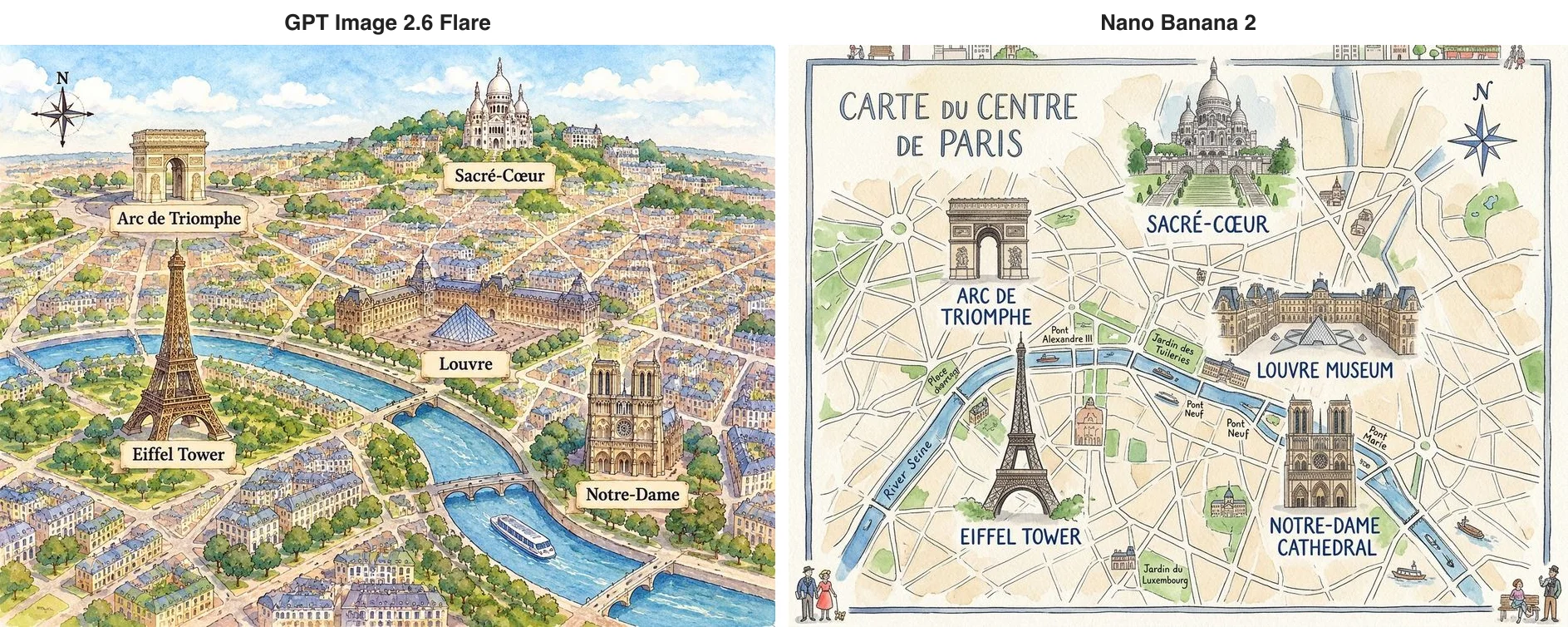
Both put the five landmarks in roughly the right places. GPT Image 2.6 wrote only the five names. Nano Banana 2 added a French title, "Carte du Centre de Paris", renamed two landmarks "Louvre Museum" and "Notre-Dame Cathedral", and labelled Pont Alexandre III, the Tuileries, the Luxembourg Gardens, Pont Marie and the River Seine. The clearest mistake is Pont Neuf, labelled twice and both times on dry land rather than on the river — there is only one. The map is rich and looks like the real thing, but it ignores "no other labels" and gets a label wrong.
This matches what we saw in our Nano Banana Pro comparison: Google's models like to add information. When it is correct, that is a bonus; when it is wrong or against the brief, it is rework. For material that must match a brief exactly, GPT Image 2.6 is less trouble.
Swapping only the background: both held the line
For editing we used one base image: a woman with short curly red hair, round glasses and a yellow raincoat, holding a paper coffee cup, in denim shorts and white socks. The instruction: change only the background to a snowy mountain village at dusk with warm lights in the windows, and keep everything about her the same. On the GPT Image 2.6 side we used Sunburst, the tier built for repeated edits.
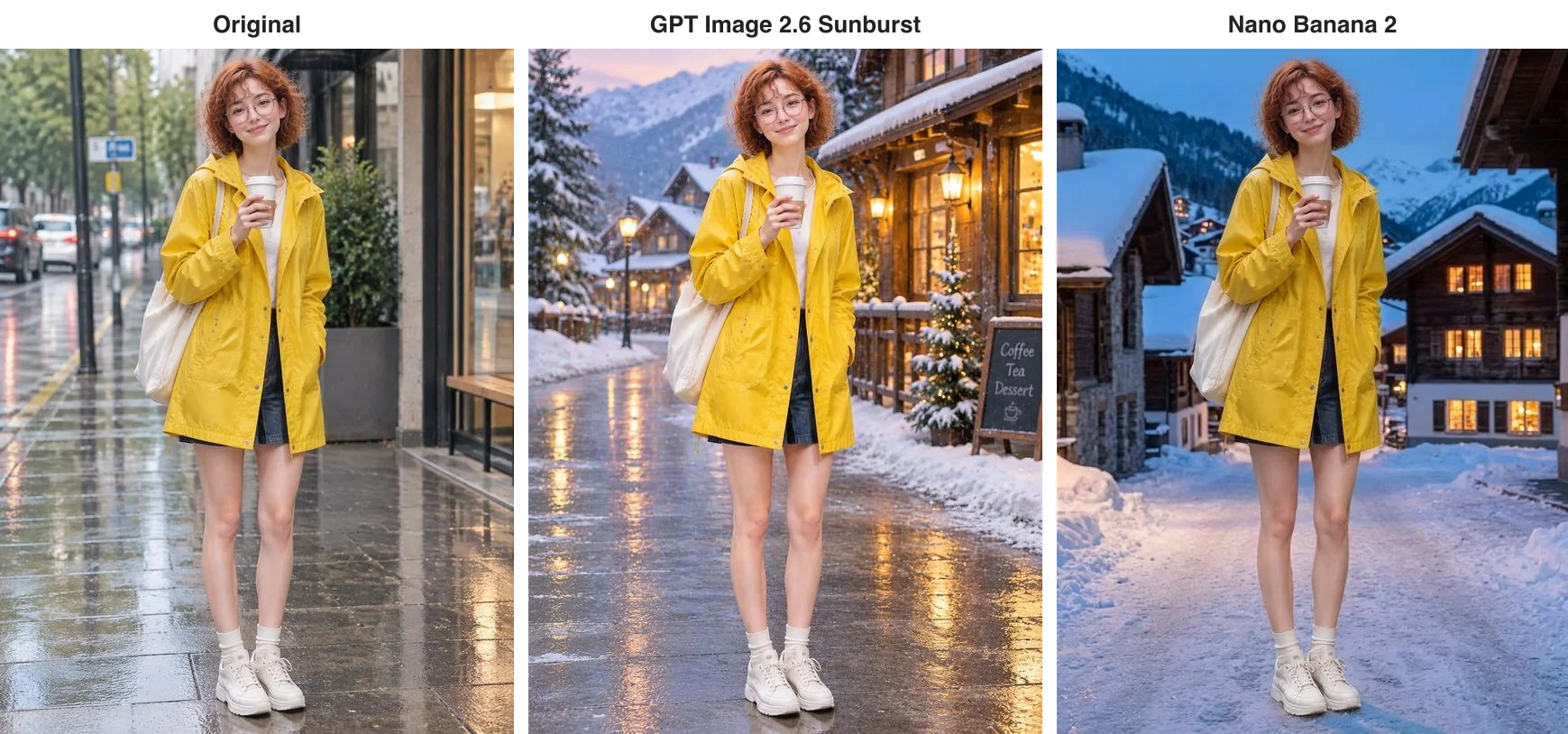
Neither touched her: denim shorts, white socks, white sneakers, raincoat, tote and cup are all there, in the same pose. That is worth noting, because its sibling Nano Banana 2.1 put her in long jeans under the same instruction in another of our tests. Nano Banana 2's background — blue dusk, snow-laden chalets, lit windows — fits "a snowy mountain village at dusk" closely; GPT Image 2.6 kept the wet, shining pavement and added a small chalkboard.
Your person and your product in one picture
Finally, we gave each model two pictures, the red-haired woman and a matte green mug with an embossed leaf logo, and asked for her at an oak table by the window, holding that mug in both hands and smiling.
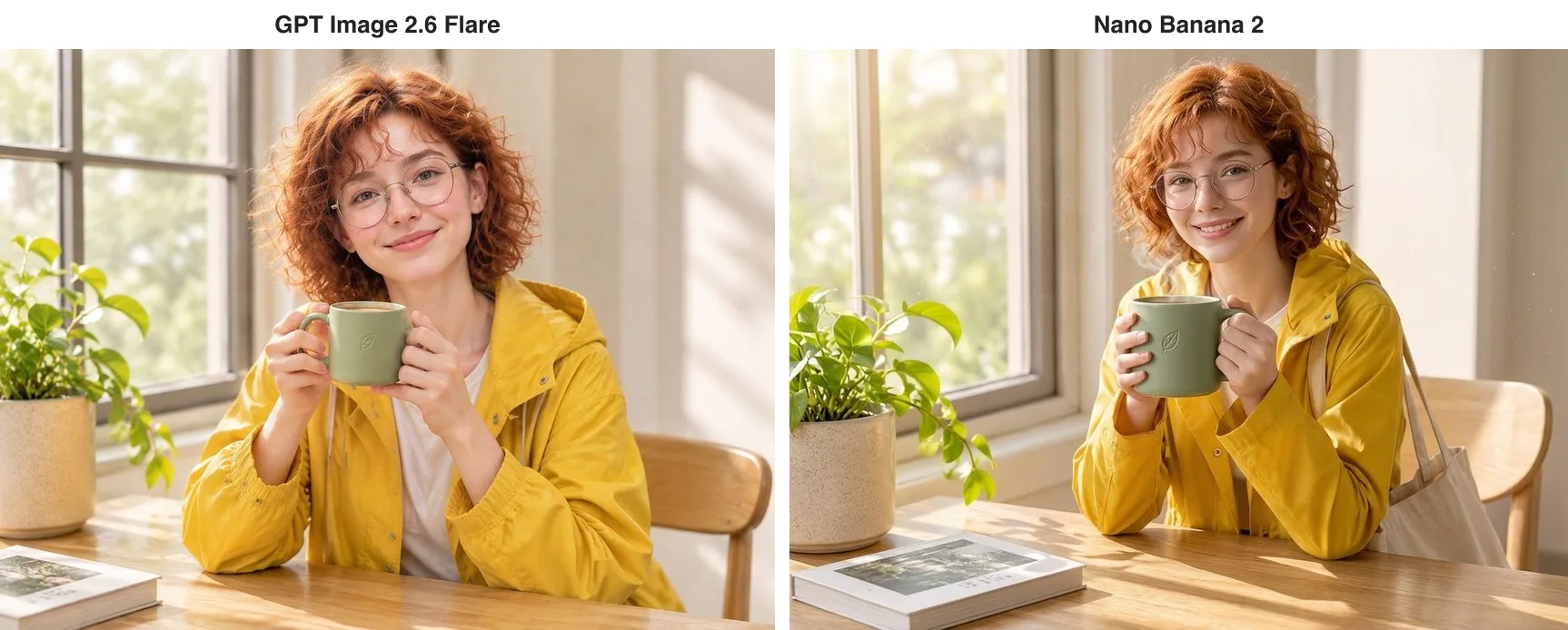
Both look natural, with the face, curls, glasses, raincoat and the leaf on the mug right, and the book from the corner of the product shot carried over. Nano Banana 2 also hung the tote bag from the first reference on her shoulder. It took 38 seconds and, with references free, still cost 5 cents; GPT Image 2.6 took 32 seconds and, as an edit at a set 1K size, is priced like any other 1K image: 2 cents.
What only one of them can do
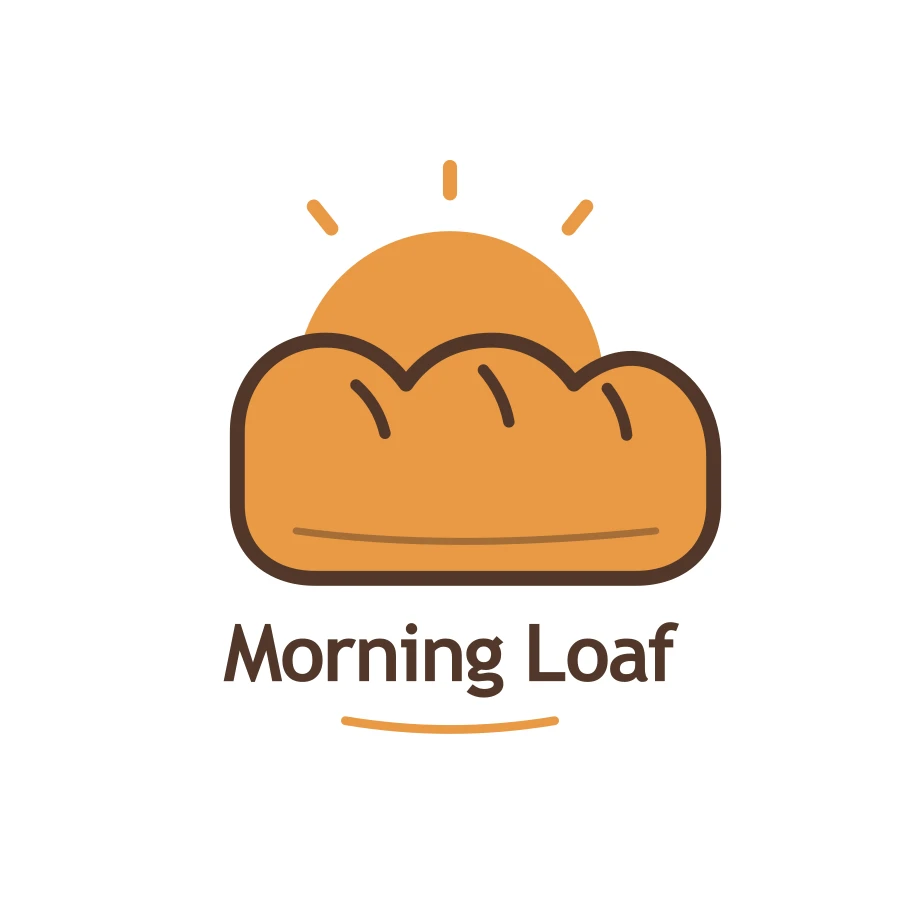
GPT Image 2.6 can turn a sentence into a looping GIF, output SVG vectors that stay sharp at any size at a flat 3.15 cents, edit only inside a circle you draw, and hit exact pixel sizes. Nano Banana 2 supports none of these. The bakery logo below is an SVG straight from GPT Image 2.6.
Nano Banana 2's strength is the information-rich, bright look of Google's models, at one price for 1K and 2K with reference photos free.
What it costs and how long it takes
Nano Banana 2 is 5 cents an image at 1K or 2K and 8 cents at 4K, with references free — $5 for a hundred 1K images. From 6 November GPT Image 2.6 prices plain PNG, JPEG and WebP images per image: 1, 2 and 3 cents at 1K for low, medium and high quality, so 2 cents at the default medium — $2 per hundred; 3, 3.5 and 4.5 cents at 2K; and at 4K, 3, 4.5 and 8 cents on Flare or 3, 8.5 and 16 cents on Sunburst. Edits with reference photos follow the same table as long as they pass a size or resolution, so our two-photo composite is 2 cents. Animated GIFs, markup edits, transparent backgrounds and edits that keep the source image's size are still billed per token, at 10% below OpenAI's list price. Neither model charges for failed requests. We ran these tests on 5 and 6 November, while 2.6 was still billed per token; the 2.6 prices in this article are the per-image prices in force from 6 November.
On speed, Nano Banana 2 took 37 to 63 seconds per image, mostly around 40; GPT Image 2.6 took 28 to 34 seconds, with the Chinese poster at 76. Overall they are close.
Which should you use?
- Prompts that must be followed exactly (material where extra text is not allowed, brand work): GPT Image 2.6.
- Google's bright, information-rich look: try Nano Banana 2.1 first at 2.2 cents; Nano Banana 2 is 5 cents.
- Composites from several photos: Google's models charge nothing extra for references, and GPT Image 2.6 prices an edit at a set size like any other image, 2 cents at 1K and default quality, with up to 16 references.
- Background swaps that keep the person intact: Nano Banana 2 and GPT Image 2.6 are both dependable.
- GIFs, vectors, circle-to-edit, exact pixel sizes: only GPT Image 2.6.
- 4K: both are flat per image, 8 cents on Nano Banana 2 against 4.5 cents on GPT Image 2.6 Flare at default quality or 8 cents at high.
On apimodels.app both run on one API key — set the model to gemini-3.1-flash-image-preview for Nano Banana 2, or gpt-image-2.6-flare or gpt-image-2.6-sunburst, to switch — and the parameters are in the image API docs and the GPT Image 2.6 docs.
Related models
- Nano Banana 2: Google's generation and editing model built on Gemini 3.1 Flash, 5 cents at 1K or 2K and 8 cents at 4K.
- Nano Banana 2.1: Google's newer efficient tier, 2.2 cents per 1K image, up to 10 references and banners as wide as 8:1.
- Nano Banana 2 Lite: the 1K version of Nano Banana 2, 2.5 cents an image.
- Nano Banana Pro: Google's high-end tier, 6.8 cents at 1K or 2K.
- GPT Image 2.6 Flare: the everyday tier of OpenAI's newest generation, with GIF and SVG output and circle-to-edit.
For Google's newer model, read GPT Image 2.6 vs Nano Banana 2.1; for the high-end tier, read GPT Image 2.6 vs Nano Banana Pro.
FAQ
Is GPT Image 2.6 or Nano Banana 2 better?
Both spelled the requested words right and neither altered the person in an edit. The difference is obedience: Nano Banana 2 adds words and labels of its own, and in our map test labelled one bridge twice; GPT Image 2.6 writes only what is asked and also makes GIFs and vectors.
How much does each image cost on each model?
On apimodels.app, Nano Banana 2 is 5 cents at 1K or 2K and 8 cents at 4K, with references free. GPT Image 2.6 prices plain images per image, 2 cents at 1K and 3.5 cents at 2K at default quality, two-reference composites at a set size included, while GIFs and markup edits are billed per token at 10% below OpenAI's list price. Failed requests are not charged on either.
Should I choose Nano Banana 2 or Nano Banana 2.1?
In most cases try Nano Banana 2.1 first: it is newer, 2.2 cents per 1K image — under half the price of Nano Banana 2 — and supports extreme shapes such as 8:1. That said, in our background-swap test Nano Banana 2 kept her clothes while Nano Banana 2.1 put her in long trousers, so for demanding edits it is worth trying both.
What model name do I use for Nano Banana 2?
On apimodels.app, set the model field to gemini-3.1-flash-image-preview for Nano Banana 2. It uses the same image endpoint and API key as GPT Image 2.6.
Can Nano Banana 2 make GIFs or SVG files?
No. Animated GIFs, SVG vectors, circle-to-edit and exact pixel sizes are GPT Image 2.6 features.