
Blog · 2026-11-05
GPT Image 2.6 vs 2.5: It Makes Stickers, Draws Vector Logos and Edits Where You Point
Model pages: GPT Image 2.6 Flare API · GPT Image 2.6 Sunburst API · GPT Image 2.5 Flare API · GPT Image 2.5 Sunburst API — pricing, specs and the playground
In November OpenAI released GPT Image 2.6 — Images 2.6 inside ChatGPT — across ChatGPT, Codex and the API at once. It replaces GPT Image 2.5 and keeps the same two tiers: Flare, built for speed and everyday pictures, and Sunburst, built for detail and for images you will keep editing. OpenAI says this generation is about 50% faster, and for the first time it can turn a sentence into an animated GIF, hand you an SVG vector file, and hold on to a person or a product more faithfully while you edit.
Launch claims always sound good. What most people want to know is simpler: are everyday pictures any better, what are the new tricks actually good for, and should I be using 2.5 or 2.6? To answer that, we gave both generations the same jobs, then worked through 2.6's new abilities one by one — 22 images in all.
A word on who we are: we run apimodels.app, a platform where one API key calls GPT Image 2.5 and 2.6 alongside other image, video, audio and language models. Every image below was generated there on 5 November 2026 and is shown exactly as it came back.
The short version
If you make the odd poster or blog illustration, the difference between 2.5 and 2.6 is smaller than the launch suggests: both handle Chinese text well, product shots look nearly identical, and neither lost the character over a couple of rounds of edits. Where 2.6 earns the upgrade is in things 2.5 simply cannot do — a full sticker set from one character, a hand-drawn doodle that moves, edits that stay inside a circle you draw, and a logo you can blow up to any size. As for "50% faster", we did not see it in these tests.
What 2.6 adds, in plain terms
Here is the difference, feature by feature:
- Animation: 2.5 makes still images only; describe a movement to 2.6 and it returns a looping GIF of 2 to 64 frames.
- Vector files: 2.5 outputs PNG or JPEG, which blur when enlarged; 2.6 can output SVG, which stays crisp at any size — ideal for logos and icons.
- Point to edit: on 2.5 you describe the spot in words; on 2.6 you can draw a circle or an arrow on the image to show exactly what to change (the image markup tool from ChatGPT, now in the API too).
- Repeated edits: OpenAI says 2.6 keeps people, products and brand details intact across rounds of changes; over our two rounds, neither generation drifted.
- Thinking time: 2.6 adds a setting for how much planning happens before drawing (OpenAI calls it complexity; on apimodels.app it is reasoning_effort), which pays off on busy scenes. 2.5 only has quality levels.
- Speed: OpenAI says 2.6 is about 50% faster, with Flare as quick as 6 seconds at low quality; most of our jobs took around half a minute on both.
- Price: OpenAI's list price for 2.6 matches 2.5. On apimodels.app, 2.5 is a fixed price per image and 2.6 is billed on actual usage; an ordinary image costs a cent or two either way.
Everyday pictures: closer than you would think
Start with the most common job. We asked each generation for a vertical, retro-style poster for a weekend coffee market carrying three lines of Chinese: the title 周末咖啡市集, the dates and venue 11月15日—16日 · 老街广场, and the hours 上午10点 — 晚上8点 · 免费入场. Chinese has long tripped up image models; get one stroke wrong and the character turns into gibberish.
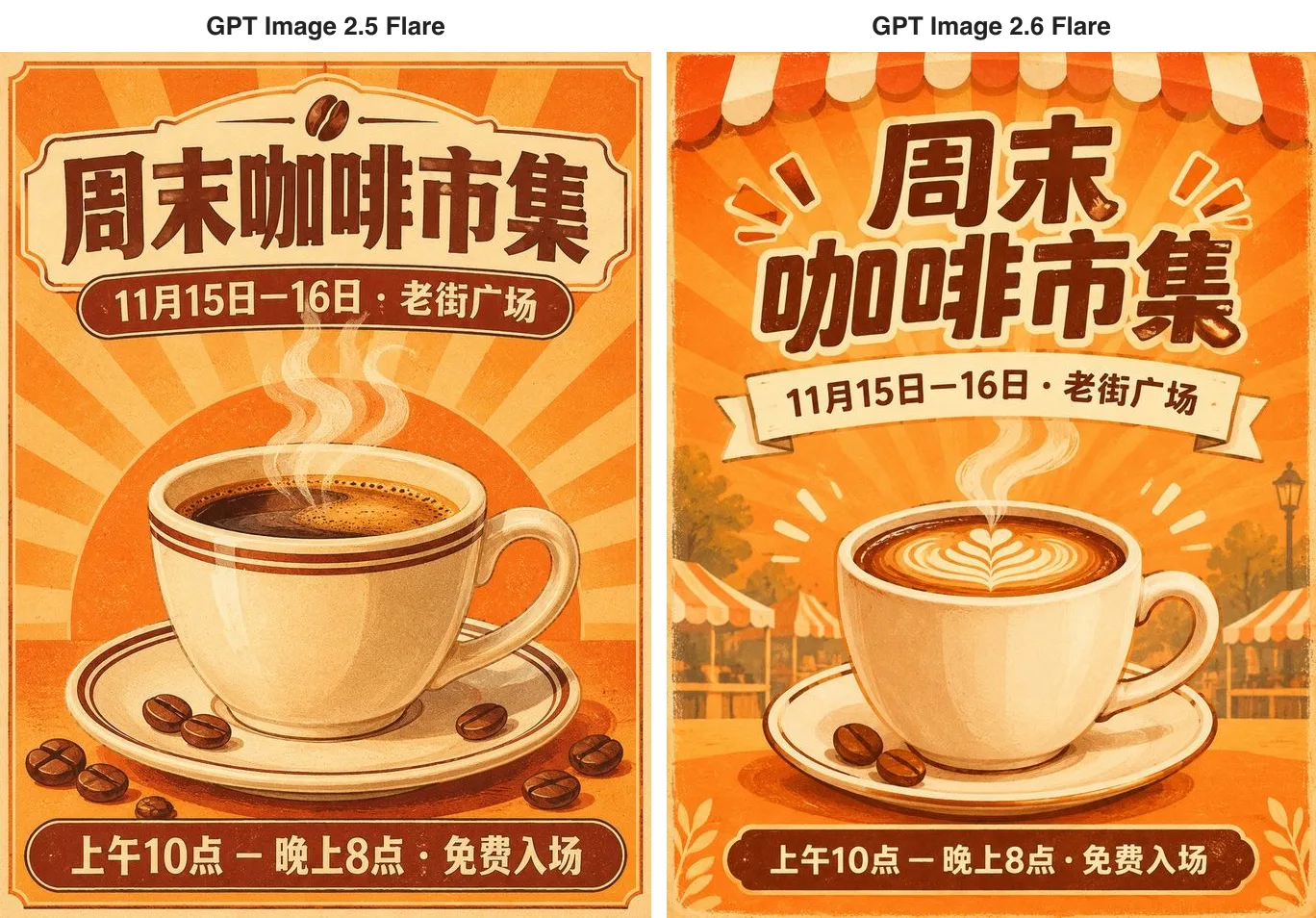
Both posters got every character right, down to the dash and the middle dot. The difference is initiative. 2.5 produced a tidy, symmetrical layout; 2.6 dressed the background with striped awnings and market stalls and split the title over two lines, so it feels more like an event. That 2.6 poster did take a while — 76 seconds against 27 for 2.5.
Next, a listing photo: a matte sage-green ceramic mug with an embossed leaf logo, on a wooden table by a sunny window.
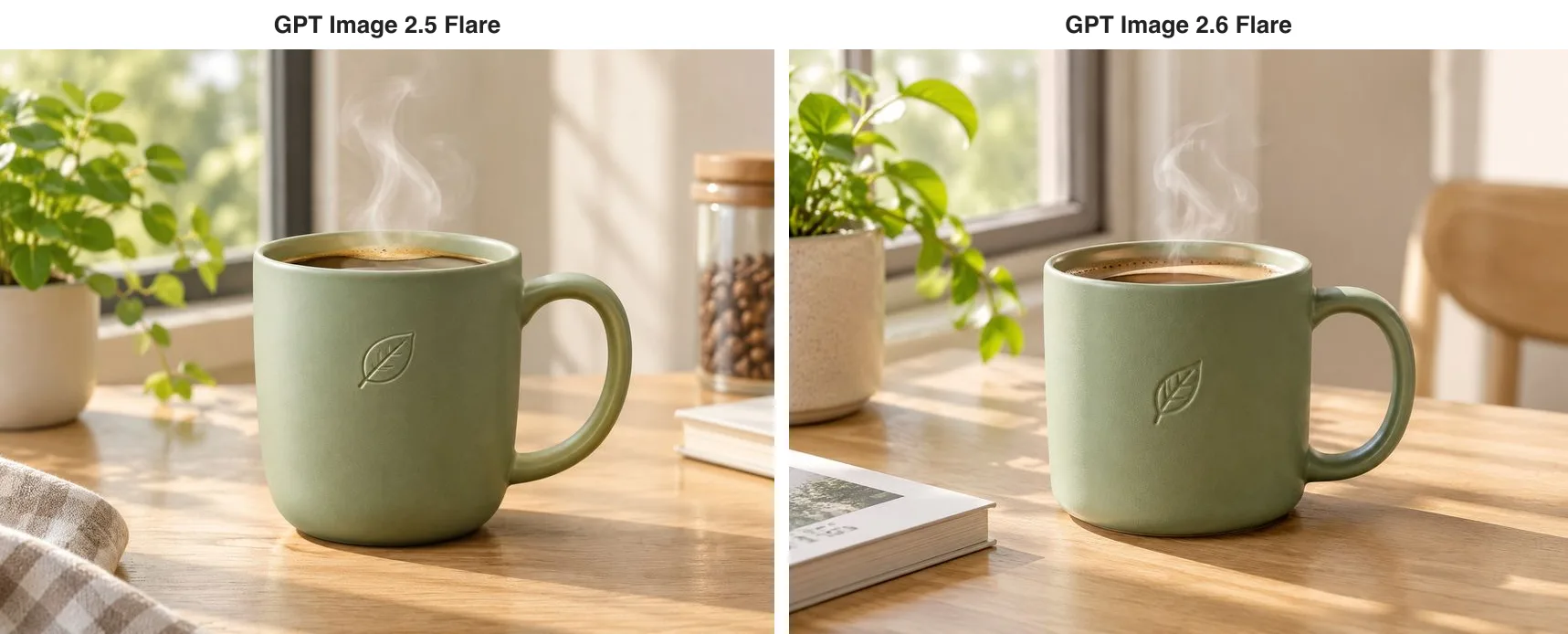
It is hard to pick a winner. The matte glaze, the embossed leaf, the steam and the window light are all handled well on both. The one blemish is the book in 2.6's lower-left corner, whose cover sprouted a few unreadable letters — for product shots, add "no text anywhere in the image" to the prompt.
So if your work is mostly posters, illustrations and product photos, 2.5 is entirely up to it — and its fixed price per image makes budgeting simpler.
A sticker from one sentence — then a whole set
The most visible new trick in 2.6 is the animated GIF. Describe a character, a movement and a mood in everyday language, and it returns a looping animation. We started with a chubby orange cat sticker: it waves a paw, blinks, a pink heart pops up, and it settles back into its starting pose.
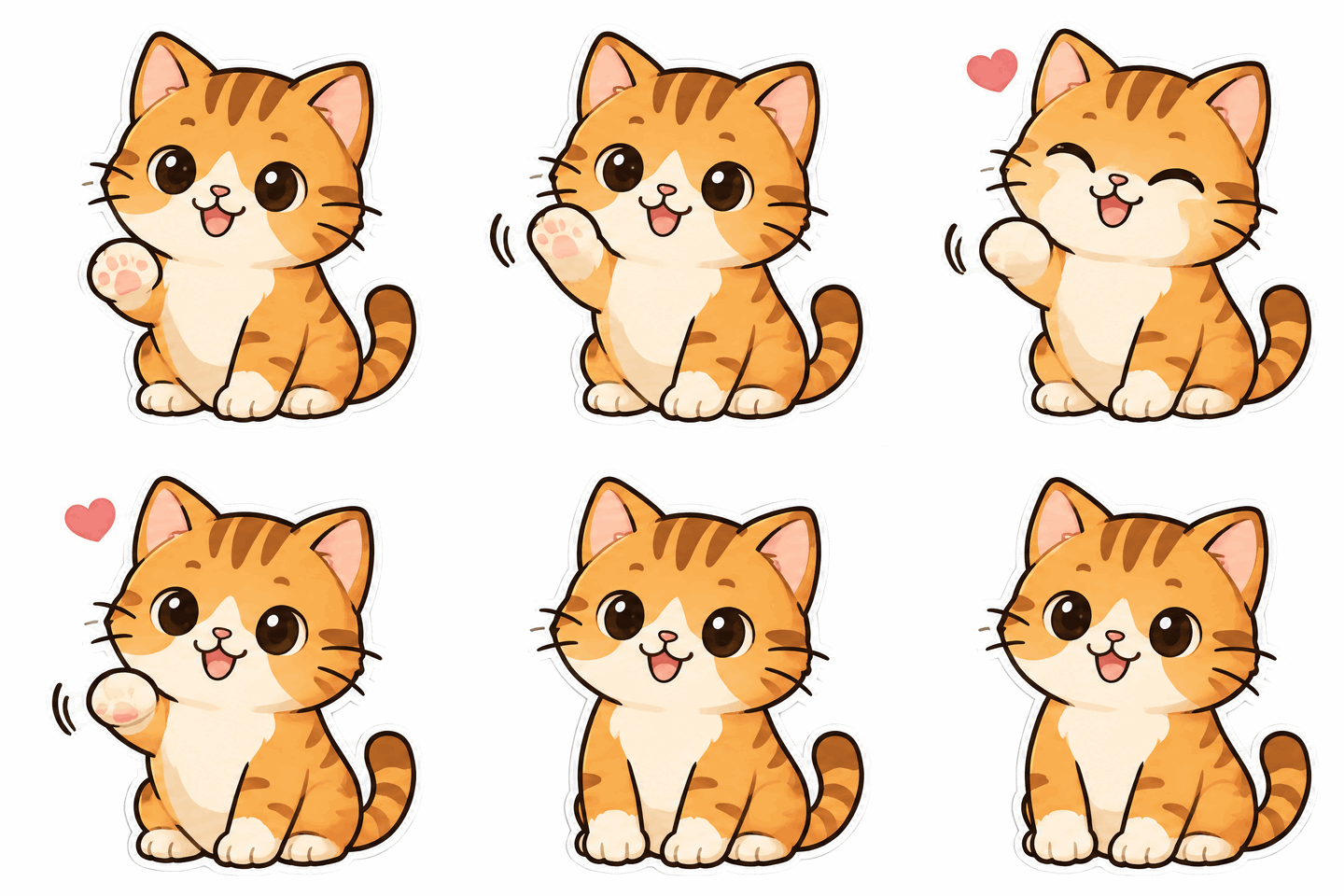
Twenty-five seconds later we had a real eight-frame loop. The stripes, the face and the white outline are identical in every frame; only the paw, the eyes and the heart move. It is ready to drop into a chat.
The more interesting part is making a set. We handed one frame of that cat back to 2.6 as a reference and asked for three more moods: a jaw-dropping shock, a wink and a thumbs-up, and a cat tucking into a big bowl of rice.

It is still the same cat in all three, stripes and outline unchanged, and each expression matches the request. Settle on a character once and you can build a full sticker pack around it, rather than hunting the internet for the right reaction image.
Short loops like these are useful well beyond stickers:
- Brand mascots: bring a shop's or an app's character to life on the website and social media.
- Loading animations: a little character that blinks while people wait is far more memorable than a spinning dot.
- Social posts: small animated greetings and event teasers.
- Rehearsing a video: try out a movement and its timing in a few frames before you commit to a video model.
Three tips for GIF prompts: write the movement as "from the starting pose to the action and back to the starting pose" so the loop closes naturally; say outright "same character, same camera, same background in every frame"; and stay around six to eight frames. Keep expectations in proportion, too — it is built for a few seconds of small movement, and anything with camera moves or a storyline belongs to a video model.
A doodle that comes to life
There is another way to use animation: start from a drawing and make it move. We asked 2.6 for something that looks like a child's crayon doodle — a grinning little cactus in a pot, wobbly lines on lined notebook paper. A photo of your own drawing works the same way.
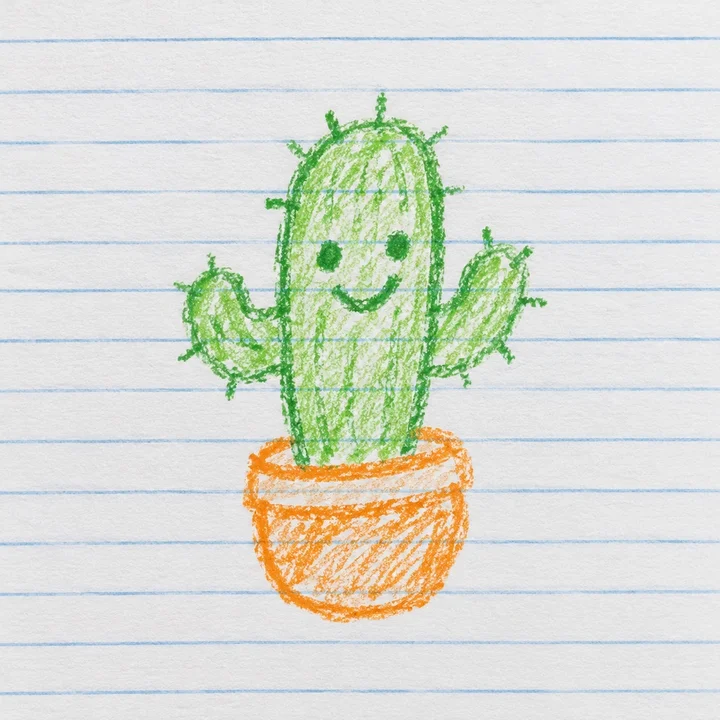
Then we handed the doodle back with a single instruction: make the cactus sway and wave, keep the crayon strokes and the lined paper, and do not change the style.
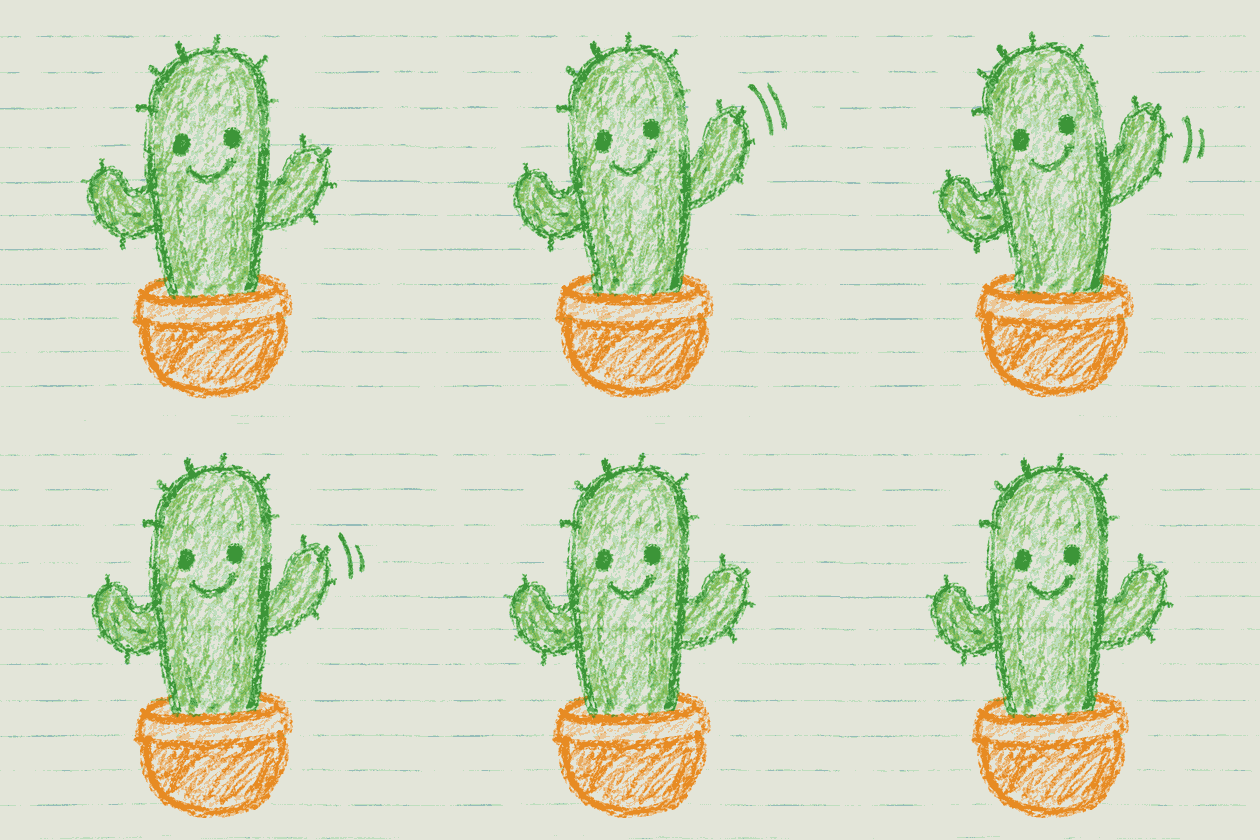
It did not "improve" the doodle into a polished illustration. The waxy crayon grain, the wobbly lines and the notebook rules are all still there; only the cactus moves. A child's drawing, a sketch in a journal or an illustrator's rough can all become a small animation this way.
Edits that do what you asked
Hardly any AI image is final on the first try. You generate something, then swap the background, adjust a pose, change a line of copy. The fear is that one change ripples through everything — the background is right, but now she has a different face, and the earlier work is wasted. OpenAI made holding on to people, products and brand details across edits a headline feature of 2.6, Sunburst especially, so we tested it three ways.
The same person, two rounds of changes
We generated a base image — a woman with short curly red hair, round glasses and a yellow raincoat, holding a paper coffee cup — and gave that same picture to 2.5 Sunburst and 2.6 Sunburst. Round one: change only the background, to a snowy mountain village at dusk.
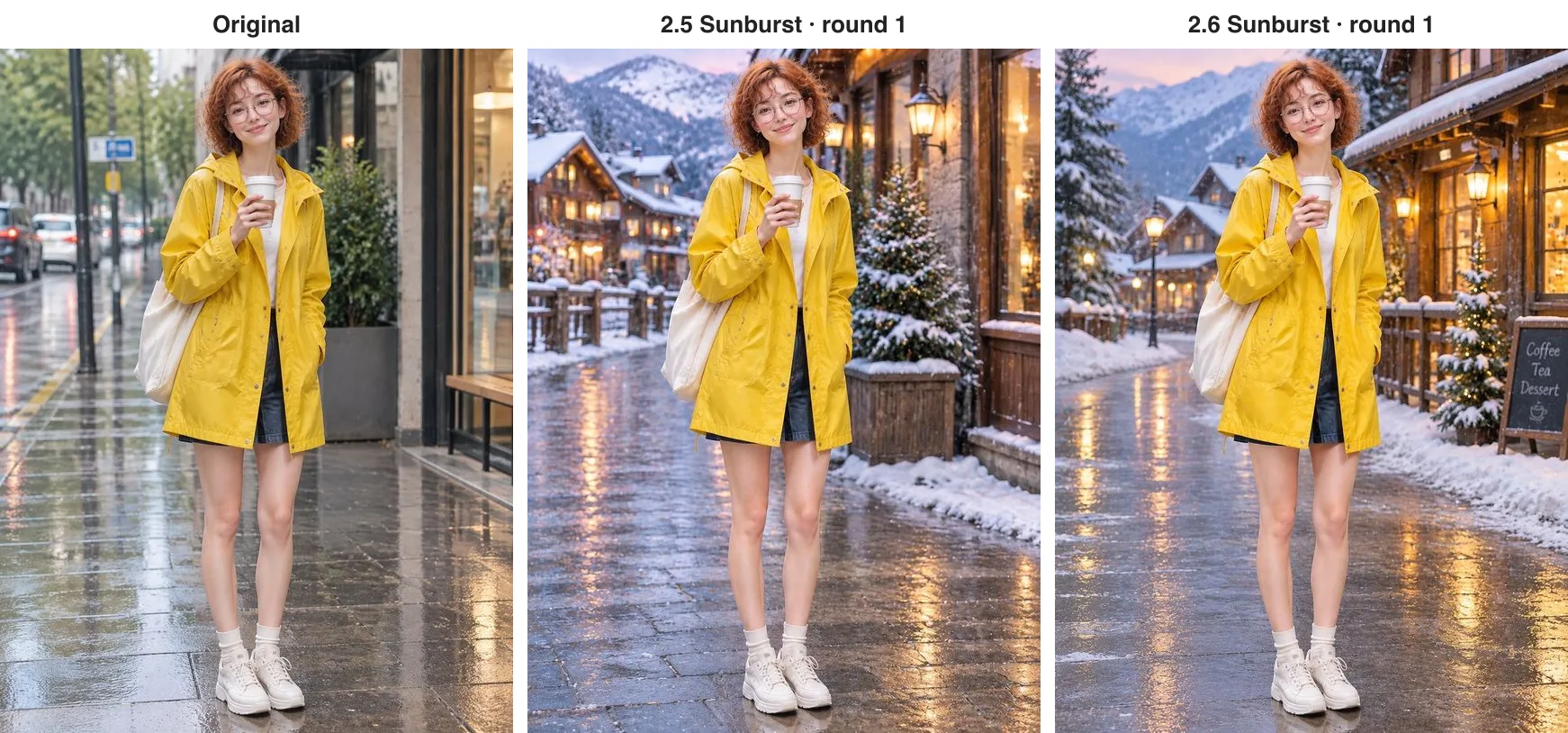
Both kept her almost exactly as she was: the face, the curls, the glasses, the buttons on the raincoat, the tote bag and the cup. 2.6 also slipped a chalkboard reading Coffee, Tea, Dessert onto the pavement. Round two: have her wave at the camera, everything else unchanged.
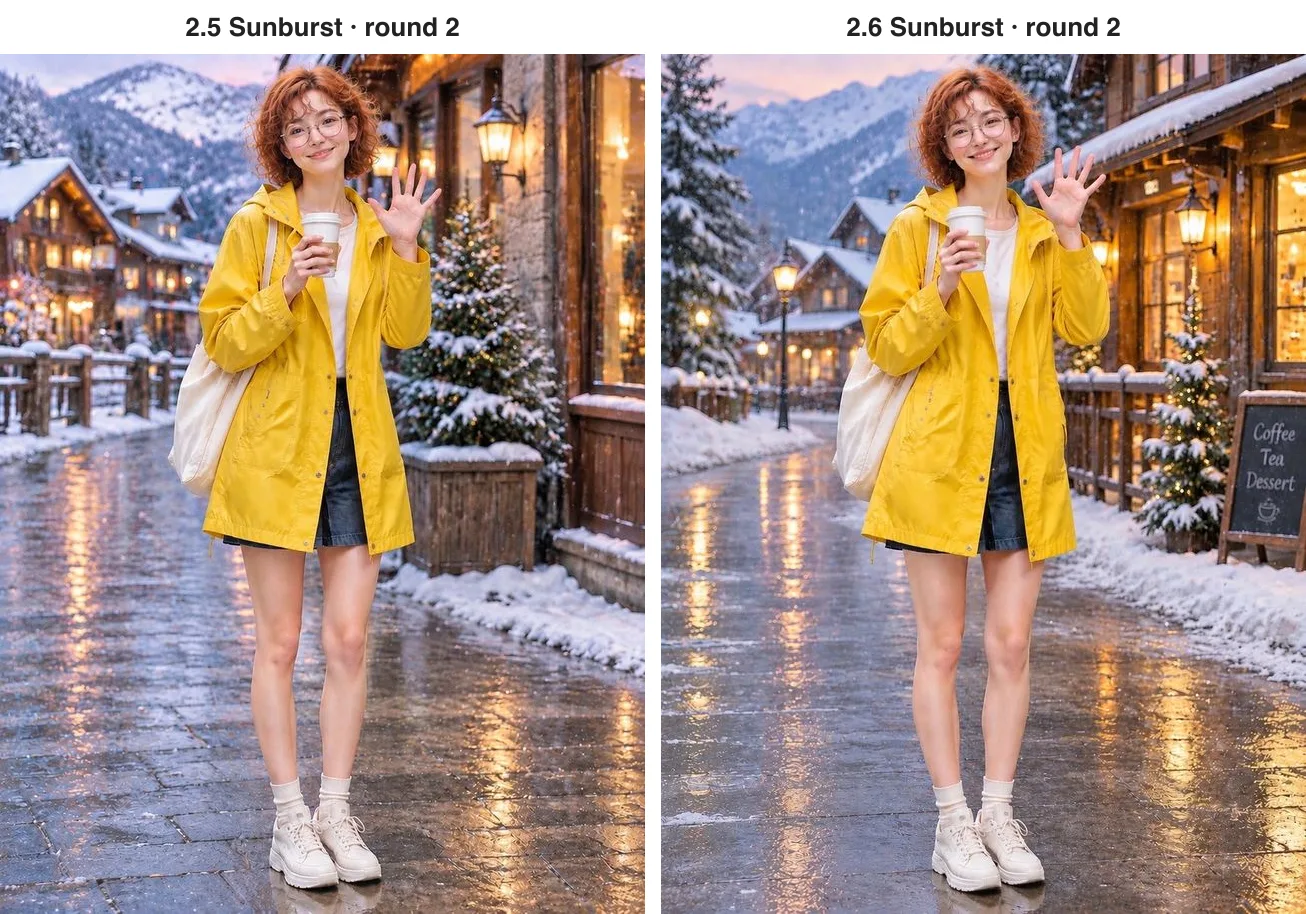
Both simply raised her free hand; the cup stayed in the other one and the snowy street stayed put. Over two rounds, neither generation swapped her face. OpenAI says 2.6 holds up better over longer chains of edits; we only ran two rounds, so we will leave that claim with them.
Change only what you circle
Sometimes you want to change one small area, and words are a clumsy way to say where. 2.6 accepts a markup image: draw a circle or an arrow on a transparent layer the same size as the picture, and it knows where to work. 2.5 has nothing like it; you have to describe the spot.
On the mug photo we circled the empty patch of table to the right and asked 2.6 to put a small white plate with a croissant inside the circle. 2.5 got the same request in words: on the table to the right of the mug, in the empty space in front of the chair.
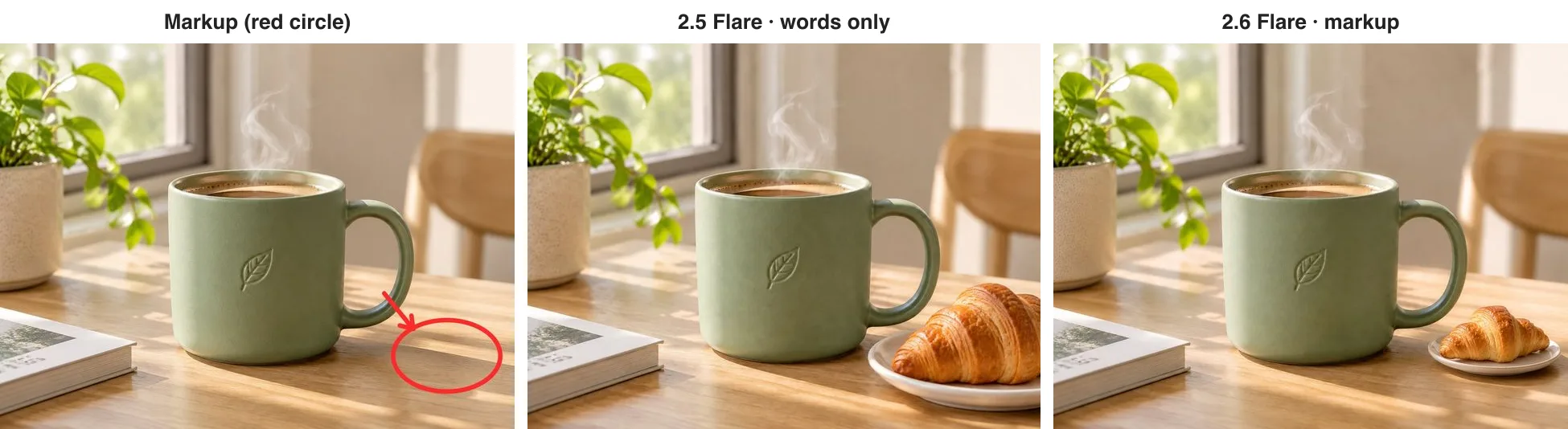
Neither touched the mug, the plant or the book. But 2.6 placed a sensibly sized plate squarely inside the circle and left the red mark out of the result, while 2.5 understood "to the right" yet drew an outsized croissant that runs off the edge of the frame. The more precise the placement, the more pointing beats describing. Any tool that exports a transparent PNG — Photoshop, Figma, Procreate — can make the markup: a transparent canvas the same size as the photo, with just your circles and arrows.
A new edition of the poster, new dates only
Then there is the series edit: the event runs again and the poster needs new dates and nothing else. We sent each coffee-market poster back to the model that made it and asked for a December edition — change only the date and venue line to 12月20日—21日 · 河边公园, add a little falling snow, and keep the title, the bottom line, the cup, the colours and the layout.
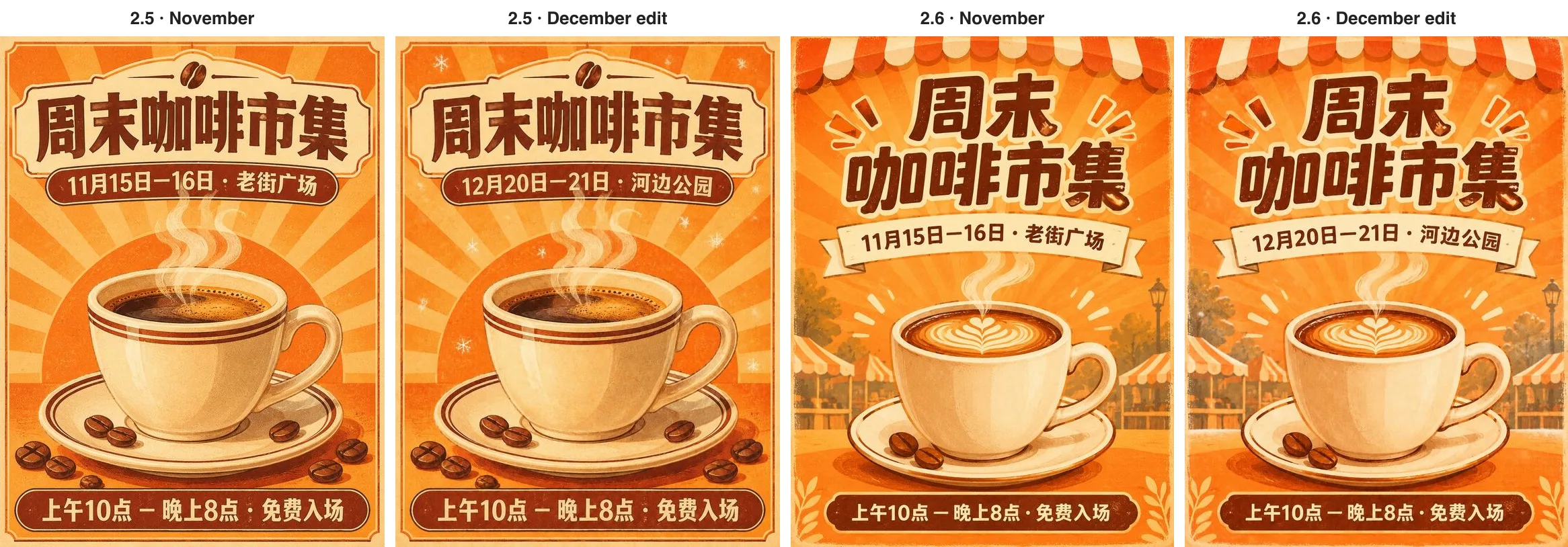
Both delivered a usable second edition: the new dates are letter-perfect, and the title, the opening hours, the cup and the layout all match the original, so the pair reads as a series. The one difference is the snow — 2.5 added a few clearly visible flakes, while 2.6's is barely there. If a change matters to you, spell it out, for example "twenty or thirty white snowflakes drifting across the top of the poster".
A shop logo, as a real vector file
For anyone running a shop, SVG output may be even more useful than GIFs. Ordinary AI images are bitmaps that go soft the moment you enlarge them for a sign or a package; an SVG is a vector file that stays sharp at any size and is easy for a designer to keep working on. We asked 2.6 for a flat logo for a neighbourhood bakery called Morning Loaf: a rounded loaf with half a rising sun behind it, two colours only — warm orange and dark brown — and the name underneath.
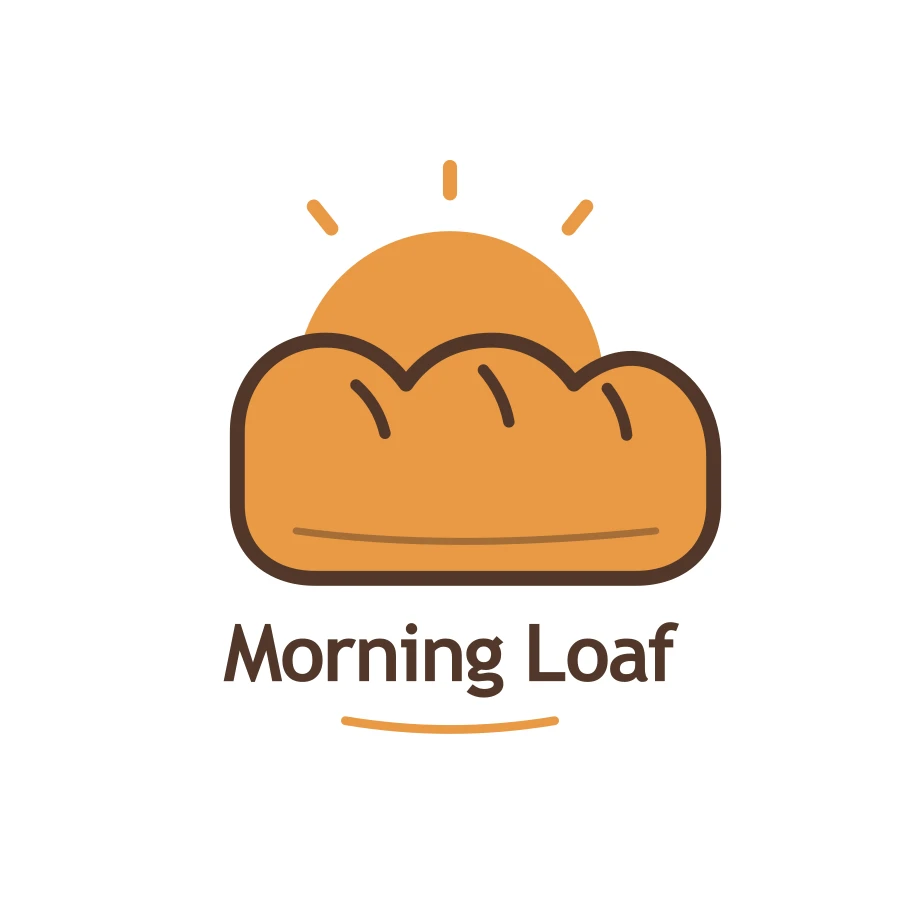
Nineteen seconds later we had a genuine SVG: strictly two colours, name spelled right, ready for a sign, a favicon or a sticker. Two caveats. The name is stored as live text, so another computer may show a different font — convert the text to outlines in Figma or Illustrator before you call it final. And it is meant for logos, icons and flat illustration; it will not turn a photo into a vector.
For busy scenes, let it think longer
2.6 has an easily overlooked setting: how much it plans before it draws. We picked a scene that is easy to get wrong — an isometric night market with exactly six stalls, signed left to right Noodles, Dumplings, Tea, Skewers, Ice Cream and Bao, lanterns overhead and a queue at every stall — and generated it once with low and once with high.
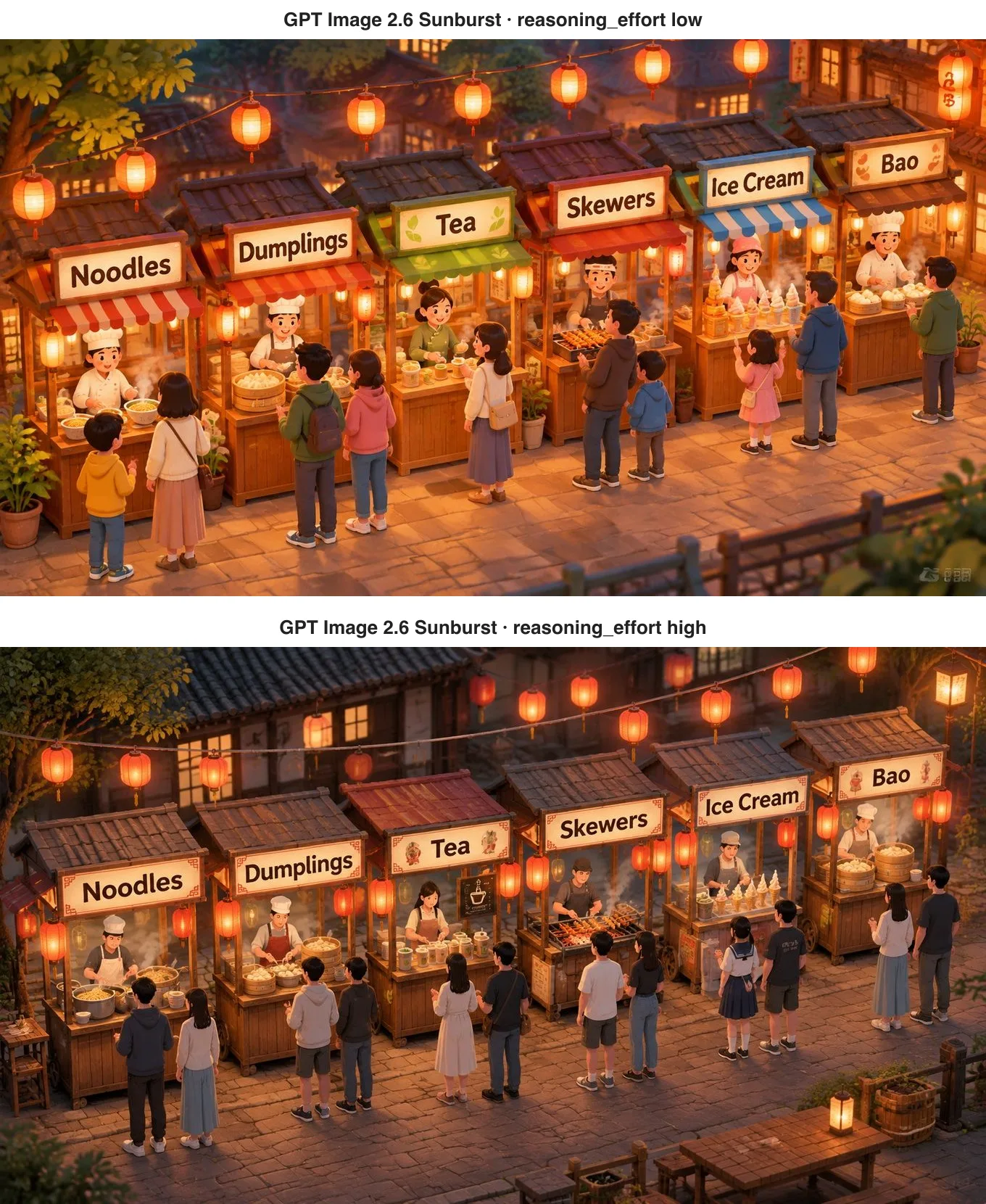
Both got six stalls and every sign in order, but the high version is more careful: buns in the bamboo steamers, skewers on the grill, each stall selling what its sign promises. The low version is more cartoonish and has a garbled, watermark-like mark in the lower-right corner. Both took the same time and cost the same, so for crowded, exacting scenes there is no reason not to choose high.
Speed: OpenAI says about 50% faster; we did not see it
OpenAI says 2.6 is about 50% faster, with Flare as quick as 6 seconds at low quality. In our tests, most jobs took 25 to 30 seconds on both generations, and one 2.6 poster took 76. Over an API, speed also depends on load at the moment, so a handful of runs proves little either way. If speed is what you care about, use Flare at low quality and time a few runs yourself.
What it costs
On apimodels.app the two generations are billed differently:
- GPT Image 2.5 is a fixed price per image: at 1K, 1 cent for low quality, 2 cents for medium and 3 cents for high. Pick a size and a quality and you know the cost — good for quoting per image and for budgeting.
- GPT Image 2.6 is billed on actual usage, at OpenAI's rates: in these tests an ordinary 1K image came to about 1 to 2 cents, an edit with a reference image about 1.5 to 4 cents, an eight-frame sticker GIF about 7 to 8 cents, and SVG is a flat 3.5 cents.
- On both, a failed request costs nothing.
Which one should you use?
Match it to the job:
- Posters, illustrations and product photos where you want to know the price of each image: GPT Image 2.5 Flare.
- Stickers, a moving mascot, a loading animation, or bringing a drawing to life: GPT Image 2.6.
- Logos and icons that must stay sharp at any size: GPT Image 2.6 with SVG output.
- Changing one small area of a picture, in a precise spot: GPT Image 2.6 with a circle drawn on it.
- A whole set of images around one character or product, with repeated edits: either works; in these tests 2.6 Sunburst cost less per edit.
- Crowded, demanding scenes: GPT Image 2.6 Sunburst, set to think longer.
When to stay on 2.5
If you need a fixed price for every image that you can quote to a client in advance, 2.6's usage-based billing is harder to plan around than 2.5's. If you rely on the xhigh or max quality levels that only 2.5 offers, stay put for now. And keep 2.6's new tricks in proportion: its GIFs are a few seconds of small movement, not video, and its SVGs are for simple, flat graphics.
How to try it
The easy way is ChatGPT itself — OpenAI says Images 2.6 is available to every ChatGPT and Codex user. To generate in bulk, or to build it into your own site, app or workflow, call it through apimodels.app with one API key and switch by setting the model to gpt-image-2.6-flare, gpt-image-2.6-sunburst, gpt-image-2.5-flare or gpt-image-2.5-sunburst. Parameters are in the GPT Image 2.6 docs (/docs/gpt-image-2-6) and GPT Image 2.5 docs (/docs/gpt-image-2-5).
FAQ
What is the biggest difference between GPT Image 2.6 and 2.5?
2.6 adds abilities 2.5 does not have: animated GIFs from a sentence (including a whole sticker set around one character), SVG vector output, editing exactly where you draw a circle, and a setting that lets the model plan longer on complex scenes. For single still images the two are close — in our tests both spelled a Chinese poster perfectly and produced near-identical product photos.
Is GPT Image 2.6 more expensive than 2.5?
Not necessarily. OpenAI lists both at the same price. On apimodels.app, 2.5 is a fixed 2 cents for a 1K medium image, while 2.6 is billed on usage — about 1 to 2 cents for an ordinary 1K image in our tests, 1.5 to 4 cents for an edit, 7 to 8 cents for an eight-frame GIF, and a flat 3.5 cents for SVG. Choose 2.5 for fixed quotes and 2.6 for the new abilities; failed requests are free on both.
Can GPT Image 2.6 make stickers?
Yes. Describe the character, the movement and the mood, and 2.6 returns a looping GIF of 2 to 64 frames — six to eight is the sweet spot. Hand one frame back as a reference and the same character can do other expressions — shocked, thumbs-up, eating — to make a full set. Ask for "same character, same camera, same background in every frame" and write the action as starting and ending in the same pose. 2.5 cannot make GIFs.
Will editing change the face or the product?
Not in our tests. After a new background and a new pose, both 2.5 and 2.6 kept the face, hair, clothes and props, and the poster edit changed only the dates. To keep it that way, name everything that must not change and add "keep everything else the same"; to change one exact area, draw a circle on it with 2.6. OpenAI says 2.6 holds up better over long chains of edits; we tested two rounds.
Should I choose Flare or Sunburst?
Flare for everyday work when speed matters; Sunburst for more detail and for images you will keep editing. On 2.6 both tiers bill from the same price list, so Sunburst costs nothing extra for being the higher tier — it may just take a little longer. On 2.5 the tiers cost the same at 1K and 2K, and Sunburst is pricier at 4K.